
IDEA Maven Mybatis generator 自动生成代码
IDEA Maven Mybatis generator 自动生成代码
安装过程步骤可以看上面的博文,里面介绍得很详细。
二、建数据表
DROP TABLE IF EXISTS `t_user`;

CREATE TABLE `t_user` (

  `id` varchar(100) NOT NULL,

  `username` varchar(20) DEFAULT NULL,

  `password` varchar(20) DEFAULT NULL,

  `headerPic` varchar(60) DEFAULT NULL,

  `email` varchar(60) DEFAULT NULL,

  `sex` varchar(2) DEFAULT NULL,

  `create_time` datetime DEFAULT NULL,

  `update_time` timestamp NOT NULL DEFAULT CURRENT_TIMESTAMP ON UPDATE CURRENT_TIMESTAMP,

  `is_delete` int(1) DEFAULT NULL,

  `address` varchar(200) DEFAULT NULL,

  `telephone` varchar(15) DEFAULT NULL,

  PRIMARY KEY (`id`)

) ENGINE=InnoDB DEFAULT CHARSET=utf8;
三、Idea创建maven项目
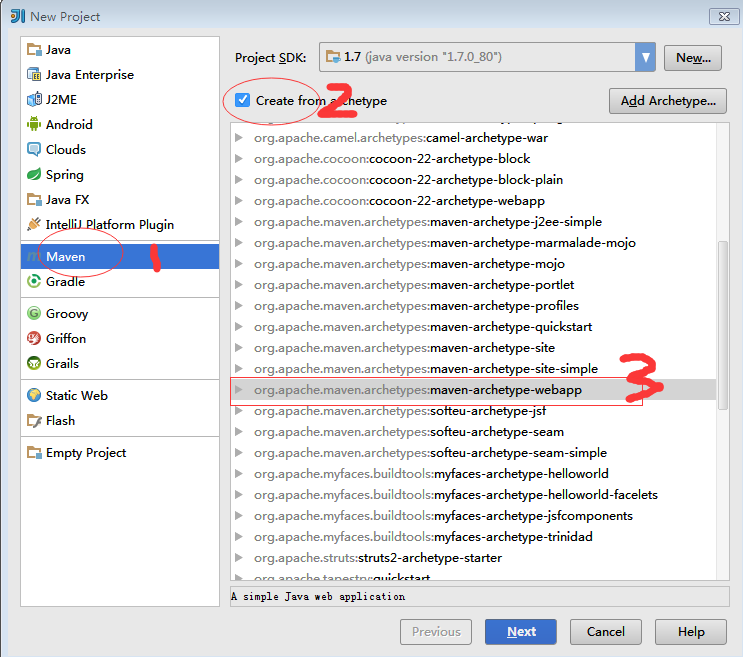
1、点击create new project-》maven-》create from archetype->maven-archetype-webapp,然点击next,步骤如图:
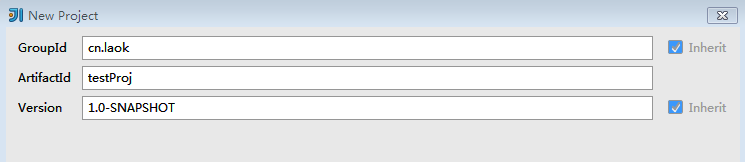
2、填写groupId和ArtifactId:(这两个参数值都是自己定义的),下面这段文字,是网上抄来的,以便大家更好地了解这两个参数。
groupid和artifactId被统称为“坐标”是为了保证项目唯一性而提出的,如果你要把你项目弄到maven本地仓库去,你想要找到你的项目就必须根据这两个id去查找。
groupId一般分为多个段,这里我只说两段,第一段为域,第二段为公司名称。域又分为org、com、cn等等许多,其中org为非营利组织,com为商业组织。举个apache公司的tomcat项目例子:这个项目的groupId是org.apache,它的域是org(因为tomcat是非营利项目),公司名称是apache,artigactId是tomcat。
比如我创建一个项目,我一般会将groupId设置为cn.laok,cn表示域为中国,laok是我个人姓名缩写,artifactId设置为testProj,表示你这个项目的名称是testProj,依照这个设置,你的包结构最好是cn.laok.testProj打头的,如果有个UserDao,它的全路径就是cn.laok.testProj.dao.UserDao
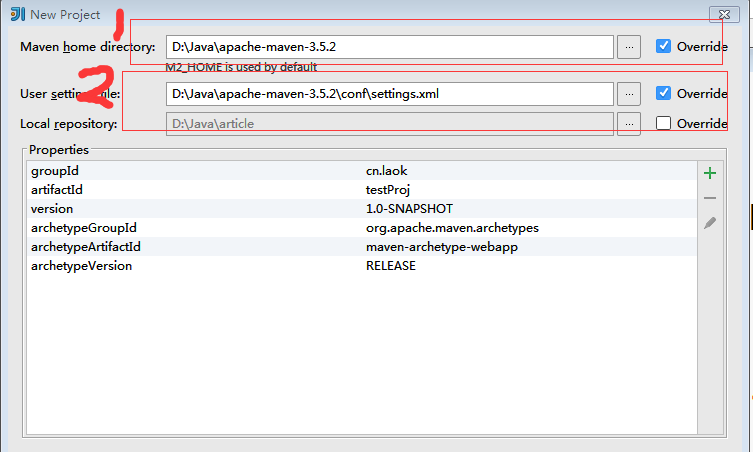
3、点击next,配置maven信息,如图:
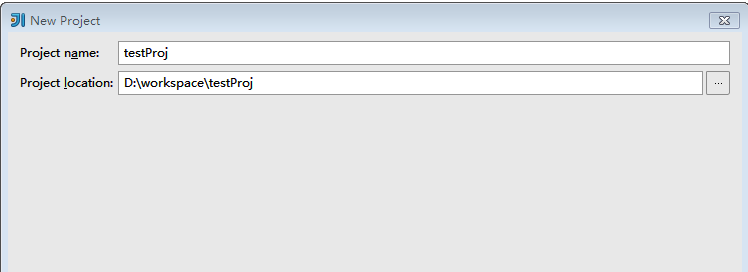
4、点击next,填写项目名称,如图:
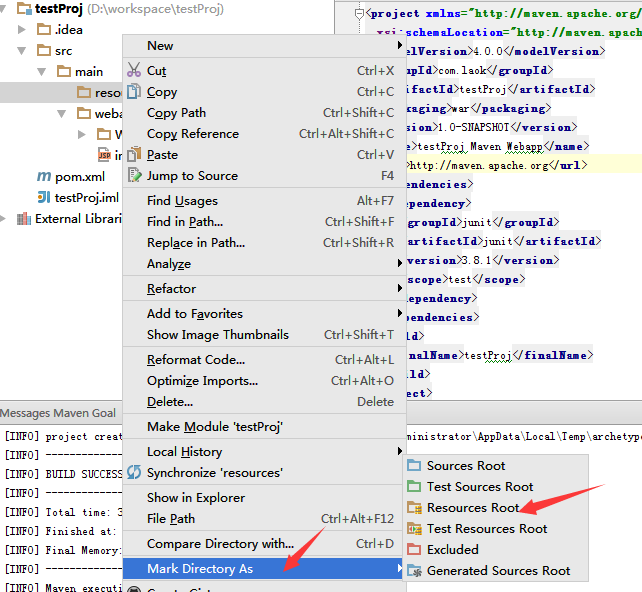
5、创建完成后,项目的结构如图,在生成代码之前,不需要创建其他文件夹,但是需要把resources文件夹设置成Resources Root(右键点击resources文件夹-》Mark Directory As->Resources Root)
四、配置pom.xml和generatorConfig.xml
1、在pom.xml中加入以下配置:
  <build>

    <finalName>create-code</finalName>

    <plugins>

      <plugin>

        <groupId>org.mybatis.generator</groupId>

        <artifactId>mybatis-generator-maven-plugin</artifactId>

        <version>1.3.2</version>

        <configuration>

          <verbose>true</verbose>

          <overwrite>true</overwrite>

        </configuration>

      </plugin>

    </plugins>

  </build>
2、在resources源文件夹下面创建generatorConfig.xml
<?xml version="1.0" encoding="UTF-8"?>

<!DOCTYPE generatorConfiguration

        PUBLIC "-//mybatis.org//DTD MyBatis Generator Configuration 1.0//EN"

        "http://mybatis.org/dtd/mybatis-generator-config_1_0.dtd">

<generatorConfiguration>

    <classPathEntry location="D:/Java/lib/mysql-connector-java-5.1.43-bin.jar" />

    <context id="test" targetRuntime="MyBatis3">

        <plugin type="org.mybatis.generator.plugins.EqualsHashCodePlugin"></plugin>

        <plugin type="org.mybatis.generator.plugins.SerializablePlugin"></plugin>

        <plugin type="org.mybatis.generator.plugins.ToStringPlugin"></plugin>

        <commentGenerator>

            <!-- 这个元素用来去除指定生成的注释中是否包含生成的日期 false:表示保护 -->

            <!-- 如果生成日期,会造成即使修改一个字段,整个实体类所有属性都会发生变化,不利于版本控制,所以设置为true -->

            <property name="suppressDate" value="true" />

            <!-- 是否去除自动生成的注释 true:是 : false:否 -->

            <property name="suppressAllComments" value="false" />

        </commentGenerator>

        <!--数据库链接URL,用户名、密码 -->

        <jdbcConnection driverClass="com.mysql.jdbc.Driver"

                        connectionURL="jdbc:mysql://localhost:3306/article" userId="root" password="">

        </jdbcConnection>

        <javaTypeResolver>

            <!-- This property is used to specify whether MyBatis Generator should

                force the use of java.math.BigDecimal for DECIMAL and NUMERIC fields, -->

            <property name="forceBigDecimals" value="false" />

        </javaTypeResolver>

        <!-- 生成模型的包名和位置 文件夹自己定义-->

        <javaModelGenerator targetPackage="com.test.model"

                            targetProject="target">

            <property name="enableSubPackages" value="true" />

            <property name="trimStrings" value="true" />

        </javaModelGenerator>

        <!-- 生成映射文件的包名和位置 文件夹自己定义-->

        <sqlMapGenerator targetPackage="com.test.mapping"

                         targetProject="target">

            <property name="enableSubPackages" value="true" />

        </sqlMapGenerator>

        <!-- 生成DAO的包名和位置 文件夹自己定义-->

        <javaClientGenerator type="XMLMAPPER"

                             targetPackage="com.test.dao" implementationPackage="com.test.dao.impl"  targetProject="target">

            <property name="enableSubPackages" value="true" />

        </javaClientGenerator>

        <!-- 要生成哪些表 -->

        <table tableName="t_user" domainObjectName="user"

               enableCountByExample="false" enableUpdateByExample="false"

               enableDeleteByExample="false" enableSelectByExample="false"

               selectByExampleQueryId="false"></table>

    </context>

</generatorConfiguration>
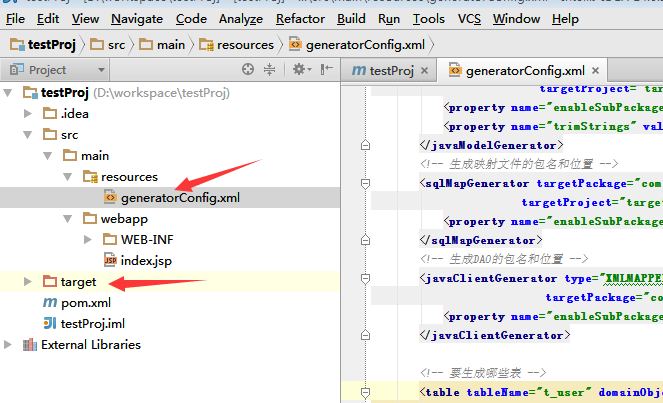
3、配置完成后,一定要点击Build->Rebuild project,生成target文件夹,不然生产代码的时候是生产在target文件下下面,没有这个文件夹会报错,当然也可以配置生成在其他文件夹下面。项目结构如图:
特别注意的一点:一定要在配置文件中加入本地的mysql-connector-java-5.1.43-bin.jar,下载地址https://dev.mysql.com/downloads/connector/j/
然后解压到本地,我的配置如下:<classPathEntry location="D:/Java/lib/mysql-connector-java-5.1.43-bin.jar" />
这个需要大家根据自己存放的路径配置。
五、执行生成代码
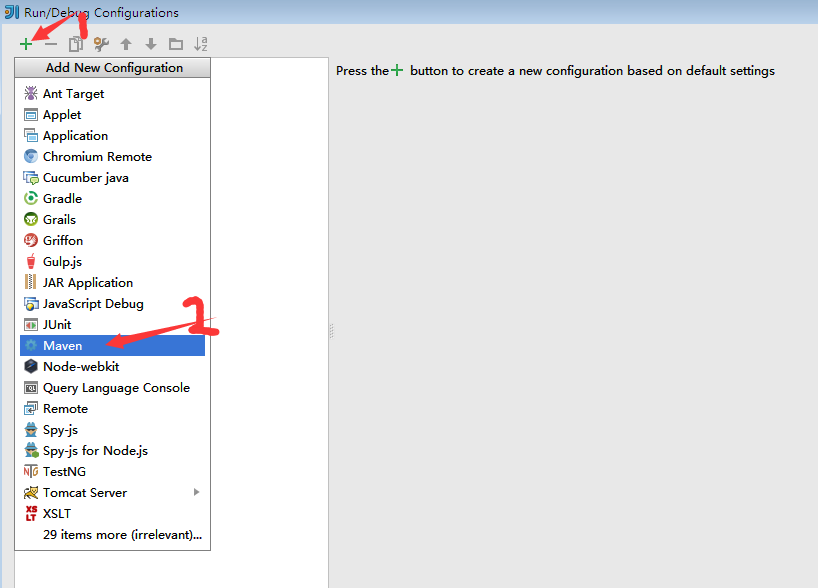
1、点击run->Edit configurations,如图:
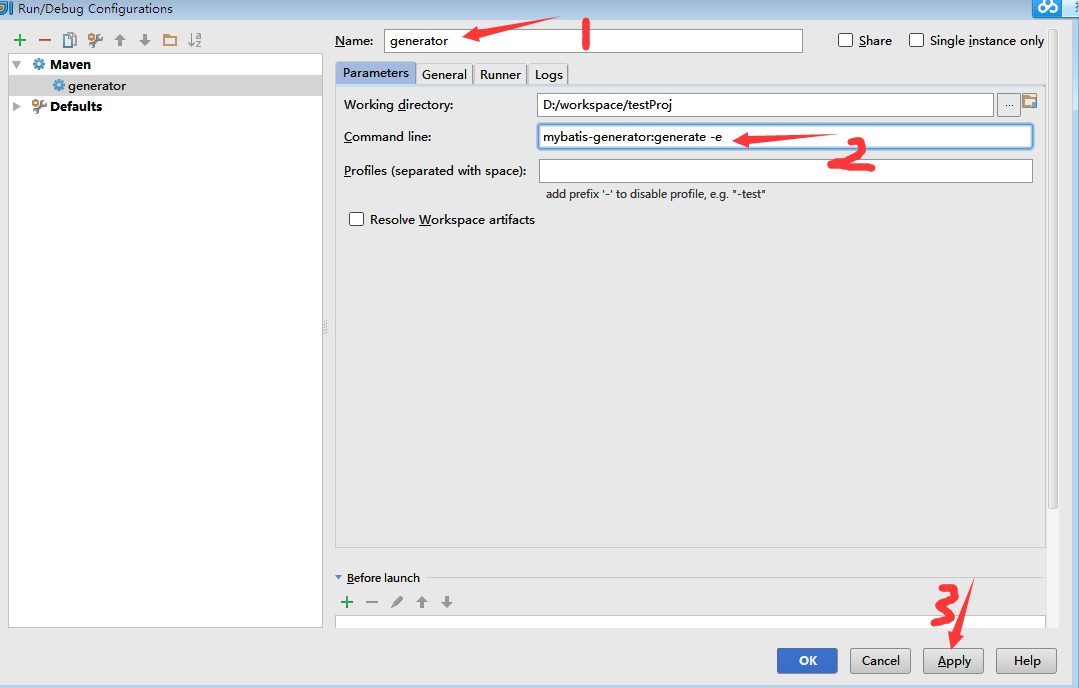
2、之后弹出运行配置框,为当前配置配置一个名称,这里其名为"generator",然后在 “Command line” 选项中输入“mybatis-generator:generate -e”
这里加了“-e ”选项是为了让该插件输出详细信息,这样可以帮助我们定位问题。
3、配置完成后,点击run-》run generator,不出意外的话,在控制台中会出现BUILD SUCCESS的info信息。完整的效果如图所示:

有写得不对的地方,烦请各位大佬指正,非常感谢。
IDEA Maven Mybatis generator 自动生成代码的更多相关文章
- IDEA Maven Mybatis generator 自动生成代码(实例讲解)(转)
IDEA Maven Mybatis generator 自动生成代码(实例讲解) MyBatis Generator • 简称MBG,是一个专门为MyBatis框架使用者定制的代码生成器,可以快速的 ...
- SpringBoot入门篇--整合mybatis+generator自动生成代码+druid连接池+PageHelper分页插件
原文链接 我们这一篇博客讲的是如何整合Springboot和Mybatis框架,然后使用generator自动生成mapper,pojo等文件.然后再使用阿里巴巴提供的开源连接池druid,这个连接池 ...
- SpringBoot 添加mybatis generator 自动生成代码插件
自动生成数据层代码,提高开发效率 1.pom添加插件,并指定配置文件路径 <!-- mybatis generator 自动生成代码插件 --> <plugin> <gr ...
- idea中mybatis generator自动生成代码配置 数据库是sqlserver
好长时间没有写博客了,最近公司要用java语言,开始学习java,属于初学者,今天主要记录一下mybatis generator自动生成代码,首先在如下图的目录中新建两个文件,如下图 generato ...
- 使用Mybatis Generator自动生成代码
MyBatis Generator(MBG)是MyBatis MyBatis 和iBATIS的代码生成器.它将为所有版本的MyBatis以及版本2.2.0之后的iBATIS版本生成代码.它将内省数据库 ...
- IDEA使用mybatis generator自动生成代码
主要就三步: 1.pom 文件中引入jar包并配置 build 属性 <dependencies> <!-- 自动生产mapper Begin! --> <depende ...
- 在IDEA中使用MyBatis Generator自动生成代码
转载自 https://blog.csdn.net/hua_faded/article/details/78900780 一.配置Maven pom.xml 文件 在pom.xml增加以下插件: ...
- Mybatis generator 自动生成代码(2)
最近准备开始做一个项目,需要开始手动创建sql,于是将Mybatis generator 工具功能强化了下. 首先,这里引入到版本一点的包 <dependency> <groupId ...
- Idea使用Mybatis Generator 自动生成代码
(1)创建一个maven工程 (2)配置pom文件 <dependencies> <dependency> <groupId>mysql</groupId&g ...
随机推荐
- Python WebDriver 文件上传(二)
今天补充一种文件上传的方法 主要是因为工作中使用SendKeys方法不稳定,具体方法见: Python WebDriver 文件上传(一) 这种方法直接通过命令行执行脚本时没有问题,可以成功上传,但是 ...
- [label][responsive-web-design]网页响应测试各种尺寸的工具
因为现在各种各样的尺寸上网设备 ,所以我们现在的网页设计都必须要兼容到各种尺寸的屏幕,必须测试各个 size下面的页面布局与排版. 一个开发人员是不可能拥有各种设备来进行测试,那么有没有什么便捷的工具 ...
- [leetcode] 11. Same Tree
因为我刷题是难度不是按发布日期,所以就有可能遇到这种情况,比如这个... Given two binary trees, write a function to check if they are e ...
- [Elixir003] Mix Archives
在[Elixir001]中使用 mix escript.build 生成一个lifelog 的escript启动脚本. 今天我们尝试一下另一种方式:生成Archives. 我们先添加一个Task 1. ...
- npm 安装less
npm install less less-loader --save 在style加上lang="less" 就可以直接用了
- Asp.NetCore安全验证之JWT
本文只是介绍了下基于AspNetCore自带的System.IdentityModel.Tokens.Jwt.dll工具在项目中Token的应用. 我这里谈到的很浅显就两点: 一,超时时间 二,数据的 ...
- mongodb 备份还原
一.简介 说起来数据库的“备份-还原”,在RDBMS系统中,都有很好的支持,也有很多选项可以设置,功能强大,也能自动完成大部分的备份功能,只要当初设置好了就可以了.对于MongoDB文档型的数据库来说 ...
- 激活IDEA,pycharm方法
1.修改hosts文件将0.0.0.0 account.jetbrains.com添加到hosts文件最后,注意hosts文件无后缀,如果遇到无法修改或权限问题,可以采用覆盖的方法去替换hosts文件 ...
- 【timeisprecious】【JavaScript 】JavaScript对象
JavaScript 对象 var a=[];console.log(new Boolean(a)); VM1319: Boolean {true} undefined var a=[];consol ...
- MySQL之FOUND_ROWS()的用法
SELECT FOUND_ROWS() 输出8(输出该表共有多少列)