
从源码看Spring Boot 2.0.1
Spring Boot 命名配置很少,却可以做到和其他配置复杂的框架相同的功能工作,从源码来看是怎么做到的。
我这里使用的Spring Boot版本是 2.0.1.RELEASE
Spring Boot最重要的注解: @SpringBootApplication
打开它:

其中的几个注解:
@SpringBootConfiguration 标注这个类是一个配置类,类似Spring的@Configuration
@EnableAutoConfiguration 开启自动配置
@ComponentScan 开启组件扫描
打开@SpringBootConfiguration:
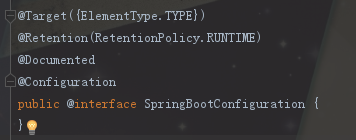
可以看作是springboot将spring的Configuration注解进行一个包装
@EnableAutoConfiguration
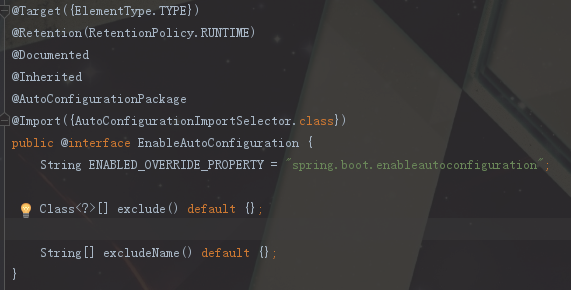
@AutoConfigurationPackage 自动扫描包的注解
@Import({AutoConfigurationImportSelector.class}) 引入组件
这个@AutoConfigurationPackage注解就是扫描跟主配置类同级目录以及子目录下的包,这也是什么Spring Boot其他的包必须在主配置类同级或者子目录以下的原因。
这里最关键的就是@Import注解向容器里导入了什么组件,导入的AutoConfigurationImportSelector.class,打开这个类,注意:在Spring Boot1.5版本中这里导入的类是:EnableAutoConfigurationImportSelector,而EnableAutoConfigurationImportSelector是继承自AutoConfigurationImportSelector的。
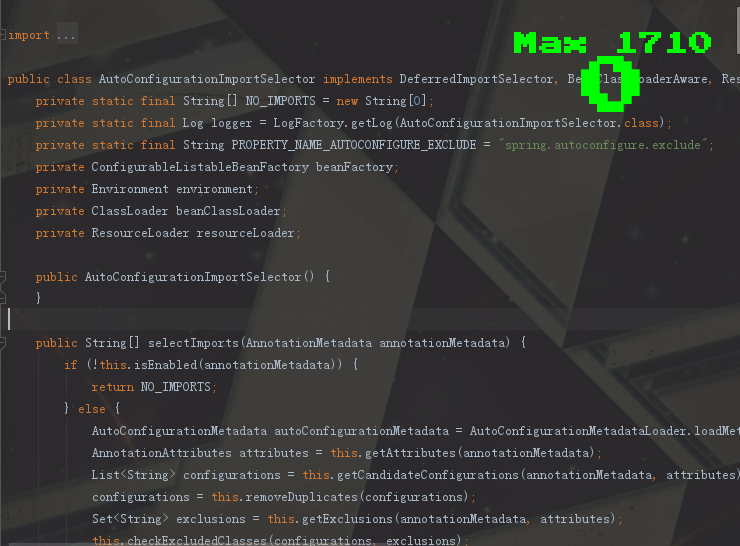
里面有一个 selectImports() 方法很重要。
    public String[] selectImports(AnnotationMetadata annotationMetadata) {

        if (!this.isEnabled(annotationMetadata)) {

            return NO_IMPORTS;

        } else {

            AutoConfigurationMetadata autoConfigurationMetadata = AutoConfigurationMetadataLoader.loadMetadata(this.beanClassLoader);

            AnnotationAttributes attributes = this.getAttributes(annotationMetadata);

            List<String> configurations = this.getCandidateConfigurations(annotationMetadata, attributes);

            configurations = this.removeDuplicates(configurations);

            Set<String> exclusions = this.getExclusions(annotationMetadata, attributes);

            this.checkExcludedClasses(configurations, exclusions);

            configurations.removeAll(exclusions);

            configurations = this.filter(configurations, autoConfigurationMetadata);

            this.fireAutoConfigurationImportEvents(configurations, exclusions);

            return StringUtils.toStringArray(configurations);

        }

    }
getCandidateConfigurations() 方法
    protected List<String> getCandidateConfigurations(AnnotationMetadata metadata, AnnotationAttributes attributes) {

        List<String> configurations = SpringFactoriesLoader.loadFactoryNames(this.getSpringFactoriesLoaderFactoryClass(), this.getBeanClassLoader());

        Assert.notEmpty(configurations, "No auto configuration classes found in META-INF/spring.factories. If you are using a custom packaging, make sure that file is correct.");

        return configurations;

    }
SpringFactoryLoader去加载一些组件的名字,看加载那些组件的名字,继续点开loadFactoryNames方法
    public static List<String> loadFactoryNames(Class<?> factoryClass, @Nullable ClassLoader classLoader) {

        String factoryClassName = factoryClass.getName();

        return (List)loadSpringFactories(classLoader).getOrDefault(factoryClassName, Collections.emptyList());

    }
loadSpringFactories方法:
   private static Map<String, List<String>> loadSpringFactories(@Nullable ClassLoader classLoader) {

        MultiValueMap<String, String> result = (MultiValueMap)cache.get(classLoader);

        if (result != null) {

            return result;

        } else {

            try {

                Enumeration<URL> urls = classLoader != null ? classLoader.getResources("META-INF/spring.factories") : ClassLoader.getSystemResources("META-INF/spring.factories");

                LinkedMultiValueMap result = new LinkedMultiValueMap();

                while(urls.hasMoreElements()) {

                    URL url = (URL)urls.nextElement();

                    UrlResource resource = new UrlResource(url);

                    Properties properties = PropertiesLoaderUtils.loadProperties(resource);

                    Iterator var6 = properties.entrySet().iterator();

                    while(var6.hasNext()) {

                        Entry<?, ?> entry = (Entry)var6.next();

                        List<String> factoryClassNames = Arrays.asList(StringUtils.commaDelimitedListToStringArray((String)entry.getValue()));

                        result.addAll((String)entry.getKey(), factoryClassNames);

                    }

                }

                cache.put(classLoader, result);

                return result;

            } catch (IOException var9) {

                throw new IllegalArgumentException("Unable to load factories from location [META-INF/spring.factories]", var9);

            }

        }

    }
标黄部分将url转何曾properties,通过传入的键获取值,在将值切割成一个个字符串,转成Array存到result里。
META-INF/spring.factories:
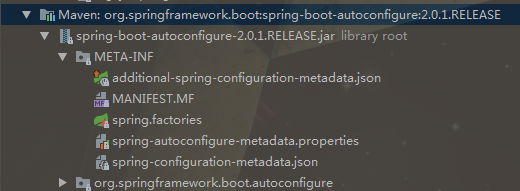
找到其中的
# Auto Configure
可以看到:
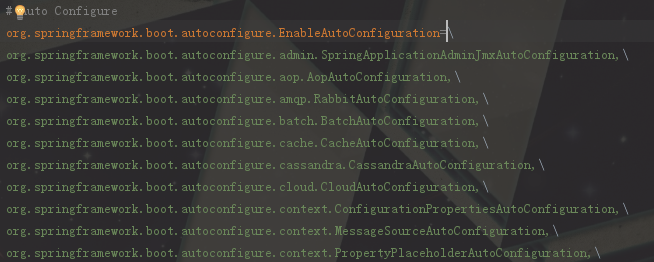
上图里面这么多的xxxAutoConfiguration就是我们的这么久得出的结果,最终就是加载这么多的类的全路径,然后springboot内部就是实例化这些类并加载到容器里面,完成springboot应用启动时的自动配置。
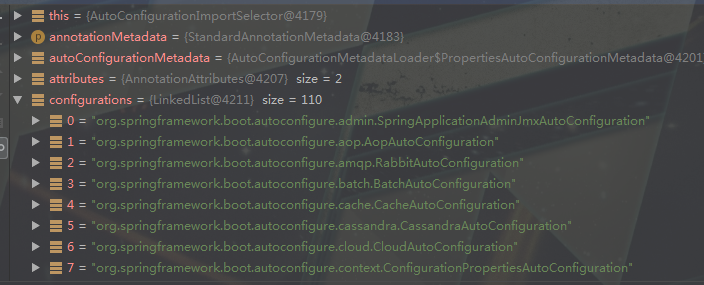
通过断点我们可以看到:
总结一下流程:
Spring Boot启动 >
@SpringBootApplication >
@EnableAutoConfiguration >
@AutoConfigurationPackage + @Import({AutoConfigurationImportSelector.class}) >
public String[] selectImports() {List<String> configurations = this.getCandidateConfigurations(annotationMetadata, attributes);} >
List<String> configurations = SpringFactoriesLoader.loadFactoryNames(); >
classLoader.getResources("META-INF/spring.factories") >
org/springframework/boot/spring-boot-autoconfigure/2.0.1.RELEASE/spring-boot-autoconfigure-2.0.1.RELEASE.jar!/META-INF/spring.factories >
spring.factories:各种xxxxAutoConfiguration的全类名
从源码看Spring Boot 2.0.1的更多相关文章
- 从源码看Spring Security之采坑笔记(Spring Boot篇)
一:唠嗑 鼓捣了两天的Spring Security,踩了不少坑.如果你在学Spring Security,恰好又是使用的Spring Boot,那么给我点个赞吧!这篇博客将会让你了解Spring S ...
- 源码解读 Spring Boot Profiles
前言 上文<一文掌握 Spring Boot Profiles> 是对 Spring Boot Profiles 的介绍和使用,因此本文将从源码角度探究 Spring Boot Profi ...
- 头秃了,二十三张图带你从源码了解Spring Boot 的启动流程~
持续原创输出,点击上方蓝字关注我 目录 前言 源码版本 从哪入手? 源码如何切分? 如何创建SpringApplication? 设置应用类型 设置初始化器(Initializer) 设置监听器(Li ...
- 从源码理解Spring原理,并用代码实现简易Spring框架
前言(本文为原创,转载请注明出处) 个人之前对于框架的学习,就停留在配置,使用阶段.说实话过段时间就会忘得荡然无存.也不知道框架的运行逻辑,就是知道添加个注解,就可以用了. 由于实习,时间比较多,也感 ...
- 手把手教你调试SpringBoot启动 IoC容器初始化源码,spring如何解决循环依赖
授人以鱼不如授人以渔,首先声明这篇文章并没有过多的总结和结论,主要内容是教大家如何一步一步自己手动debug调试源码,然后总结spring如何解决的循环依赖,最后,操作很简单,有手就行. 本次调试 是 ...
- Spring Boot 2.0系列文章(五):Spring Boot 2.0 项目源码结构预览
关注我 转载请务必注明原创地址为:http://www.54tianzhisheng.cn/2018/04/15/springboot2_code/ 项目结构 结构分析: Spring-boot-pr ...
- spring boot 2.0 源码分析(一)
在学习spring boot 2.0源码之前,我们先利用spring initializr快速地创建一个基本的简单的示例: 1.先从创建示例中的main函数开始读起: package com.exam ...
- spring boot 2.0 源码分析(五)
在上一篇文章中我们详细分析了spring boot是如何准备上下文环境的,今天我们来看一下run函数剩余的内容.还是先把run函数贴出来: /** * Run the Spring applicati ...
- spring boot 2.0 源码分析(二)
在上一章学习了spring boot 2.0启动的大概流程以后,今天我们来深挖一下SpringApplication实例变量的run函数. 先把这段run函数的代码贴出来: /** * Run the ...
随机推荐
- Java读取Txt封装到对象中——(三)
JavaBean package bean; public class Question { private String timu; //题干 private String leixing; //类 ...
- Docker安装ActiveMQ
⒈下载 docker pull webcenter/activemq ⒉运行 docker run -d --name myactivemq -p 8161:8161 -p 61613:61613 - ...
- Ajax jsonp 跨域请求实例
跨域请求 JSONP的缺点则是:它只支持GET请求而不支持POST等其它类型的HTTP请求:它只支持跨域HTTP请求这种情况,不能解决不同域的两个页面之间如何进行JavaScript调用的问题. $. ...
- listener failed: zbx_tcp_listen() fatal error: unable to serve on any address [[-]:20050]
故障现象: 客户端报错:service zabbix-agent 启动后,端口没有被正常监听,服务端也无法正常连接 将客户端改为二进制文件安装也不能正常启动/usr/local/zabbix/sbin ...
- 判断Javascript变量是否为空 undefined 或者null(附样例)
1.变量申明未赋值 var type; //type 变量未赋值 1. type==undefined //true 2. type===undefined //true 3. typeof(type ...
- PYTHON-文件指针的移动,移动和函数基础
# 文件内指针的移动 #大前提:文件内指针的移动是Bytes为单位的,唯独t模式下的read读取内容个数是以字符为单位 # f.seek(指针移动的字节数,模式控制): 控制文件指针的移动# 模式控制 ...
- rsync使用详解
1.什么是Rsync Rsync(remote synchronize)是一个远程数据同步工具,可通过LAN/WAN快速同步多台主机间的文件.Rsync使用所谓的“Rsync算法”来使本地和远 程两个 ...
- CCF2014123集合竞价(C语言版)
问题描述 某股票交易所请你编写一个程序,根据开盘前客户提交的订单来确定某特定股票的开盘价和开盘成交量. 该程序的输入由很多行构成,每一行为一条记录,记录可能有以下几种: 1. buy p s 表示一个 ...
- 性能测试二十二:环境部署之Nginx
由于单纯用tomcat只能通过ip+端口号的形式访问,这样只能访问一个tomcat,而真实项目中又不可能只用一两个tomcat,所以就需要Nginx来进行分配访问请求, Nginx本身性能非常好,据官 ...
- 利用setTimeout延时器 制作广告自动关闭
模仿广告自动关闭效果 <!DOCTYPE html> <html lang="en"> <head> <meta charset=&quo ...