
从源码看Spring Security之采坑笔记(Spring Boot篇)
一:唠嗑
- 鼓捣了两天的Spring Security,踩了不少坑。如果你在学Spring Security,恰好又是使用的Spring Boot,那么给我点个赞吧!这篇博客将会让你了解Spring Security的各种坑!
- 阅读前说一下,这篇博客是我一字一字打出来的,转载务必注明出处哦!
- 另外,本文已授权微信公众号“后端技术精选”独家发布
二:开始
1.准备
- Spring boot 1.5
- Mysql 5.7
- 导入依赖
        <!-- Web工程 -->
        <dependency>
            <groupId>org.springframework.boot</groupId>
            <artifactId>spring-boot-starter-web</artifactId>
        </dependency>
        <!-- 数据库相关 -->
        <dependency>
            <groupId>org.springframework.boot</groupId>
            <artifactId>spring-boot-starter-data-jpa</artifactId>
        </dependency>
        <dependency>
            <groupId>mysql</groupId>
            <artifactId>mysql-connector-java</artifactId>
        </dependency>
        <!-- security 核心 -->
        <dependency>
            <groupId>org.springframework.boot</groupId>
            <artifactId>spring-boot-starter-security</artifactId>
        </dependency>
        <!-- thymeleaf 模板-->
        <dependency>
            <groupId>org.springframework.boot</groupId>
            <artifactId>spring-boot-starter-thymeleaf</artifactId>
        </dependency>
        <!-- 可以在HTML使用sec标签操作Security -->
        <dependency>
            <groupId>org.thymeleaf.extras</groupId>
            <artifactId>thymeleaf-extras-springsecurity4</artifactId>
        </dependency>
2.开启Security并配置
package cn.zyzpp.security.config;

import org.springframework.beans.factory.annotation.Autowired;
import org.springframework.context.annotation.Configuration;
import org.springframework.security.authentication.AuthenticationProvider;
import org.springframework.security.config.annotation.authentication.builders.AuthenticationManagerBuilder;
import org.springframework.security.config.annotation.web.builders.HttpSecurity;
import org.springframework.security.config.annotation.web.builders.WebSecurity;
import org.springframework.security.config.annotation.web.configuration.EnableWebSecurity;
import org.springframework.security.config.annotation.web.configuration.WebSecurityConfigurerAdapter;
import org.springframework.security.core.userdetails.UserDetailsService;

/**
 * Create by yster@foxmail.com 2018/6/10/010 18:07
 */
@EnableWebSecurity
public class MySerurityConfig extends WebSecurityConfigurerAdapter {
    /*自己实现下面两个接口*/
    @Autowired
    private AuthenticationProvider authenticationProvider;
    @Autowired
    private UserDetailsService userDetailsService;

    @Override
    protected void configure(HttpSecurity http) throws Exception {
        http.authorizeRequests()
                .antMatchers("/", "/signIn").permitAll()//所有人都可以访问
                .antMatchers("/leve/1").hasRole("VIP1") //设置访问角色
                .antMatchers("/leve/2").hasRole("VIP2")
                .antMatchers("/leve/3").hasAuthority("VIP2")//设置访问权限
                .anyRequest().authenticated() //其他所有资源都需要认证,登陆后访问
                .and()
                .formLogin()//开启自动配置的授权功能
                .loginPage("/login")    //自定义登录页(controller层需要声明)
                .usernameParameter("username")  //自定义用户名name值
                .passwordParameter("password")  //自定义密码name值
                .failureUrl("/login?error") //登录失败则重定向到此URl
                .permitAll() //登录页都可以访问
                .and()
                .logout()//开启自动配置的注销功能
                .logoutSuccessUrl("/")//注销成功后返回到页面并清空Session
                .and()
                .rememberMe()
                .rememberMeParameter("remember")//自定义rememberMe的name值,默认remember-Me
                .tokenValiditySeconds(604800);//记住我的时间/秒
    }

    /*定义认证规则*/
    @Override
    protected void configure(AuthenticationManagerBuilder auth) throws Exception {
    /*  保存用户信息到内存中
        auth.inMemoryAuthentication()
             .withUser("张三").password("123456").roles("VIP1")
             .and()
             .withUser("李四").password("123456").roles("VIP2");
    */

        /*自定义认证*/
        auth.authenticationProvider(authenticationProvider);
        auth.userDetailsService(userDetailsService);//不定义的话rememberMe报错
    }

    /*忽略静态资源*/
    @Override
    public void configure(WebSecurity web) {
        web.ignoring().antMatchers("/resources/static/**");
    }

}
讲一下:
- 我们基本不会把用户信息保存在内存中,所以我们自定义认证方法。这里我推荐阅读 认证(Authentication)与源码解读 了解。
- 自定义认证也有两种方法,第一是注入DaoAuthenticationProvider(org.springframework.security.authentication.dao)
    @Bean
    public DaoAuthenticationProvider daoAuthenticationProvider(){
        DaoAuthenticationProvider daoAuthenticationProvider = new DaoAuthenticationProvider();
        daoAuthenticationProvider.setUserDetailsService(userDetailsService);//获取用户信息
        daoAuthenticationProvider.setPasswordEncoder(new Md5PasswordEncoder());//MD5加密
        daoAuthenticationProvider.setSaltSource(new SaltSource() {  //加盐
            @Override
            public Object getSalt(UserDetails user) {
                return user.getUsername();
            }
        });
        return daoAuthenticationProvider;
}- 然后改一下设置
auth.authenticationProvider(authenticationProvider);这种方法我并不推荐,因为我们把密码错误的异常交给了Security底层去抛出,然而抛出的消息只是
Bad credentials这样的消息提示你会需要?所以我们使用第二种方法,如下:
3.自定义AuthenticationProvider接口实现类
package cn.zyzpp.security.config;

import org.springframework.beans.factory.annotation.Autowired;
import org.springframework.security.authentication.AuthenticationProvider;
import org.springframework.security.authentication.DisabledException;
import org.springframework.security.authentication.UsernamePasswordAuthenticationToken;
import org.springframework.security.authentication.encoding.Md5PasswordEncoder;
import org.springframework.security.core.Authentication;
import org.springframework.security.core.userdetails.UserDetails;
import org.springframework.stereotype.Component;

/**
 * Create by yster@foxmail.com 2018/6/21/021 15:53
 * Authentication 是一个接口,用来表示用户认证信息的
 */
@Component
public class MyAuthenticationProvider implements AuthenticationProvider{
    @Autowired
    private MyUserDetailsService userDetailsService;

    @Override
    public Authentication authenticate(Authentication authentication){
        //1.获取用户输入的用户名 密码
        String username = authentication.getName();
        String password = (String) authentication.getCredentials();
        //2.关于MD5加密:
        //因为我们是自定义Authentication,所以必须手动加密加盐而不需要再配置。
        password = new Md5PasswordEncoder().encodePassword(password,username);
        //3.由输入的用户名查找该用户信息,内部抛出异常
        UserDetails user = userDetailsService.loadUserByUsername(username);
        //4.密码校验
        if (!password.equals(user.getPassword())) {
            throw new DisabledException("---->UserName :" + username + " password error!");
        }
        return new UsernamePasswordAuthenticationToken(user, password, user.getAuthorities());
    }

    @Override
    public boolean supports(Class<?> aClass) {
        return (UsernamePasswordAuthenticationToken.class
                .isAssignableFrom(aClass));
    }

}
讲一下:
- 这里说Security的一个坑:
相信你也看到了有的教程上说抛出
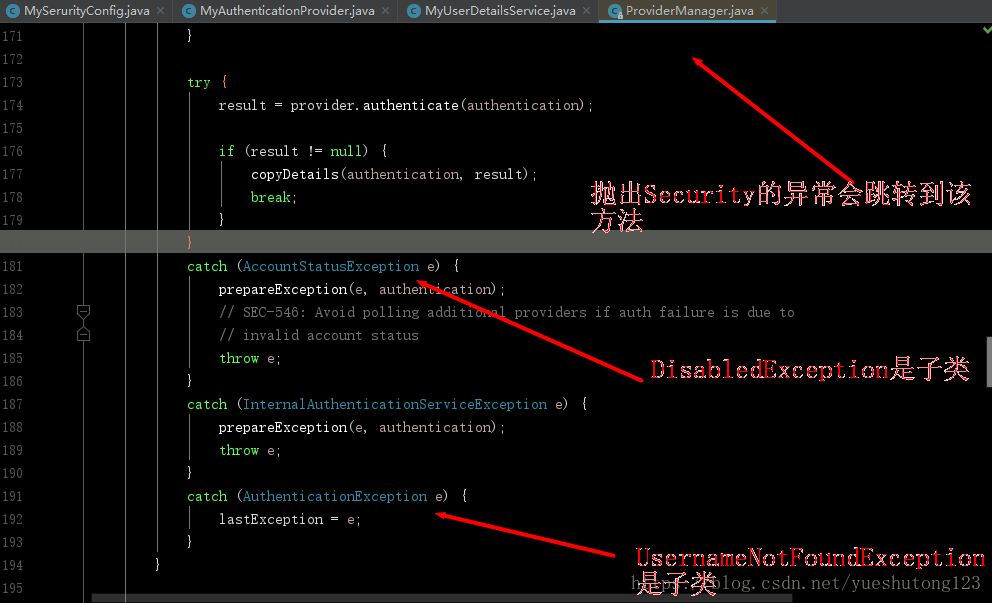
UsernameNotFoundException用户找不到,BadCredentialsException坏的凭据,但这两个类都是继承自AuthenticationException抽象类,当你抛出这俩异常时,Security底层会捕捉到你抛出的异常,如图:
看到了吧,
AuthenticationException异常并不会被抛出,debug调式一下,你就会感受到它的曲折历程,相当感人!然后莫名其妙的被换掉了,而且无解。- 没错,你没看错,
AccountStatusException异常被直接抛出了,这正是我们需要的;有的同学可能想到了自定义异常,但我们是结合Security框架,要按人家的规则来,不信你试试。 - 附一些常用异常
 /*
    AuthenticationException常用的的子类:(会被底层换掉,不推荐使用)
    UsernameNotFoundException 用户找不到
    BadCredentialsException 坏的凭据

    AccountStatusException用户状态异常它包含如下子类:(推荐使用)
    AccountExpiredException 账户过期
    LockedException 账户锁定
    DisabledException 账户不可用
    CredentialsExpiredException 证书过期
*/
4.自定义UserDetailsService接口实现类
package cn.zyzpp.security.config;

import cn.zyzpp.security.entity.Role;
import cn.zyzpp.security.service.UserService;
import org.springframework.beans.factory.annotation.Autowired;
import org.springframework.security.authentication.DisabledException;
import org.springframework.security.core.GrantedAuthority;
import org.springframework.security.core.authority.SimpleGrantedAuthority;
import org.springframework.security.core.userdetails.User;
import org.springframework.security.core.userdetails.UserDetails;
import org.springframework.security.core.userdetails.UserDetailsService;
import org.springframework.stereotype.Component;

import java.util.ArrayList;
import java.util.List;

/**
 * 进行认证的时候需要一个 UserDetailsService 来获取用户的信息 UserDetails,
 * 其中包括用户名、密码和所拥有的权限等。
 * Create by yster@foxmail.com 2018/6/21/021 15:56
 */
@Component
public class MyUserDetailsService implements UserDetailsService {

    @Autowired
    private UserService userService;

    /*
     * 采坑笔记:
     * new SimpleGrantedAuthority("...")时
     * 加前戳是Role,通过hasRole()获取,用来认证角色;
     * 不加前戳是Authoritiy,通过hasAuthority()获取,用来鉴定权限;
     * 总结:加前戳是角色,不加前戳是权限。此前戳只用于本类。
     */
    String role_ = "ROLE_";

    @Override
    public UserDetails loadUserByUsername(String username) {
        //1.业务层根据username获取该用户
        cn.zyzpp.security.entity.User user = userService.findUserByUserName(username);
        if (user == null) {
            //这里我们不抛出UsernameNotFoundException因为Security会把我们抛出的该异常捕捉并换掉;
            //这里要明确Security抛出的异常无法被ControllerAdvice捕捉到,无法进行统一异常处理;
            //而我们只需要打印正确的异常消息即可,Security自动把异常添加到HttpServletRequest或HttpSession中
            throw new DisabledException("---->UserName :" + username + " not found!");
        }
        //2.从业务层获取用户权限并转为Authorities
        List<GrantedAuthority> authorities = new ArrayList<>();
        for (Role role : user.getRoleList()) {
            authorities.add(new SimpleGrantedAuthority(role.getName()));//设置权限
            authorities.add(new SimpleGrantedAuthority(role_ + role.getName()));//设置角色
        }
        //3.返回Spring定义的User对象
        return new User(username, user.getPassword(), authorities);
    }

}
讲一下:
- 我们在保存用户信息到内存中时是这样的
  auth.inMemoryAuthentication()
      .withUser("张三")
      .password("123456")
      .roles("ROLE_VIP1")
.authorities("VIP1")- 角色和权限是分开设置的,但我们在自定义时只有权限设置,
authorities.add(new SimpleGrantedAuthority("权限名"));- 定义以后你会发现这真真真…的是权限,不是角色,联想到上面Security的角色和权限其实是不同的,我想我应该是错过了什么?
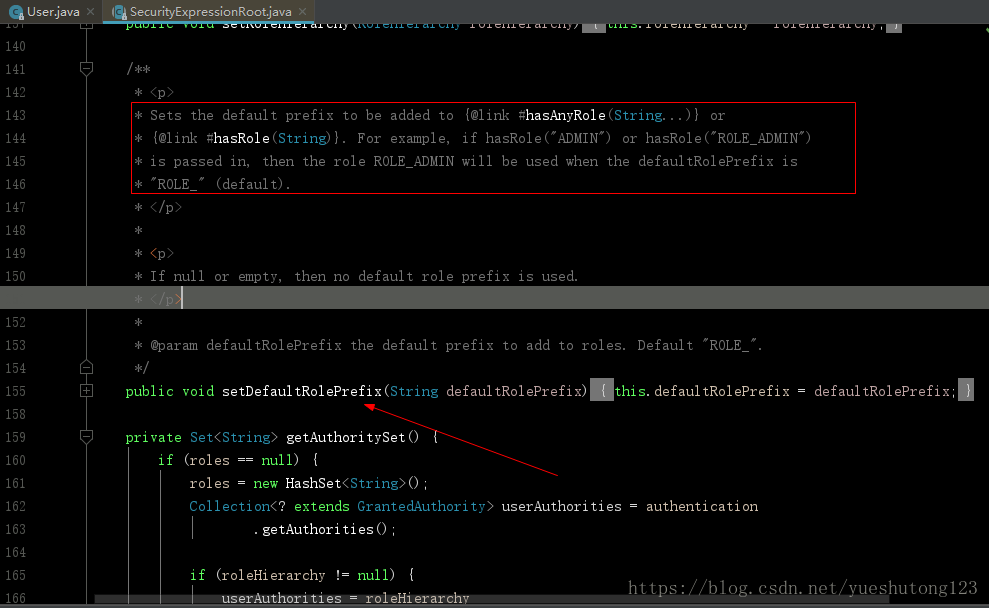
然后翻看Security源码:
翻译过来:如果调用hasRole(“ADMIN”)或hasRole(“ROLE_ADMIN”)
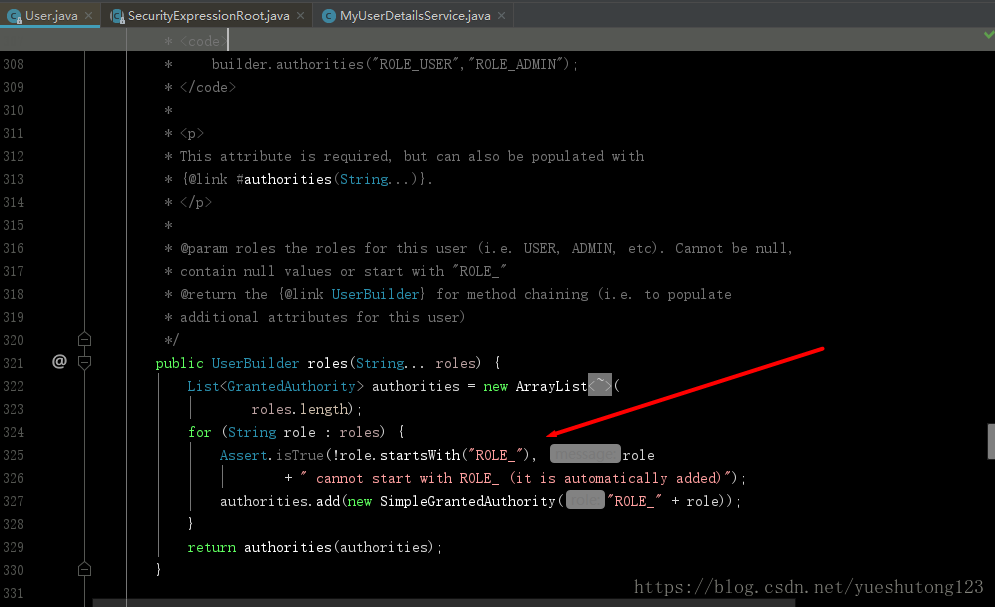
方法时,当Role前缀为”ROLE_”(默认)时将使用ROLE_ADMIN角色。而我们在把用户信息保存到内存时,底层是这样的:
解读一下就是在调用
.roles("ROLE_VIP1")方法注册Role时,先通过role.startsWith("ROLE_")断言输入的角色名是否是"ROLE_"开头的,如果不是,补充"RELE_"前戳。- 所以,Security解决角色和权限分开的依据就是是否含有
"ROLE_"前戳,该默认前戳也是可以自己修改的。 - ok,继续我们的Security学习之路。
5.获取Security登录异常信息
package cn.zyzpp.security.controller;
...
import cn.zyzpp.security.service.UserService;
import javax.servlet.http.HttpServletRequest;
import javax.servlet.http.HttpSession;

/**
 * Create by yster@foxmail.com 2018/6/10/010 18:35
 */
@Controller
public class MyController {
    @Autowired
    UserService userService;

    @Autowired
    HttpSession session;
    @Autowired
    HttpServletRequest request;

    /*ModelMap的Key*/
    final String ERROR = "error";

    /**
     * 自定义登录页并进行异常信息提示
     * 需要在Security中设置
     */
    @RequestMapping(value = "/login")
    public String login(ModelMap modelMap){
      /*
       security的AuthenticationException异常自动保存在request或session中
       官方默认保存在Session,但我们自定义过多。我测试是在request中。
       所以在html页面还需要搭配th:if="${param.error!=null}"检查Url是否有参数error
        */
        String key = WebAttributes.AUTHENTICATION_EXCEPTION;

        if (session.getAttribute(key)!=null){
//            System.out.println("request");
            AuthenticationException exception = (AuthenticationException) session.getAttribute(key);
            modelMap.addAttribute(ERROR,exception.getMessage());
        }
        if (request.getAttribute(key)!=null){
//            System.out.println("session");
            AuthenticationException exception = (AuthenticationException) request.getAttribute(key);
            modelMap.addAttribute(ERROR,exception.getMessage());
        }

        return "login";
    }

}
自定义login登录页面
- Security规定若是GET访问则是请求页面,POST访问则为提交登录
<!DOCTYPE html>
<html xmlns:th="http://www.thymeleaf.org">
<head>
    <meta charset="UTF-8"/>
    <title>登录页面</title>
</head>
<body>
<form th:action="@{/login}" method="post">
    用户名:<input type="text" placeholder="username" name="username" required=""/><br/>
    密码:<input type="password" placeholder="password" name="password" required=""/><br/>
    记住我:<input type="checkbox" name="remember"/>
    <input type="submit" value="提交"/>
    <span th:if="${param.error!=null}" th:text="${error}"/>
</form>
</body>
</html>
讲一下:
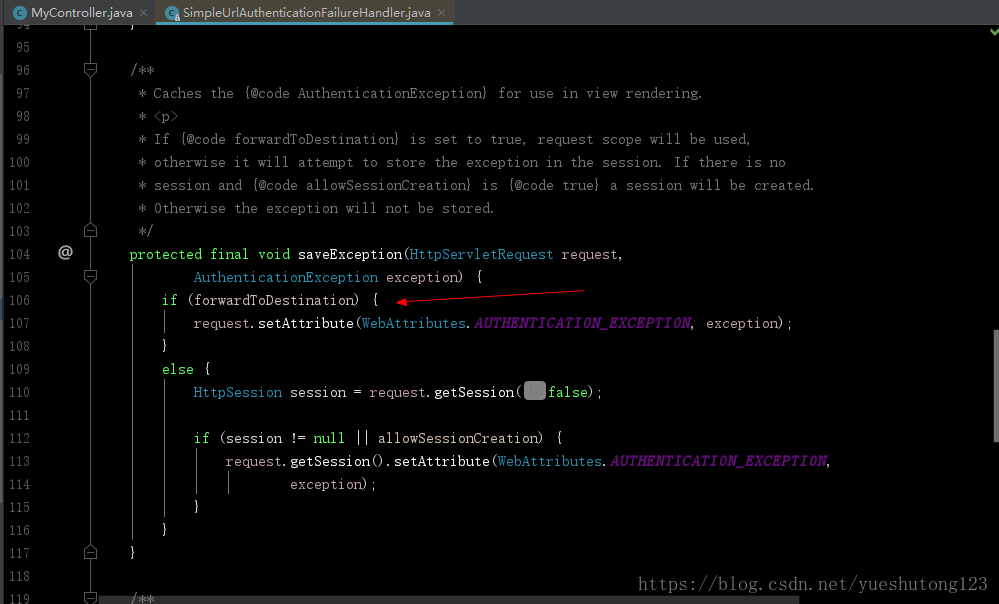
- 如果你debug追踪一下,你就可以了解Security的运行原理
- Security的
SimpleUrlAuthenticationFailureHandler(简单认证故障处理)会把异常保存到request或session中,forwardToDestination默认为false,也就是保存在session,实际我们测试是保存在request。
6.在view层使用Security
6.1 使用HTML sec标签 (推荐)
<!DOCTYPE html>
<html xmlns:th="http://www.thymeleaf.org" xmlns:sec="http://www.thymeleaf.org/thymeleaf-extras-springsecurity4">
<head>
    <meta charset="UTF-8"/>
    <title>首页</title>
</head>
<body>
<div sec:authorize="isAuthenticated()">
    <form th:action="@{/logout}" method="POST">
        <input type="submit" value="注销" />
    </form>
    user:<b sec:authentication="name"></b><br/>
    <!-- principal对应org.springframework.security.core.userdetails.User类 -->
    Role:<b sec:authentication="principal.authorities"></b>
</div>
<div sec:authorize="!isAuthenticated()">
    <h2>游客你好!</h2>请<a th:href="@{/login}">登录</a>
</div>
<div sec:authorize="hasRole('VIP1')">
    <h2>ROLE_VIP1_可见</h2>
</div>
<div sec:authorize="hasRole('VIP2')">
    <h2>ROLE_VIP2_可见</h2>
</div>
<div sec:authorize="hasAuthority('VIP1')">
    <h2>Authority:VIP1_可见</h2>
</div>
</body>
</html>
6.2 编码获取用户登录信息
- 下面为我自己写的方法,看看就好!
    /**
     * 不使用sec标签(不推荐)
     * 在Controller获取用户信息
     */
    @RequestMapping("/index")
    public String index1(ModelMap model){
        userAndRoles(model);
        return "index";
    }

    /**
     * Security辅助方法:获取用户信息
     */
    private void userAndRoles(ModelMap model) {
        //从Security获取当前用户会话
        Object principal = SecurityContextHolder.getContext()
                .getAuthentication()
                .getPrincipal();
        User user = null;
        //判断用户已经登录
        if (principal instanceof User){
            user = (User) principal;
            //遍历迭代器获取用户权限
            Iterator<GrantedAuthority> iterator = user.getAuthorities().iterator();
            List<String> roles = new ArrayList<>();
            while (iterator.hasNext()){
                roles.add(iterator.next().getAuthority());
            }
            //保存角色信息
            model.addAttribute("roles",roles.toString());
        }
        //保存用户信息,未登录为空
        model.addAttribute("user",user);
    }
6.权限及用户的Entity类
- 权限表
/**
 * 权限表
 * Create by yster@foxmail.com 2018/6/21/021 18:00
 */
@Entity
@Table(name = "role")
public class Role {
    @Id
    @GeneratedValue
    private int id;
    private String name;
    ...
}
- 用户表
/**
 * Create by yster@foxmail.com 2018/6/21/021 17:59
 */
@Entity
@Table(name = "user",uniqueConstraints = {@UniqueConstraint(columnNames="username")})
public class User {
    @Id
    @GeneratedValue
    private int id;
    private String username;
    private String password;
    @OneToMany(cascade={CascadeType.ALL}, fetch=FetchType.EAGER)
    @JoinColumn(name = "r_id")
    private List<Role> roleList;
    ....
}
- 关于Security的部分先到这里,之所以写这篇博客,源于网上的相关资料略少,坑略多,毕竟做伸手党做惯了,一些坑踩的还是不容易的!
- 项目我已经打包上传至:https://download.csdn.net/download/yueshutong123/10494694
2019/1/9补充
Spring Security在方法级别上的保护
Spring Security从2.0版本开始,提供了方法级别的安全支持,并提供了 JSR-250 的支持。写一个配置类 SecurityConfig 继承 WebSecurityConfigurationAdapter,并加上相关注解,就可以开启方法级别的保护。
@EnableWebSecurity
@Configuration
@EnableGlobalMethodSecurity(prePostEnabled = true)
public class SerurityConfig extends WebSecurityConfigurerAdapter {
}
在上面的配置代码中,@EnableGlobalMethodSecurity(prePostEnabled = true) 注解开启了方法级别的保护,括号后面的参数可选,可选的参数如下。
- prePostEnabled:Spring Security 的 Pre 和 Post 注解是否可用,即 @PreAuthorize 和 @PostAuthorize 是否可用。
- secureEnabled:Spring Security 的 @Service 注解是否可用。
- jsr250Enabled:Spring Security 对 JSR-250 的注解是否可用。
一般来说,只会用到 prePostEnabled。因为 即 @PreAuthorize 注解比 @PostAuthorize 注解更适合方法级别的安全控制,并且支持 Spring EL 表达式,适合 Spring 开发者。其中,@PreAuthorize 注解会在进入方法钱进行权限验证,@PostAuthorize 注解在方法执行后再进行权限验证。
如何在方法上写权限注解呢?
例如有权限点字符串“ROLE_ADMIN”,在方法上可以写为 @PreAuthorize(“hasRole(‘ADMIN’)”),也可以写为 @PreAuthorize(“hasAuthority(‘ROLE_ADMIN’)”),这二者是等价的。加多个权限点,可以写为 @PreAuthorize(“hasRole(‘ADMIN’,‘USER’)”)、@PreAuthorize(“hasAuthority(‘ROLE_ADMIN’,‘ROLE_USER’)”)。
从源码看Spring Security之采坑笔记(Spring Boot篇)的更多相关文章
- clickhouse源码Redhat系列机单机版安装踩坑笔记
前情概要 由于工作需要用到clickhouse, 这里暂不介绍概念,应用场景,谷歌,百度一大把. 将安装过程踩下的坑记录下来备用 ClickHouse源码 git clone安装(直接下载源码包安装失 ...
- 解密随机数生成器(二)——从java源码看线性同余算法
Random Java中的Random类生成的是伪随机数,使用的是48-bit的种子,然后调用一个linear congruential formula线性同余方程(Donald Knuth的编程艺术 ...
- spring源码解析(一) 环境搭建(各种坑的解决办法)
上次搭建spring源码的环境还是两年前,依稀记得那时候也是一顿折腾,奈何当时没有记录,导致两年后的今天把坑重踩了一遍,还遇到了新的坑,真是欲哭无泪;为了以后类似的事情不再发生,这次写下这篇博文来必坑 ...
- 从源码看Azkaban作业流下发过程
上一篇零散地罗列了看源码时记录的一些类的信息,这篇完整介绍一个作业流在Azkaban中的执行过程,希望可以帮助刚刚接手Azkaban相关工作的开发.测试. 一.Azkaban简介 Azkaban作为开 ...
- 从源码看Android中sqlite是怎么通过cursorwindow读DB的
更多内容在这里查看 https://ahangchen.gitbooks.io/windy-afternoon/content/ 执行query 执行SQLiteDatabase类中query系列函数 ...
- 从源码看Android中sqlite是怎么读DB的(转)
执行query 执行SQLiteDatabase类中query系列函数时,只会构造查询信息,不会执行查询. (query的源码追踪路径) 执行move(里面的fillwindow是真正打开文件句柄并分 ...
- 从Chrome源码看浏览器的事件机制
.aligncenter { clear: both; display: block; margin-left: auto; margin-right: auto } .crayon-line spa ...
- 从Chrome源码看JS Array的实现
.aligncenter { clear: both; display: block; margin-left: auto; margin-right: auto } .crayon-line spa ...
- 从源码看JDK提供的线程池(ThreadPoolExecutor)
一丶什么是线程池 (1)博主在听到线程池三个字的时候第一个想法就是数据库连接池,回忆一下,我们在学JavaWeb的时候怎么理解数据库连接池的,数据库创建连接和关闭连接是一个比较耗费资源的事情,对于那些 ...
随机推荐
- matlab练习程序(波纹扭曲)
其实就是用sin或cos对x,y坐标进行变换,处理的时候依然是反向变换. 类似的,用不同的函数能得到不同的扭曲效果,比如log,1/x,exp等等. 效果如下: 代码如下(还给出了如何生成gif图片的 ...
- Spark SQL整体架构
0.整体架构 注意:Spark SQL是Spark Core之上的一个模块,所有SQL操作最终都通过Catalyst翻译成类似的Spark程序代码被Spark Core调度执行,其过程也有Job.St ...
- MySQL 博客文章目录(2017-02-18更新)
1MySQL安装配置 Linux MySQL源码安装缺少ncurses-devel包 Linux平台卸载MySQL总结 Linux 卸载mysql-libs包出现错误 CentOS 7 安装MySQL ...
- java----OO的概念和设计原则(转)
一.OO(面向对象)的设计基础 面向对象(OO):就是基于对象概念,以对象为中心,以类和继承为构造机制,充分利用接口和多态提供灵活性, 来认识.理解.刻划客观世界和设计.构建相应的软件系统.面向对象的 ...
- 省市区三级联动(附j全国省市区json文件)
效果如图所示: 首先提供全国所有省份的JS文件 下载地址:https://files.cnblogs.com/files/likui-bookHouse/address.rar 打开js内容如下: h ...
- idea2018版tomcat基本配置
前言 在配置tomcat之前,要先创建一个javaweb的工程 打开idea的主界面,在菜单中点击File,出现以下的图 点击选择 Application Server 点击选择 Tomcat Ser ...
- 给html标签加上鼠标划过小手样式
给html标签加上鼠标划过小手样式 方法:给当前标签增加样式 style="cursor:pointer;" eg:增加返回箭头样式,给箭头增加小手 <span onclic ...
- UnicodeEncodeError: 'ascii' codec can't encode characters in position
UnicodeEncodeError: 'ascii' codec can't encode characters in position python运行时出现这个错误,解决方法如下: 加入如下语句 ...
- [Hive_8] Hive 设计优化
0. 说明 在 Hive 中,数据库是一个文件夹,表也是文件夹 partition,是一个字段,是文件 前提:在 Hive 进行 where 子句查询的时候,会将条件语句和全表进行比对,搜索出所需的数 ...
- LeetCode算法题-Reverse Vowels of a String(Java实现-四种解法)
这是悦乐书的第206次更新,第218篇原创 01 看题和准备 今天介绍的是LeetCode算法题中Easy级别的第74题(顺位题号是345).编写一个函数,它将一个字符串作为输入,并仅反转一个字符串的 ...