
Linux 中C/C++ search path(头文件搜索路径)
https://blog.csdn.net/BjarneCpp/article/details/76135980
起因
我拿到了一套Linux下的C++代码,代码中有这个头文件#include <unistd.h>,在Windows上查看缺少这个头文件,而这个头文件就是Linux中的系统文件。
困惑
因此我想在Linux下去查找这个文件。通过Linux指令:
locate unistd.h
查找结果下图所示:
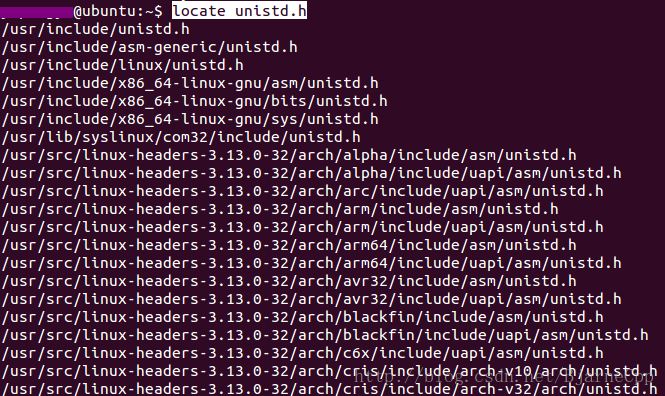
查找出来这么多路径下的同名文件,不知道要用哪一个unistd.h。因此必须要找g++或者gcc头文件搜索路径。
方法
我在这里 C/C++ search path(头文件搜索路径) - MJN - CSDN博客 找到了办法。
这里 GCC The C Preprocessor: Search Path 讲述了如何去查看GCC的搜索路径。我把内容粘贴到这里:
Search Path
By default, the preprocessor looks for header files included by the quote form of the directive #include “file” first relative to the directory of the current file, and then in a preconfigured list of standard system directories. For example, if /usr/include/sys/stat.h contains #include “types.h”, GCC looks for types.h first in /usr/include/sys, then in its usual search path.
For the angle-bracket form #include , the preprocessor’s default behavior is to look only in the standard system directories. The exact search directory list depends on the target system, how GCC is configured, and where it is installed. You can find the default search directory list for your version of CPP by invoking it with the -v option. For example,
cpp -v /dev/null -o /dev/nullThere are a number of command-line options you can use to add additional directories to the search path. The most commonly-used option is -Idir, which causes dir to be searched after the current directory (for the quote form of the directive) and ahead of the standard system directories. You can specify multiple -I options on the command line, in which case the directories are searched in left-to-right order.
If you need separate control over the search paths for the quote and angle-bracket forms of the ‘#include’ directive, you can use the -iquote and/or -isystem options instead of -I. See Invocation, for a detailed description of these options, as well as others that are less generally useful.
If you specify other options on the command line, such as -I, that affect where the preprocessor searches for header files, the directory list printed by the -v option reflects the actual search path used by the preprocessor.
Note that you can also prevent the preprocessor from searching any of the default system header directories with the -nostdinc option. This is useful when you are compiling an operating system kernel or some other program that does not use the standard C library facilities, or the standard C library itself.
解决
我在Linux终端执行了这条指令:
cpp -v /dev/null -o /dev/null
显示效果如图所示:
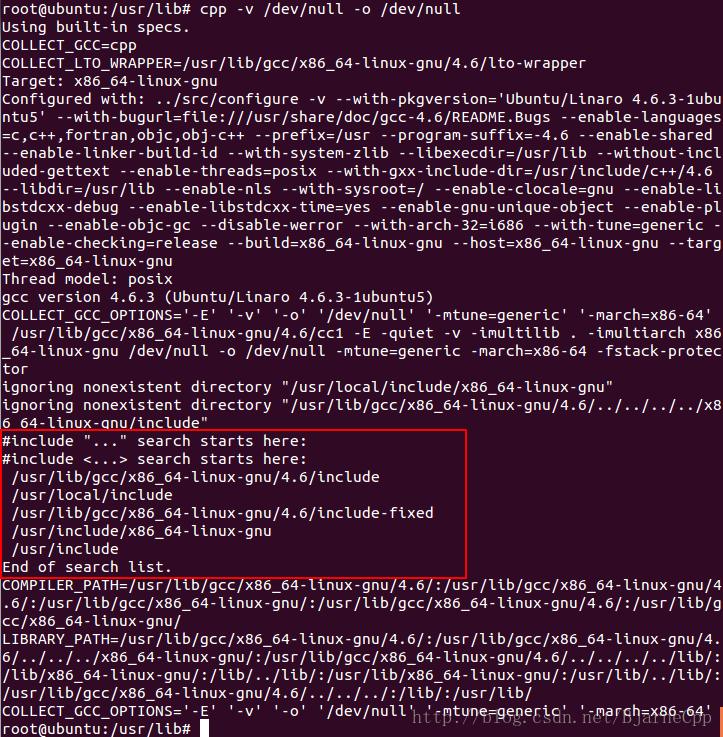
最后我根据之前locate unistd.h查找到的路径(看图一),比对图二中的路径,确定就能在/usr/include路径下,找到我想要的unistd.h文件。
Linux 中C/C++ search path(头文件搜索路径)的更多相关文章
- Linux下的头文件搜索路径
对于以压缩包发布的软件,在它的目录下通常都有一个配置脚本configure,它的作用确定编译参数(比如头文件位置.连接库位置等),然后生成Makefile以编译程序.可以进入该软件的目录,执 ...
- Xcode增加头文件搜索路径的方法
Xcode增加头文件搜索路径的方法 以C++工程为例: 在Build Settings 页面中的Search Paths一节就是用来设置头文件路径. 相关的配置项用红框框起来了,共有三个配置项: He ...
- Linux C语言头文件搜索路径
本文介绍在linux中头文件的搜索路径,也就是说你通过include指定的头文件,linux下的gcc编译器它是怎么找到它的呢.在此之前,先了解一个基本概念. 头文件是一种文本文件,使用文本编辑器将代 ...
- linux下编译时的默认库和头文件搜索路径
链接库路径 默认的链接库路径,定义在搜索/etc/ld.so.conf下的一些路径,其包含了一些重要的系统位置:LIBRARY_PATH, 但如果定义了LD_LIBRARY_PATH, 动态库的搜索路 ...
- eclipse C开发添加自己的头文件搜索路径
eclipse编译C程序时提示: ..\src\main.c:8:21: fatal error: my_type.h: No such file or directory 如图: 需要添加自己的头文 ...
- [转]Linux学习笔记——例说makefile 头文件查找路径
0.前言 从学习C语言开始就慢慢开始接触makefile,查阅了很多的makefile的资料但总感觉没有真正掌握makefile,如果自己动手写一个makefile总觉得非常吃力.所以特意借助 ...
- linux gcc头文件搜索路径
#include <>: 直接到系统指定的某些目录中去找某些头文件.#include "": 先到源文件所在文件夹去找,然后再到系统指定的某些目录中去找某些头文件 1. ...
- Linux学习笔记——例说makefile 头文件查找路径
0.前言 从学习C语言開始就慢慢開始接触makefile,查阅了非常多的makefile的资料但总感觉没有真正掌握makefile,假设自己动手写一个makefile总认为非常吃力.所以特意借 ...
- GCC编译默认的头文件搜索路径
对于c语言来说: gcc -xc -E -v - 截图: 对于c++来说: gcc -xc++ -E -v - 截图: gcc的arg和opt解释: 后面一干啥作用暂时不知道
随机推荐
- 搭建ssh框架项目(五)
一.控制层优化 (1)创建BaseAction.java类 package com.cppdy.ssh.web.action; import javax.servlet.http.HttpServle ...
- 如何通过编译Linux内核打开IPVS(LVS)的debug模式
前言 为了定位keepalived VIP的问题, 一步一步定位到IPVS, IPVS默认是没有打开Debug模式的, 若需要打开Debug模式需要重新编译IPVS模块加载后才行, 最好的方式当然是仅 ...
- gcd,lcm
定理:gcd(a,b)*lcm(a,b)=a*b; 更相损减术:gcd(a,b)=gcd(b,a-b)=gcd(a,a-b) 欧几里得算法:gcd(a,b)=gcd(b,a mod b) 复杂度O(l ...
- hdu5672 尺取
因为没有初始化ans搞了一晚上 还是尺取,枚举所有l 然后寻找对应满足条件的r,这个串可以被后面所有的串包含,所以每个l 的贡献就是len-r+1 #include<bits/stdc++.h& ...
- 线段树解LIS
先是nlogn的LIS解法 /* LIS nlogn解法 */ #include<iostream> #include<cstring> #include<cstdio& ...
- ERP简介(一)
ERP是针对物资资源管理(物流).人力资源管理(人流).财务资源管理(财流).信息资源管理(信息流)集成一体化的企业管理软件 一:系统模块简介:
- Javascript事件设计模式(七)
一:事件设计概述 事件机制可以使程序逻辑更加符合现实世界,在JavaScript中很多对象都有自己的事件,例如按钮就有onclick事件,下拉列表框就有 onchange事件,通过这些事件可以方便编程 ...
- [转]MyEclipse8.5破解方法
本文是转自其它博文,用以留着备份的~ Step: 1.建立一个任意名称的Java Project 2.在该工程中建立一个名文MyEclipseGen的Java文件(MyEclipseGen.java) ...
- python全栈开发day47-jqurey
一.昨日内容回顾 二.今日内容总结 1.jquery的介绍 1).为什么要用jquery? # window.onload 事件有事件覆盖的问题,因此只能写一个事件. # 代码容错性差 # 浏览器兼容 ...
- Codeforces Round #429 (Div. 2) - D Leha and another game about graph
Leha and another game about graph 题目大意:给你一个图,每个节点都有一个v( -1 , 0 ,1)值,要求你选一些边,使v值为1 的点度数为奇数,v值为0的度数为偶数 ...