
mvc 前端校验
首先解决 Ajax.BeginFor异步提交表单,给表单添加样式的问题。不能直接用class属性,网上找了很多都是用ClassName,经过测试不管用,看源代码发现生成的是ClassName而非class,其实很简单,加一个@符号即可,即@class="";
我们知道,LabelFor是不能添加class样式的,这个需自行拓展,反编译后自行拓展了一个给LabelFor添加样式的方法,代码如下:
 using System;

 using System.Collections.Generic;

 using System.Linq;

 using System.Web;

 using System.Web.Mvc;

 using System.Linq.Expressions;

 namespace System.Web.Mvc

 {

     public static class MyLabelExtensions

     {

         public static MvcHtmlString MyLabelFor<TModel, TValue>(this HtmlHelper<TModel> html, Expression<Func<TModel, TValue>> expression, string className)

         {

             return LabelHelper(html, ModelMetadata.FromLambdaExpression<TModel, TValue>(expression, html.ViewData), ExpressionHelper.GetExpressionText(expression), className);

         }

         private static MvcHtmlString LabelHelper(HtmlHelper html, ModelMetadata metadata, string htmlFieldName, string className = "")

         {

             string txtLabel = metadata.DisplayName ??

                               (metadata.PropertyName ?? htmlFieldName.Split(new char[] {','}).Last<string>());

             if (string.IsNullOrEmpty(className))

             {

                 return MvcHtmlString.Empty;

             }

             TagBuilder tagBuilder = new TagBuilder("label");

             tagBuilder.Attributes.Add("for", TagBuilder.CreateSanitizedId(html.ViewContext.ViewData.TemplateInfo.GetFullHtmlFieldName(htmlFieldName)));

             tagBuilder.Attributes.Add("class", className);

             tagBuilder.SetInnerText(txtLabel);

             return new MvcHtmlString(tagBuilder.ToString(TagRenderMode.Normal));

         }

     }

 }
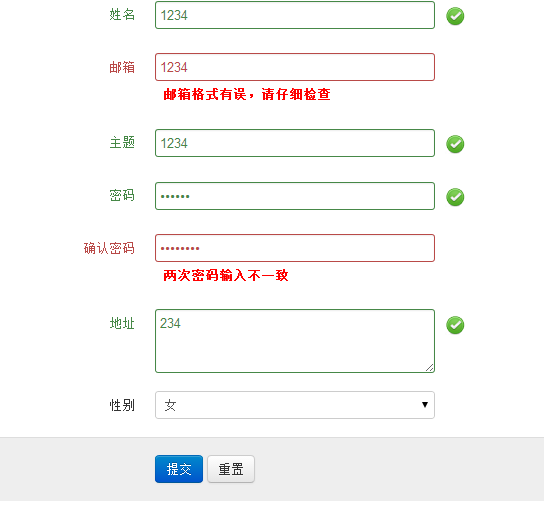
先看效果:
CSS
label.valid {

          width: 24px;

          height: 24px;

          background: url(assets/img/valid.png) center center no-repeat;

          display: inline-block;

          text-indent: -9999px;

        }

        label.error {

            font-weight: bold;

            color: red;

            padding: 2px 8px;

            margin-top: 2px;

        }
前端JS代码:
@{

    Layout = null;

}

@model MvcApp.DataTable.Controllers.MyTest

<!DOCTYPE html>

<html>

<head>

    <title>Index</title>

    <link href="../../JQueryValidate/assets/css/bootstrap.min.css" rel="stylesheet" type="text/css" />

    <link href="../../JQueryValidate/style.css" rel="stylesheet" type="text/css" />

    <script src="../../JQueryValidate/assets/js/jquery-1.7.1.min.js" type="text/javascript"></script>

    <script src="../../JQueryValidate/assets/js/jquery.validate.js" type="text/javascript"></script>

    <script type="text/javascript" language="javascript" charset="gb2312">

        $(document).ready(function() {

            $('#contact-form').validate({

                rules: {

                    Name: {

                        minlength: 2,

                        required: true,

                        remote: {

                            url: "/Home/GetSameNameCount/",

                            type: "post",

                            data: {

                                Name: function () {

                                    return $('#Name').val();

                                }

                            }

                        }

                    },

                    Email: {

                        required: true,

                        email: true

                    },

                    Subject: {

                        minlength: 2,

                        required: true

                    },

                    Password: {

                        required: true,

                        minlength: 5

                    },

                    Password2: {

                        required: true,

                        minlength: 5,

                        equalTo: "#Password"

                    },

                    Address: {

                        minlength: 2,

                        required: true

                    }

                },

                messages: {

                    Name: {

                        minlength: "请输入长度至少2位",

                        required: "名称必须的必!",

                        remote: "姓名已存在,请输入其他名称"

                    },

                    Email: {

                        required: "请输入邮箱地址",

                        email: "邮箱格式有误,请仔细检查"

                    },

                    Subject: {

                        minlength: "请输入长度至少2位",

                        required: "Must Write Subject Please"

                    },

                    Password: {

                        required: "请输入密码",

                        minlength: "密码长度至少为5位数"

                    },

                    Password2: {

                        required: "请再次输入密码",

                        minlength: "密码长度至少为5位数",

                        equalTo: "两次密码输入不一致"

                    },

                    Address: {

                        minlength: "请输入长度至少2位",

                        required: "消息不能为空撒"

                    }

                },

                highlight: function (element) {

                    $(element).closest('.control-group').removeClass('success').addClass('error');

                },

                success: function (element) {

                    element

			.text('OK!').addClass('valid')

			.closest('.control-group').removeClass('error').addClass('success');

                }

            });

        });

        function afterSave() {

        }

    </script>

</head>

    <body>

        @using (Ajax.BeginForm("SetRecord", "Home", new AjaxOptions { UpdateTargetId = "ajaxResult", HttpMethod = "POST", InsertionMode = InsertionMode.Replace, OnSuccess = "afterSave" }, new { id = "contact-form", @class = "form-horizontal" }))

        {

            <div class="control-group">

                @Html.MyLabelFor(model => model.Name, "control-label")

                <div class="controls">

                    @Html.TextBoxFor(model => model.Name, new { @class="input-xlarge" })

                </div>

            </div>

            <div class="control-group">

                @Html.MyLabelFor(model => model.Email, "control-label")

                <div class="controls">

                    @Html.TextBoxFor(model => model.Email, new { @class="input-xlarge" })

                </div>

            </div>

            <div class="control-group">

                @Html.MyLabelFor(model => model.Subject, "control-label")

                <div class="controls">

                    @Html.TextBoxFor(model => model.Subject, new { @class="input-xlarge" })

                </div>

            </div>

            <div class="control-group">

                @Html.MyLabelFor(model => model.Password, "control-label")

                <div class="controls">

                    @Html.TextBoxFor(model => model.Password, new { @class = "input-xlarge", type = "password" })

                </div>

            </div>

            <div class="control-group">

                @Html.MyLabelFor(model => model.Password2, "control-label")

                <div class="controls">

                    @Html.TextBoxFor(model => model.Password2, new { @class = "input-xlarge", type = "password" })

                </div>

            </div>

            <div class="control-group">

                @Html.MyLabelFor(model => model.Address, "control-label")

                <div class="controls">

                    <textarea class="input-xlarge" name="Address" id="Address" rows="3"></textarea>

                </div>

            </div>

            <div class="form-group">

                @Html.MyLabelFor(model => model.Sex, "control-label")


                @Html.DropDownListFor(model => model.Sex, new SelectList(ViewBag.SexList, "strKey", "strValue", 1), "--请选择--", new { style = "width: 280px;" })

            </div>

            <div class="form-actions">

                <button type="submit" class="btn btn-primary">提交</button>

                <button type="reset" class="btn">重置</button>

            </div>

        }

    </body>

</html>
后台C#代码:
 using System;

 using System.Collections.Generic;

 using System.Linq;

 using System.Web;

 using System.Web.Mvc;

 using System.Runtime.Serialization;

 using System.ComponentModel;

 namespace MvcApp.DataTable.Controllers

 {

     public class HomeController : Controller

     {

         //

         // GET: /Home/

         public ActionResult Index()

         {

             ViewBag.SexList = new List<KeyValue>

             {

                 new KeyValue("","男"),new KeyValue("","女")

             };

             return View();

         }

         [HttpPost]

         public ActionResult SetRecord(MyTest t)

         {

             string m = t.Name;

             return Content("ok");

         }

         [HttpPost]

         public ActionResult GetSameNameCount()

         {

             string Name = Request["Name"];

             bool isExistName = true;//验证通过

             if (Name == "huangzhong")

             {

                 isExistName = false;//用户名已存在,验证不通过

             }

             System.Web.Script.Serialization.JavaScriptSerializer javascriptserializer = new System.Web.Script.Serialization.JavaScriptSerializer();

             return Content(javascriptserializer.Serialize(isExistName));

         }

     }

     [DataContract]

     public class MyTest

     {

         [DataMember]

         [DisplayName("姓名")]

         public string Name { get; set; }

         [DataMember]

         [DisplayName("邮箱")]

         public string Email { get; set; }

         [DataMember]

         [DisplayName("主题")]

         public string Subject { get; set; }

         [DataMember]

         [DisplayName("地址")]

         public string Address { get; set; }

         [DataMember]

         [DisplayName("密码")]

         public string Password { get; set; }

         [DataMember]

         [DisplayName("确认密码")]

         public string Password2 { get; set; }

         [DataMember]

         [DisplayName("性别")]

         public string Sex { get; set; }

     }

     public class KeyValue

     {

         public string strKey { get; set; }

         public string strValue { get; set; }

         public KeyValue(string iv, string it)

         {

             this.strKey = iv;

             this.strValue = it;

         }

     }

 }
mvc 前端校验的更多相关文章
- 基于asp.net(C#)MVC+前端bootstrap+ztree+lodash+jquery技术-Angel工作室通用权限管理
一.Angel工作室简单通用权限系统简介 AngelRM(Asp.net MVC Web api)是基于asp.net(C#)MVC+前端bootstrap+ztree+lodash+jquery技术 ...
- Java Web 学习(6) —— Spring MVC 之校验器
Spring MVC 之校验器 数据验证 一个典型的 Spring MVC 应用会同时应用到 formatters/converters 和 validators. 在调用 controller 期间 ...
- spring mvc 数据校验(bean实体注解实现)
spring mvc 数据校验 1.添加个jar (jar与一版本会冲突) <dependency> <groupId>com.fasterxml</groupId> ...
- 【代码总结】Spring MVC数据校验
1.实验介绍 --------------------------------------------------------------------------------------------- ...
- Spring MVC数据校验
在web应用程序中,为了防止客户端传来的数据引发程序异常,常常需要对 数据进行验证.输入验证分为客户端验证与服务器端验证.客户端验证主要通过JavaScript脚本进行,而服务器端验证则主要通过Jav ...
- spring mvc 数据校验
1.需要导入的jar包: slf4j-api-1.7.21.jar validation-api-1.0.0.GA.jar hibernate-validator-4.0.1.GA.jar 2.访问页 ...
- MVC之校验
MVC校验 首先要在Models中创建几个属性 例子:Id.UserName.Age属性.然后创建控制器,然后添加一个试图,选择强类型,选择支架模板Create生成页面,然后将所有控件改为TextBo ...
- ASP.NET MVC 前端(View)向后端(Controller)中传值
在MVC中,要把前端View中的值传递给后端Controller, 主要有两种方法 1. 利用Request.Form 或者 Request.QueryString public ActionResu ...
- 转:ASP.Net MVC:校验、AJAX与过滤器
原文地址:http://blog.jobbole.com/85005/ 一.校验 — 表单不是你想提想提就能提 1.1 DataAnnotations(数据注解) 位于 System.Componen ...
随机推荐
- NodeJs--HTTP源码分析
在github上按下按键t,就可以呼出仓库搜索的面板(在大型项目中方便检索文件),检索出http.js文件检索出来,通过ctrl+F来搜索某个方法. _http_outgoing 带下划线的是私有模块 ...
- How to compile and install Snort from source code on Ubuntu
http://www.tuicool.com/articles/v6j2Ab Snort is by far the most popular open-source network intrusio ...
- Dockerfile详解(一)
Dockerfile 用于自动化构建一个docker镜像.Dockerfile里有 CMD 与 ENTRYPOINT 两个功能咋看起来很相似的指令,开始的时候觉得两个互用没什么所谓,但其实并非如此: ...
- cocos2d-x JS 获取当前系统时间(解决屏幕双击点击事件)
记录一下,好开心,感觉今天自己又学到东西了,对于屏幕双击事件本来还毫无头绪的,今天得以解决总算没白费加班,其实原理很简单:就是在点击事件里做一个判断,这个判断就是需要获取当前系统的时间的毫秒差,第一次 ...
- 在屏幕拖拽3D物体移动
3D物体的拖拽不同于2D的.因为3D物体有x,y,z当然.实际拖拽还是在XZ平面.只是多了几个转换 using UnityEngine; using System.Collections; publi ...
- PHP socket通信之UDP
服务端: //服务器信息 $server = 'udp://127.0.0.1:9998'; //消息结束符号 $msg_eof = "\n"; $socket = stream_ ...
- clear/reset select2,重置select2,恢复默认
4.0 version //方法一$('#yourButton').on('click', function() { $('#yourfirstSelect2').val(null).trigger( ...
- 域名重新绑定ip时访问地址NotFount404
情形描述:部署在A服务器IIS上的asp.net程序,搬迁到B服务器上,重新绑定域名和ip后.再访问网址时有些电脑能正常访问,而有些电脑报404 not found错误. 经分析发现是个人电脑网络设置 ...
- 排序(Sort)-----选择排序
声明:文中动画转载自https://blog.csdn.net/qq_34374664/article/details/79545940 1.选择排序简介 选择排序(Select Sort ...
- Spring tokenizeToStringArray
tokenizeToStringArray: StringUtils.tokenizeToStringArray(pattern, this.pathSeparator, this.trimToken ...