
Netty入门(4) - 附带的ChannelHandler和Codec
使用SSL/TLS创建安全的Netty程序
Java提供了抽象的SslContext和SslEngine,实际上SslContext可以用来获取SslEngine来进行加密和解密。Netty拓展了Java的SslEngine,称SslHandler,用来对网络数据进行加密和解密。
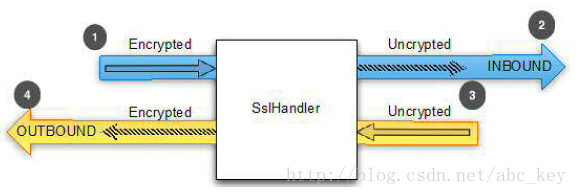
1、制作自签证书
#keytool -genkey -keysize 2048 -validity 365 -keyalg RSA -dnam e "CN=gornix.com" -keypass 654321 -storepass 123456 -keystore gornix.jks
keytool为JDK提供的生成证书工具
- -keysize 2048 密钥长度2048位(这个长度的密钥目前可认为无法被暴力破解)
- -validity 365 证书有效期365天
- -keyalg RSA 使用RSA非对称加密算法
- -dname "CN=gornix.com" 设置Common Name为gornix.com,这是我的域名
- -keypass 654321 密钥的访问密码为654321
- -storepass 123456 密钥库的访问密码为123456(其实这两个密码也可以设置一样,通常都设置一样,方便记)
- -keystore gornix.jks 指定生成的密钥库文件为gornix.jks
2、服务端程序
public class SocketServerHelper {

    private static int WORKER_GROUP_SIZE = Runtime.getRuntime().availableProcessors() * 2;

    private static EventLoopGroup bossGroup;

    private static EventLoopGroup workerGroup;

    private static Class<? extends ServerChannel> channelClass;

    public static void startSpiderServer() throws Exception {

        ServerBootstrap b = new ServerBootstrap();

        b.childOption(ChannelOption.TCP_NODELAY, true)

        .childOption(ChannelOption.SO_KEEPALIVE, true)

        .childOption(ChannelOption.SO_REUSEADDR, true)

        .childOption(ChannelOption.ALLOCATOR, new PooledByteBufAllocator(false))

        .childOption(ChannelOption.SO_RCVBUF, 1048576)

        .childOption(ChannelOption.SO_SNDBUF, 1048576);

        bossGroup = new NioEventLoopGroup(1);

        workerGroup = new NioEventLoopGroup(WORKER_GROUP_SIZE);

        channelClass = NioServerSocketChannel.class;

        System.out.println("workerGroup size:" + WORKER_GROUP_SIZE);

        System.out.println("preparing to start spider server...");

        b.group(bossGroup, workerGroup);

        b.channel(channelClass);

        KeyManagerFactory keyManagerFactory = null;

        KeyStore keyStore = KeyStore.getInstance("JKS");

        keyStore.load(new FileInputStream("G:\\ssl.jks"), "123456".toCharArray());

        keyManagerFactory = KeyManagerFactory.getInstance("SunX509");

        keyManagerFactory.init(keyStore,"123456".toCharArray());

        SslContext sslContext = SslContextBuilder.forServer(keyManagerFactory).build();

        b.childHandler(new SslChannelInitializer(sslContext));

        b.bind(9912).sync();

        System.out.println("spider server start sucess, listening on port " + 9912 + ".");

    }

    public static void main(String[] args) throws Exception {

        SocketServerHelper.startSpiderServer();

    }

    public static void shutdown() {

        System.out.println("preparing to shutdown spider server...");

        bossGroup.shutdownGracefully();

        workerGroup.shutdownGracefully();

        System.out.println("spider server is shutdown.");

    }

}
public class SslChannelInitializer extends ChannelInitializer<Channel> {

    private final SslContext context;

    public SslChannelInitializer(SslContext context) {

        this.context = context;

    }

    @Override

    protected void initChannel(Channel ch) throws Exception {

        SSLEngine engine = context.newEngine(ch.alloc());

        engine.setUseClientMode(false);

        ch.pipeline().addFirst("ssl", new SslHandler(engine));

        ChannelPipeline pipeline = ch.pipeline();

        pipeline.addLast("frameDecoder", new LengthFieldBasedFrameDecoder(Integer.MAX_VALUE, 0, 4, 0, 4));

        pipeline.addLast("frameEncoder", new LengthFieldPrepender(4));  //最大16M

        pipeline.addLast("decoder", new StringDecoder(Charset.forName("UTF-8")));

        pipeline.addLast("encoder", new StringEncoder(Charset.forName("UTF-8")));

        pipeline.addLast("spiderServerBusiHandler", new SpiderServerBusiHandler());

    }

}
3、客户端程序
public class SocketClientHelper {

     public static void main(String[] args) {

            Channel channel = SocketClientHelper.createChannel("localhost",9912);

            try {

                Thread.sleep(100);

            } catch (InterruptedException e) {

                e.printStackTrace();

            }

            SocketHelper.writeMessage(channel, "ssh over tcp test 1");

            SocketHelper.writeMessage(channel, "ssh over tcp test 2");

            SocketHelper.writeMessage(channel, "ssh over tcp test 3");

            SocketHelper.writeMessage(channel, "ssh over tcp test 4");

            SocketHelper.writeMessage(channel, "ssh over tcp test 5");

        }

        public static Channel createChannel(String host, int port) {

            Channel channel = null;

            Bootstrap b = getBootstrap();

            try {

                channel = b.connect(host, port).sync().channel();

                System.out.println(MessageFormat.format("connect to spider server ({0}:{1,number,#}) success for thread [" + Thread.currentThread().getName() + "].", host , port));

            } catch (Exception e) {

                e.printStackTrace();

            }

            return channel;

        }

        public static Bootstrap getBootstrap(){

            EventLoopGroup group;

            Class<? extends Channel> channelClass = NioSocketChannel.class;

            group = new NioEventLoopGroup();

            Bootstrap b = new Bootstrap();

            b.group(group).channel(channelClass);

            b.option(ChannelOption.SO_KEEPALIVE, true);

            b.option(ChannelOption.TCP_NODELAY, true);

            b.option(ChannelOption.SO_REUSEADDR, true);

            b.option(ChannelOption.CONNECT_TIMEOUT_MILLIS, 5000);

            TrustManagerFactory tf = null;

            try {

                KeyStore keyStore = KeyStore.getInstance("JKS");

                keyStore.load(new FileInputStream("G:\\ssl.jks"), "123456".toCharArray());

                tf = TrustManagerFactory.getInstance("SunX509");

                tf.init(keyStore);

                SslContext sslContext = SslContextBuilder.forClient().trustManager(tf).build();

                b.handler(new SslChannelInitializer(sslContext));

                return b;

            } catch(Exception e) {

                e.printStackTrace();

            }

            return null;

        }

}
public class SslChannelInitializer extends ChannelInitializer<Channel> {

    private final SslContext context;

    public SslChannelInitializer(SslContext context) {

        this.context = context;

    }

    @Override

    protected void initChannel(Channel ch) throws Exception {

        SSLEngine engine = context.newEngine(ch.alloc());

        engine.setUseClientMode(true);

        ch.pipeline().addFirst("ssl", new SslHandler(engine));

        ChannelPipeline pipeline = ch.pipeline();

        pipeline.addLast("frameDecoder", new LengthFieldBasedFrameDecoder(Integer.MAX_VALUE, 0, 4, 0, 4));

        pipeline.addLast("frameEncoder", new LengthFieldPrepender(4));  //最大16M

        pipeline.addLast("decoder", new StringDecoder(Charset.forName("UTF-8")));

        pipeline.addLast("encoder", new StringEncoder(Charset.forName("UTF-8")));

        pipeline.addLast("spiderClientBusiHandler", new SpiderClientBusiHandler());

    }

}
可见SSL也没什么神秘的,就是在普通的TCP连接基础上包了一层处理而已(但如果要自己实现这层处理那可是相当复杂的),这层处理体现在Netty中就是一个SslHandler,把这个SslHandler加入到TCP连接的处理管线中即可。
PS:我们也可以使用基于认证和报文头加密的方式实现安全性。
处理空闲和超时
IdleStateHandler:当一个通道没有进行读写或者运行了一段时间后发出IdleStateEvent
ReadTimeoutHandler:在指定时间没没有接收到任何数据将抛出ReadTimeoutException
WriteTimeoutHandler:在指定时间内没有写入数据将抛出WriteTimeoutException
public class IdleStateHandlerInitializer extends ChannelInitializer<Channel> {

    @Override

    protected void initChannel(Channel ch) throws Exception {

        ChannelPipeline pipeline = ch.pipeline();

        pipeline.addLast(new IdleStateHandler(0, 0, 60, TimeUnit.SECONDS));

        pipeline.addLast(new HeartbeatHandler());

    }

    public static final class HeartbeatHandler extends ChannelInboundHandlerAdapter {

        private static final ByteBuf HEARTBEAT_SEQ = Unpooled.unreleasableBuffer(Unpooled.copiedBuffer("HEARTBEAT", CharsetUtil.UTF_8));

        @Override

        public void userEventTriggered(ChannelHandlerContext ctx, Object evt) throws Exception {

            if (evt instanceof IdleStateEvent) {

                ctx.writeAndFlush(HEARTBEAT_SEQ.duplicate()).addListener(ChannelFutureListener.CLOSE_ON_FAILURE);

            } else {

                super.userEventTriggered(ctx, evt);

            }

        }

    }

}
分隔符协议
DelimiterBasedFrameDecoder,解码器,接收ByteBuf由一个或者多个分隔符拆分,如NUL或者换行符。
LineBasedFrameDecoder,解码器,接收ByteBuf以分隔符结束,如"\n"和"\r\n"
public class LineBasedHandlerInitializer extends ChannelInitializer<Channel> {

    @Override

    protected void initChannel(Channel ch) throws Exception {

        ch.pipeline().addLast(new LineBasedFrameDecoder(65*1024), new FrameHandler());

    }

    public static final class FrameHandler extends SimpleChannelInboundHandler<ByteBuf> {

        @Override

        protected void channelRead0(ChannelHandlerContext arg0, ByteBuf arg1) throws Exception {

            // do something

        }

    }

}
长度为基础的协议
FixedLengthFrameDecoder:解码器,固定长度提取帧
LengthFieldBasedFrameDecoder:解码器,读取头部长度并提取帧的长度
public class LengthBasedInitializer extends ChannelInitializer<Channel> {

    @Override

    protected void initChannel(Channel ch) throws Exception {

        ch.pipeline().addLast(new LengthFieldBasedFrameDecoder(65*1024, 0, 8))

                        .addLast(new FrameHandler());

    }

    public static final class FrameHandler extends SimpleChannelInboundHandler<ByteBuf> {

        @Override

        protected void channelRead0(ChannelHandlerContext ctx, ByteBuf msg) throws Exception {

            // do something

        }

    }

}
写大数据
写大量的数据的一个有效的方法就是使用异步框架,如果内存和网络都处于爆满负荷状态,你需要停止写,Netty提供zero-memory-copy机制,这种方法在将文件内容写到网络堆栈空间时可以获得最大的性能:
public class WriteBigData extends ChannelInboundHandlerAdapter {

    @Override

    public void channelRead(ChannelHandlerContext ctx, Object msg) throws Exception {

        File file = new File("");

        FileInputStream fis = new FileInputStream(file);

        FileRegion region = new DefaultFileRegion(fis.getChannel(), 0, file.length());

        Channel channel = ctx.channel();

        channel.writeAndFlush(region).addListener(new ChannelFutureListener() {

            @Override

            public void operationComplete(ChannelFuture future) throws Exception {

                if (!future.isSuccess()) {

                    Throwable cause = future.cause();

                    // do something

                }

            }

        });

    }

}
如果只想发送指定的数据块,可以使用ChunkedFile、ChunkedNioFile、ChunkedStream、ChunkedNioStream等。
Protobuf序列化传输
ProtobufDecoder、ProtobufEncoder、ProtobufVarint32FrameDecoder、ProtobufVarint32LengthPrepender,使用Protobuf需要映入protobuf-java-2.5.0.jar
1、下载编译器,将protoc.exe配置到环境变量:https://github.com/google/protobuf/releases
2、编写.proto文件,参考:https://blog.csdn.net/hry2015/article/details/70766603
syntax = "proto3"; // 声明可以选择protobuf的编译器版本(v2和v3)

option java_outer_classname = "MessageProto"; // 指定生成的java类的类名

message Message {  // 相当于c语言中的struct语句,表示定义一个信息,其实也就是类。

  string id = 1; // 要传输的字段了,子段后面需要有一个数字编号,从1开始递增

  string content = 2;

}
3、CMD执行编译操作
protoc ./Message.proto --java_out=./
4、引入maven
<!-- https://mvnrepository.com/artifact/com.google.protobuf/protobuf-java -->

<dependency>

   <groupId>com.google.protobuf</groupId>

   <artifactId>protobuf-java</artifactId>

   <version>3.5.1</version>

</dependency>
5、服务端
public class ServerPoHandlerProto extends ChannelInboundHandlerAdapter {

    @Override

    public void channelRead(ChannelHandlerContext ctx, Object msg) {

        MessageProto.Message message = (MessageProto.Message) msg;

        if (ConnectionPool.getChannel(message.getId()) == null) {

            ConnectionPool.putChannel(message.getId(), ctx);

        }

        System.err.println("server:" + message.getId());

        ctx.writeAndFlush(message);

    }

    @Override

    public void exceptionCaught(ChannelHandlerContext ctx, Throwable cause) {

        cause.printStackTrace();

        ctx.close();

    }

}
bootstrap.group(bossGroup, workerGroup)

                .channel(NioServerSocketChannel.class)

                .childHandler(new ChannelInitializer<SocketChannel>() {

                    @Override

                    public void initChannel(SocketChannel ch) throws Exception {

                        // 实体类传输数据,protobuf序列化

                        ch.pipeline().addLast("decoder",

                                new ProtobufDecoder(MessageProto.Message.getDefaultInstance()));

                        ch.pipeline().addLast("encoder",

                                new ProtobufEncoder());

                        ch.pipeline().addLast(new ServerPoHandlerProto());

                    }

                })

                .option(ChannelOption.SO_BACKLOG, 128)

                .childOption(ChannelOption.SO_KEEPALIVE, true);
6、客户端
public class ClientPoHandlerProto extends ChannelInboundHandlerAdapter {

    @Override

    public void channelRead(ChannelHandlerContext ctx, Object msg) {

        MessageProto.Message message = (MessageProto.Message) msg;

        System.out.println("client:" + message.getContent());

    }

    @Override

    public void exceptionCaught(ChannelHandlerContext ctx, Throwable cause) {

        cause.printStackTrace();

        ctx.close();

    }

}
Bootstrap b = new Bootstrap();

            b.group(workerGroup);

            b.channel(NioSocketChannel.class);

            b.option(ChannelOption.SO_KEEPALIVE, true);

            b.handler(new ChannelInitializer<SocketChannel>() {

                @Override

                public void initChannel(SocketChannel ch) throws Exception {

                    // 实体类传输数据,protobuf序列化

                    ch.pipeline().addLast("decoder",

                            new ProtobufDecoder(MessageProto.Message.getDefaultInstance()));

                    ch.pipeline().addLast("encoder",

                            new ProtobufEncoder());

                    ch.pipeline().addLast(new ClientPoHandlerProto());

                }

            });
单元测试
package com.netty.learn.demo6;

import java.util.List;

import java.util.Random;

import io.netty.buffer.ByteBuf;

import io.netty.buffer.Unpooled;

import io.netty.channel.ChannelHandlerContext;

import io.netty.channel.ChannelPipeline;

import io.netty.channel.SimpleChannelInboundHandler;

import io.netty.channel.embedded.EmbeddedChannel;

import io.netty.handler.codec.ByteToMessageDecoder;

public class EmbeddedChannelInboundTest {

    public static void main(String[] args) {

        Random r = new Random();

        ByteBuf byteBuf = Unpooled.buffer();

        for (int i = 0; i < 3; i++) {

            int one = r.nextInt();

            byteBuf.writeInt(one);

            System.out.println("generate one: " + one);

        }

        EmbeddedChannel embeddedChannel = new EmbeddedChannel();

        // 获取channelPipeLine

        ChannelPipeline channelPipeline = embeddedChannel.pipeline();

        channelPipeline.addFirst(new DecodeTest());

        channelPipeline.addLast(new SimpleChannelInBoundHandlerTest());

        // 写入测试数据

        embeddedChannel.writeInbound(byteBuf);

        embeddedChannel.finish();

        // 验证测试数据

        System.out.println("embeddedChannel readInbound:" + embeddedChannel.readInbound());

        System.out.println("embeddedChannel readInbound:" + embeddedChannel.readInbound());

        System.out.println("embeddedChannel readInbound:" + embeddedChannel.readInbound());

    }

}

// 解码器

class DecodeTest extends ByteToMessageDecoder {

    @Override

    protected void decode(ChannelHandlerContext ctx, ByteBuf in, List<Object> out) throws Exception {

        if (in.readableBytes() >= 4) {

            out.add(in.readInt());

        }

    }

}

// channelHandler

@SuppressWarnings("rawtypes")

class SimpleChannelInBoundHandlerTest extends SimpleChannelInboundHandler {

    @Override

    protected void channelRead0(ChannelHandlerContext ctx, Object msg) throws Exception {

        System.out.println("Received message:" + msg);

        ctx.fireChannelRead(msg);

    }

}
Netty入门(4) - 附带的ChannelHandler和Codec的更多相关文章
- 【Netty】ChannelHandler和codec
一.前言 前面学习了Netty的codec框架,下面接着学习ChannelHandler与codec之间的关联. 二.ChannelHandler和codec Netty为不同的协议提供了处理器和编解 ...
- Netty入门教程——认识Netty
什么是Netty? Netty 是一个利用 Java 的高级网络的能力,隐藏其背后的复杂性而提供一个易于使用的 API 的客户端/服务器框架. Netty 是一个广泛使用的 Java 网络编程框架(N ...
- Netty入门
一.NIO Netty框架底层是对NIO的高度封装,所以想要更好的学习Netty之前,应先了解下什么是NIO - NIO是non-blocking的简称,在jdk1.4 里提供的新api,他的他的特性 ...
- netty入门(一)
1. netty入门(一) 1.1. 传统socket编程 在任何时候都可能有大量的线程处于休眠状态,只是等待输入或者输出数据就绪,这可能算是一种资源浪费. 需要为每个线程的调用栈都分配内存,其默认值 ...
- Netty入门(二)之PC聊天室
参看Netty入门(一):Netty入门(一)之webSocket聊天室 Netty4.X下载地址:http://netty.io/downloads.html 一:服务端 1.SimpleChatS ...
- Netty入门(一)之webSocket聊天室
一:简介 Netty 是一个提供 asynchronous event-driven (异步事件驱动)的网络应用框架,是一个用以快速开发高性能.高可靠性协议的服务器和客户端. 换句话说,Netty 是 ...
- Netty 系列(三)Netty 入门
Netty 系列(三)Netty 入门 Netty 是一个提供异步事件驱动的网络应用框架,用以快速开发高性能.高可靠性的网络服务器和客户端程序.更多请参考:Netty Github 和 Netty中文 ...
- 让Netty入门变得简单
让Netty入门变得简单 https://mp.weixin.qq.com/s/MBnbLmCmFJo0QK9WNwXrXQ 如果先启动nettyClient就不会有nettyServer输出了: p ...
- Netty入门二:开发第一个Netty应用程序
Netty入门二:开发第一个Netty应用程序 时间 2014-05-07 18:25:43 CSDN博客 原文 http://blog.csdn.net/suifeng3051/article/ ...
随机推荐
- Spring AOP切点表达式用法总结
1. 简介 面向对象编程,也称为OOP(即Object Oriented Programming)最大的优点在于能够将业务模块进行封装,从而达到功能复用的目的.通过面向对象编程,不同的模 ...
- target存放的是编译后的.class文件地方 默认情况下不会讲非class文件放入进入 如果要使用非.class文件 需要通过增加配置方式自动加入文件
target存放的是编译后的.class文件地方 默认情况下不会讲非class文件放入进入 如果要使用非.class文件 需要通过增加配置方式自动加入文件
- 学习笔记之csrf
CBV 添加 csrf 第一种: 指定方法方面添加 装饰器 @memethod_decorator(xxx) 第二种 全部添加: 注意 在类名前: @method_decorator(xxx,name ...
- 聊聊我怎么系统学习Linux技能并快速提高的
随着电子信息科技时代的发展,学会使用计算机在我们的生活中成为了必不可少的一项技能.而作为计算机中的三大操作系统之一的Linux更是饱受计算机爱好者们的喜爱.今天我们就来和大家一起聊一聊Linux操作系 ...
- Ubuntu 16.04安装Tomcat 8
此篇为http://www.cnblogs.com/EasonJim/p/7139275.html的分支页. 前提:必须正确安装JDK. 一.通过二进制包(tar.gz)安装 下载: https:// ...
- Borg Maze POJ - 3026 (BFS + 最小生成树)
题意: 求把S和所有的A连贯起来所用的线的最短长度... 这道题..不看discuss我能wa一辈子... 输入有坑... 然后,,,也没什么了...还有注意 一次bfs是可以求当前点到所有点最短距离 ...
- ecplise tomcat忽然出现404
场景:之前用的好好的,eclipse可以启动,然后浏览器访问 localhost:8080 出现tomcat 404 页面 解决方法:删掉server ,重新建个 server
- 【 Gym - 101138J 】Valentina and the Gift Tree(树链剖分)
BUPT2017 wintertraining(15) 4 D Gym - 101138J 数据 题意 n个节点的一棵树,每个节点的权值为g,q个询问,树上的节点U-V,求U到V的路径的最大子段和. ...
- 数据挖掘(二)用python实现数据探索:汇总统计和可视化
今天我们来讲一讲有关数据探索的问题.其实这个概念还蛮容易理解的,就是我们刚拿到数据之后对数据进行的一个探索的过程,旨在了解数据的属性与分布,发现数据一些明显的规律,这样的话一方面有助于我们进行数据预处 ...
- luogu4268 Directory Traversal (dfs)
题意:给一个树状的文件结构,让你求从某个文件夹出发访问到所有文件,访问路径字符串长度之和的最小值,其中,访问父节点用..表示,两级之间用/分割 做两次dfs,第一次算DownN[x]和DownS[x] ...