
试水Spring Cloud Hystrix
Spring Cloud Hystrix是一个容错库,它实现了断路器模式,使得当服务发生异常时,会自动切断连接,并将请求引导至预设的回调方法。
服务端
在Spring Tool Suite的文件菜单中,点击新建Spring Starter Project。建立一个普通的Restful风格的服务。

import org.springframework.boot.SpringApplication;

import org.springframework.boot.autoconfigure.SpringBootApplication;

import org.springframework.web.bind.annotation.RequestMapping;

import org.springframework.web.bind.annotation.RestController;

@RestController

@SpringBootApplication

public class SpringcloudHystrixServerApplication {

	public static void main(String[] args) {

		SpringApplication.run(SpringcloudHystrixServerApplication.class, args);

	}

	@RequestMapping(value = "/message")

	public String getMessage() {

		return "Hello World!";

	}

}
application.properties文件中配置服务的端口,server.port=8200。
服务启动后,可以在浏览器查看相应接口。

客户端
再建立一个客户端应用程序,在创建时选择Hystrix,Hystrix Dashboard,Actuator和Web模块。

项目创建完成后,添加一个Service,其中包括调用服务端接口的方法及一个回调方法。注意这里@HystrixCommand的用法。
import java.net.URI;

import org.springframework.stereotype.Service;

import org.springframework.web.client.RestTemplate;

import com.netflix.hystrix.contrib.javanica.annotation.HystrixCommand;

@Service

public class MessageService {

	private final RestTemplate restTemplate;

	public MessageService(RestTemplate rest) {

		this.restTemplate = rest;

	}

	@HystrixCommand(fallbackMethod = "reliable")

	public String getMessage() {

		URI uri = URI.create("http://localhost:8200/message");

		return this.restTemplate.getForObject(uri, String.class);

	}

	public String reliable() {

		return "Woo, something wrong!";

	}

}
在客户端的入口方法加上@EnableCircuitBreaker标记,并把它的端口设为server.port=8300。
import org.springframework.beans.factory.annotation.Autowired;

import org.springframework.boot.SpringApplication;

import org.springframework.boot.autoconfigure.SpringBootApplication;

import org.springframework.boot.web.client.RestTemplateBuilder;

import org.springframework.cloud.client.circuitbreaker.EnableCircuitBreaker;

import org.springframework.cloud.netflix.hystrix.dashboard.EnableHystrixDashboard;

import org.springframework.context.annotation.Bean;

import org.springframework.web.bind.annotation.RequestMapping;

import org.springframework.web.bind.annotation.RestController;

import org.springframework.web.client.RestTemplate;

@EnableHystrixDashboard

@EnableCircuitBreaker

@RestController

@SpringBootApplication

public class SpringcloudHystrixClientApplication {

	@Autowired

	private MessageService messageService;

	@Bean

	public RestTemplate rest(RestTemplateBuilder builder) {

		return builder.build();

	}

	public static void main(String[] args) {

		SpringApplication.run(SpringcloudHystrixClientApplication.class, args);

	}

	@RequestMapping("/message")

	public String getMessge() {

		return messageService.getMessage();

	}

}
启动客户端后,如果在浏览器里看到页面能正常获取服务端的数据,说明当前客户端与服务端运作都是正常的。
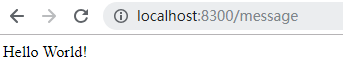
然后,停止服务端,让情况出现异常。
刷新页面,可以看到这次的结果也在预料之内,当客户端调用服务端失败后,通过Hystrix的作用,自动切换至调用预设的回调方法。

仪表盘
Hystrix自带可视化仪表盘,在上面的客户端代码中,入口方法除了增加了@EnableCircuitBreaker标记外,还有@EnableHystrixDashboard。这样的设置便可以启用Hystrix的仪表盘。
不过在application.properties文件还需要加上以下配置,以避免“Unable to connect to Command Metric Stream”错误。
management.endpoints.web.exposure.include=hystrix.stream

management.endpoints.web.base-path=/
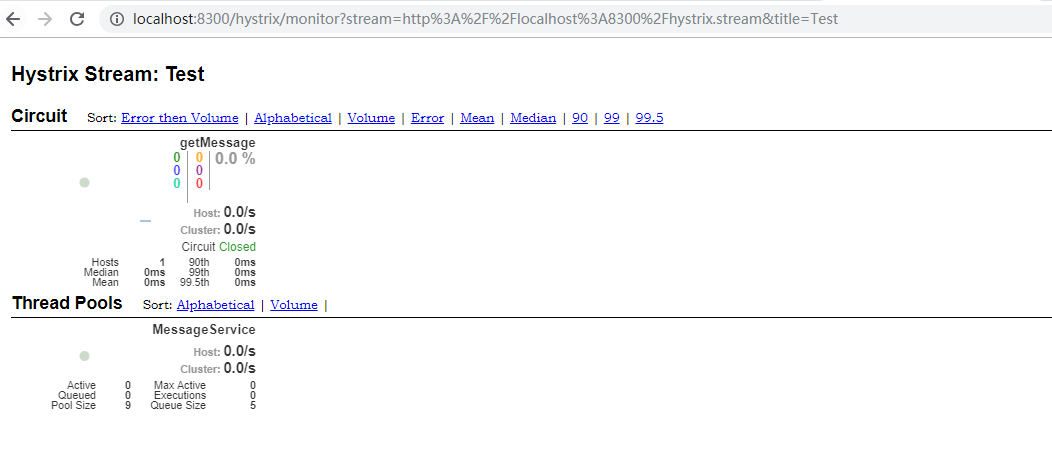
当客户端被启动后,使用http://localhost:8300/hystrix路径可以直接访问仪表盘。

之后在Hystrix Dashboard下面的地址栏内填上http://localhost:8300/hystrix.stream,再点击Monitor Stream按钮,监控结果一览无遗。
试水Spring Cloud Hystrix的更多相关文章
- spring cloud Hystrix监控面板Hystrix Dashboard和Turbine
我们提到断路器是根据一段时间窗内的请求情况来判断并操作断路器的打开和关闭状态的.而这些请求情况的指标信息都是HystrixCommand和HystrixObservableCommand实例在执行过程 ...
- Spring Cloud Hystrix 1(熔断器简介)
在分布式框架中当某个服务单元发生故障之后通过断路器的故障监控向调用方返回一个错误响应,而不是长期等待这样就不会使得线程因调用故障服务被长时间占用不放,避免了故障在分布式系统中的蔓延 针对上述问题,Sp ...
- Spring Cloud Hystrix 服务容错保护 5.1
Spring Cloud Hystrix介绍 在微服务架构中,通常会存在多个服务层调用的情况,如果基础服务出现故障可能会发生级联传递,导致整个服务链上的服务不可用为了解决服务级联失败这种问题,在分布式 ...
- 笔记:Spring Cloud Hystrix 异常处理、缓存和请求合并
异常处理 在 HystrixCommand 实现的run方法中抛出异常,除了 HystrixBadRequestException之外,其他异常均会被Hystrix 认为命令执行失败并触发服务降级处理 ...
- 笔记:Spring Cloud Hystrix 服务容错保护
由于每个单元都在不同的进程中运行,依赖通过远程调用的方式执行,这样就有可能因为网络原因或是依赖服务自身问题出现调用故障或延迟,而这些问题会直接导致调用方的对外服务也出现延迟,若此时调用方的请求不断增加 ...
- Spring Cloud 微服务笔记(六)Spring Cloud Hystrix
Spring Cloud Hystrix Hystrix是一个延迟和容错库,旨在隔离远程系统.服务和第三方库,阻止链接故障,在复杂的分布式系统中实现恢复能力. 一.快速入门 1)依赖: <dep ...
- 第五章 服务容错保护:Spring Cloud Hystrix
在微服务架构中,我们将系统拆分为很多个服务,各个服务之间通过注册与订阅的方式相互依赖,由于各个服务都是在各自的进程中运行,就有可能由于网络原因或者服务自身的问题导致调用故障或延迟,随着服务的积压,可能 ...
- spring cloud: Hystrix(五):如禁止单个FeignClient使用hystrix
spring cloud: Hystrix(五):如禁止单个FeignClient使用hystrix 首先application.yml / applicatoin.propreties的配置项:fe ...
- spring cloud: Hystrix(四):feign类似于hystrix的断容器功能:fallback
spring cloud: Hystrix(四):feign使用hystrix @FeignClient支持回退的概念:fallback方法,这里有点类似于:@HystrixCommand(fallb ...
随机推荐
- 拯救者y720 双显卡, nvidia 1060 ,Ubuntu16.04 安装 Nvidia 显卡驱动
为了能够记录,下次可以有参考的东西,就记录如此 多谢网上大牛的帖子,我都是安装您们的才顺利的一次性,无黑屏现象的完成了安装 1. 参考: 1.secure boot option ( 开机进入bios ...
- excel表格 xls、xlsx 读取
public static void main(String[] args) throws Exception { // getdslContext(); String file = "F: ...
- Android 使用开源库StickyGridHeaders来实现带sections和headers的GridView显示本地图片效果
大家好!过完年回来到现在差不多一个月没写文章了,一是觉得不知道写哪些方面的文章,没有好的题材来写,二是因为自己的一些私事给耽误了,所以过完年的第一篇文章到现在才发表出来,2014年我还是会继续在CSD ...
- 一道简单的HashMap面试题所想到的...
前言 看到一个JDK1.7和JDK1.8中关于HashMap的一个面试题: JDK1.7和1.8中HashMap中链表的插入的方式有什么不同? 原以为自己对HashMap的源码理解的还算可以了,应该足 ...
- Cubieboard A10 安装Nand系统,配置nginx,php,mysql,samba详细教程
安装前置条件 1.下载win32diskimager-v0.7-binary.zip 2.下载debian_wheezy_armhf_v1_mele.zip 3.下载cubie_nand_uboot_ ...
- 菜鸟要做架构师(二)——java性能优化之for循环
完成同样的功能,用不同的代码来实现,性能上可能会有比较大的差别,所以对于一些性能敏感的模块来说,对代码进行一定的优化还是很有必要的.今天就来说一下java代码优化的事情,今天主要聊一下对于for(wh ...
- Oracle---常用SQL语法和数据对象
1.INSERT (往数据表里插入记录的语句) INSERT INTO 表名(字段名1, 字段名2, ……) VALUES ( 值1, 值2, ……); INSERT INTO 表名(字段名1, 字 ...
- 【iCore4 双核心板_ARM】例程十三:SDIO实验——读取SD卡信息
实验现象: 核心代码: int main(void) { system_clock.initialize(); led.initialize(); usart6.initialize(); usart ...
- Java知多少(31)static关键字以及Java静态变量和静态方法
static 修饰符能够与变量.方法一起使用,表示是“静态”的. 静态变量和静态方法能够通过类名来访问,不需要创建一个类的对象来访问该类的静态成员,所以static修饰的成员又称作类变量和类方法.静态 ...
- 解决Django-1.8.2应用部署到Apache后无法显示admin应用的CSS
在将Django-1.8.2应用部署到Apache后,无法显示admin应用的静态内容,而在“manage.py runserver”命令下可以正常显示,主要是Apache没有找到Django静态内容 ...