
RabbitMQ 安装
Install Erlang from the Erlang Solutions repository or
- Follow the instructions under "Installation using repository" at Erlang Solutions.
++++++++++++++++++++++++++++++++++++++++++++++++++++++
Key : rpm --import http://packages.erlang-solutions.com/rpm/erlang_solutions.asc Yum :rpm --uvh http://packages.erlang-solutions.com/erlang-solutions-1.0-1.noarch.rpm #erlang_solutions.repo
++++++++++++++++++++++++++++++++++++++++++++++++++++++
Install monolithic Erlang from Erlang Solutions or
- Download and install the appropriate esl-erlang RPM from Erlang Solutions.
- Download and install the esl-erlang-compat RPM (direct download) produced by Jason McIntosh.
This is needed since Erlang Solutions' monolithic packages provide "esl-erlang"; this package just requires "esl-erlang" and provides "erlang".
++++++++++++++++++++++++++++++++++++++++++++++++++++++

yum install esl-erlang
 wget http://www.rabbitmq.com/releases/rabbitmq-server/v3.6.0/rabbitmq-server-3.6.0-1.noarch.rpm
rpm -ivh rabbitmq-server-3.6.0-1.noarch.rpm
++++++++++++++++++++++++++++++++++++++++++++++++++++++
Run RabbitMQ Server
- Customise RabbitMQ Environment Variables
-
The server should start using defaults. You can customise the RabbitMQ environment. Also see how to configure components.
- service rabbitmq-server stop/start/etc. service rabbitmq-server start
-
Note: The server is set up to run as system user rabbitmq. If you change the location of the Mnesia database or the logs, you must ensure the files are owned by this user (and also update the environment variables).
Enable RabbitMQ Plugins
rabbitmq-plugins list
rabbitmq-plugins enable rabbitmq_management
service rabbitmq-server restart
http://localhost:15672 for newer versions of rabbitmq) & login via default user and password which is guest:guest &Port AccessSELinux and similar mechanisms may prevent RabbitMQ from binding to a port. When that happens, RabbitMQ will fail to start. Make sure the following ports can be opened:
- 4369 (epmd), 25672 (Erlang distribution)
- 5672, 5671 (AMQP 0-9-1 without and with TLS)
- 15672 (if management plugin is enabled)
- 61613, 61614 (if STOMP is enabled)
- 1883, 8883 (if MQTT is enabled)
It is possible to configure RabbitMQ to use different ports.
Default user access
The broker creates a user guest with password guest. Unconfigured clients will in general use these credentials. By default, these credentials can only be used when connecting to the broker as localhost so you will need to take action before connecting fromn any other machine.
See the documentation on access control for information on how to create more users, delete the guestuser, or allow remote access to the guest user.
Managing the Broker
To stop the server or check its status, etc., you can invoke rabbitmqctl (as an administrator). It should be available on the path. All rabbitmqctl commands will report the node absence if no broker is running.
- Invoke rabbitmqctl stop to stop the server.
- Invoke rabbitmqctl status to check whether it is running.
More info on rabbitmqctl.
Logging
Output from the server is sent to a RABBITMQ_NODENAME.log file in the RABBITMQ_LOG_BASE directory. Additional log data is written to RABBITMQ_NODENAME-sasl.log.
The broker always appends to the log files, so a complete log history is retained.
You can use the logrotate program to do all necessary rotation and compression, and you can change it. By default, this script runs weekly on files located in default /var/log/rabbitmq directory. See/etc/logrotate.d/rabbitmq-server to configure logrotate.
Controlling System Limits on Linux
RabbitMQ installations running production workloads may need system limits and kernel parameters tuning in order to handle a decent number of concurrent connections and queues. The main setting that needs adjustment is the max number of open files, also known as ulimit -n. The default value on many operating systems is too low for a messaging broker (eg. 1024 on several Linux distributions). We recommend allowing for at least 65536 file descriptors for user rabbitmq in production environments. 4096 should be sufficient for most development workloads.
There are two limits in play: the maximum number of open files the OS kernel allows (fs.file-max) and the per-user limit (ulimit -n). The former must be higher than the latter.
The most straightforward way to adjust the per-user limit for RabbitMQ is to edit the rabbitmq-env.conf to invoke ulimit before the service is started.
ulimit -S -n 4096
This soft limit cannot go higher than the hard limit (which defaults to 4096 in many distributions). The hard limit can be increased via /etc/security/limits.conf. This also requires enabling the pam_limits.somodule and re-login or reboot.
Note that limits cannot be changed for running OS processes.
For more information about controlling fs.file-max with sysctl, please refer to the excellent Riak guide on open file limit tuning.
Verifying the Limit
RabbitMQ management UI displays the number of file descriptors available for it to use on the Overview tab.
rabbitmqctl status
includes the same value.
The following command
cat /proc/$RABBITMQ_BEAM_PROCESS_PID/limits
can be used to display effective limits of a running process. $RABBITMQ_BEAM_PROCESS_PID is the OS PID of the Erlang VM running RabbitMQ, as returned by rabbitmqctl status.
Configuration Management Tools
Configuration management tools (e.g. Chef, Puppet, BOSH) provide assistance with system limit tuning. Ourdeveloper tools guide lists relevant modules and projects.
+++++++++++++++++++++++++++++++++++++++++++++
When I tried to login I have the same error:
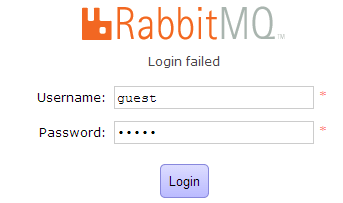
So I created the rabbitmq.config inside the directory /etc/rabbitmq with this:
[{rabbit, [{loopback_users, []}]}].
Then invoke-rc.d rabbitmq-server start and both the console and the java client can access using guest/guest:

So, I think you have some other problem, if this procedure doesn't work, for example your RabbitMQ is unable to read the configuration or of some reason you have changed RABBITMQ_CONFIG_FILE
RabbitMQ 安装的更多相关文章
- RabbitMQ学习系列(二): RabbitMQ安装与配置
上一篇,简单介绍了RabbitMQ的情况还有一些相关的概念,这一篇,会讲讲 RabbitMQ安装与配置. 1.安装 Rabbit MQ 是建立在强大的Erlang OTP平台上,因此安装RabbitM ...
- RabbitMQ安装配置
安装RabbitMQ windows下的安装是非常简单的,我们需要准备两个东西 erlang的环境 下载windows和与之对象的操作系统位数安装包 http://www.erlang.org/do ...
- RabbitMQ安装和配置
RabbitMQ: MQ:message queue.MQ全称为Message Queue, 消息队列(MQ)是一种应用程序对应用程序的通信方法.应用程序通过读写出入队列的消息(针对应用程序的数据)来 ...
- windows 下rabbitmq 安装---转载
原文地址:http://blog.sina.com.cn/s/blog_7cc0c8cc0101mb4a.html 1.下载并安装erlang,http://www.erlang.org/downlo ...
- Day11 Memcached、Redis和RabbitMQ安装
修改Ubuntu镜像源: sudo vi /etc/apt/sources.list 全部替换为以下内容: ---------------------------------------------- ...
- rabbitmq安装Management Plugin
运行和安装Rabbitmq Management的步骤如下: 1.进入Rabbitmq安装目录,运行rabbitmq-plugins enable rabbitmq_management 2.运行ra ...
- RabbitMQ安装与初始配置
[TOC] 本文只讨论linux下的Rabbitmq安装. Erlang安装 rabbitmq依赖于Erlang,需先安装,推荐安装rabbitmq/erlang-rpm: #clone源码 git ...
- Linux下RabbitMq安装
在大多数大公司,像应用服务器软件的安装.部署都是运维的事情,其实自己去尝试部署一下,也是有收获的. 有机会正好尝试了Linux下的rabbitMq安装过程,做了记录,希望有用到的人可以做下参考. 安装 ...
- Windows下RabbitMQ安装及入门
1.Windows下安装RabbitMQ需要以下几个步骤 (1):下载erlang,原因在于RabbitMQ服务端代码是使用并发式语言erlang编写的,下载地址:http://www.erlang. ...
- (一)surging 微服务框架使用系列之surging 的准备工作rabbitmq安装
(1)下载erlang: http://www.erlang.org/download/otp_win64_17.3.exe 并安装 (2)下载RabbitMQ: http://www.rabbitm ...
随机推荐
- reg.test is not a function 报错
正则中 比如 var reg = "/^[0-9]$/" 会报 reg.test is not a function 如果 var reg = /^[0-9]$/ 就不会有错 因为 ...
- 【转】pycharm快捷键、常用设置、包管理
转自:pycharm快捷键.常用设置.包管理 在PyCharm安装目录 /opt/pycharm-3.4.1/help目录下可以找到ReferenceCard.pdf快捷键英文版说明 or 打开pyc ...
- SSH原理与运用
SSH是每一台Linux电脑的标准配置. 随着Linux设备从电脑逐渐扩展到手机.外设和家用电器,SSH的使用范围也越来越广.不仅程序员离不开它,很多普通用户也每天使用. SSH具备多种功能,可以用于 ...
- 编写高质量JavaScript代码的基本要点
全局变量 javaScript通过函数管理变量作用域.在函数内部声明的变量只在这个函数内部可用,函数外面不可用.另一方面,在任何函数外面声明的或是函数内未声明直接使用的变量叫做全局变量. 每个Java ...
- Windows与Linux主机之间的连接和交互工具
1.Putty 远程连接Linux主机 Windows主机上安装putty,工具打开后显示如下: 输入要连接的Linux主机的IP地址,点击Load,连接主机后输入用户名密码,即可登录Linux主机 ...
- sonar-gerrit-plugin-2.2.0 安装
这是一个很新的插件国内使用的用户还是很少的,公司有需要才花了一段时间去研究. 作用:在 code review的时候可以将sonar的检测结果直接集成返回.帮助po对code 进行review. 请严 ...
- debug实战:COM组件GetToSTA导致高内存+GC被阻塞
最近花了好几周解决一个WPF高内存的问题,问题的表象是内存不断增加.未被回收,根源是GC的FinalizeThread被阻塞,导致整个GC挂掉.从以下几步来分析这个问题: 1.用ANTS Memory ...
- HTML中head里的内容经浏览器解析后全到body里
我从linux服务器nginx上把一个网站迁移到windows的IIS上数据什么的都么有问题,配置好rewrite以后,访问网站,发现样式变动了,网站上方空出了一块我用chrome浏览器的审查元素一看 ...
- linux下各种软件的安装过程
//////知识储备//////////////////////////////////////////////////////////////////// /var 下存放着服务和经常改变的文件 / ...
- ubuntu 13.04 tftp服务器建立
本文参考博文:http://blog.chinaunix.net/uid-20718037-id-3194493.html 用tftp下载就需要要我们的主机上先安装tftp服务器. 1.安装软件 ...