
使用vant的时候,报错:component has been registered but not used以及vant的使用方法总结
使用vant的时候,报错:component has been registered but not used以及vant的使用方法总结
在使用vant的时候。 想按需引入,于是安装了babel-plugin-import插件。
但是遇到了上述报错。 不在components中注册,或者用这种常用的方式注册,都会报错:
//示例

import { Button } from 'vant'//引入

components:{ Button } //注册
注意:文档都没有写引入的组件的注册部分,没有完整的使用实例。
具体报错如下:
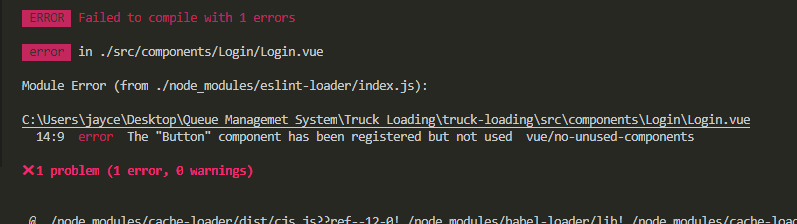
解决方案1(只有少量使用vant组件的时候,可以考虑这个,因为一个个引入有些麻烦)
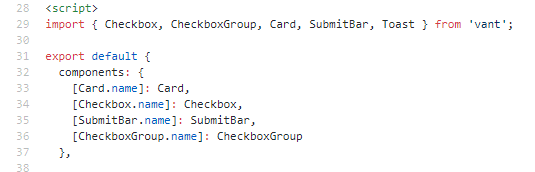
手动引入,需要单独引入组件和css。 组件的路径文件夹名称有时候还需要自己找。
路径是:node_modules_vant@2.6.0@vant\lib
还要单独的引入对应的css样式。
特别需要注意的是注册方式需要是:
[组件名.name]:组件名
<template>

  <div>

    this is for test words!

    <van-swipe-cell>

      <template #left>

        <van-button square type="primary" text="选择" />

      </template>

      <van-cell :border="true" title="单元格" value="内容" />

      <template #right>

        <van-button square type="danger" text="删除" />

        <van-button square type="primary" text="收藏" />

      </template>

    </van-swipe-cell>

    <van-button type="default">默认按钮</van-button>

    <van-button type="primary">主要按钮</van-button>

    <van-button type="info">信息按钮</van-button>

  </div>

</template>

<script>

import Button from 'vant/lib/button';

import SwipeCell from 'vant/lib/swipe-cell';

import Cell from 'vant/lib/cell';

import 'vant/lib/swipe-cell/style';

import 'vant/lib/cell/style';

import 'vant/lib/button/style';

export default {

  name: "Login",

  components: {

      [Button.name]:Button,

      [SwipeCell.name]:SwipeCell,

      [Cell.name]:Cell

  }

};

</script>
需要引入暴露的组件名。但是测试发现可以是任意的,
因为swipe-cell中没有搜索到找到SwipeCell。
但是在button中有export“Button”
例如:
import XButton from 'vant/lib/button';//引入

[XButton.name]:XButton//注册
所以只需要保持一致就行。
该解决方案参考了:
在官方在github中提供的demo中,发现局部注册有像这样写的。
https://github.com/youzan/vant-demo/blob/master/vant/base/src/view/cart/index.vue
解决方案2 (这会让打包后的文件体积大一点,但是确实是最方便的方式。如果不考虑模块化,工程化开发而不介意把它挂载到vue原型的话)
main.js
import Vue from 'vue'

import App from './App.vue'

import Vant from 'vant';

import 'vant/lib/index.css';

Vue.use(Vant);

Vue.config.productionTip = false

new Vue({

  render: h => h(App),

}).$mount('#app')
demo.vue
<template>

  <div>

    this is for test words!

    <van-swipe-cell>

      <template #left>

        <van-button square type="primary" text="选择" />

      </template>

      <van-cell :border="true" title="单元格" value="内容" />

      <template #right>

        <van-button square type="danger" text="删除" />

        <van-button square type="primary" text="收藏" />

      </template>

    </van-swipe-cell>

    <van-button type="default">默认按钮</van-button>

    <van-button type="primary">主要按钮</van-button>

    <van-button type="info">信息按钮</van-button>

  </div>

</template>

<script>

export default {

  name: "Login",

  components: {

  }

};

</script>
不用导入,不用注册,直接用.
解决方案3(推荐)也是开篇使用babel-plugin-import插件遇到的问题的解决方法
其实这不算解决方案。只是以前用vue的时候,组件注册这里有个小细节一直没有注意导致的。
快速查看示例代码:
<template>

  <div>

    this is for test words!

    <van-swipe-cell>

      <template #left>

        <van-button square type="primary" text="选择" />

      </template>

      <van-cell :border="true" title="单元格" value="内容" />

      <template #right>

        <van-button square type="danger" text="删除" />

        <van-button square type="primary" text="收藏" />

      </template>

    </van-swipe-cell>

    <van-button type="default">默认按钮</van-button>

    <van-button type="primary">主要按钮</van-button>

    <van-button type="info">信息按钮</van-button>

  </div>

</template>

<script>

import { Button,SwipeCell,Cell } from 'vant'

export default {

  name: "Login",

  components: {

    'van-button':Button,//对应<van-button>标签

    'van-swipe-cell':SwipeCell,//对应<van-swipe-cell>标签

    'van-cell':Cell//对应<van-cell>标签

    //也可以像这样写

    // vanButton:Button,

    // vanSwipeCell:SwipeCell,

    // vanCell:Cell

  }

};

</script>
之所以,出现“component has been registered but not used”这个报错,就是因为使用了components:{ Button }进行注册。
这种注册方式注册的是Button这个元素,但是在dom上确实没有这个元素。 因为是van-button这个元素。 而这个元素又没有被正确注册 。
也就是说<van-button>标签、<van-swipe-cell>标签、<van-cell>标签都没有被正确的注册导致的。
你可以像这样来注册组件:
'van-button':Button,//对应<van-button>标签

'van-swipe-cell':SwipeCell,//对应<van-swipe-cell>标签

'van-cell':Cell//对应<van-cell>标签
还可以用驼峰命令法,首字母大小写都可以,省略" - " 来进行注册。如:
vanButton:Button,

vanSwipeCell:SwipeCell,

vanCell:Cell

或者

VanButton:Button,

VanSwipeCell:SwipeCell,

VanCell:Cell
该解决方案参考:
https://cn.vuejs.org/v2/guide/components-registration.html (#组件名大小写)
总结:
在vue中,带短横线的标签元素的注册。必须是驼峰命令法,或者用引号括起来。
如<van-button>的注册必须是

vanButton:Button

或者VanButton:Button

再或者'van-button':Button
使用vant的时候,报错:component has been registered but not used以及vant的使用方法总结的更多相关文章
- VUE编译报错 Component template should contain exactly one root element. If you are using v-if on multiple elements, use v-else-if to chain them instead
背景: 在使用VUE添加标签的时候编译报错,报错如下: Component template should contain exactly one root element. If you are u ...
- Vue脚手架报错 Component name "Student" should always be multi-word vue/multi-word-component-names
报错信息分析: 新手在第一个次使用脚手架的时候难免会遇到各种各样奇怪的问题,最近在学习Vue的过程中就出现了如下问题 通过阅读报错信息可知: 是我们的组件名有一些问题,(报错信息翻译过来大概就是组件名 ...
- ubuntu 修改保存报错E37:No write since last change(add ! to override)的解决方法
报错信息如下: E37: No write since last change (add ! to override) 解决办法是: 在修改完后,将命令 :q 改成 :wq 即可.
- (原创)vagrant up 异常报错,出现 There was an error while executing `VBoxManage` 的解决方法
最近在使用 vagrant homestead 时,不小心在虚拟机上使用了 exit 命令退出虚拟机,导致再使用 vagrant up 时出现以下错误: Bringing machine 'larav ...
- Https协议报错:com.sun.net.ssl.internal.www.protocol.https.HttpsURLConnectionOldImpl解决方法
旭日Follow_24 的CSDN 博客 ,全文地址请点击: https://blog.csdn.net/xuri24/article/details/82220333 所用应用服务器:JBoss服务 ...
- Archlinux/Manjaro使用笔记-使用makepkg安装软件 报错:未找到strip分割所需的二进制文件 的解决方法
我的邮箱地址:zytrenren@163.com欢迎大家交流学习纠错! 使用archlinux或manjaro安装aurman时遇到如下报错 错误:未找到strip分割所需的二进制文件 原因:未安装g ...
- Win7 64bit 安装VisualSVN出现报错:Servic 'VisualSVN Server' failed to start.解决的方法
问题描写叙述: Win7 64bit 安装VisualSVN时出现报错: Servic 'VisualSVN Server' failed to start.Please check VisualSV ...
- 报错org.openqa.selenium.WebDriverException: disconnected: unable to connect to renderer解决方法
做自动化时经常会遇到不兼容的问题,比如以下简单的脚本,主要是打开浏览器,然后最大化窗口,打开百度,输入内容搜索,代码如下: package com.gs.selenium; import org.op ...
- mac下python环境pip报错[SSL: TLSV1_ALERT_PROTOCOL_VERSION] tlsv1 alert protocol version (_ssl.c:590) 的解决方法
1.mac下python环境pip报错: issuserdeMacBook-Pro:~ issuser$ pip install pyinstallerCollecting pyinstaller ...
随机推荐
- Feign 注解翻译器 三
一.自定义注解翻译器 (1)JAXRS 注解翻译器实例 ① 导入JAXRS所需要的jar包 <dependency> <groupId>io.github.openfeign& ...
- win7下firefox和chrome升级到最新版之后页面打不开的解决办法
一.升级firefox到最新版后,页面崩溃,打开是空白页,连选项设置都打不开了. 最开始是我的firefox很久没升级,最近要要开始做开发,于是最让它自动升级.等升级到最新版本后,打开浏览器是结果显示 ...
- svn更新时同步web服务器
1.重中之重:第一次更新需要先把数据库先检索出来,执行脚本./post.commit #!/bin/sh export LANG=en_US.UTF-8 SVN=/usr/local/subversi ...
- python中那些让开发事半功倍的模块
1. Map Map会将一个函数映射到一个输入列表的所有元素上 ex: 有一个列表: [1,2,3,4,5,6], 现在要求把列表每个元素乘以10 如果你还不知道Map,那你可能会这样做: list1 ...
- debug.js在手机上打印调试信息
在做移动端开发的时候大家应该都遇到过这么一个问题:如何在手机上打印调试信息? 在pc端我们通常会用console.log 或者 alert,但大家知道console.log在手机上是看不到打印信息的: ...
- httpServletRequest.getCharacterEncoding()取出来是个null,怎么办?
因为浏览器没有把正确的编码方式给服务器端. 目前,许多浏览器在Content-Type头中不会指定字符编码方式,那么容器就会使用"ISO-8859-1"方式解析POST数据,而此时 ...
- 计算广告中的CPM和eCPM
计算广告中的CPM和eCPM CPM和eCPM分别是什么? CPM(Cost per Mille ) : 千次展示付费.是针对广告主说的,你要花多少钱,购买一千次广告展示的机会.类似的还有CPC (C ...
- IDEA 激活码,IDEA 注册码,IDEA 2019.3 激活码
文末分享:IDEA 激活码, IDEA 注册码,已购买的正版授权,请不要网上传播. 声明:支持知识产权,支持正版产权,以下仅限个人学习使用IDEA工具时随笔记录,禁止商业使用. 一.下载idea 下载 ...
- JavaWeb----Cookie&Session
## 会话技术 1.会话:一次会话中包含多次请求和响应. * 第一次会话:浏览器第一次给服务器资源发送请求,会话建立,直到有一方断开为止. 2.功能:再一次会话的范围内的多次请求间,共享数据 3. ...
- 牛客练习赛60 A—F题解(缺E题)
本蒟蒻这次只过了三题 赛后学习了一下出题人巨佬的标码(码风比我好多了 贴的代码有些是仿出题人)现在将自己的理解写下来与大家分享 A这个题一分析就是每个数字都会与所有数字&一下 (a&a ...