
C# HttpClient 使用 Consul 发现服务
试用了Overt.Core.Grpc, 把 GRPC 的使用改造得像 WCF, 性能测试也非常不错, 非常推荐各位使用.
但已有项目大多是 http 请求, 改造成 GRPC 的话, 工作量比较大, 于是又找到了 Steeltoe.Discovery, 在 Startup 给 HttpClient 添加 DelegatingHandler, 动态改变请求url中的 host 和 port, 将http请求指向consul 发现的服务实例, 这样就实现了服务的动态发现.
经过性能测试, Steeltoe.Discovery 只有 Overt.Core.Grpc 的20%, 非常难以接受, 于是自己实现了一套基于 consul 的服务发现工具. 嗯, 名字好难取啊, 暂定为 ConsulDiscovery.HttpClient 吧
功能很简单:
- webapi 从json中读取配置信息 ConsulDiscoveryOptions;
- 如果自己是一个服务, 则将自己注册到consul中并设置健康检查Url;
- ConsulDiscovery.HttpClient 内有一个consul client 定时刷新所有服务的url访问地址.
比较核心的两个类
using Consul;

using Microsoft.Extensions.Options;

using System;

using System.Collections.Generic;

using System.Linq;

using System.Threading;

namespace ConsulDiscovery.HttpClient

{

    public class DiscoveryClient : IDisposable

    {

        private readonly ConsulDiscoveryOptions consulDiscoveryOptions;

        private readonly Timer timer;

        private readonly ConsulClient consulClient;

        private readonly string serviceIdInConsul;

        public Dictionary<string, List<string>> AllServices { get; private set; } = new Dictionary<string, List<string>>(StringComparer.OrdinalIgnoreCase);

        public DiscoveryClient(IOptions<ConsulDiscoveryOptions> options)

        {

            consulDiscoveryOptions = options.Value;

            consulClient = new ConsulClient(x => x.Address = new Uri($"http://{consulDiscoveryOptions.ConsulServerSetting.IP}:{consulDiscoveryOptions.ConsulServerSetting.Port}"));

            timer = new Timer(Refresh);

            if (consulDiscoveryOptions.ServiceRegisterSetting != null)

            {

                serviceIdInConsul = Guid.NewGuid().ToString();

            }

        }

        public void Start()

        {

            var checkErrorMsg = CheckParams();

            if (checkErrorMsg != null)

            {

                throw new ArgumentException(checkErrorMsg);

            }

            RegisterToConsul();

            timer.Change(, consulDiscoveryOptions.ConsulServerSetting.RefreshIntervalInMilliseconds);

        }

        public void Stop()

        {

            Dispose();

        }

        private string CheckParams()

        {

            if (string.IsNullOrWhiteSpace(consulDiscoveryOptions.ConsulServerSetting.IP))

            {

                return "Consul服务器地址 ConsulDiscoveryOptions.ConsulServerSetting.IP 不能为空";

            }

            if (consulDiscoveryOptions.ServiceRegisterSetting != null)

            {

                var registerSetting = consulDiscoveryOptions.ServiceRegisterSetting;

                if (string.IsNullOrWhiteSpace(registerSetting.ServiceName))

                {

                    return "服务名称 ConsulDiscoveryOptions.ServiceRegisterSetting.ServiceName 不能为空";

                }

                if (string.IsNullOrWhiteSpace(registerSetting.ServiceIP))

                {

                    return "服务地址 ConsulDiscoveryOptions.ServiceRegisterSetting.ServiceIP 不能为空";

                }

            }

            return null;

        }

        private void RegisterToConsul()

        {

            if (string.IsNullOrEmpty(serviceIdInConsul))

            {

                return;

            }

            var registerSetting = consulDiscoveryOptions.ServiceRegisterSetting;

            var httpCheck = new AgentServiceCheck()

            {

                HTTP = $"{registerSetting.ServiceScheme}{Uri.SchemeDelimiter}{registerSetting.ServiceIP}:{registerSetting.ServicePort}/{registerSetting.HealthCheckRelativeUrl.TrimStart('/')}",

                Interval = TimeSpan.FromMilliseconds(registerSetting.HealthCheckIntervalInMilliseconds),

                Timeout = TimeSpan.FromMilliseconds(registerSetting.HealthCheckTimeOutInMilliseconds),

                DeregisterCriticalServiceAfter = TimeSpan.FromSeconds(),

            };

            var registration = new AgentServiceRegistration()

            {

                ID = serviceIdInConsul,

                Name = registerSetting.ServiceName,

                Address = registerSetting.ServiceIP,

                Port = registerSetting.ServicePort,

                Check = httpCheck,

                Meta = new Dictionary<string, string>() { ["scheme"] = registerSetting.ServiceScheme },

            };

            consulClient.Agent.ServiceRegister(registration).Wait();

        }

        private void DeregisterFromConsul()

        {

            if (string.IsNullOrEmpty(serviceIdInConsul))

            {

                return;

            }

            try

            {

                consulClient.Agent.ServiceDeregister(serviceIdInConsul).Wait();

            }

            catch

            { }

        }

        private void Refresh(object state)

        {

            Dictionary<string, AgentService>.ValueCollection serversInConsul;

            try

            {

                serversInConsul = consulClient.Agent.Services().Result.Response.Values;

            }

            catch // (Exception ex)

            {

                // 如果连接consul出错, 则不更新服务列表. 继续使用以前获取到的服务列表

                // 但是如果很长时间都不能连接consul, 服务列表里的一些实例已经不可用了, 还一直提供这样旧的列表也不合理, 所以要不要在这里实现 健康检查? 这样的话, 就得把检查地址变成不能设置的

                return;

            }

            // 1. 更新服务列表

            // 2. 如果这个程序提供了服务, 还要检测 服务Id 是否在服务列表里

            var tempServices = new Dictionary<string, HashSet<string>>();

            bool needReregisterToConsul = true;

            foreach (var service in serversInConsul)

            {

                var serviceName = service.Service;

                if (!service.Meta.TryGetValue("scheme", out var serviceScheme))

                {

                    serviceScheme = Uri.UriSchemeHttp;

                }

                var serviceHost = $"{serviceScheme}{Uri.SchemeDelimiter}{service.Address}:{service.Port}";

                if (!tempServices.TryGetValue(serviceName, out var serviceHosts))

                {

                    serviceHosts = new HashSet<string>();

                    tempServices[serviceName] = serviceHosts;

                }

                serviceHosts.Add(serviceHost);

                if (needReregisterToConsul && !string.IsNullOrEmpty(serviceIdInConsul) && serviceIdInConsul == service.ID)

                {

                    needReregisterToConsul = false;

                }

            }

            if (needReregisterToConsul)

            {

                RegisterToConsul();

            }

            var tempAllServices = new Dictionary<string, List<string>>(StringComparer.OrdinalIgnoreCase);

            foreach (var item in tempServices)

            {

                tempAllServices[item.Key] = item.Value.ToList();

            }

            AllServices = tempAllServices;

        }

        public void Dispose()

        {

            DeregisterFromConsul();

            consulClient.Dispose();

            timer.Dispose();

        }

    }

}
using System;

using System.Net.Http;

using System.Threading;

using System.Threading.Tasks;

namespace ConsulDiscovery.HttpClient

{

    public class DiscoveryHttpMessageHandler : DelegatingHandler

    {

        private static readonly Random random = new Random((int)DateTime.Now.Ticks);

        private readonly DiscoveryClient discoveryClient;

        public DiscoveryHttpMessageHandler(DiscoveryClient discoveryClient)

        {

            this.discoveryClient = discoveryClient;

        }

        protected override async Task<HttpResponseMessage> SendAsync(HttpRequestMessage request, CancellationToken cancellationToken)

        {

            if (discoveryClient.AllServices.TryGetValue(request.RequestUri.Host, out var serviceHosts))

            {

                if (serviceHosts.Count > )

                {

                    var index = random.Next(serviceHosts.Count);

                    request.RequestUri = new Uri(new Uri(serviceHosts[index]), request.RequestUri.PathAndQuery);

                }

            }

            return await base.SendAsync(request, cancellationToken).ConfigureAwait(false);

        }

    }

}
使用方法
为了简单, 我为新建的WebApi 增加了一个 HelloController, 提供 SayHelloService 服务, 并把自己注册到Consul.
当我们访问这个WebApi的 /WeatherForecast 时, 其Get()方法会访问 http://SayHelloService/Hello/NetCore, 这就相当于一次远程调用, 只是调用的就是这个WebApi的/Hello/NetCore
1. appsettings.json 增加
  "ConsulDiscoveryOptions": {

    "ConsulServerSetting": {

      "IP": "127.0.0.1", // 必填

      "Port": 8500, // 必填

      "RefreshIntervalInMilliseconds": 1000

    },

    "ServiceRegisterSetting": {

      "ServiceName": "SayHelloService", // 必填

      "ServiceIP": "127.0.0.1", // 必填

      "ServicePort": 5000, // 必填

      "ServiceScheme": "http", // 只能是http 或者 https, 默认http,

      "HealthCheckRelativeUrl": "/HealthCheck",

      "HealthCheckIntervalInMilliseconds": 500,

      "HealthCheckTimeOutInMilliseconds": 2000

    }

  }
2.修改Startup.cs
using ConsulDiscovery.HttpClient;

using Microsoft.AspNetCore.Builder;

using Microsoft.AspNetCore.Hosting;

using Microsoft.Extensions.Configuration;

using Microsoft.Extensions.DependencyInjection;

using Microsoft.Extensions.Hosting;

using System;

namespace WebApplication1

{

    public class Startup

    {

        public Startup(IConfiguration configuration)

        {

            Configuration = configuration;

        }

        public IConfiguration Configuration { get; }

        public void ConfigureServices(IServiceCollection services)

        {

            services.AddControllers();

            // 注册 ConsulDiscovery 相关配置

            services.AddConsulDiscovery(Configuration);

            // 配置 SayHelloService 的HttpClient

            services.AddHttpClient("SayHelloService", c =>

                {

                    c.BaseAddress = new Uri("http://SayHelloService");

                })

                .AddHttpMessageHandler<DiscoveryHttpMessageHandler>();

        }

        public void Configure(IApplicationBuilder app, IWebHostEnvironment env, IHostApplicationLifetime lifetime)

        {

            if (env.IsDevelopment())

            {

                app.UseDeveloperExceptionPage();

            }

            app.UseRouting();

            app.UseAuthorization();

            app.UseEndpoints(endpoints =>

            {

                endpoints.MapControllers();

            });

            // 启动 ConsulDiscovery

            app.StartConsulDiscovery(lifetime);

        }

    }

}
3. 添加 HelloController
using Microsoft.AspNetCore.Mvc;

namespace WebApplication1.Controllers

{

    [ApiController]

    [Route("[controller]")]

    public class HelloController : ControllerBase

    {

        [HttpGet]

        [Route("{name}")]

        public string Get(string name)

        {

            return $"Hello {name}";

        }

    }

}
4. 修改WeatherForecast
using Microsoft.AspNetCore.Mvc;

using System.Net.Http;

using System.Threading.Tasks;

namespace WebApplication1.Controllers

{

    [ApiController]

    [Route("[controller]")]

    public class WeatherForecastController : ControllerBase

    {

        private readonly IHttpClientFactory httpClientFactory;

        public WeatherForecastController(IHttpClientFactory httpClientFactory)

        {

            this.httpClientFactory = httpClientFactory;

        }

        [HttpGet]

        public async Task<string> Get()

        {

            var httpClient = httpClientFactory.CreateClient("SayHelloService");

            var result = await httpClient.GetStringAsync("Hello/NetCore");

            return $"WeatherForecast return:           {result}";

        }

    }

}
5. 启动consul
consul agent -dev
6. 启动 WebApplication1 并访问 http://localhost:5000/weatherforecast
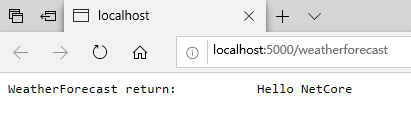
以上示例可以到 https://github.com/zhouandke/ConsulDiscovery.HttpClient 下载, 请记住一定要 启动consul: consul agent -dev
End
C# HttpClient 使用 Consul 发现服务的更多相关文章
- .NET Core HttpClient+Consul实现服务发现
简介 随着.NET Core的不断发展与成熟,基于.NET Core实现微服务的解决方案也越来越多.这其中必然需要注册中心,Consul成为了.NET Core实现服务注册与发现的首选.类似的解决方案 ...
- .net core grpc consul 实现服务注册 服务发现 负载均衡(二)
在上一篇 .net core grpc 实现通信(一) 中,我们实现的grpc通信在.net core中的可行性,但要在微服务中真正使用,还缺少 服务注册,服务发现及负载均衡等,本篇我们将在 .net ...
- .netcore consul实现服务注册与发现-集群完整版
原文:.netcore consul实现服务注册与发现-集群完整版 一.Consul的集群介绍 Consul Agent有两种运行模式:Server和Client.这里的Server和Clien ...
- .netcore consul实现服务注册与发现-单节点部署
原文:.netcore consul实现服务注册与发现-单节点部署 一.Consul的基础介绍 Consul是HashiCorp公司推出的开源工具,用于实现分布式系统的服务发现与配置.与其他分 ...
- .Net Core Grpc Consul 实现服务注册 服务发现 负载均衡
本文是基于..net core grpc consul 实现服务注册 服务发现 负载均衡(二)的,很多内容是直接复制过来的,..net core grpc consul 实现服务注册 服务发现 负载均 ...
- .NET Core HttpClientFactory+Consul实现服务发现
前言 上篇文章.NET Core HttpClient+Consul实现服务发现提到过,HttpClient存在套接字延迟释放的问题,高并发情况导致端口号被耗尽引起服务器拒绝服务的问题.好在微软意识到 ...
- 一个故事,一段代码告诉你如何使用不同语言(Golang&C#)提供相同的能力基于Consul做服务注册与发现
目录 引言 什么是微服务 传统服务 微服务 什么是服务注册与服务发现 为什么要使用不同的语言提供相同的服务能力 服务协调器 服务注册 Golang C#(.NetCore3.1) 服务发现 通过Htt ...
- 简单RPC框架-基于Consul的服务注册与发现
*:first-child { margin-top: 0 !important; } body>*:last-child { margin-bottom: 0 !important; } /* ...
- Spring Cloud Consul 实现服务注册和发现
Spring Cloud 是一个基于 Spring Boot 实现的云应用开发工具,它为基于 JVM 的云应用开发中涉及的配置管理.服务发现.断路器.智能路由.微代理.控制总线.全局锁.决策竞选.分布 ...
随机推荐
- Kubernetes-在Kubernetes集群上搭建HBase集群
经过3天的努力,终于在Kubernetes上把HBase集群搭建起来了,搭建步骤如下. 创建HBase镜像 配置文件包含core-site.xml.hbase-site.xml.hdfs-site ...
- php beast windows编译教程
git clone https://github.com/Microsoft/php-sdk-binary-tools.git c:\php-sdk cd c:\php-sdk git checkou ...
- 图论--割点--Tarjan
#include<iostream> #include<stdio.h> #include<vector> using namespace std; const i ...
- P4768 [NOI2018]归程(kruskal 重构树)
洛谷P4768 [NOI2018]归程 LOJ#2718.「NOI2018」归程 用到 kruskal 重构树,所以先说这是个啥 显然,这和 kruskal 算法有关系 (废话 这个重构树是一个有点权 ...
- pycharm 新建文件后选错文件格式怎么改
经常在新建文件的时候,忘记填写文件后缀,导致文件无默认格式,而且同名字的文件怎么改都改不成想要的格式,所以随手记录一下怎么修正: 原因:肯定是pycharm已经默认指定了一个格式,所以再重复新建同样名 ...
- Java并发编程实战 03互斥锁 解决原子性问题
文章系列 Java并发编程实战 01并发编程的Bug源头 Java并发编程实战 02Java如何解决可见性和有序性问题 摘要 在上一篇文章02Java如何解决可见性和有序性问题当中,我们解决了可见性和 ...
- Kubernetes笔记(二):了解k8s的基本组件与概念
前文 Kubernetes笔记(一):十分钟部署一套K8s环境 介绍了如何快速搭建一个k8s系统.为了继续使用k8s来部署我们的应用,需要先对k8s中的一些基本组件与概念有个了解. Kubernete ...
- 通过10个实例小练习,快速熟练 Vue3.0 核心新特性
Vue3.0 发 beta 版都有一段时间了,正式版也不远了,所以真的要学习一下 Vue3.0 的语法了. GitHub 博客地址: https://github.com/biaochenxuying ...
- git --添加多个文件
今天测试,发现之前写的auto testcase,有好多发生了改变,因此需要修改脚本重新上传至git当中. 对好几个test case script 进行了修改,之前只是一个一个的修改,这次是多个,经 ...
- 2020年腾讯实习生C++面试题&持续更新中(5)
2020年腾讯实习生C++面试题&持续更新中(5) 大家好呀,我是好好学习天天编程的天天~ 昨天一位小伙伴反馈已经拿到了腾讯offer,很是替小伙伴的激动~ 那今天还是持续给大家分享面经,希望 ...