
Nginx(一):安装与常用命令
简介
Nginx ("engine x") 是一个高性能的 HTTP 和反向代理服务器,特点是占有内存少,并发能 力强,事实上nginx的并发能力确实在同类型的网页服务器中表现较好,在高连接并发的情况下,Nginx是Apache服务器不错的替代品。中国大陆使用nginx 网站用户有:百度、京东、新浪、网易、腾讯、淘宝等。
nginx 原理与参数
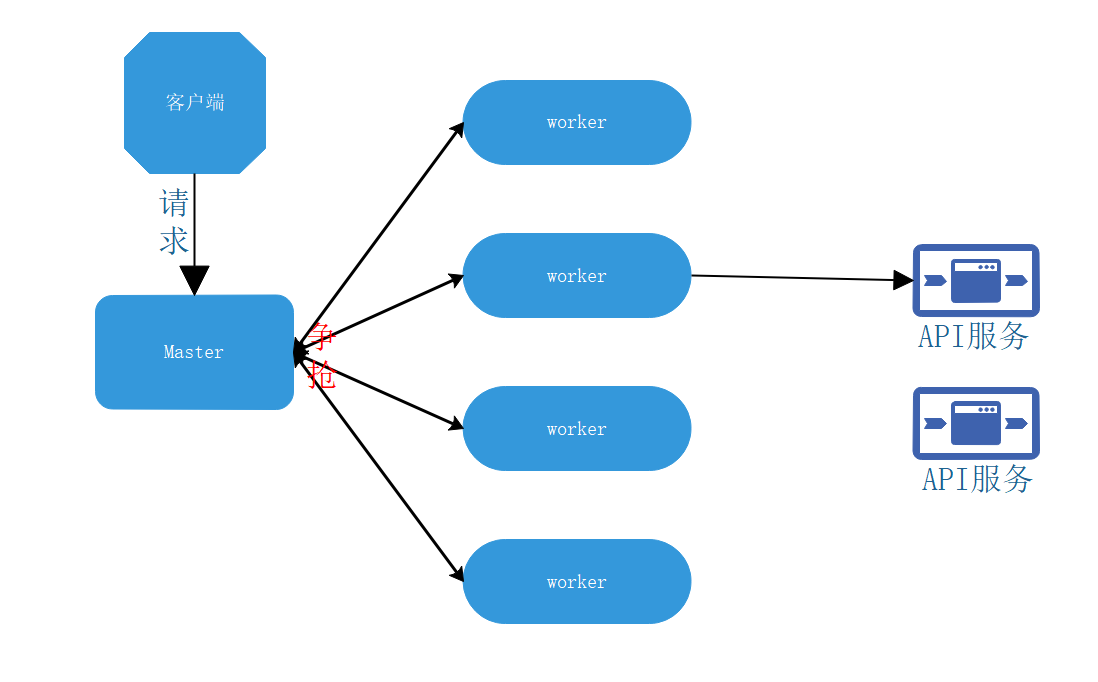
master-workers 的机制的好处
首先,对于每个 worker 进程来说,独立的进程,不需要加锁,所以省掉了锁带来的开销, 同时在编程以及问题查找时,也会方便很多。其次,采用独立的进程,可以让互相之间不会 影响,一个进程退出后,其它进程还在工作,服务不会中断,master 进程则很快启动新的 worker 进程。当然,worker 进程的异常退出,肯定是程序有 bug 了,异常退出,会导致当 前 worker 上的所有请求失败,不过不会影响到所有请求,所以降低了风险。
设置 worker
Nginx 同 redis 类似都采用了 io 多路复用机制,每个 worker 都是一个独立的进程,但每个进 程里只有一个主线程,通过异步非阻塞的方式来处理请求, 即使是千上万个请求也不在话 下。每个 worker 的线程可以把一个 cpu 的性能发挥到极致。所以 worker 数和服务器的 cpu 数相等是最为适宜的。设少了会浪费 cpu,设多了会造成 cpu 频繁切换上下文带来的损耗。
连接数 worker_connection
这个值是表示每个 worker 进程所能建立连接的最大值,所以,一个 nginx 能建立的最大连接数,应该是 worker_connections * worker_processes。当然,这里说的是最大连接数,对于 HTTP 请 求 本 地 资 源 来 说 , 能 够 支 持 的 最 大 并 发 数 量 是 worker_connections * worker_processes,如果是支持 http1.1 的浏览器每次访问要占两个连接,所以普通的静态访 问最大并发数是: worker_connections * worker_processes /2,而如果是 HTTP 作 为反向代理来说,最大并发数量应该是 worker_connections * worker_processes/4。因为作为反向代理服务器,每个并发会建立与客户端的连接和与后端服务的连接,会占用两个连接。
安装
初次安装
[root@localhost ~]# yum install -y nginx

Loaded plugins: fastestmirror

Loading mirror speeds from cached hostfile

 * base: mirrors.tuna.tsinghua.edu.cn

 * extras: mirrors.huaweicloud.com

 * updates: mirrors.huaweicloud.com

No package nginx available.

Error: Nothing to do
原因是nginx位于第三方的yum源里面,而不在centos官方yum源里面
解决方案
#使用 yum-config-manager 软件包命令

[root@localhost ~]# yum install -y yum-utils

#安装wget

[root@localhost ~]#yum install -y wget

#切换到repo配置文件目录

[root@localhost ~]# cd /etc/yum.repos.d/

#备份CentOs-Base.repo源文件

[root@localhost yum.repos.d]# mv CentOs-Base.repo CentOs-Base.repo.bak

#网络下载centos官方和扩展.repo文件

[root@localhost yum.repos.d]# wget http://mirrors.aliyun.com/repo/Centos-7.repo

#安装epel-release

[root@localhost yum.repos.d]# yum install -y epel-release

[root@localhost yum.repos.d]#mv /etc/yum.repos.d/epel-testing.repo /etc/yum.repos.d/epel-testing.repo.backup

[root@localhost yum.repos.d]# wget http://mirrors.aliyun.com/repo/epel-7.repo

#清理软件源缓存

[root@localhost yum.repos.d]# yum clean all

#重建缓存

[root@localhost yum.repos.d]# yum makecache

#可选选项,更新系统 可选操作

[root@localhost yum.repos.d]# yum update

# 也可以使用yum-config-manager --add-repo 命令。进行以下操作推荐备份原.repo文件。yum-config-manager命令必要条件: yum install -y yum-utils

[root@localhost ~]# yum-config-manager --add-repo http://mirrors.aliyun.com/repo/Centos-7.repo

[root@localhost ~]# yum-config-manager --add-repo http://mirrors.aliyun.com/repo/epel-7.repo
二次安装
[root@localhost ~]# yum install -y nginx
[root@localhost ~]# find / -name 'nginx'

/etc/logrotate.d/nginx

/etc/nginx

/var/lib/nginx

/var/log/nginx

/usr/sbin/nginx

/usr/lib64/perl5/vendor_perl/auto/nginx

/usr/lib64/nginx

/usr/share/nginx
校验
# 启动

[root@localhost ~]# cd /usr/sbin/

[root@localhost sbin]# ./nginx

# 查看状态

[root@localhost sbin]# ps -ef|grep nginx

root      40783      1  0 21:25 ?        00:00:00 nginx: master process ./nginx

nginx     40784  40783  0 21:25 ?        00:00:00 nginx: worker process

nginx     40785  40783  0 21:25 ?        00:00:00 nginx: worker process

nginx     40786  40783  0 21:25 ?        00:00:00 nginx: worker process

nginx     40787  40783  0 21:25 ?        00:00:00 nginx: worker process
停止
[root@localhost sbin]# ./nginx -s stop
重载
[root@localhost sbin]# ./nginx -s reload

# 重载指定配置文件

[root@localhost sbin]# ./nginx -s reload -c /etc/nginx/nginx.conf
第二种启动方式
# 启动

[root@localhost ~]# systemctl start nginx

# 查看状态

[root@localhost ~]# systemctl status nginx

● nginx.service - The nginx HTTP and reverse proxy server

   Loaded: loaded (/usr/lib/systemd/system/nginx.service; disabled; vendor preset: disabled)

   Active: active (running) since Sat 2020-04-04 21:52:43 CST; 50s ago

  Process: 42188 ExecStart=/usr/sbin/nginx (code=exited, status=0/SUCCESS)

  Process: 42185 ExecStartPre=/usr/sbin/nginx -t (code=exited, status=0/SUCCESS)

  Process: 42183 ExecStartPre=/usr/bin/rm -f /run/nginx.pid (code=exited, status=0/SUCCESS)

 Main PID: 42191 (nginx)

   CGroup: /system.slice/nginx.service

           ├─42191 nginx: master process /usr/sbin/nginx

           ├─42192 nginx: worker process

           ├─42193 nginx: worker process

           ├─42194 nginx: worker process

           └─42195 nginx: worker process

Apr 04 21:52:43 localhost systemd[1]: Starting The nginx HTTP and reverse proxy server...

Apr 04 21:52:43 localhost nginx[42185]: nginx: the configuration file /etc/nginx/nginx.conf syntax is ok

Apr 04 21:52:43 localhost nginx[42185]: nginx: configuration file /etc/nginx/nginx.conf test is successful

Apr 04 21:52:43 localhost systemd[1]: Started The nginx HTTP and reverse proxy server.

# 停止

[root@localhost ~]# systemctl stop nginx

[root@localhost ~]# systemctl status nginx

● nginx.service - The nginx HTTP and reverse proxy server

   Loaded: loaded (/usr/lib/systemd/system/nginx.service; disabled; vendor preset: disabled)

   Active: inactive (dead)

Apr 04 21:48:37 localhost nginx[41953]: nginx: configuration file /etc/nginx/nginx.conf test is successful

Apr 04 21:48:37 localhost systemd[1]: Started The nginx HTTP and reverse proxy server.

Apr 04 21:49:40 localhost systemd[1]: Stopping The nginx HTTP and reverse proxy server...

Apr 04 21:49:40 localhost systemd[1]: Stopped The nginx HTTP and reverse proxy server.

Apr 04 21:52:43 localhost systemd[1]: Starting The nginx HTTP and reverse proxy server...

Apr 04 21:52:43 localhost nginx[42185]: nginx: the configuration file /etc/nginx/nginx.conf syntax is ok

Apr 04 21:52:43 localhost nginx[42185]: nginx: configuration file /etc/nginx/nginx.conf test is successful

Apr 04 21:52:43 localhost systemd[1]: Started The nginx HTTP and reverse proxy server.

Apr 04 21:54:12 localhost systemd[1]: Stopping The nginx HTTP and reverse proxy server...

Apr 04 21:54:12 localhost systemd[1]: Stopped The nginx HTTP and reverse proxy server.
Nginx(一):安装与常用命令的更多相关文章
- Nginx编译安装及常用命令
一个执着于技术的公众号 前言 前面我们已经了解Nginx基础入门知识,今天就带大家一起学习下Nginx编译安装部署 准备工作 一台linux机器(本次实验以CentOS 7.5为例) 到Nginx官方 ...
- ios开发环境配置及cordova安装与常用命令
一.ios开发环境配置 1.首先要有台Mac Book,如果有Mac Book,跳过步骤2.3.4,如果没有,执行步骤2.3.4: 2.下载并安装VMware Workstation,最好是下最新版本 ...
- Git安装以及常用命令(图文详解)
**Git安装以及常用命令** 1.下载安装Git,傻瓜式安装相信大家都会. 官网下载地址:[https://git-scm.com/downloads] 2.Git基本操作 (1)git --ver ...
- linux基础学习之软件安装以及常用命令
linux基础学习之软件安装以及常用命令 调用中央仓库: yum install wget 然后下载nodejs: wget https://nodejs.org/dist/v10.14.2/node ...
- Git安装和常用命令
Git是目前世界上最先进的分布式版本控制系统!!! Git能自动帮我们记录每次文件的改动,还可以让同事协作编辑. 接下来,简单的介绍下Git的安装和常用命令: Git安装: 1.Windows系统,进 ...
- RabbitMQ入门教程(一):安装和常用命令
原文:RabbitMQ入门教程(一):安装和常用命令 版权声明:本文为博主原创文章,遵循CC 4.0 BY-SA版权协议,转载请附上原文出处链接和本声明. 本文链接:https://blog.csdn ...
- 记录redis安装及常用命令
Redis安装及常用命令 一.安装 1.下载,解压,进入redis解压目录,make. make PREFIX=目录/redis install :安装到指定目录文件名为redis. 2.将解压目录里 ...
- 实验 1 Linux 系统的安装和常用命令
实验 1 Linux 系统的安装和常用命令 (题目) 一.实验目的 (1)掌握 Linux 虚拟机的安装方法.Spark 和 Hadoop 等大数据软件在 Linux 操作系统 上运行可以发挥最佳性能 ...
- Nginx安装及常用命令
一.选定源码目录 cd /usr/local/src 可以是任何目录,本文选定的是/usr/local/src 二.安装依赖库 yum install gcc yum install pcre-dev ...
- Docker安装和常用命令
Docker安装 Docker的安装可以参考 https://docs.docker.com/ 下面的 Get Docker / Docker CE / Linux, 需要关注的主要是CentOS和U ...
随机推荐
- YARN-MapReduce的作业提交流程
YARN分布式资源管理系统 组成: ResourceManager:YARN的资源管理器,主节点,通过NodeManager管理集群中所有的资源 NodeManager:YARN的节点管理器,从节点, ...
- FL Studio钢琴卷轴之画笔工具
在FL Studio中,钢琴卷轴窗口是制作音乐很重要的一个窗口,大部分音乐编辑的工作都要在该窗口中完成.钢琴卷轴的概念来源于旧时自动机械钢琴所使用的纸质卷轴,在钢琴卷轴中,纵轴代表音符的高度,横轴代表 ...
- 追星女孩必备!使用Camtasia制作爱豆视频
制作爱豆视频,我用得比较多的是Camtasia(Windows)教程录制.因为这款软件操作简单,功能强大,用起来相当顺手呢.而且更重要的是,Camtasia有录屏功能,电脑存量不足的情况下,真的很好用 ...
- CorelDRAW X7 X8 2017 2018是什么关系?
从CorelDRAW 2017版本开始我们叫习惯了的X几系列的CorelDRAW毅然决然的就换了称呼,所以有时候很多朋友对于软件版本,经常会傻傻分不清,还有人认为X8版本比2017版本高,究竟为什么会 ...
- 肝了一周的 UDP 基础知识终于出来了。
我把自己以往的文章汇总成为了 Github ,欢迎各位大佬 star https://github.com/crisxuan/bestJavaer 已提交此篇文章 运输层位于应用层和网络层之间,是 O ...
- C语言讲义——函数
为实现特定目的而编写的一段可被调用的代码 简单地讲:函数就是一组语句,取了个名字 别名:子例程(routine)/方法(Method,一般面向对象的语言使用这个叫法) 函数的组成部分 以主函数为例: ...
- [BUGCASE]层叠上下文和z-index属性使用不当引发的文本被遮挡的问题
一.问题描述 在一个fixed-data-table(一个React组件)制作的表格中,需要给表头的字段一个提示的特效,所以做了一个提示层 这个提示层被固定(拖动表格的水平滚动条时固定)的表格列遮住 ...
- Why系统:0.1 + 0.2 != 0.3
为了知道更多一点,打算自己来一个why系列. 面试官:同学, 请问 0.1 + 0.2 等于多少 同学:不等于0.3, 因为精度问题 面试官:能更深入的说一下嘛 同学:...... 上面的同学,就是曾 ...
- IDEA无法识别module
如图,我爱算法模块无法识别 如此,放开注释部分 即可
- Python中排序函数sorted和排序方法sort的异同点对比分析
Python中对序列进行排序有两种方法,一种是使用python内置的全局sorted函数,另一种是使用序列内置的sort方法. 一. 两者相同点 在支持sort方法的序列中都可以对序列进行排序: 二者 ...