
Python之Windows服务
1、首先要安装pywin32-220.win-amd64-py2.7.exe
2、
SvcDoRun:服务启动的时候会执行的方法
SvcStop:服务停止的时候会执行的方法
# coding=utf-8

import sys

import logging

from logging.handlers import RotatingFileHandler

import datetime

import os

import win32serviceutil

import win32service

import win32event

import time

reload(sys)

sys.setdefaultencoding('utf-8')

def log():

    logger = logging.getLogger(__name__)

    logger.setLevel(level=logging.INFO)
  # 必须要指定 sys.path[0] 得到的是这个文件所在的路径  如果不指定就跑到win32所在的路径下了

    logPath = os.path.join(sys.path[0], 'log')

    if not os.path.exists(logPath):

        os.makedirs(logPath)

    handler = RotatingFileHandler(

        os.path.join(logPath, '%s.txt' % datetime.date.today()), maxBytes=5 * 1024 * 1024, backupCount=10)

    handler.setLevel(level=logging.INFO)

    formatter = logging.Formatter(

        '%(asctime)s - %(name)s - %(levelname)s - %(message)s')

    handler.setFormatter(formatter)

    logger.addHandler(handler)

    logger.error('error')

class PythonService(win32serviceutil.ServiceFramework):

    # 服务名

    _svc_name_ = "WinServiceTest"

    # 服务显示名称

    _svc_display_name_ = "WinServiceTest"

    # 服务描述

    _svc_description_ = "WinServiceTest description"

    def __init__(self, args):

        win32serviceutil.ServiceFramework.__init__(self, args)

        self.hWaitStop = win32event.CreateEvent(None, 0, 0, None)

    def SvcDoRun(self):

        while True:  # 要加while循环 否则服务只能运行1次 启动服务时有提示

            log()
       #死循环  服务停止不了
       if win32event.WaitForSingleObject(self.hWaitStop, 5000) == win32event.WAIT_OBJECT_0:
break
def SvcStop(self):

        # 先告诉SCM停止这个过程

        self.ReportServiceStatus(win32service.SERVICE_STOP_PENDING)

        # 设置事件

        win32event.SetEvent(self.hWaitStop)

# 必须要加 否则会出现Python could not import the service's module 错误代码1

if __name__ == '__main__':

    win32serviceutil.HandleCommandLine(PythonService)
注意点:
1)if __name__ == '__main__'必须要加,否则会报错。
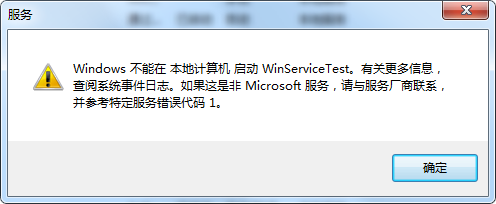

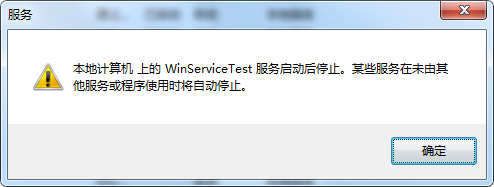
2)while True也要加,如果只想运行一次可以不加。会有提示,说只运行了1次。
Python之Windows服务的更多相关文章
- Python做windows服务
Python做windows服务(多进程服务),并结束多进程 Python中_,__,__xx__的区别 在注册MyWinService服务时,再使用 "sc delete 服务器名称&qu ...
- 用python写windows服务
用python写windows服务(1) 以python2.5 为例需要软件 * python 2.5 * pywin32(与2.5 版本相匹配的) Service Control Ma ...
- Python-windows服务-重启自动化
一. 前言 有了上一篇的“python初学”的基础,咱们就有了python的开发包,有了开发环境IDE,那我们就可以干活了.我的第一个选题就是让我们的windows服务可以按照我们的意愿进行自动重启. ...
- 【python】使用python写windows服务
背景 运维windows服务器的同学都知道,windows服务器进行批量管理的时候非常麻烦,没有比较顺手的工具,虽然saltstack和ansible都能够支持windows操作,但是使用起来总感觉不 ...
- python管理Windows服务
上一篇介绍了pywin32模块,它的win32service子模块提供了对服务管理API的包装,相关API如下: ChangeServiceConfig ChangeServiceConfig2 Cl ...
- 写一个Python的windows服务
1. 安装pywin32和pyinstaller pip install pywin32 pip install pyinstaller 2.写一个服务Demo # -*- coding: utf-8 ...
- python实现编写windows服务
使用python编写windows服务 最近测试服务器上经常发生磁盘空间不足,每次手动清除比较麻烦,所以写个windows服务定时清理下.中间也遇到过几个坑,一起记录下来. 1.python实现win ...
- Python搭建调用本地dll的Windows服务(浏览器可以访问,附测试dll64位和32位文件)
一.前言说明 博客声明:此文链接地址https://www.cnblogs.com/Vrapile/p/14113683.html,请尊重原创,未经允许禁止转载!!! 1. 功能简述 (1)本文提供生 ...
- 一次使用Python连接数据库生成二维码并安装为windows服务的工作任务
最近有一个需求,在现有生产系统上的人员库中增加一个此人员关键信息的二维码,支持文字版和跳转版两种方式,与报表工具关联,可打印.以windows服务方式,定时检查,只要发现某人员没有此二维码信息,就生成 ...
随机推荐
- python之ftp与paramiko与hasattr与getattr
为了方便树莓派和电脑上相互传输数据文件的传输.也就是上传和下载文件,我自己就写了一个ftp 主要是运用到hasattr与getattr 先看一下服务器上的程序吧 # _*_coding:utf-8_* ...
- sql sever 2008基础知识
下面是一些总结,如果执行时发现错误,可以查看错误消息进行解决,也可上网查资料 数据库的组成: 主数据文件:有且只有一个,扩展名为.mdf. 次数据文件:可以没有,也可以有任意个.扩展名为.ndf. 日 ...
- ceph osd tree的可视化
前言 很久没有处理很大的集群,在接触一个新集群的时候,如果集群足够大,需要比较长的时间才能去理解这个集群的结构,而直接去看ceph osd tree的结果,当然是可以的,这里是把osd tree的结构 ...
- JWT 实战
上一篇我们讲解了 JWT 的基本原理和结构 你了解JWT吗?,接下来我们具体实战一下! 1. 引入依赖 <!--引入jwt--> <dependency> <groupI ...
- HDU100题简要题解(2080~2089)
//2089之前忘做了,周二C语言课上做,至于2086,写题解的时候突然发现之前的做法是错的,新的解法交上去CE,等周二再弄吧,其余题目暂时可以放心 HDU2080 夹角有多大II 题目链接 Prob ...
- linux学习笔记全-如何学习linux?
简介 今天整理文件整理出了好多年前学习linux的笔记 就整理下发布在博客上怕文件形式会误删. linux入门基础对于新手而言不推荐看书!!不推荐看书!!(大牛跳过)先看视频看linuxcast的视频 ...
- xss攻击与防范
xss攻击方式以及防范 通常来说,网站一般都是有着,用户注册,用户登录,实名认证等等这些需要用户把信息录入数据库的接口 xss找的就是这种接口,他们可以在传递数据的时候,传递恶意的 script ...
- 转换文件格式遭遇 FileNotFoundError:[WinError 2]系统找不到指定的文件
重启试试
- guitar pro系列教程(二十七):Guitar Pro教程之理解记谱法
前面的章节我们讲解了很多关于Guitar Pro'的功能使用,今天小编还是采用图文结合的方式为大家讲解它的理解记谱法,对于很多新人来说,在我们看谱之前,我们肯定要先熟悉他的一些功能如何使用以及一些关于 ...
- guitar pro系列教程(二十二):Guitar Pro在乐谱上的工作【二】
我们在上一篇文章中给大家介绍了Guitar Pro的工作面板和音轨功能,今天我们将会给大家介绍Guitar Pro这款吉他谱学习软件得音频设置面板,在该面板中包含了声卡得选择.MIDI的输入输出及音轨 ...