
Raspberry Pi & GPIO
Raspberry Pi & GPIO

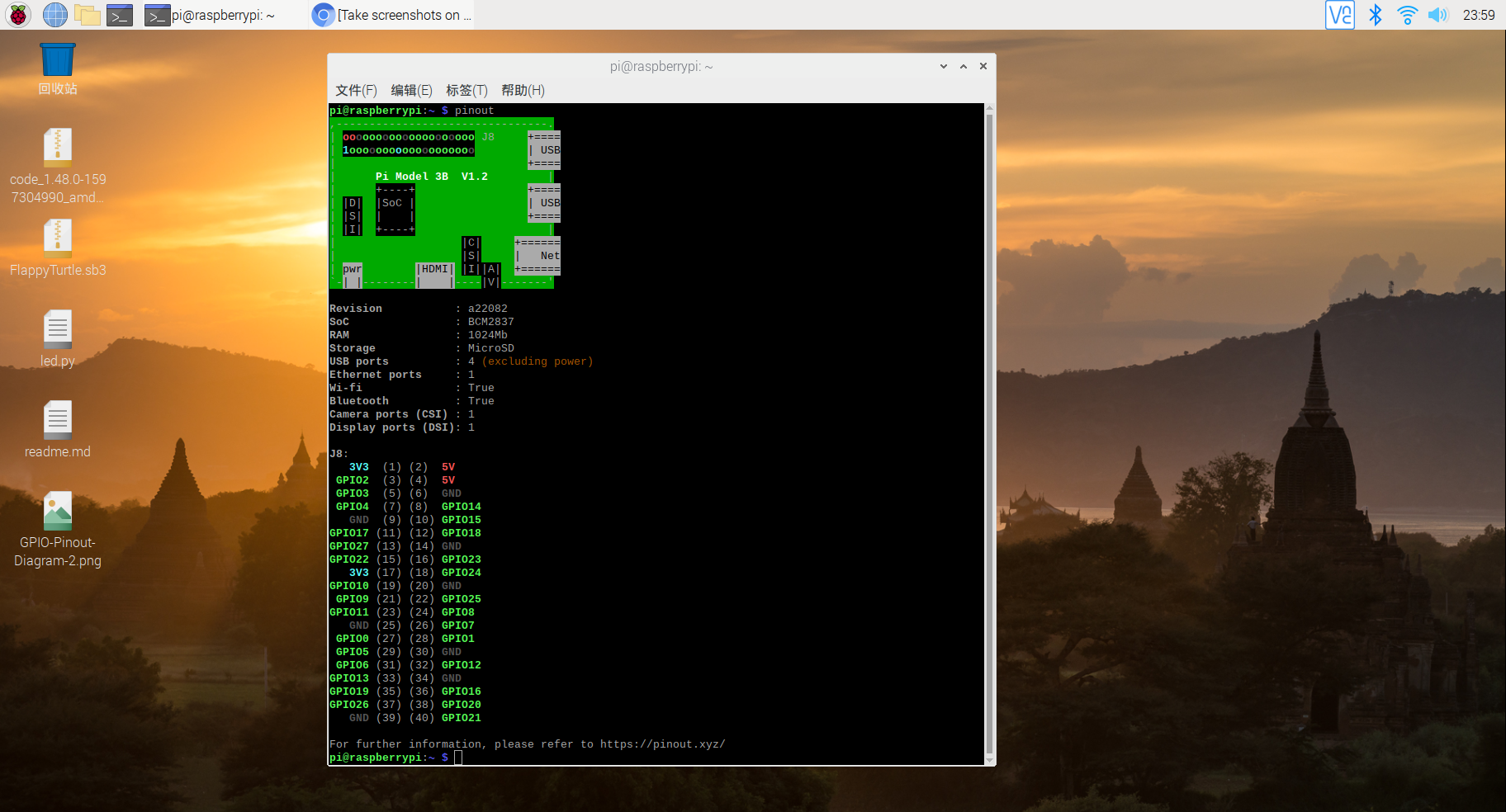
pinout === pin out / p in out
pi@raspberrypi:~ $ pinout

,--------------------------------.

| oooooooooooooooooooo J8     +====

| 1ooooooooooooooooooo        | USB

|                             +====

|      Pi Model 3B  V1.2         |

|      +----+                 +====

| |D|  |SoC |                 | USB

| |S|  |    |                 +====

| |I|  +----+                    |

|                   |C|     +======

|                   |S|     |   Net

| pwr        |HDMI| |I||A|  +======

`-| |--------|    |----|V|-------'

Revision           : a22082

SoC                : BCM2837

RAM                : 1024Mb

Storage            : MicroSD

USB ports          : 4 (excluding power)

Ethernet ports     : 1

Wi-fi              : True

Bluetooth          : True

Camera ports (CSI) : 1

Display ports (DSI): 1

J8:

   3V3  (1) (2)  5V

 GPIO2  (3) (4)  5V

 GPIO3  (5) (6)  GND

 GPIO4  (7) (8)  GPIO14

   GND  (9) (10) GPIO15

GPIO17 (11) (12) GPIO18

GPIO27 (13) (14) GND

GPIO22 (15) (16) GPIO23

   3V3 (17) (18) GPIO24

GPIO10 (19) (20) GND

 GPIO9 (21) (22) GPIO25

GPIO11 (23) (24) GPIO8

   GND (25) (26) GPIO7

 GPIO0 (27) (28) GPIO1

 GPIO5 (29) (30) GND

 GPIO6 (31) (32) GPIO12

GPIO13 (33) (34) GND

GPIO19 (35) (36) GPIO16

GPIO26 (37) (38) GPIO20

   GND (39) (40) GPIO21

For further information, please refer to https://pinout.xyz/

pi@raspberrypi:~ $
Pinout
引脚排列
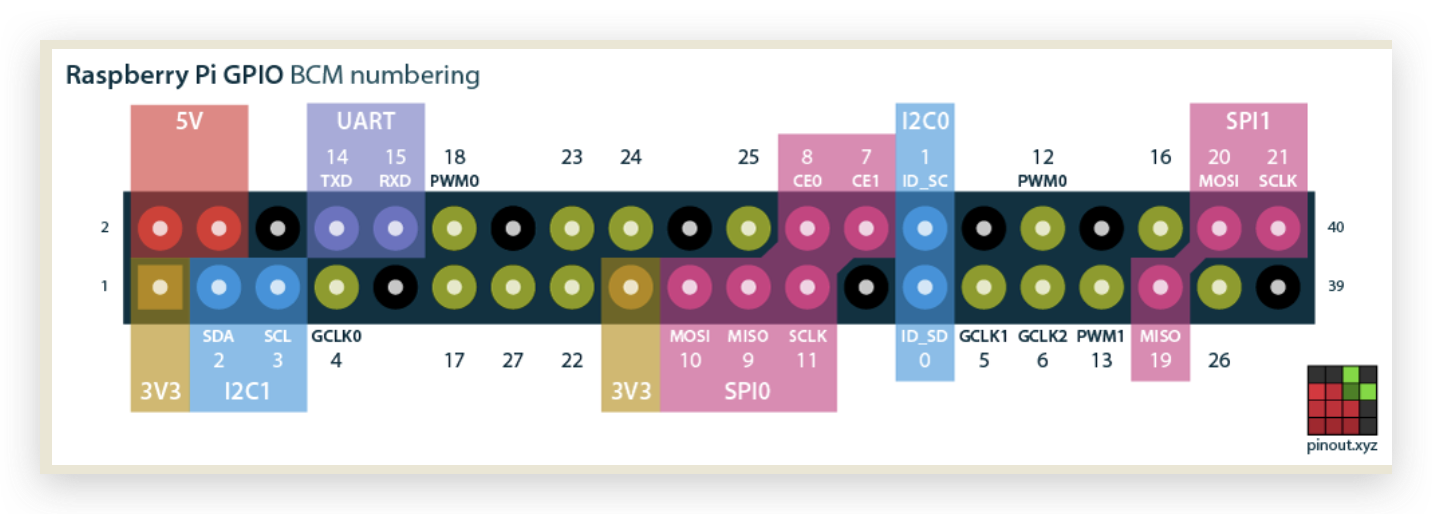
GPCLK0
https://pinout.xyz/pinout/pin7_gpio4
BCM 17
https://pinout.xyz/pinout/pin11_gpio17
3v3
3.3 v 正极 +,高电平
5v
5v 正极 +,高电平
GND
Ground 负极 - ,接地,低电平
GPIO
general purpose input/output
普通 GPIO,如 GPIO 17,可以控制电平的高低状态,改变 LED 的显示状态
特殊 GPIO, 如 ,一般高级功能才用的到,暂不讲解
LED 点亮
电路图,
电源正极(3v3 pin) => 电阻 => LED 正极(长脚) => 电源负极(GND pin)

面包板

电阻 200Ω (大于 50Ω? 200KΩ 不好使?)

LED 长正短负

杜邦线,红正黑负
面包板,正负极是安排划分的???
红线接正极,黑线接负极
220欧姆电阻器, 200k is not ok
触觉 按钮 开关
led 长针是正极,短针是负极
https://youtu.be/XrlR7cHSltw?t=370
You can test whether your GPIO pins and LEDs are working by building the circuit below. You can use any resistor over about 50Ω.
The LED is connected directly to the GND pin and the 3V3 pin via the 330 Ohm resistor, and should light up.
Be sure to connect your LED the correct way round; the longer leg should be connected to the 3V3 pin:
GPIO with Scratch 2
GPIO with Python
refs
https://www.cnblogs.com/xgqfrms/p/13474349.html
https://www.raspberrypi.org/documentation/usage/gpio/
xgqfrms 2012-2020
www.cnblogs.com 发布文章使用:只允许注册用户才可以访问!
Raspberry Pi & GPIO的更多相关文章
- Raspberry Pi GPIO Protection
After damaging the GPIO port on our raspberry pi while designing a new solar monitoring system we de ...
- Pi# - Raspberry Pi GPIO Library for .NET
Project Description Pi# (pronounced “Pi Sharp”) is a library to expose the GPIO functionality of the ...
- (0)开始 Raspberry Pi 项目前需要知道的 10 件事
https://www.digikey.cn/zh/articles/techzone/2017/feb/10-things-to-know-before-starting-a-raspberry-p ...
- (RaspBerry Pi) Python GPIO 基本操作
目前打算由潛入深慢慢學習RaspBerry Pi, 所以先由最容易下手的Python進入樹莓派的世界 首先要使用 GPIO 需要利用RPI.GPIO package想當然爾必須先安裝 所以先執行下列命 ...
- 树莓派 Raspberry PI之GPIO
树莓派 Raspberry PI之GPIO 树莓派各版本硬件原理图:https://www.raspberrypi.org/documentation/hardware/raspberrypi/REA ...
- RASPBERRY PI 外设学习资源
参考: http://www.siongboon.com/projects/2013-07-08_raspberry_pi/index.html Raspberry Pi Get st ...
- Raspberry Pi UART with PySerial
参考:http://programmingadvent.blogspot.hk/2012/12/raspberry-pi-uart-with-pyserial.html Raspberry Pi UA ...
- Hello Raspberry Pi
Raspberry Pi 入手好一段时间了,原意是想撸 linux,但是后来一整年都在忙孩子房子户口本子的事,这玩意也就搁了一年尘. 最近终于被生活折腾到了尾声,开始找一些东西来折腾折腾. 一.什么是 ...
- 三大主流开源硬件对比:Arduino vs BeagleBone vs Raspberry Pi
个人总结: Arduino就是个AVR单片机,个人觉得更适合玩电子的,社区也很活跃. BeagleBone是ARM Cortex-A8,属于嵌入式,价格高于Pi,但是许多方面拥有超越 Pi 的优 势, ...
随机推荐
- 理想的DevOp流程怎么做?看看Slack的代码部署实践 原创 Michael Deng 高可用架构 今天
理想的DevOp流程怎么做?看看Slack的代码部署实践 原创 Michael Deng 高可用架构 今天
- C# 防止程序多开(重复开启)
Mutex(mutual exclusion,互斥)是 .Net Framework 中提供跨多个线程同步访问的一个类.它非常类似了 Monitor 类,因为他们都只有一个线程能拥有锁定.而操作系统能 ...
- 安装、登入centos7
系统CentOS7.4 http://isoredirect.centos.org/centos/7/isos/x86_64/CentOS-7-x86_64-Everything-1708.iso 虚 ...
- C# 给Word不同页面设置不同背景
给Word文档设置背景时,通常只能针对整篇文档设置统一的背景,如果需要对某些页面单独设置背景,则需要通过另外的方式来实现.本文通过C# 程序代码演示如何来实现.并附VB.NET代码作参考. 思路:通过 ...
- (七)整合 Redis集群 ,实现消息队列场景
整合 Redis集群 ,实现消息队列场景 1.Redis集群简介 1.1 RedisCluster概念 2.SpringBoot整合Redis集群 2.1 核心依赖 2.2 核心配置 2.3 参数渲染 ...
- Web信息收集-目标扫描-OpenVAS
Web信息收集-目标扫描-OpenVAS 一.OpenVAS简述 二.部署OpenVAS 2.1 升级Kali Linux 2.2 安装OpenVAS 2.3 修改admin账户密码 2.4 修改默认 ...
- Java8新特性_四大内置核心函数式接口
Consumner : 消费型接口 Supplier :供给型接口 Function:函数式接口 Predicate:断言型接口 其他接口: 四大内置核心函数式接口: Consumner : 消费型接 ...
- Asp.net core通过自定义特性实现双端数据验证的一些想法
asp.net core集成了非常方便的数据绑定和数据校验机制,配合操作各种easy的vs,效率直接高到飞起. 通过自定义验证特性(Custom Validation Attribute)可以实现对于 ...
- Jenkins(5)生成allure报告
前言 jenkins集成了allure插件,安装插件后运行pytest+allure的脚本即可在jenkins上查看allure报告了. allure安装 在运行代码的服务器本机,我这里是用的dock ...
- 带撤销并查集 & 可持久化并查集
带撤销并查集支持从某个元素从原来的集合中撤出来,然后加入到一个另外一个集合中,或者删除该元素 用一个映射来表示元素和并查集中序号的关系,代码中用\(to[x]\) 表示x号元素在并查集中的 id 删除 ...