
hadoop2.7.3+spark2.0.1+scala2.11.8集群部署
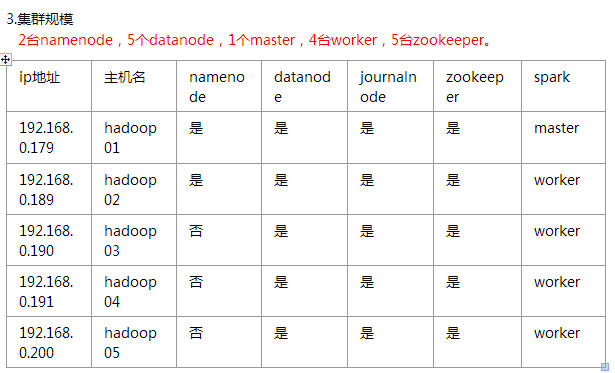
一、环境

soft soft nproc 102400
root soft nproc unlimited
soft soft nofile 102400
soft hard nofile 102400
#将SELINUX=enforcing改为SELINUX=disabled
五、安装hadoop
#配置hadoop-env.sh
export JAVA_HOME=/home/hadoop/jdk1.8.0_101
#编辑core-site.xml
<?xml version="1.0" encoding="UTF-8"?>

<?xml-stylesheet type="text/xsl" href="configuration.xsl"?>

<!--

  Licensed under the Apache License, Version 2.0 (the "License");

  you may not use this file except in compliance with the License.

  You may obtain a copy of the License at

    http://www.apache.org/licenses/LICENSE-2.0

  Unless required by applicable law or agreed to in writing, software

  distributed under the License is distributed on an "AS IS" BASIS,

  WITHOUT WARRANTIES OR CONDITIONS OF ANY KIND, either express or implied.

  See the License for the specific language governing permissions and

  limitations under the License. See accompanying LICENSE file.

-->

<!-- Put site-specific property overrides in this file. -->

<configuration>

  <property>

    <name>fs.defaultFS</name>

    <value>hdfs://base</value>

  </property>

  <property>

    <name>hadoop.tmp.dir</name>

    <value>/home/hadoop/data/hadoopdata/tmp</value>

  </property>

  <!-- 指定zookeeper地址 -->

  <property>

	<name>ha.zookeeper.quorum</name>

	<value>n1:2181,n2:2181,n3:2181,n4:2181,n5:2181</value>

  </property>

  <property>

    <name>fs.hdfs.impl</name>

    <value>org.apache.hadoop.hdfs.DistributedFileSystem</value>

    <description>The FileSystem for hdfs: uris.</description>

  </property>

</configuration>
#编辑hdfs-site.xml
<?xml version="1.0" encoding="UTF-8"?>

<?xml-stylesheet type="text/xsl" href="configuration.xsl"?>

<!--

  Licensed under the Apache License, Version 2.0 (the "License");

  you may not use this file except in compliance with the License.

  You may obtain a copy of the License at

    http://www.apache.org/licenses/LICENSE-2.0

  Unless required by applicable law or agreed to in writing, software

  distributed under the License is distributed on an "AS IS" BASIS,

  WITHOUT WARRANTIES OR CONDITIONS OF ANY KIND, either express or implied.

  See the License for the specific language governing permissions and

  limitations under the License. See accompanying LICENSE file.

-->

<!-- Put site-specific property overrides in this file. -->

<configuration>

<property>

  <!-- 开几个备份 -->

    <name>dfs.replication</name>

    <value>3</value>

  </property>

  <property>

    <name>dfs.namenode.name.dir</name>

    <value>file:///home/hadoop/data/hadoopdata/name</value>

  </property>

  <property>

    <name>dfs.datanode.data.dir</name>

    <value>/home/hadoop/data/hadoopdata/disk1</value>

	<final>true</final>

  </property>

  <property>

    <name>dfs.nameservices</name>

    <value>base</value>

  </property>

  <property>

    <name>dfs.ha.namenodes.base</name>

    <value>n1,n2</value>

  </property>

  <property>

    <name>dfs.namenode.rpc-address.base.n1</name>

    <value>n1:8020</value>

  </property>

  <property>

    <name>dfs.namenode.rpc-address.base.n2</name>

    <value>n2:8020</value>

  </property>

  <property>

    <name>dfs.namenode.http-address.base.n1</name>

    <value>n1:50070</value>

  </property>

  <property>

    <name>dfs.namenode.http-address.base.n2</name>

    <value>n2:50070</value>

  </property>

  <property>

    <name>dfs.namenode.shared.edits.dir</name>

    <value>qjournal://n1:8485;n2:8485;n3:8485;n4:8485;n5:8485/base</value>

  </property>

  <property>

    <name>dfs.client.failover.proxy.provider.base</name>

    <value>org.apache.hadoop.hdfs.server.namenode.ha.ConfiguredFailoverProxyProvider</value>

  </property>

  <property>

    <name>dfs.ha.fencing.methods</name>

    <value>sshfence</value>

  </property>

  <property>

    <name>dfs.ha.fencing.ssh.private-key-files</name>

    <value>/home/hadoop/.ssh/id_rsa</value>

  </property>

  <property>

    <name>dfs.journalnode.edits.dir</name>

    <value>/home/hadoop/app/hadoop-2.7.3/journal</value>

  </property>

    <property>

        <name>dfs.ha.automatic-failover.enabled</name>

        <value>true</value>

    </property>

    <property>

        <name>ha.zookeeper.quorum</name>

	<value>n1:2181,n2:2181,n3:2181,n4:2181,n5:2181</value>

    </property>

    <property>

        <!--指定ZooKeeper超时间隔,单位毫秒 -->

        <name>ha.zookeeper.session-timeout.ms</name>

        <value>2000</value>

    </property>

<property>

    <name>fs.hdfs.impl.disable.cache</name>

    <value>true</value>

</property>

</configuration>
#编辑mapred-site.xml
<configuration>

 <property>

    <name>mapreduce.framework.name</name>

    <value>yarn</value>

 </property>

 <property>

    <name>mapreduce.map.memory.mb</name>

    <value>8000</value>

 </property>

 <property>

    <name>mapreduce.reduce.memory.mb</name>

    <value>8000</value>

 </property>

 <property>

    <name>mapreduce.map.java.opts</name>

    <value>-Xmx8000m</value>

 </property>

 <property>

    <name>mapreduce.reduce.java.opts</name>

    <value>-Xmx8000m</value>

 </property>

 <property>

   <name>mapred.task.timeout</name>

   <value>1800000</value> <!-- 30 minutes -->

 </property>

</configuration>
#编辑yarn-site.xml
<?xml version="1.0"?>

<!--

  Licensed under the Apache License, Version 2.0 (the "License");

  you may not use this file except in compliance with the License.

  You may obtain a copy of the License at

    http://www.apache.org/licenses/LICENSE-2.0

  Unless required by applicable law or agreed to in writing, software

  distributed under the License is distributed on an "AS IS" BASIS,

  WITHOUT WARRANTIES OR CONDITIONS OF ANY KIND, either express or implied.

  See the License for the specific language governing permissions and

  limitations under the License. See accompanying LICENSE file.

-->

<configuration>

    <property>

        <name>yarn.resourcemanager.connect.retry-interval.ms</name>

        <value>2000</value>

    </property>

    <property>

        <name>yarn.resourcemanager.ha.automatic-failover.enabled</name>

        <value>true</value>

    </property>

    <!-- 开启RM高可靠 -->

	<property>

	    <name>yarn.resourcemanager.ha.enabled</name>

	    <value>true</value>

	</property>

	<!-- 指定RM的cluster id -->

	<property>

	    <name>yarn.resourcemanager.cluster-id</name>

	    <value>yrc</value>

	</property>

	<!-- 指定RM的名字 -->

	<property>

	    <name>yarn.resourcemanager.ha.rm-ids</name>

	    <value>rm1,rm2</value>

	</property>

	<!-- 分别指定RM的地址 -->

	<property>

	    <name>yarn.resourcemanager.hostname.rm1</name>

	    <value>n1</value>

	</property>

	<property>

	    <name>yarn.resourcemanager.hostname.rm2</name>

	    <value>n2</value>

	</property>

	<property>

        <name>yarn.resourcemanager.ha.id</name>

        <value>rm2</value>

	</property>

	<!-- 指定zk集群地址 -->

	<property>

	    <name>yarn.resourcemanager.zk-address</name>

	    <value>n1:2181,n2:2181,n3:2181,n4:2181,n5:2181</value>

	</property>

    <property>

        <name>yarn.nodemanager.aux-services</name>

        <value>mapreduce_shuffle</value>

    </property>

    <property>

        <name>yarn.log-aggregation-enable</name>

        <value>true</value>

    </property>

    <property>

        <name>yarn.log-aggregation.retain-seconds</name>

        <value>86400</value>

    </property>

    <property>

        <name>yarn.nodemanager.vmem-pmem-ratio</name>

        <value>3</value>

    </property>

    <property>

        <name>yarn.nodemanager.resource.memory-mb</name>

        <value>57000</value>

    </property>

    <property>

        <name>yarn.scheduler.minimum-allocation-mb</name>

        <value>4000</value>

    </property>

    <property>

        <name>yarn.scheduler.maximum-allocation-mb</name>

        <value>10000</value>

    </property>

</configuration>
#编辑slaves文件
n1
n2
n3
n4
n5
#将hadoop目录scp到其他主机
六、启动
启动所有zookeeper,查看状态是否成功
启动所有journalnode
hadoop-daemons.sh start journalnode
#hadoop01上执行
hdfs namenode -format #namenode 格式化
hdfs zkfc -formatZK #格式化高可用
sbin/hadoop-daemon.sh start namenode #启动namenode
#备份节点执行
hdfs namenode -bootstrapStandby #同步主节点和备节点之间的元数据
停止所有journalnode,namenode
启动hdfs和yarn相关进程
./start-dfs.sh
./start-yarn.sh
备份节点手动启动resourcemanager
#先更改备份节点的yarn-site.xml文件
<property>

        <name>yarn.resourcemanager.ha.id</name>

        <value>rm2</value>          #这里改成node的id,否则会报端口已占用的错误

</property>
./yarn-daemon.sh start resourcemanager
七、检查
[root@n1 ~]# jps
16016 Jps
24096 DFSZKFailoverController
19859 QuorumPeerMain
22987 NameNode
18878 Datanode
29397 ResourceManager
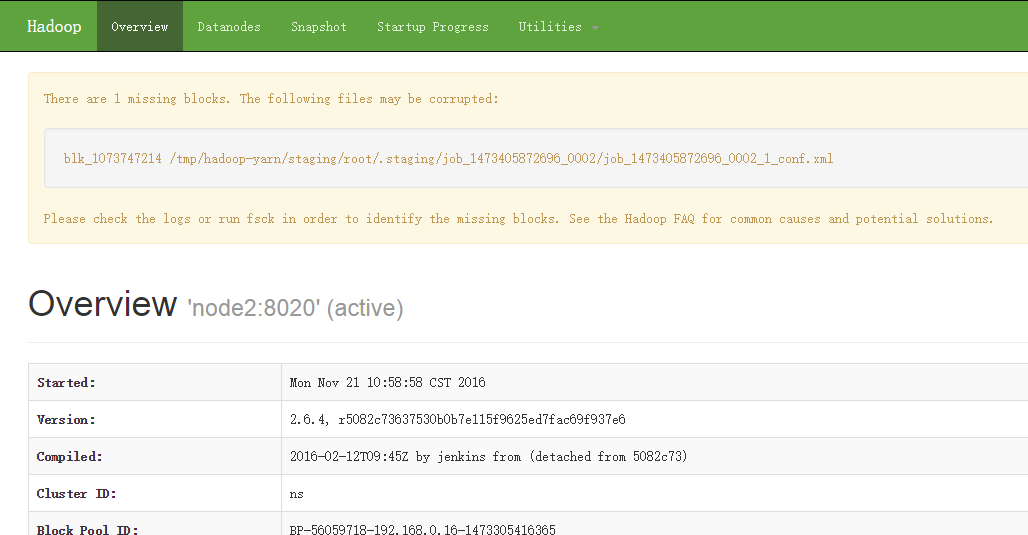
#浏览器访问
http://ip:50070
hadoop2.7.3+spark2.0.1+scala2.11.8集群部署的更多相关文章
- 安装Scala-2.11.7——集群学习日记
前言 在安装Spark之前,我们需要安装Scala语言的支持.在此我选择的是scala-2.11.7版本. scala-2.11.7下载 为了方便,我现在我的SparkMaster主机上先安装,把目录 ...
- kafka 0.10.2 cetos6.5 集群部署
安装 zookeeper http://www.cnblogs.com/xiaojf/p/6572351.html安装 scala http://www.cnblogs.com/xiaojf/p/65 ...
- Redis3.0.1 Stable版本的集群部署(Mac)
本文档基于如下原始文档(CentOS)创建: http://blog.csdn.net/xu470438000/article/details/42971091 修改了一些路径的错误,补全了一些命令执 ...
- redis-5.0.5 集群部署
之前写过一套基于redis-4.0.6版本的测试集群部署 https://www.cnblogs.com/mrice/p/10730309.html 最近生产环境需要部署一套redis-5.0.5版本 ...
- Ubuntu14.04或16.04下安装JDK1.8+Scala+Hadoop2.7.3+Spark2.0.2
为了将Hadoop和Spark的安装简单化,今日写下此帖. 首先,要看手头有多少机器,要安装伪分布式的Hadoop+Spark还是完全分布式的,这里分别记录. 1. 伪分布式安装 伪分布式的Hadoo ...
- Kafka设计解析(十七)Kafka 0.11客户端集群管理工具AdminClient
转载自 huxihx,原文链接 Kafka 0.11客户端集群管理工具AdminClient 很多用户都有直接使用程序API操作Kafka集群的需求.在0.11版本之前,kafka的服务器端代码(即添 ...
- 超详细从零记录Hadoop2.7.3完全分布式集群部署过程
超详细从零记录Ubuntu16.04.1 3台服务器上Hadoop2.7.3完全分布式集群部署过程.包含,Ubuntu服务器创建.远程工具连接配置.Ubuntu服务器配置.Hadoop文件配置.Had ...
- 保姆级教程,带你认识大数据,从0到1搭建 Hadoop 集群
大数据简介,概念部分 概念部分,建议之前没有任何大数据相关知识的朋友阅读 大数据概论 什么是大数据 大数据(Big Data)是指无法在一定时间范围内用常规软件工具进行捕捉.管理和处理的数据集合,是需 ...
- Hadoop 2.6.0 集群部署
Hadoop的集群部署和单节点部署类似,配置文件不同,另外需要修改网络方面的配置 首先,准备3台虚拟机,系统为CentOS 6.6,其中一台为namenode 剩余两台为 datanode: 修改主机 ...
随机推荐
- python+opencv切割细胞及细胞团(持续更新)
内容包括:游离细胞的切割,有效细胞的信息提取,找出非正常细胞,细胞团的切割,找出非正常细胞团 代码较多,请移步到我的github
- python中 _、__、__xx__() 区别及使用场景
1.访问权限(private.public)与继承方式(只有public继承) 在面向对象编程语言中,类的属性与方法都会设置访问控制权限,从而满足我们的设计需求.一般而言,我们通常会将对象的属性设置为 ...
- 华为云—环境安装(jdk安装,tomcat安装)
前言 在前面咱们讲到华为云的购买以及一些配置,通过上一文即可获得一个可以直接访问使用的云服务器.但是对于不同的人群服务器的使用用途可能不同,对于咱们大部分的java程序员来说,jdk.tomcat.m ...
- Ubuntu apt update卡在Connecting to security.ubuntu.com解决方法
Ubuntu操作系统运行apt update命令时会卡在Connecting to security.ubuntu.com,搭了梯子也无法解决 尝试了网络上的方法,如: https://blog.cs ...
- 赞!7000 字学习笔记,一天搞定 MySQL
MySQL数据库简介 MySQL近两年一直稳居第二,随时有可能超过Oracle计晋升为第一名,因为MySQL的性能一直在被优化,同时安全机制也是逐渐成熟,更重要的是开源免费的. MySQL是一种关系数 ...
- JS中同步和异步
首先,我们要知道,JavaScript的本质是一门浏览器脚本语言,在执行的时候是一行一行的执行,只有前面的代码执行完了才会执行后面的代码.JS是单线程语言指的就是这个意思. 同步和异步其实在进行任务执 ...
- Chive CTF 2020 - Tiki
题目状态: OPEN - 正在试图解这道题CLOSED - 这道题还没有打开SOLVED - 解决了!鼓掌撒花! 赛事信息: 起止时间:2020-04-09 01:00 ~ 2020-04-12 01 ...
- Fetch.AI 首席技术官Toby Simpson参与AMA活动
感谢7月11日在YouTube上参与 Fetch.AI AMA的所有人.我们收到了大量的问题,遗憾的是我们没有时间回答其中的多数问题.如果你错过了现场AMA,你可以在下面观看全部内容: 在本文中,我们 ...
- (一)学习了解OrchardCore笔记——开篇:基于asp.net core的OrchardCore
想深入了解OrchadCore源码许久了,但是读源码的时候遇到很多问题而网上的参考资料太少了(几乎都是OrchadCms不带OrchardCore的),现在解决得差不多了,做下笔记方便自己查看,有错误 ...
- java 面向对象(二十八):异常 一
1. 异常的体系结构 * java.lang.Throwable * |-----java.lang.Error:一般不编写针对性的代码进行处理. * |-----java.lang.Exceptio ...