
[转]ROS 传感器消息及RVIZ可视化Laserscan和PointCloud
https://blog.csdn.net/yangziluomu/article/details/79576508
https://answers.ros.org/question/60239/how-to-extract-and-use-laser-data-from-scan-topic-in-ros-using-c/
https://answers.ros.org/question/149256/subscribe-laserscan/
目录
ROS 传感器消息
在使用ROS各个传感器消息之前,弄清楚各个传感器在ROS是如何表示的显得极为重要。特别是,Laserscan, PointCloud等用了很久之后,感觉已经很熟悉了,但是一些细节行的东西一直没有深究,并且对某些参数难以形成直觉上的认识,很大程度上影响了在与其他算法或者硬件衔接时的问题。这里,我单独的将Laserscan,PointCloud发布在rviz中,通过修改不同的ROS消息参数,直观的观察其在参数的作用。整个工程代码可以在此处下载:https://download.csdn.net/download/ziqian0512/10289936。
ROS 传感器消息之Laserscan
消息定义
首先,查看一下sensor_msgs/LaserScan.msg的定义,见ros.org/LaserScan.“`
Header header

float32 angle_min        # start angle of the scan [rad]

float32 angle_max        # end angle of the scan [rad]

float32 angle_increment  # angular distance between measurements [rad]

float32 time_increment   # time between measurements [seconds]

float32 scan_time        # time between scans [seconds]

float32 range_min        # minimum range value [m]

float32 range_max        # maximum range value [m]

float32[] ranges         # range data [m] (Note: values < range_min or > range_max should be discarded)

float32[] intensities # intensity data [device-specific units]- 1
- 2
- 3
- 4
- 5
- 6
- 7
- 8
- 9
- 10
在消息中需要特别说明的主要是ranges和intensities,ranges表示在某一个角度时,扫描到物体离自己的距离,这很容易理解。intensities则表示测量的强度,也就是激光所反射的亮度,通常来说,值越大,光反射越亮。也就可以用intensities做一些假设,推荐扫描到物体的材料。比如,Hokyuo Laser scanner就提供了反射的所有强度,而 Sick S300则只检测是否由反光带。
测试代码
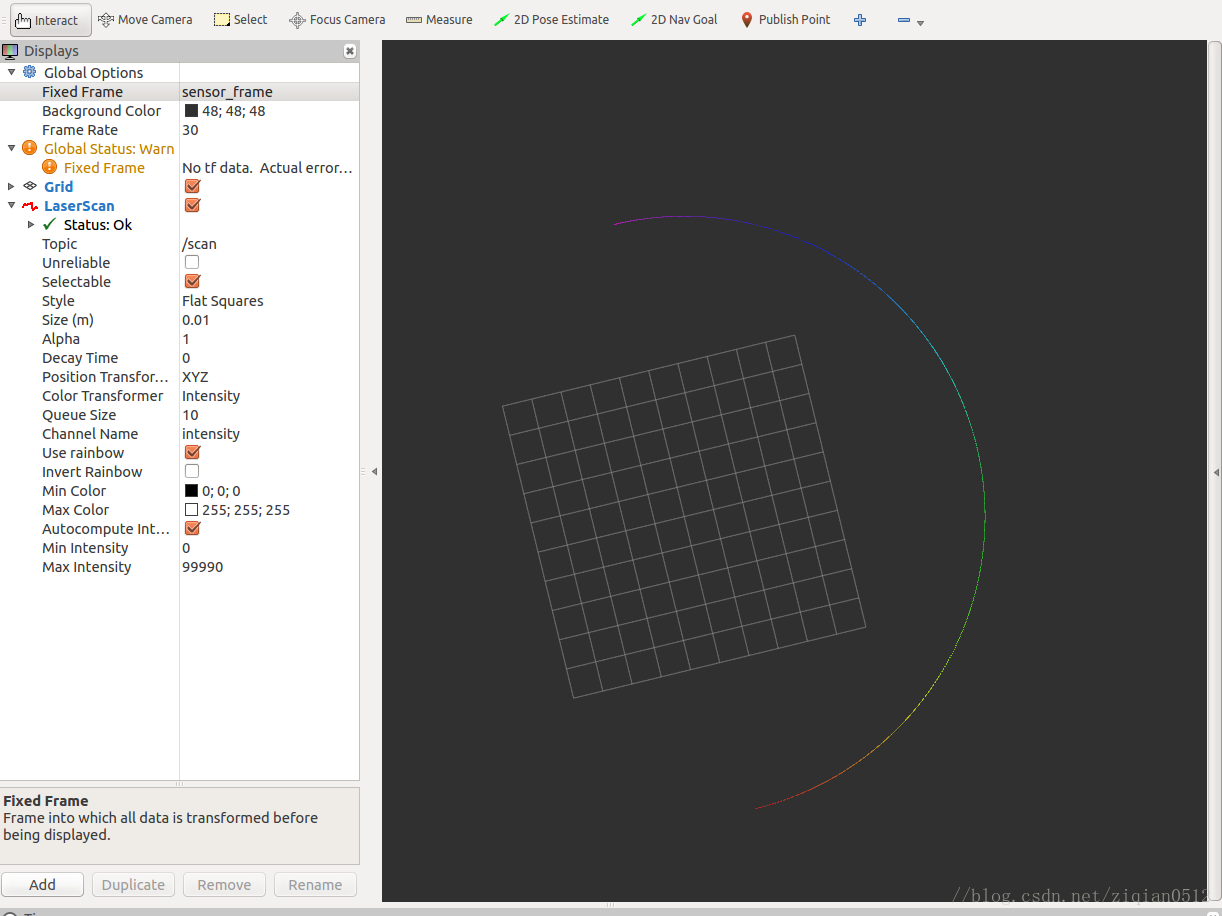
以下为测试Laserscan源码,需要特别关注的num_readings(点数),ranges(距离),intensities(强度)参数在调节过程中,rviz中Laserscan的变化。
编译以下代码后,还需要选择sensor_frame坐标系,和消息/scan。效果图如下:
代码:
#include <ros/ros.h>

#include <sensor_msgs/LaserScan.h>

int main(int argc, char** argv){

  ros::init(argc, argv, "laser_scan_publisher");

  ros::NodeHandle n;

  ros::Publisher scan_pub = n.advertise<sensor_msgs::LaserScan>("scan", 50);

  unsigned int num_readings = 100;

  double laser_frequency = 40;

  double ranges[num_readings];

  double intensities[num_readings];

  int count = 10;

  ros::Rate r(1.0);

  while(n.ok()){

    //generate some fake data for our laser scan

    for(unsigned int i = 0; i < num_readings; ++i){

      ranges[i] = count;

      intensities[i] = 10*i;

    }

    ros::Time scan_time = ros::Time::now();

    //populate the LaserScan message

    sensor_msgs::LaserScan scan;

    scan.header.stamp = scan_time;

    scan.header.frame_id = "sensor_frame";

    scan.angle_min = -1.57;

    scan.angle_max = 1.57;

    scan.angle_increment = 3.14 / num_readings;

    scan.time_increment = (1 / laser_frequency) / (num_readings);

    scan.range_min = 0.0;

    scan.range_max = 100.0;

    scan.ranges.resize(num_readings);

    scan.intensities.resize(num_readings);

    for(unsigned int i = 0; i < num_readings; ++i){

      scan.ranges[i] = ranges[i];

      scan.intensities[i] = intensities[i];

    }

    scan_pub.publish(scan);

    // ++count;

    ROS_WARN_STREAM("count"<<count);

    r.sleep();

  }

}- 1
- 2
- 3
- 4
- 5
- 6
- 7
- 8
- 9
- 10
- 11
- 12
- 13
- 14
- 15
- 16
- 17
- 18
- 19
- 20
- 21
- 22
- 23
- 24
- 25
- 26
- 27
- 28
- 29
- 30
- 31
- 32
- 33
- 34
- 35
- 36
- 37
- 38
- 39
- 40
- 41
- 42
- 43
- 44
- 45
- 46
- 47
- 48
ROS 传感器消息之PointCloud
消息定义
PointCloud 描述如下:
Header header

geometry_msgs/Point32[] points # Array of 3d points

ChannelFloat32[] channels # channel name, value- 1
- 2
- 3
channels可以进一步解释为:
#   "rgb" - For point clouds produced by color stereo cameras. uint8 (R,G,B) values packed into the least significant 24 bits,in order.

#   "intensity" - laser or pixel intensity.

# The channel name should give the semantics of the channel (e.g. "intensity" instead of "value").

string name

# The values array should be 1-1 with the elements of the associated PointCloud.

float32[] values- 1
- 2
- 3
- 4
- 5
- 6
- 7
- 8
name表示不同的表示方式,可以是像素值,亮度等。values则是典型的依赖于传感器的亮度值返回,表示测量的质量,可以是灰度图像的灰度值,也可以是类似laserscan的强度。
测试代码
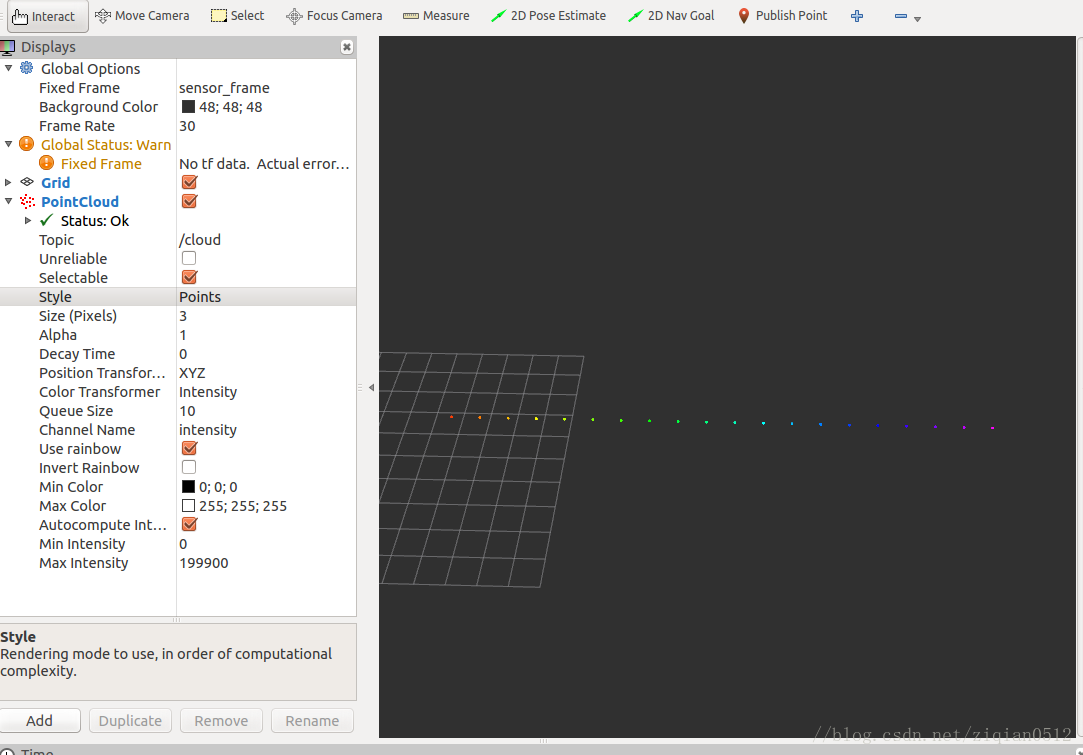
在以下代码中,重点需要调节num_points(点数),channels(设置通道,以及强度),points(位置)参数来观察PointCloud的变化。编译以下代码后,还需要选择sensor_frame坐标系,和消息/cloud。效果图如下:
代码
#include <ros/ros.h>

#include <sensor_msgs/PointCloud.h>

int main(int argc, char** argv){

  ros::init(argc, argv, "point_cloud_publisher");

  ros::NodeHandle n;

  ros::Publisher cloud_pub = n.advertise<sensor_msgs::PointCloud>("/cloud", 50);

  unsigned int num_points = 2000;

  int count = 0;

  ros::Rate r(1.0);

  while(n.ok()){

    sensor_msgs::PointCloud cloud;

    cloud.header.stamp = ros::Time::now();

    cloud.header.frame_id = "sensor_frame";

    cloud.points.resize(num_points);

    //we'll also add an intensity channel to the cloud

    cloud.channels.resize(1);

    cloud.channels[0].name = "intensities";

    cloud.channels[0].values.resize(num_points);

    //generate some fake data for our point cloud

    for(unsigned int i = 0; i < num_points; ++i){

      cloud.points[i].x = 1 + i/100;

      cloud.points[i].y = 1;

      cloud.points[i].z = 1;

      cloud.channels[0].values[i] = 100 * i;

    }

    cloud_pub.publish(cloud);

    // ++count;

    r.sleep();

  }

}- 1
- 2
- 3
- 4
- 5
- 6
- 7
- 8
- 9
- 10
- 11
- 12
- 13
- 14
- 15
- 16
- 17
- 18
- 19
- 20
- 21
- 22
- 23
- 24
- 25
- 26
- 27
- 28
- 29
- 30
- 31
- 32
- 33
- 34
- 35
- 36
- 37
- 38
小结
详细的介绍需要已经有很多了,自己动手调试并观察rviz中传感器数据的变化可以加强对使用传感器以及研究其算法增加直观的体验。目的是为了自己更加方便的查询和使用。
Reference
[转]ROS 传感器消息及RVIZ可视化Laserscan和PointCloud的更多相关文章
- ROS中发布IMU传感器消息
下面使用SYD Dynamics的9轴AHRS(Attitude and heading reference system),来发布sensor_msgs/Imu类型的消息. 将传感器用USB转串口接 ...
- [转]ROS中使用message_filters进行多传感器消息同步
转:http://www.rosclub.cn/post-1030.html 最近实验室老师在做一个多传感器数据采集实验,涉及到了消息同步.所以就学习了ROS官网下的消息同步工具message_fil ...
- [实例]ROS使用OpenCV读取图像并发布图像消息在rviz中显示
思路: (1)使用opencv读取本地图像 (2)调用cv_bridge::CvImage().toImageMsg()将本地图像发送给rviz显示 一.使用opencv读取本地图像并发布图像消息 ( ...
- ROS:消息发布器和订阅器(c++)
学习资料主要源自http://wiki.ros.org/ROS/Tutorials/WritingPublisherSubscriber%28c%2B%2B%29 $ roscd beginner_t ...
- ubuntu16.04 ROS安转及RVIZ启动
1.软件中心配置 首先打开软件和更新对话框,打开后按照下图进行配置(确保你的"restricted", "universe," 和 "multiver ...
- ROS 日志消息(C++)
1.日志级别 日志消息分为五个不同的严重级别宏,与Android的Log定义的严重级别类似,如下基础宏: ROS_DEBUG_STREAM.ROS_INFO_STREAM.ROS_WARN_STREA ...
- [转]ROS Q&A | How to read LaserScan data
http://www.theconstructsim.com/read-laserscan-data/ Step 1. Open a project on ROS Development Studio ...
- RVIZ可视化平台
- 机器人操作系统(ROS)教程22:ROS的3D可视化工具—rviz
rviz是ROS中的一个3D可视化工具,有了它就可以把你用代码建的机器人模型转化为可视的3D模型. 首先需要安装: rosdep install rviz 然后编译rviz: rosmake rviz ...
随机推荐
- Hadoop优势,组成的相关架构,大数据生态体系下的模式
Hadoop优势,组成的相关架构,大数据生态体系下的模式 一.Hadoop的优势 二.Hadoop的组成 2.1 HDFS架构 2.2 Yarn架构 2.3 MapReduce架构 三.大数据生态体系 ...
- 使用zxing生成彩色或带图片的二维码
<!-- https://mvnrepository.com/artifact/com.google.zxing/core --> <dependency> <group ...
- 关于SANGFOR AC记录上网记录
1.查看加密APP的访问记录,不支持推送证书的方式.也就是这种的是没办法查看到的:2.查看加密网站的访问记录,通过推送证书,电脑可以查看到:手机端安卓的不能,苹果可以,但是不建议做,适用性不好:3.查 ...
- CSS奇思妙想 -- 使用 background 创造各种美妙的背景
本文属于 CSS 绘图技巧其中一篇,系列文章: 在 CSS 中使用三角函数绘制曲线图形及展示动画 CSS奇思妙想 -- 使用 CSS 创造艺术 将介绍一些利用 CSS 中的 background.mi ...
- ApiTesting全链路自动化测试框架 - 初版发布(一)
简介 此框架是基于Python+Pytest+Requests+Allure+Yaml+Json实现全链路接口自动化测试. 主要流程:解析接口数据包 ->生成接口基础配置(yml) ->生 ...
- memcache安装及解决无法远程连接的问题
Memcached是什么 Memcached是一个自由开源的,高性能,分布式内存对象缓存系统. Memcached是以LiveJournal旗下Danga Interactive公司的Brad Fit ...
- 2019牛客暑期多校训练营(第二场) H-Second Large Rectangle(单调栈)
题意:给出由01组成的矩阵,求求全是1的次大子矩阵. 思路: 单调栈 全是1的最大子矩阵的变形,不能直接把所有的面积存起来然后排序取第二大的,因为次大子矩阵可能在最大子矩阵里面,比如: 1 0 0 1 ...
- hdu4325 Flowers
Problem Description As is known to all, the blooming time and duration varies between different kind ...
- zoj3471 Most Powerful
Recently, researchers on Mars have discovered N powerful atoms. All of them are different. These ato ...
- python之字符串方法upper/lower
1.描述: upper():用于将字符串全部转换为大写字母 lower():用于将字符串全部转换为小写字母 2.语法 str.upper() str.lower() 3.返回值 upper()或low ...