
Java调用WebService方法总结(1)--准备工作
WebService是一种跨编程语言、跨操作系统平台的远程调用技术,已存在很多年了,很多接口也都是通过WebService方式来发布的;本系列文章主要介绍Java调用WebService的各种方法,使用在线的中文简体字<->繁体字转换服务(http://www.webxml.com.cn/WebServices/TraditionalSimplifiedWebService.asmx)作为测试服务端,使用其中的简体字转换为繁体字方法toTraditionalChinese来演示WebService的调用。本文主要做些准备工作,方便后续文章中实际的调用。
1、WSDL
为了防止该在线WebService不可用,这里把WSDL贴在这里,方便与代码对照。
http://www.webxml.com.cn/WebServices/TraditionalSimplifiedWebService.asmx?wsdl
This XML file does not appear to have any style information associated with it. The document tree is shown below.
<wsdl:definitions xmlns:soap="http://schemas.xmlsoap.org/wsdl/soap/" xmlns:tm="http://microsoft.com/wsdl/mime/textMatching/" xmlns:soapenc="http://schemas.xmlsoap.org/soap/encoding/" xmlns:mime="http://schemas.xmlsoap.org/wsdl/mime/" xmlns:tns="http://webxml.com.cn/" xmlns:s="http://www.w3.org/2001/XMLSchema" xmlns:soap12="http://schemas.xmlsoap.org/wsdl/soap12/" xmlns:http="http://schemas.xmlsoap.org/wsdl/http/" xmlns:wsdl="http://schemas.xmlsoap.org/wsdl/" targetNamespace="http://webxml.com.cn/">
<wsdl:documentation xmlns:wsdl="http://schemas.xmlsoap.org/wsdl/">
<a href="http://www.webxml.com.cn/" target="_blank">WebXml.com.cn</a> <strong>中文简体字<->繁体字转换 WEB 服务</strong><br />此中文简体字<->繁体字转换Web Services请不要用于任何商业目的,若有需要请<a href="http://www.webxml.com.cn/zh_cn/contact_us.aspx" target="_blank">联系我们</a>,欢迎技术交流。 QQ:8409035<br /><strong>使用本站 WEB 服务请注明或链接本站:http://www.webxml.com.cn/ 感谢大家的支持</strong>!<br /><br />
</wsdl:documentation>
<wsdl:types>
<s:schema elementFormDefault="qualified" targetNamespace="http://webxml.com.cn/">
<s:element name="toSimplifiedChinese">
<s:complexType>
<s:sequence>
<s:element minOccurs="0" maxOccurs="1" name="sText" type="s:string"/>
</s:sequence>
</s:complexType>
</s:element>
<s:element name="toSimplifiedChineseResponse">
<s:complexType>
<s:sequence>
<s:element minOccurs="0" maxOccurs="1" name="toSimplifiedChineseResult" type="s:string"/>
</s:sequence>
</s:complexType>
</s:element>
<s:element name="toTraditionalChinese">
<s:complexType>
<s:sequence>
<s:element minOccurs="0" maxOccurs="1" name="sText" type="s:string"/>
</s:sequence>
</s:complexType>
</s:element>
<s:element name="toTraditionalChineseResponse">
<s:complexType>
<s:sequence>
<s:element minOccurs="0" maxOccurs="1" name="toTraditionalChineseResult" type="s:string"/>
</s:sequence>
</s:complexType>
</s:element>
<s:element name="string" nillable="true" type="s:string"/>
</s:schema>
</wsdl:types>
<wsdl:message name="toSimplifiedChineseSoapIn">
<wsdl:part name="parameters" element="tns:toSimplifiedChinese"/>
</wsdl:message>
<wsdl:message name="toSimplifiedChineseSoapOut">
<wsdl:part name="parameters" element="tns:toSimplifiedChineseResponse"/>
</wsdl:message>
<wsdl:message name="toTraditionalChineseSoapIn">
<wsdl:part name="parameters" element="tns:toTraditionalChinese"/>
</wsdl:message>
<wsdl:message name="toTraditionalChineseSoapOut">
<wsdl:part name="parameters" element="tns:toTraditionalChineseResponse"/>
</wsdl:message>
<wsdl:message name="toSimplifiedChineseHttpGetIn">
<wsdl:part name="sText" type="s:string"/>
</wsdl:message>
<wsdl:message name="toSimplifiedChineseHttpGetOut">
<wsdl:part name="Body" element="tns:string"/>
</wsdl:message>
<wsdl:message name="toTraditionalChineseHttpGetIn">
<wsdl:part name="sText" type="s:string"/>
</wsdl:message>
<wsdl:message name="toTraditionalChineseHttpGetOut">
<wsdl:part name="Body" element="tns:string"/>
</wsdl:message>
<wsdl:message name="toSimplifiedChineseHttpPostIn">
<wsdl:part name="sText" type="s:string"/>
</wsdl:message>
<wsdl:message name="toSimplifiedChineseHttpPostOut">
<wsdl:part name="Body" element="tns:string"/>
</wsdl:message>
<wsdl:message name="toTraditionalChineseHttpPostIn">
<wsdl:part name="sText" type="s:string"/>
</wsdl:message>
<wsdl:message name="toTraditionalChineseHttpPostOut">
<wsdl:part name="Body" element="tns:string"/>
</wsdl:message>
<wsdl:portType name="TraditionalSimplifiedWebServiceSoap">
<wsdl:operation name="toSimplifiedChinese">
<wsdl:documentation xmlns:wsdl="http://schemas.xmlsoap.org/wsdl/">
<br /><h3>繁体字转换为简体字</h3><p>输入参数:sText = 字符串; 返回数据:字符串。</p><br />
</wsdl:documentation>
<wsdl:input message="tns:toSimplifiedChineseSoapIn"/>
<wsdl:output message="tns:toSimplifiedChineseSoapOut"/>
</wsdl:operation>
<wsdl:operation name="toTraditionalChinese">
<wsdl:documentation xmlns:wsdl="http://schemas.xmlsoap.org/wsdl/">
<br /><h3>简体字转换为繁体字</h3><p>输入参数:sText = 字符串; 返回数据:字符串。</p><br />
</wsdl:documentation>
<wsdl:input message="tns:toTraditionalChineseSoapIn"/>
<wsdl:output message="tns:toTraditionalChineseSoapOut"/>
</wsdl:operation>
</wsdl:portType>
<wsdl:portType name="TraditionalSimplifiedWebServiceHttpGet">
<wsdl:operation name="toSimplifiedChinese">
<wsdl:documentation xmlns:wsdl="http://schemas.xmlsoap.org/wsdl/">
<br /><h3>繁体字转换为简体字</h3><p>输入参数:sText = 字符串; 返回数据:字符串。</p><br />
</wsdl:documentation>
<wsdl:input message="tns:toSimplifiedChineseHttpGetIn"/>
<wsdl:output message="tns:toSimplifiedChineseHttpGetOut"/>
</wsdl:operation>
<wsdl:operation name="toTraditionalChinese">
<wsdl:documentation xmlns:wsdl="http://schemas.xmlsoap.org/wsdl/">
<br /><h3>简体字转换为繁体字</h3><p>输入参数:sText = 字符串; 返回数据:字符串。</p><br />
</wsdl:documentation>
<wsdl:input message="tns:toTraditionalChineseHttpGetIn"/>
<wsdl:output message="tns:toTraditionalChineseHttpGetOut"/>
</wsdl:operation>
</wsdl:portType>
<wsdl:portType name="TraditionalSimplifiedWebServiceHttpPost">
<wsdl:operation name="toSimplifiedChinese">
<wsdl:documentation xmlns:wsdl="http://schemas.xmlsoap.org/wsdl/">
<br /><h3>繁体字转换为简体字</h3><p>输入参数:sText = 字符串; 返回数据:字符串。</p><br />
</wsdl:documentation>
<wsdl:input message="tns:toSimplifiedChineseHttpPostIn"/>
<wsdl:output message="tns:toSimplifiedChineseHttpPostOut"/>
</wsdl:operation>
<wsdl:operation name="toTraditionalChinese">
<wsdl:documentation xmlns:wsdl="http://schemas.xmlsoap.org/wsdl/">
<br /><h3>简体字转换为繁体字</h3><p>输入参数:sText = 字符串; 返回数据:字符串。</p><br />
</wsdl:documentation>
<wsdl:input message="tns:toTraditionalChineseHttpPostIn"/>
<wsdl:output message="tns:toTraditionalChineseHttpPostOut"/>
</wsdl:operation>
</wsdl:portType>
<wsdl:binding name="TraditionalSimplifiedWebServiceSoap" type="tns:TraditionalSimplifiedWebServiceSoap">
<soap:binding transport="http://schemas.xmlsoap.org/soap/http"/>
<wsdl:operation name="toSimplifiedChinese">
<soap:operation soapAction="http://webxml.com.cn/toSimplifiedChinese" style="document"/>
<wsdl:input>
<soap:body use="literal"/>
</wsdl:input>
<wsdl:output>
<soap:body use="literal"/>
</wsdl:output>
</wsdl:operation>
<wsdl:operation name="toTraditionalChinese">
<soap:operation soapAction="http://webxml.com.cn/toTraditionalChinese" style="document"/>
<wsdl:input>
<soap:body use="literal"/>
</wsdl:input>
<wsdl:output>
<soap:body use="literal"/>
</wsdl:output>
</wsdl:operation>
</wsdl:binding>
<wsdl:binding name="TraditionalSimplifiedWebServiceSoap12" type="tns:TraditionalSimplifiedWebServiceSoap">
<soap12:binding transport="http://schemas.xmlsoap.org/soap/http"/>
<wsdl:operation name="toSimplifiedChinese">
<soap12:operation soapAction="http://webxml.com.cn/toSimplifiedChinese" style="document"/>
<wsdl:input>
<soap12:body use="literal"/>
</wsdl:input>
<wsdl:output>
<soap12:body use="literal"/>
</wsdl:output>
</wsdl:operation>
<wsdl:operation name="toTraditionalChinese">
<soap12:operation soapAction="http://webxml.com.cn/toTraditionalChinese" style="document"/>
<wsdl:input>
<soap12:body use="literal"/>
</wsdl:input>
<wsdl:output>
<soap12:body use="literal"/>
</wsdl:output>
</wsdl:operation>
</wsdl:binding>
<wsdl:binding name="TraditionalSimplifiedWebServiceHttpGet" type="tns:TraditionalSimplifiedWebServiceHttpGet">
<http:binding verb="GET"/>
<wsdl:operation name="toSimplifiedChinese">
<http:operation location="/toSimplifiedChinese"/>
<wsdl:input>
<http:urlEncoded/>
</wsdl:input>
<wsdl:output>
<mime:mimeXml part="Body"/>
</wsdl:output>
</wsdl:operation>
<wsdl:operation name="toTraditionalChinese">
<http:operation location="/toTraditionalChinese"/>
<wsdl:input>
<http:urlEncoded/>
</wsdl:input>
<wsdl:output>
<mime:mimeXml part="Body"/>
</wsdl:output>
</wsdl:operation>
</wsdl:binding>
<wsdl:binding name="TraditionalSimplifiedWebServiceHttpPost" type="tns:TraditionalSimplifiedWebServiceHttpPost">
<http:binding verb="POST"/>
<wsdl:operation name="toSimplifiedChinese">
<http:operation location="/toSimplifiedChinese"/>
<wsdl:input>
<mime:content type="application/x-www-form-urlencoded"/>
</wsdl:input>
<wsdl:output>
<mime:mimeXml part="Body"/>
</wsdl:output>
</wsdl:operation>
<wsdl:operation name="toTraditionalChinese">
<http:operation location="/toTraditionalChinese"/>
<wsdl:input>
<mime:content type="application/x-www-form-urlencoded"/>
</wsdl:input>
<wsdl:output>
<mime:mimeXml part="Body"/>
</wsdl:output>
</wsdl:operation>
</wsdl:binding>
<wsdl:service name="TraditionalSimplifiedWebService">
<wsdl:documentation xmlns:wsdl="http://schemas.xmlsoap.org/wsdl/">
<a href="http://www.webxml.com.cn/" target="_blank">WebXml.com.cn</a> <strong>中文简体字<->繁体字转换 WEB 服务</strong><br />此中文简体字<->繁体字转换Web Services请不要用于任何商业目的,若有需要请<a href="http://www.webxml.com.cn/zh_cn/contact_us.aspx" target="_blank">联系我们</a>,欢迎技术交流。 QQ:8409035<br /><strong>使用本站 WEB 服务请注明或链接本站:http://www.webxml.com.cn/ 感谢大家的支持</strong>!<br /><br />
</wsdl:documentation>
<wsdl:port name="TraditionalSimplifiedWebServiceSoap" binding="tns:TraditionalSimplifiedWebServiceSoap">
<soap:address location="http://www.webxml.com.cn/WebServices/TraditionalSimplifiedWebService.asmx"/>
</wsdl:port>
<wsdl:port name="TraditionalSimplifiedWebServiceSoap12" binding="tns:TraditionalSimplifiedWebServiceSoap12">
<soap12:address location="http://www.webxml.com.cn/WebServices/TraditionalSimplifiedWebService.asmx"/>
</wsdl:port>
<wsdl:port name="TraditionalSimplifiedWebServiceHttpGet" binding="tns:TraditionalSimplifiedWebServiceHttpGet">
<http:address location="http://www.webxml.com.cn/WebServices/TraditionalSimplifiedWebService.asmx"/>
</wsdl:port>
<wsdl:port name="TraditionalSimplifiedWebServiceHttpPost" binding="tns:TraditionalSimplifiedWebServiceHttpPost">
<http:address location="http://www.webxml.com.cn/WebServices/TraditionalSimplifiedWebService.asmx"/>
</wsdl:port>
</wsdl:service>
</wsdl:definitions>
2、用SoapUI生成Soap消息
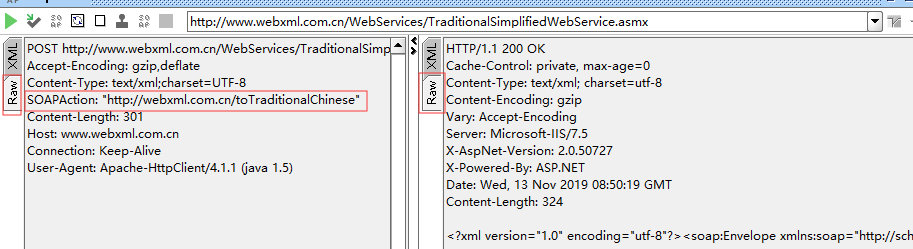
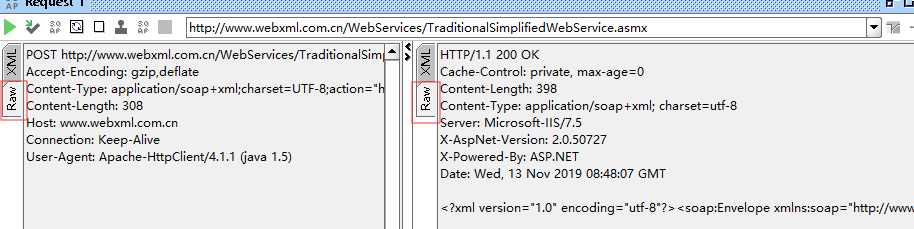
该在线WebService同时实现Soap1.1和Soap1.2,这里分别生成消息。
2.1、Soap1.1
查询xml

查看Raw
2.1、Soap1.2
查看xml

查看Raw
3、本地WebService服务
由于我们用的在线WebService服务端为.NET实现的,而我们客户端是JAVA,如果是RPC方式调用则无法调用;这里创建一个本地的JAX-WS实现的WebService,用于这个系列文章中RPC方式的调用。RPC已经过时,但为了技术的完整性,也记录下。
3.1、接口类
package com.inspur.zsyw.ws;

import javax.jws.WebParam;

import javax.jws.WebService;

@WebService
@SOAPBinding(style = SOAPBinding.Style.RPC)

public interface ITestService {

    String hello(@WebParam(name = "name") String name);

}
3.1、实现类
package com.inspur.zsyw.ws.impl;

import com.inspur.zsyw.ws.ITestService;

@javax.jws.WebService(endpointInterface="com.inspur.zsyw.ws.ITestService", targetNamespace = "http://ws.zsyw.inspur.com/", serviceName = "TestService")

public class TestServiceImpl implements ITestService {

    @Override

    public String hello(String name) {

        return "hello," + name;

    }

}
3.3、本地WSDL
http://10.40.103.48:9006/zsywservice/TestService?wsdl
This XML file does not appear to have any style information associated with it. The document tree is shown below.

<!--

 Published by JAX-WS RI at http://jax-ws.dev.java.net. RI's version is Oracle JAX-WS 2.1.5.

-->

<!--

 Generated by JAX-WS RI at http://jax-ws.dev.java.net. RI's version is Oracle JAX-WS 2.1.5.

-->

<definitions xmlns:soap="http://schemas.xmlsoap.org/wsdl/soap/" xmlns:tns="http://ws.zsyw.inspur.com/" xmlns:xsd="http://www.w3.org/2001/XMLSchema" xmlns="http://schemas.xmlsoap.org/wsdl/" targetNamespace="http://ws.zsyw.inspur.com/" name="TestService">

<types/>

<message name="hello">

<part name="name" type="xsd:string"/>

</message>

<message name="helloResponse">

<part name="return" type="xsd:string"/>

</message>

<portType name="ITestService">

<operation name="hello">

<input message="tns:hello"/>

<output message="tns:helloResponse"/>

</operation>

</portType>

<binding name="TestServiceImplPortBinding" type="tns:ITestService">

<soap:binding transport="http://schemas.xmlsoap.org/soap/http" style="rpc"/>

<operation name="hello">

<soap:operation soapAction=""/>

<input>

<soap:body use="literal" namespace="http://ws.zsyw.inspur.com/"/>

</input>

<output>

<soap:body use="literal" namespace="http://ws.zsyw.inspur.com/"/>

</output>

</operation>

</binding>

<service name="TestService">

<port name="TestServiceImplPort" binding="tns:TestServiceImplPortBinding">

<soap:address location="http://10.40.103.48:9006/zsywservice/TestService"/>

</port>

</service>

</definitions>
4、调用
本文主要介绍一些准备工作,具体调用参见下列文章:
Java调用WebService方法总结(2)--JAX-WS调用WebService
Java调用WebService方法总结(3)--wsimport调用WebService
Java调用WebService方法总结(4)--Axis调用WebService
Java调用WebService方法总结(5)--Axis2调用WebService
Java调用WebService方法总结(6)--XFire调用WebService
Java调用WebService方法总结(7)--CXF调用WebService
Java调用WebService方法总结(8)--soap.jar调用WebService
Java调用WebService方法总结(9,end)--Http方式调用WebService
Java调用WebService方法总结(1)--准备工作的更多相关文章
- Java调用WebService方法总结(9,end)--Http方式调用WebService
Http方式调用WebService,直接发送soap消息到服务端,然后自己解析服务端返回的结果,这种方式比较简单粗暴,也很好用:soap消息可以通过SoapUI来生成,也很方便.文中所使用到的软件版 ...
- Java调用WebService方法总结(8)--soap.jar调用WebService
Apache的soap.jar是一种历史很久远的WebService技术,大概是2001年左右的技术,所需soap.jar可以在http://archive.apache.org/dist/ws/so ...
- Java调用WebService方法总结(7)--CXF调用WebService
CXF = Celtix + XFire,继承了Celtix和XFire两大开源项目的精华,是一个开源的,全功能的,容易使用的WebService框架.文中所使用到的软件版本:Java 1.8.0_1 ...
- Java调用WebService方法总结(6)--XFire调用WebService
XFire是codeHaus组织提供的一个WebService开源框架,目前已被Apache的CXF所取代,已很少有人用了,这里简单记录下其调用WebService使用方法.官网现已不提供下载,可以到 ...
- Java调用WebService方法总结(5)--Axis2调用WebService
Axis2是新一点Axis,基于新的体系结构进行了全新编写,有更强的灵活性并可扩展到新的体系结构.文中demo所使用到的软件版本:Java 1.8.0_191.Axis2 1.7.9. 1.准备 参考 ...
- Java调用WebService方法总结(4)--Axis调用WebService
Axis是比较常用的WebService框架,该项目在2006实现了最终版,后面就没有更新了.文中demo所使用到的软件版本:Java 1.8.0_191.Axis 1.4. 1.准备 参考Java调 ...
- Java调用WebService方法总结(3)--wsimport调用WebService
wsimport是JDK自带的把WSDL转成Java的工具,可以很方便的生成调用WebService的代码.文中所使用到的软件版本:Java 1.8.0_191. 1.准备 参考Java调用WebSe ...
- Java调用WebService方法总结(2)--JAX-WS调用WebService
用JAX-WS(Java API for XML Web Services)调用WebService不需要引入其他框架,都是JDK自带的:文中所使用到的软件版本:Java 1.8.0_191.Dom4 ...
- java调用webservice方法
由于项目的历史原因,webservice服务端是乙方公司开发的,我们自己开发的系统需要去调用乙方公司的webservice接口.前面用了网上提供的一种方法(非生成代理类),怎么也调用不成功(也许是因为 ...
随机推荐
- [C++] const和mutable关键字使用方法
const 修饰的变量为常成员变量,表示此变量不能被修改赋值,并且构造函数中只能用初始化列表的方式初始化,其他初始化方式都是错误的 const 修饰的函数为常成员函数,表示此函数中只能读取成员变量,不 ...
- Vue 打包部署到服务器后,非主页刷新后出现404问题解决
开心把项目部署到服务上,从头到尾点了一遍,发现没有问题,以为就可以大功告成,没想到刷新页面时出现 被破泼了一脸的凉水,更奇怪的事首页没有问题,只有其他页面出现,在调戏了很久的度娘后,才从坑里跳出来,以 ...
- 【软工实践】Beta冲刺(5/5)
链接部分 队名:女生都队 组长博客: 博客链接 作业博客:博客链接 小组内容 恩泽(组长) 过去两天完成了哪些任务 描述 将数据分析以可视化形式展示出来 新增数据分析展示等功能API 服务器后端部署, ...
- 如何开发一个npm包并发布到npm中央仓库
转自: https://liaolongdong.com/2019/01/24/publish-public-npm.html 如何开发一个npm包并发布到npm中央仓库需求背景:平时在项目工作中可能 ...
- LInux_CentosOS中yum安装jdk及配置环境变量
系统版本 [root@localhost ~]# cat /etc/redhat-release CentOS Linux release 7.6.1810 (Core) #安装之前先查看一下有无系统 ...
- [LeetCode] 361. Bomb Enemy 炸敌人
Given a 2D grid, each cell is either a wall 'W', an enemy 'E' or empty '0' (the number zero), return ...
- 警方破获超大DDoS黑产案,20万个僵尸网络运营商被抓
中国警方已镇压并逮捕了一个犯罪集团,该集团经营着一个由200,000多个受感染网站构成的僵尸网络,这些网站被用来发起DDoS攻击. 这是中国当局针对兴旺的本地DDoS租用场景进行的首次重大镇压,最大的 ...
- 【Flume学习之一】Flume简介
环境 apache-flume-1.6.0 Flume是分布式日志收集系统.可以将应用产生的数据存储到任何集中存储器中,比如HDFS,HBase:同类工具:Facebook Scribe,Apache ...
- C# 与 .NET Framework 对应关系
C#各版本新增加功能(系列文章) 本系列文章主要整理并介绍 C# 各版本的新增功能. C# 8.0 C#8.0 于 2019年4月 随 .NET Framework 4.8 与 Visual St ...
- bat启动OpenOffice4
start "" /d "C:\Program Files (x86)\OpenOffice 4\program" "soffice.exe" ...