
[08001] Could not create connection to database server. Attempted reconnect 3 times. Giving up.
使用idea连接数据库的时候,报错为
[08001] Could not create connection to database server. Attempted reconnect 3 times. Giving up.
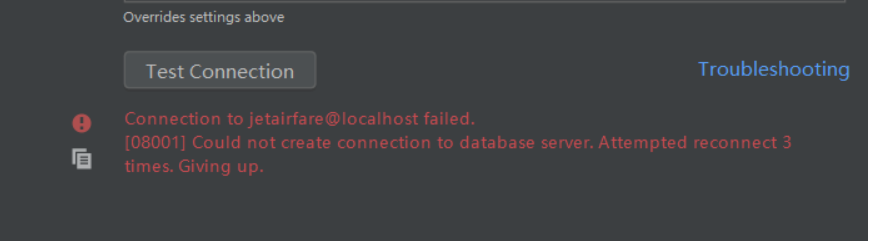
后来查阅资料发现这都是因为安装mysql的时候时区设置的不正确 mysql默认的是美国的时区,而我们中国大陆要比他们迟8小时,采用+8:00格式。使用的数据库是MySQL,在你没有指定MySQL驱动版本的情况下它自动依赖的驱动是8.0.12很高的版本,这是由于数据库和系统时区差异所造成的,在jdbc连接的url后面加上serverTimezone=GMT即可解决问题,如果需要使用gmt+8时区,需要写成GMT%2B8,否则会被解析为空。再一个解决办法就是使用低版本的MySQL jdbc驱动,5.1.28不会存在时区的问题。
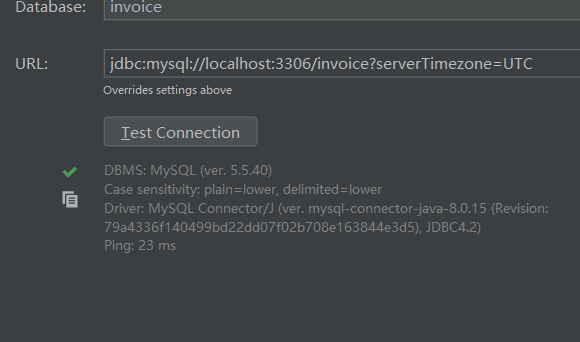
在连接字符串后面加上?serverTimezone=UTC
其中UTC是统一标准世界时间。
完整的连接字符串示例:jdbc:mysql://localhost:3306/test?serverTimezone=UTC
或者还有另一种选择:jdbc:mysql://127.0.0.1:3306/test?useUnicode=true&characterEncoding=UTF-8,这个是解决中文乱码输入问题,当然也可以和上面的一起结合:jdbc:mysql://127.0.0.1:3306/test?useUnicode=true&characterEncoding=UTF-8&serverTimezone=UTC
另一种情况改成:jdbc:mysql://localhost:3306/test?serverTimezone=GMT 之后才行。
jdbc是mysql-connector-java-8.0.11.jar,设置过时区 set time_zone = ‘+8:00’
总结:出现这个问题先看自己系统设置的时区是UTC还是GMT,再找对应的解决办法
[08001] Could not create connection to database server. Attempted reconnect 3 times. Giving up.的更多相关文章
- [08001] Could not create connection to database server. Attempted reconnect 3 times. Giving up IDEA2019的database插件无法链接mysql的解决办法(08001错误)
[08001] Could not create connection to database server. Attempted reconnect 3 times. Giving up. 点击这里 ...
- pycharm2019连接mysql错误08801 ------Connection to django1@localhost failed. [08001] Could not create connection to database server. Attempted reconnect 3 times. Giving up.
Error:Connection to django1@localhost failed. [08001] Could not create connection to database server ...
- pycharm连接mysql是出现Connection to orm02@127.0.0.1 failed. [08001] Could not create connection to database server. Attempted reconnect 3 times. Giving up.
下面这个问题反正我是遇到了,也是难为我好几天,于是我决定发一个教程出来给大家看看!希望能帮助你们 原因: 可能是数据库的版本与本机装的驱动不匹配导致的, 解决方案一: 在 url 后面街上一句 因为笔 ...
- pycharm2019连接mysql错误:08801 ------Connection to django1@localhost failed. [08001] Could not create connection to database server. Attempted reconnect 3 times. Giving up.
- IntelliJ IDEA连接不上数据库 (Connection to testdb@localhost failed. [08001] Could not create connection to database server. Attempted reconnect 3 times. Giving up.)
问题提示为: 原因:MySQL数据库版本为8.0以上,需要在URL加上时区,即加上?serverTimezone=GMT 成功后为:
- 通过dbcp链接池对数据库操作报 Cannot create PoolableConnectionFactory (Could not create connection to database server. Attempted reconnect 3 times. Giving up.)--解决方案
org.springframework.transaction.CannotCreateTransactionException: Could not open JDBC Connection for ...
- Could not create connection to database server. Attempted reconnect 3 times. Giving up.错误
项目是基于springboot框架,昨天从git上pull代码之后也没有具体看更改的地方,结果运行的时候就报错了. java.sql.SQLNonTransientConnectionExceptio ...
- 解决idea中mysql连接失败Could not create connection to database server. Attempted reconnect 3 times. Giving up.
原因是少一个参数,设置时区的. 解决方法: 加一个参数: serverTimezone=UTC jdbc:mysql://localhost:3306/SshProject?useUnicode=t ...
- Could not create connection to database server. Attempted reconnect 3 times. Giving up.
报出这个错误,可能原因: 1.检查MySQL数据库服务是否正常(包含检查服务名和密码),如果不正常,修复至正常为止: 2.maven工程中导入的mysql的jar版本和你的MySQL版本不相符,必须相 ...
随机推荐
- 使用 Consul 作为 Python 微服务的配置中心
使用 Consul 作为 Python 微服务的配置中心 Consul 作为数据中心,提供了 k/v 存储的功能,我们可以利用这个功能为 Python 微服务提供配置中心. Consul 提供了 HT ...
- appium 弹窗处理
测试过程中遇到两类弹窗: 系统权限弹窗具体业务弹窗系统权限弹窗Android系统权限弹窗一般出现在安装 app 后首次打开,如:定位权限.电话权限等.我们可以按顺序执行测试用例,将该类操作放到 Ini ...
- 【剑指offer】面试题 21. 调整数组顺序使奇数位于偶数前面
面试题 21. 调整数组顺序使奇数位于偶数前面
- Markdown Html高级功能 测试用例
插入音频 后台样式代码: #cnblogs_post_body .music { height: 140px; /*padding-bottom: 14.39%;*/ /* 16:9 */ posit ...
- SAS学习笔记57 template的管理
template查询 首先点击SAS Windows左上方查询框,输入“odst”或者“odstemplates”,如下所示: 然后点击enter键,进入查询的template文件夹,如下所示: 这里 ...
- [国家集训队] JZPKIL
题目链接 洛谷:https://www.luogu.org/problemnew/show/P4464 Solution 这题是真的毒....数论大杂烩,窝断断续续写了两天. 众所周知: \[ {\r ...
- HDFS-HA高可用集群搭建
HA高可用集群搭建 1.总体集群规划 在hadoop102.hadoop103和hadoop104三个节点上部署Zookeeper. hadoop102 hadoop103 hadoop104 Nam ...
- NEST search查询
/// <summary> /// GET /megacorp/employee/_search /// </summary> /// <returns></ ...
- 【洛谷 P3975】 [TJOI2015]弦论(后缀自动机)
题目链接 建出后缀自动机. T=0,每个子串算一次,否则每个子串算该子串的\(endpos\)集合大小次. 用\(f[i]\)表示结点\(i\)表示的\(endpos\)集合大小,则\(f[i]\)为 ...
- iOS - Base64转图片&&图片转Base64
记录一个小功能 app传base64位上去,服务器拿到后转图片保存,当app请求拿回用户图片时,服务器再把图片转base64字符串返回给app,app再转图片 // 64base字符串转图片 - (U ...