
wpf 对控件进行截图,获取快照
有时候我们项目,在执行某个操作后,会生成一些数据结果,如报表一类的东西,我们需要对结果进行保存,甚至是生成word文档。
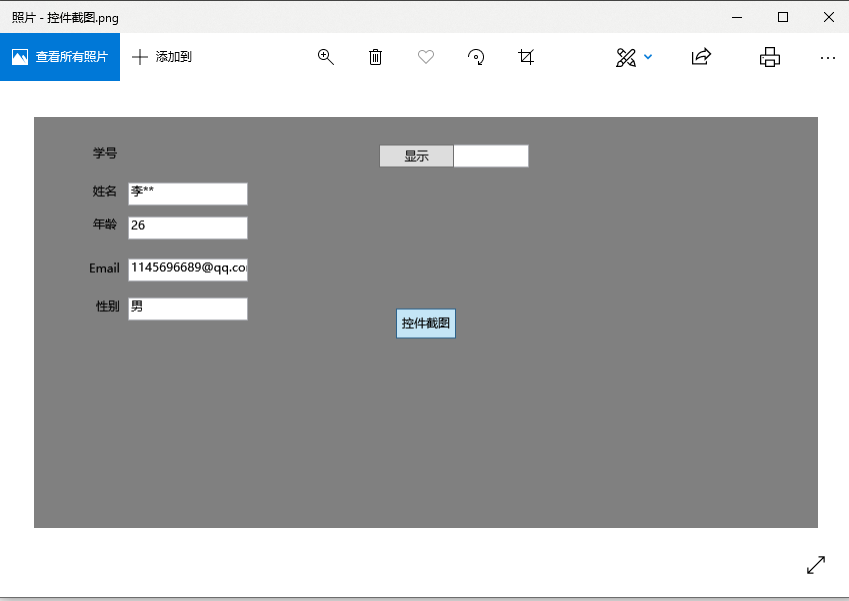
那么首先获取到控件快照就最基本的条件。
生成快照的静态方法类
using System;

using System.Collections.Generic;

using System.Drawing;

using System.Drawing.Imaging;

using System.IO;

using System.Linq;

using System.Text;

using System.Threading.Tasks;

using System.Windows;

using System.Windows.Media.Imaging;

namespace MvvmFuncationApp.Model

{

    public static class ToBitmapTool

    {

        /// <summary>

        /// 截图转换成bitmap

        /// </summary>

        /// <param name="element"></param>

        /// <param name="width">默认控件宽度</param>

        /// <param name="height">默认控件高度</param>

        /// <param name="x">默认0</param>

        /// <param name="y">默认0</param>

        /// <returns></returns>

        public static Bitmap ToBitmap(this FrameworkElement element, int width = , int height = , int x = , int y = )

        {

            if (width == ) width = (int)element.ActualWidth;

            if (height == ) height = (int)element.ActualHeight;

            var rtb = new RenderTargetBitmap(width, height, x, y, System.Windows.Media.PixelFormats.Default);

            rtb.Render(element);

            var bit = BitmapSourceToBitmap(rtb);

            //测试代码

            DirectoryInfo d = new DirectoryInfo(System.IO.Path.Combine(Directory.GetCurrentDirectory(), "Cache"));

            if (!d.Exists) d.Create();

            bit.Save(System.IO.Path.Combine(d.FullName, "控件截图.png"));

            return bit;

        }

        /// <summary>

        /// BitmapSource转Bitmap

        /// </summary>

        /// <param name="source"></param>

        /// <returns></returns>

        public static Bitmap BitmapSourceToBitmap(this BitmapSource source)

        {

            return BitmapSourceToBitmap(source, source.PixelWidth, source.PixelHeight);

        }

        /// <summary>

        /// Convert BitmapSource to Bitmap

        /// </summary>

        /// <param name="source"></param>

        /// <returns></returns>

        public static Bitmap BitmapSourceToBitmap(this BitmapSource source, int width, int height)

        {

            Bitmap bmp = null;

            try

            {

                PixelFormat format = PixelFormat.Format24bppRgb;

                /*set the translate type according to the in param(source)*/

                switch (source.Format.ToString())

                {

                    case "Rgb24":

                    case "Bgr24": format = PixelFormat.Format24bppRgb; break;

                    case "Bgra32": format = PixelFormat.Format32bppPArgb; break;

                    case "Bgr32": format = PixelFormat.Format32bppRgb; break;

                    case "Pbgra32": format = PixelFormat.Format32bppArgb; break;

                }

                bmp = new Bitmap(width, height, format);

                BitmapData data = bmp.LockBits(new System.Drawing.Rectangle(System.Drawing.Point.Empty, bmp.Size),

                    ImageLockMode.WriteOnly,

                    format);

                source.CopyPixels(Int32Rect.Empty, data.Scan0, data.Height * data.Stride, data.Stride);

                bmp.UnlockBits(data);

            }

            catch

            {

                if (bmp != null)

                {

                    bmp.Dispose();

                    bmp = null;

                }

            }

            return bmp;

        }

    }

}
添加按钮事件:
        private void BitMapBtn_Click(object sender, RoutedEventArgs e)

        {
       // StudentInfoGrid =======>控件的名称
        ToBitmapTool.ToBitmap(StudentInfoGrid); }
      }
前台代码:
 <Grid Background="Gray" Name="StudentInfoGrid">

        <Label Content="学号" Height="" HorizontalAlignment="Left" Margin="54,23,0,0" Name="labelStudentId" VerticalAlignment="Top" />

        <TextBox Text="{Binding Student.StudentId}" IsReadOnly="True" Height="" HorizontalAlignment="Right" Margin="0,27,289,0" Name="textBoxStudentId" VerticalAlignment="Top" Width="" />

        <Label Content="姓名" Height="" HorizontalAlignment="Left" Margin="54,61,0,0" Name="labelStudentName" VerticalAlignment="Top" />

        <TextBox Text="{Binding Student.StudentName}" IsReadOnly="True" Height="" HorizontalAlignment="Left" Margin="94,65,0,0" Name="textBoxStudentName" VerticalAlignment="Top" Width="" />

        <Label Content="年龄" Height="" HorizontalAlignment="Left" Margin="54,94,0,0" Name="labelStudentAge" VerticalAlignment="Top" />

        <TextBox Text="{Binding Student.StudentAge}" IsReadOnly="True" Height="" HorizontalAlignment="Left" Margin="94,99,0,0" Name="textBoxStudentAge" VerticalAlignment="Top" Width="" />

        <Label Content="Email" Height="" HorizontalAlignment="Left" Margin="50,138,0,0" Name="labelStudentEmail" VerticalAlignment="Top" />

        <TextBox Text="{Binding Student.StudentEmail}" IsReadOnly="True" Height="" HorizontalAlignment="Left" Margin="94,141,0,0" Name="textBoxStudentEmail" VerticalAlignment="Top" Width="" />

        <Label Content="性别" Height="" HorizontalAlignment="Left" Margin="57,176,0,0" Name="labelStudentSex" VerticalAlignment="Top" />

        <TextBox Text="{Binding Student.StudentSex}" IsReadOnly="True" Height="" HorizontalAlignment="Left" Margin="94,180,0,0" Name="textBoxStudentSex" VerticalAlignment="Top" Width="" />

        <Button Command="{Binding ShowCommand}" Content="显示" Height="" HorizontalAlignment="Left" Margin="345,27,0,0" Name="buttonShow" VerticalAlignment="Top" Width="" />

        <Button Content="控件截图" Name="BitMapBtn" Click="BitMapBtn_Click"

                Width="" Height="" Margin="0,30"></Button>

    </Grid>
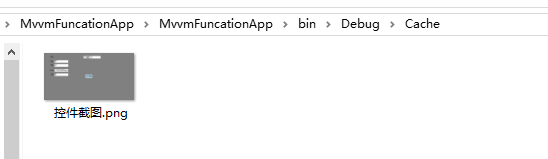
运行程序 ==》进入项目的debug目录下
wpf 对控件进行截图,获取快照的更多相关文章
- WPF默认控件模板的获取和资源词典的使用
一.获取默认的控件模板 WPF修改控件模板是修改外观最方便的方式,但是会出现不知道原来的控件的模板长什么样,或者想用来参考的,下面分享一下获取某控件默认控件模板的方式(已Button为例): 1.创建 ...
- WPF 对控件进行截图且不丢失范围(转载)
原文:Taking WPF “Screenshots” I was recently working on a Surface project at Microsoft (that will be s ...
- WPF常用控件应用demo
WPF常用控件应用demo 一.Demo 1.Demo截图如下: 2.demo实现过程 总体布局:因放大缩小窗体,控件很根据空间是否足够改变布局,故用WrapPanel布局. <ScrollVi ...
- C# WPF开源控件库:MahApps.Metro
其实站长很久之前就知道这个开源WPF控件库了,只是一直欣赏不了这种风格,但也star了该项目.每次浏览该仓库时,发现star越来越多,也看到很多网友对它的褒奖,所以今天就向大家推荐这款WPF控件库. ...
- WPF Image控件中的ImageSource与Bitmap的互相转换
原文:WPF Image控件中的ImageSource与Bitmap的互相转换 1.从bitmap转换成ImageSource [DllImport("gdi32.dll", ...
- 正则表达式——WPF输入控件TextBox 限定输入特定字符
概念: 正则表达式是对字符串操作的一种逻辑公式, 就是用事先定义好的一些特定字符.及这些特定字符的组合,组成一个“规则字符串”, 这个“规则字符串”用来表达对字符串的一种过滤逻辑. 目的: 给定一个正 ...
- WPF DataGrid 控件的运用
WPF DataGrid 控件的运用 运行环境:Window7 64bit,.NetFramework4.61,C# 6.0: 编者:乌龙哈里 2017-02-23 参考: King Cobra 博客 ...
- WPF布局控件常用属性介绍
WPF布局控件常用属性介绍 其它 | 作者:慧都控件网 | 2011-04-06 13:41:57| 阅读 0次 有用(0) 评论(0) 概述:WPF布局控件都是派生自System.Windows ...
- C# WPF 歌词控件(支持逐字定位描色效果)
原文:C# WPF 歌词控件(支持逐字定位描色效果) 之前做了一个模仿网易云歌词的控件,实现了加载网易云歌词并能随音乐播放进度定位歌词.今天呢将在这个控件的基础上增加逐字定位描色功能,如下图效果(QQ ...
随机推荐
- 第09组 团队Git现场编程实战
组长博客链接 1.团队分工 团队成员 分工明细 王耀鑫 博客撰写,数据处理 陈志荣 前端界面,前端功能实现 陈超颖 前端界面,前端功能实现 沈梓耀 前端界面,前端功能实现 林明镇 数据处理 滕佳 前端 ...
- cnetos6.5安装Varnish
安装依赖包: tar -zxvf docutils-0.13.1.tar.gz python setup.py install unzip pcre2-10.23.zip ./configure -- ...
- python 玩爬虫安装了一大堆第三方库
之前就听说过爬虫,感觉很复杂的样子,但是看到python代码很简短.由于本机已经安装了python2.7 所以就拿来py 文件跑一下想看看效果. 结果各种代码错误.然后根据每个错误去下载对应的依赖项. ...
- linux 命令 文件数量统计
# 查看当前目录下的文件数量(不包含子目录中的文件) ls -l|grep "^-"| wc -l # 查看当前目录下的文件数量(包含子目录中的文件) 注意:R,代表子目录 ls ...
- RSA前台加密后台解密
RSA解密时BadPaddingException java rsa 解密报:javax.crypto.BadPaddingException: Decryption error Java安全架构__ ...
- PostgreSQL中的The Oversized-Attribute Storage Technique(TOAST:超大属性存储技术)
PostgreSQL使用固定的页面大小(通常为8kB),并且不允许元组跨越多个页面.因此,不可能直接存储非常大的字段值.为了克服这种限制,将大字段值压缩和/或分解成多个物理行.这对用户来说是透明的,对 ...
- android -------- LiveDataBus的使用
LiveData是17年GoogleIO大会上提出来的一个新技术.相对于通信总线类型的框架EventBus和RxBus来说,它更简单,更简洁.更解耦. LiveEventBus是一款Android消息 ...
- XCode教程之 如何在苹果开发者平台添加设备UDID
XCode教程之 如何在苹果开发者平台添加设备UDID.在Xcode开发中,如何在苹果开发者平台添加新的手机设备UDID,进行测试,具体如下 工具/原料 Apple Developer 方法/步骤 1 ...
- nmon报告分析
nmon结果说明及分析 2018年09月29日 16:12:10 Jio_2018 阅读数 2334 使用nmon analyser生成的结果文件包含了N多个sheet页,下面只是结合个人经验对几 ...
- Laya的对象唯一标识
Egret中是obj.hashcode Laya中是obj["$_GID"]