
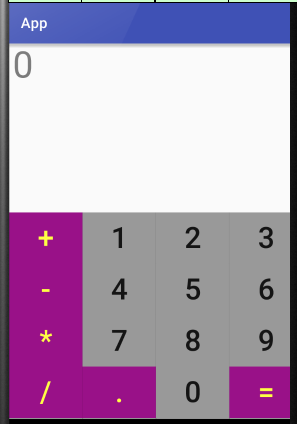
Android 网格布局 计算器
 <GridLayout xmlns:android="http://schemas.android.com/apk/res/android"

     xmlns:tools="http://schemas.android.com/tools"

     android:id="@+id/GridLayout1"

     android:layout_width="wrap_content"

     android:layout_height="wrap_content"

     android:rowCount="6"

     android:columnCount="4"

     android:orientation="horizontal">

     <TextView

         android:layout_width="match_parent"

         android:layout_height="230dp"

         android:layout_columnSpan="4"

         android:text="0"

         android:textSize="50sp"

         android:layout_marginLeft="5dp"

         android:layout_marginRight="5dp"

         />

     <Button

         android:layout_width="100dp"

         android:layout_height="70dp"

         android:text="+"

         android:textSize="40dp"

         android:background="#918"

         android:textColor="#FF4"

         />

     <Button

         android:layout_width="100dp"

         android:layout_height="70dp"

         android:text="1"

         android:textSize="40dp"

         android:background="#999"

         />

     <Button

         android:layout_width="100dp"

         android:layout_height="70dp"

         android:text="2"

         android:textSize="40dp"

         android:background="#999"

         />

     <Button

         android:layout_width="100dp"

         android:layout_height="70dp"

         android:text="3"

         android:textSize="40dp"

         android:background="#999"

         />

     <Button

         android:layout_width="100dp"

         android:layout_height="70dp"

         android:text="-"

         android:textSize="40dp"

         android:background="#918"

         android:textColor="#FF4"

         />

     <Button

         android:layout_width="100dp"

         android:layout_height="70dp"

         android:text="4"

         android:textSize="40dp"

         android:background="#999"

         />

     <Button

         android:layout_width="100dp"

         android:layout_height="70dp"

         android:text="5"

         android:textSize="40dp"

         android:background="#999"

         />

     <Button

         android:layout_width="100dp"

         android:layout_height="70dp"

         android:text="6"

         android:textSize="40dp"

         android:background="#999"

         />

     <Button

         android:layout_width="100dp"

         android:layout_height="70dp"

         android:text="*"

         android:textSize="40dp"

         android:background="#918"

         android:textColor="#FF4"

         />

     <Button

         android:layout_width="100dp"

         android:layout_height="70dp"

         android:text="7"

         android:textSize="40dp"

         android:background="#999"

         />

     <Button

         android:layout_width="100dp"

         android:layout_height="70dp"

         android:text="8"

         android:textSize="40dp"

         android:background="#999"

         />

     <Button

         android:layout_width="100dp"

         android:layout_height="70dp"

         android:text="9"

         android:textSize="40dp"

         android:background="#999"

         />

     <Button

         android:layout_width="100dp"

         android:layout_height="70dp"

         android:text="/"

         android:textSize="40dp"

         android:background="#918"

         android:textColor="#FF4"

         />

     <Button

         android:layout_width="100dp"

         android:layout_height="70dp"

         android:text="."

         android:textSize="40dp"

         android:background="#918"

         android:textColor="#FF4"

         />

     <Button

         android:layout_width="100dp"

         android:layout_height="70dp"

         android:text="0"

         android:textSize="40dp"

         android:background="#999"

         />

     <Button

         android:layout_width="100dp"

         android:layout_height="70dp"

         android:text="="

         android:textSize="40dp"

         android:background="#918"

         android:textColor="#FF4"

         />

 </GridLayout>
Android 网格布局 计算器的更多相关文章
- Android——网格布局仿计算器
代码如下: <?xml version="1.0" encoding="utf-8"?> <GridLayout xmlns:android= ...
- Android 网格布局短信发送界面
<?xml version="1.0" encoding="utf-8"?> <GridLayout xmlns:android=" ...
- Android 线性布局 计算器
<?xml version="1.0" encoding="utf-8"?> <LinearLayout xmlns:android=&quo ...
- android的布局-----GridLayout(网格布局)
学习导图 (一)简介 网格布局由GridLayout所代表,在android4.0之后新增加的布局管理器,因此需要android4.0之后的版本中使用,如果在更早的平台使用该布局管理器,则需要导入相应 ...
- Android中帧布局-FrameLayout和网格布局-GridLayout
帧布局-FrameLayout 一.概念 帧布局中,容器为每个加入其中的空间创建一个空白的区域(成为一帧).每个空间占据一帧,这些帧会按gravity属性自动对齐. 帧布局的效果是将其中的所有空间叠加 ...
- android——学习:网格布局——GridLayout
Android一开始就提供了几种布局控件,如线性布局LinearLayout.相对布局RelativeLayout和表格布局TableLayout等,但在很多情况下,这些布局控件是不能满足要求的,因此 ...
- Android布局_网格布局GirdLayout
自Android4.0版本后新增的GirdLayout网格布局(API 14) <?xml version="1.0" encoding="utf-8"? ...
- Android精通:TableLayout布局,GridLayout网格布局,FrameLayout帧布局,AbsoluteLayout绝对布局,RelativeLayout相对布局
在Android中提供了几个常用布局: LinearLayout线性布局 RelativeLayout相对布局 FrameLayout帧布局 AbsoluteLayout绝对布局 TableLayou ...
- Android开发---网格布局案例
Android开发---网格布局案例 效果图: 1.MainActivity.java package com.example.android_activity; import android.ap ...
随机推荐
- 在linux下的firefox中安装flashplayer
将 libflashplayer.so 复制进 ~/.mozilla/plugins/ 若目标目录不存在,请自行创建
- NOIP200205均分纸牌
均分纸牌 描述 有 N 堆纸牌,编号分别为 1,2,…, N.每堆上有若干张 ...
- SQL Server 索引视图 聚簇索引
创建示例: 朋友的网站速度慢,让我帮忙看下,他用的SQL Server里面 有一个文章表里面有30多万条记录 还有一个用户表里面也差不多17万记录 偏偏当初设计的时候没有冗余字段 很多帖子信息需要JO ...
- Android中ListView放入PopupWindow产生问题解决
今天在做项目时候发现将ListView放入PopupWindow产生问题,ListView放入PopupWindow后 对PopupWindow设置了setFocusable(true)这时候其他的控 ...
- ios7下不能录音问题解决
在ios6上运行非常正常的AVAudioRecoder组件,而跑到ios7上就不能工作了.通过google搜索在stackoverflow上的解决方法.http://stackoverflow.com ...
- mysql中时间类型datetime,timestamp与int的区别
在mysql中存储时间,我们可以用datetime 格式,timestamp格式,也可以用int格式.那么我们设计的时候该如何考虑呢? 首先,我觉得应该明白这几个格式究竟是如何的,然后看看他们的区别, ...
- 为什么你要拒绝我 ——苹果AppStore被拒理由大全
简而言之 截图中出现了Android 截图中出现了hack苹果的内容 评论中出现了"屌丝"等不雅词汇 App中包含谈论Android系统的内容 你修改了状态栏,不行 只有第三方登录 ...
- servlet 笔记
Servlet的作用是接收浏览器传给服务端的请求(request),并将服务端处理完的响应(response)返回给用户的浏览器,浏览器和服务端之间通过http协议进行沟通,其过程是浏览器根据用户的选 ...
- postgresql之distinct用法
1. 去重:关键字distinct去重功能 在其他数据库(oracle,mysql)是存在:当然postgresql也有这个功能 [postgres@sdserver40_210 ~]$ psql ...
- Python 中translate()与replace()区别
translate函数和replace函数一样,用于替换字符串中的某个部分,但是和replace不同,translate只处理单个字符,而且可以同时进行多个替换.在使用translate函数转换之前, ...