
How to debug .NET Core RC2 app with Visual Studio Code on Windows?
Simone Chiaretta (http://codeclimber.net.nz/archive/2016/05/20/How-to-debug-NET-Core-RC2-app-with-Visual-Studio.aspx)
So, you installed .NET Core RC2 , you followed the getting started tutorial and you got your “Hello World!” printed on your command prompt just by using the CLI. Then you went the next step and you tried to use Visual Studio Code and the C# extension to edit the application outside of Visual Studio. And finally you want to try and debug and set a breakpoint inside the application, but you encountered some problems and nothing worked. Here is how to make it work.
Specify the launch configuration
Visual Studio Code needs to know how to launch your application, and this is specified in alaunch.json file inside the .vscode folder. From the debug window, click the “gear” icon and Code will create it for you: just choose the right environment “.NET Core”.
Then you must specify the path to your executable in the program property. In the standard hwapp sample app, replace
1: "program": "${workspaceRoot}/bin/Debug/<target-framework>/<project-name.dll>",
with
1: "program": "${workspaceRoot}/bin/Debug/netcoreapp1.0/hwapp.dll",
There is much more you can specify in the launch.json file. To see all the options have a look at the official doc: Debugging in Visual Studio Code.
Specify the task runner
If you try to debug now you’ll have another warning: “No task runner configured”.This is because for launching, VS Code has to build the project, and this is done via a task. But no worries, just click the “Configure Task Runner” button in the info box, choose which task runner you want to use, in this case “.NET Core”, and the tasks.json file will be created for you. More info on task runners in VS Code can be found on the offical documentation: Tasks in Visual Studio Code.
Running and debugging
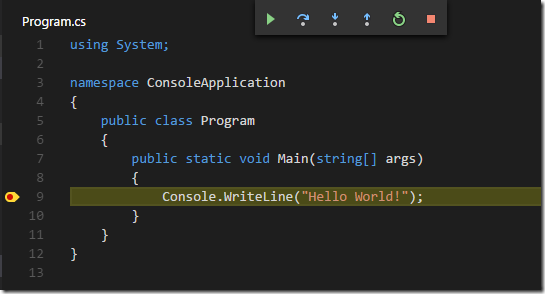
Now you can click the “Start Debugging” button or F5 and the application runs. Cool… Now you set a breakpoint and the executions stops where you set it, doesn’t it? Well… if you are on Mac or Linux it does. But it doesn’t stop if you are on Windows and the Debug Console says something like:
1: WARNING: Could not load symbols for 'hwapp.dll'.
2: '...\hwapp\bin\Debug\netcoreapp1.0\hwapp.pdb' is a Windows PDB.
3: These are not supported by the cross-platform .NET Core debugger.
Introducing Portable PDBs
In order to be able to debug cross-platform, .NET Core has now a “portable PDB” format, and the newly introduced .NET Core debugger for Visual Studio Code only supports this format. Unfortunately by default, on Windows, the .NET Core build generates standard “Windows PDBs”, which are not supported. But the fix is easy, you just have to tell the compiler to generate portable PDBs.
This is done by specifying the debugType to be portable.
1: {
2: "buildOptions": {
3: "debugType": "portable"
4: },
5: ...
6: }
And voila! Breakpoints are hit!
How to debug .NET Core RC2 app with Visual Studio Code on Windows?的更多相关文章
- Create an ASP.NET Core web app in Visual Studio Code
https://www.microsoft.com/net/core#windowscmd https://download.microsoft.com/download/B/9/F/B9F1AF57 ...
- 006.Adding a controller to a ASP.NET Core MVC app with Visual Studio -- 【在asp.net core mvc 中添加一个控制器】
Adding a controller to a ASP.NET Core MVC app with Visual Studio 在asp.net core mvc 中添加一个控制器 2017-2-2 ...
- Create A .NET Core Development Environment Using Visual Studio Code
https://www.c-sharpcorner.com/article/create-a-net-core-development-environment-using-visual-studio- ...
- 使用Visual Studio Code开发.NET Core看这篇就够了
作者:依乐祝 原文地址:https://www.cnblogs.com/yilezhu/p/9926078.html 在本文中,我将带着大家一步一步的通过图文的形式来演示如何在Visual Studi ...
- docker4dotnet #3 在macOS上使用Visual Studio Code和Docker开发asp.net core和mysql应用
.net猿遇到了小鲸鱼,觉得越来越兴奋.本来.net猿只是在透过家里那田子窗看外面的世界,但是看着海峡对岸的苹果园越来越茂盛,实在不想再去做一只宅猿了.于是,.net猿决定搭上小鲸鱼的渡轮到苹果园去看 ...
- 使用Visual Studio Code开发Asp.Net Core WebApi学习笔记(八)-- 多环境开发
本篇将演示Asp.Net Core如何在多环境下进行开发适配. 在一个正规的开发流程里,软件开发部署将要经过三个阶段:开发.测试.上线,对应了三个环境:开发.测试.生产.在不同的环境里,需要编写不同的 ...
- Visual Studio Code和Docker开发asp.net core和mysql应用
Visual Studio Code和Docker开发asp.net core和mysql应用 .net猿遇到了小鲸鱼,觉得越来越兴奋.本来.net猿只是在透过家里那田子窗看外面的世界,但是看着海峡对 ...
- 【实验手册】使用Visual Studio Code 开发.NET Core应用程序
.NET Core with Visual Studio Code 目录 概述... 2 先决条件... 2 练习1: 安装和配置.NET Core以及Visual Studio Code 扩展... ...
- 使用Visual Studio Code开发Asp.Net Core WebApi学习笔记(十)-- 发布(Windows)
本篇将在这个系列演示的例子上继续记录Asp.Net Core在Windows上发布的过程. Asp.Net Core在Windows上可以采用两种运行方式.一种是自托管运行,另一种是发布到IIS托管运 ...
随机推荐
- 水印第三版 ~ 变态水印(这次用Magick.NET来实现,附需求分析和源码)
技能 汇总:http://www.cnblogs.com/dunitian/p/4822808.html#skill 以前的水印,只是简单走起,用的是原生态的方法.现在各种变态水印,于是就不再用原生态 ...
- Android数据加密之异或加密算法
前言: 这几天被公司临时拉到去做Android IM即时通信协议实现,大致看了下他们定的协议,由于之前没有参与,据说因服务器性能限制,只达成非明文传递,具体原因我不太清楚,不过这里用的加密方式是采用异 ...
- SQL Server-聚焦NOT IN VS NOT EXISTS VS LEFT JOIN...IS NULL性能分析(十八)
前言 本节我们来综合比较NOT IN VS NOT EXISTS VS LEFT JOIN...IS NULL的性能,简短的内容,深入的理解,Always to review the basics. ...
- Xamarin与Visual stuido2015离线安装包分享
最近看见大伙留言才知道国内安装Xamarin开发原来这么艰辛啊! 第一:网速不快 第二:Android SDK下载受限 等等... 鉴于这些原因,特写下这篇文章以及分享打包好的离线包以帮助大家尽快体验 ...
- ASP.NET中画图形验证码
context.Response.ContentType = "image/jpeg"; //生成随机的中文验证码 string yzm = "人口手大小多少上中下男女天 ...
- java中的移位运算符:<<,>>,>>>总结
java中有三种移位运算符 << : 左移运算符,num << 1,相当于num乘以2 >> : 右移运算符,num >& ...
- 【腾讯Bugly干货分享】微信终端跨平台组件 Mars 系列 - 我们如约而至
导语 昨天上午,微信在广州举办了微信公开课Pro.于是,精神哥这两天的朋友圈被小龙的"八不做"刷屏了.小伙伴们可能不知道,下午,微信公开课专门开设了技术分论坛.在分论坛中,微信开源 ...
- BIO\NIO\AIO记录
IO操作可以分为3类:同步阻塞(BIO).同步非阻塞(NIO).异步(AIO). 同步阻塞(BIO):在此种方式下,用户线程发起一个IO操作以后,必须等待IO操作的完成,只有当真正完成了IO操作以后, ...
- MySQL8:连接查询
连接查询 连接是关系型数据库模型的主要特点. 连接查询是关系型数据库中最主要的查询,主要包括内连接.外连接等通过联结运算符可以实现多个表查询. 在关系型数据库管理系统中,表建立时各种数据之间的关系不必 ...
- 任意多边形切割/裁剪(附C#代码实现)
本实现主要参考了发表于2003年<软件学报>的<一个有效的多边形裁剪算法>(刘勇奎,高云,黄有群)这篇论文,所使用的理论与算法大都基于本文,对论文中部分阐述进行了详细解释,并提 ...