
OpenCASCADE BRepTools
OpenCASCADE BRepTools
Abstract. OpenCASCADE BRepTools provides utilities for BRep data structure. OuterWire method to find the outer wire of a face. Dump method to dump a BRep object. It also can be used as the data exchange for OpenCASCADE native shapes.
Key Words. OpenCASCADE, BRepTools, BRep, Topology
1. Introduction
OpenCASCADE 提供了一个类BRepTools,其中有许多static函数,主要用来对BRep表示的拓朴形状的数据进行读写,也提供了查找一个面中外环(Outer Wire)的函数。因为OpenCASCADE中的边界表示法BRep的数据结构如下图1.1所示:
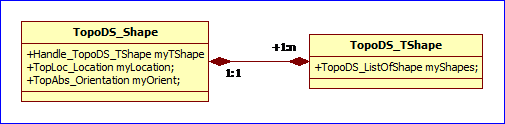
Figure 1.1 BRep Data Structure of OpenCASCADE
因为OpenCASCADE中拓朴结构采用了包含关系,当需要将TopoDS_Shape数据保存到文件时,如何保持TopoDS_Shape中的关系,以便于从文件读取这些数据时,可以重构出TopoDS_Shape中的各种关系?
参 考opennurbs中的BRep表示时数据的存储方式,可知直接在BRep中保存拓朴及几何数据的索引,这样对数据的存储及读取时重构拓朴结构还是很方 便的。而在OpenCASCADE中拓朴数据是以Handle来保存的,且为组合关系,即一个父结构中有一个列表 (TopoDS_ListOfShape)给包含了子结构数据。对于没有索引的OpenCASCADE的拓朴结构,如何进行读写操作呢?
本文结合类BRepTools中的函数,对OpenCASCADE中TopoDS_Shape数据的保存和读取功能的代码进行分析,从而对ModelingData中的BRep数据做进一步的理解。
2.Topology Shape Serialization
OpenCASCADE的类BRepTools中提供了如下函数,可以TopoDS_Shape中的数据进行导入导出:
v BRepTools::Dump();
v BRepTools::Read();
v BRepTools::Write();
这 几个函数比较常用,因为可以方便地将TopoDS_Shape导出,或导入到OpenCASCADE的Draw Test Harness中,来对程序一些算法进行验证。对于使用了组合关系的TopoDS_Shape如何确保数据的保存及读取后,能够维持这些关系?带着这个问 题去看BRep文件读写的功能,应该更为清晰。
还是看看代码,如下所示为输出TopoDS_Shape的函数,在程序Debug时比较常用:
//=======================================================================

//function : Dump

//purpose  :

//=======================================================================

void  BRepTools::Dump(const TopoDS_Shape& Sh, Standard_OStream& S)

{

  BRepTools_ShapeSet SS;

  SS.Add(Sh);

  SS.Dump(Sh,S);

  SS.Dump(S);

}
其中使用了类BRepTools_ShapeSet,这里的Set的意思我理解为集合的意思,其Add函数如下:
//=======================================================================

//function : Add

//purpose  :

//=======================================================================

Standard_Integer  TopTools_ShapeSet::Add(const TopoDS_Shape& S)

{

  if (S.IsNull()) return ;

  myLocations.Add(S.Location());

  TopoDS_Shape S2 = S;

  S2.Location(TopLoc_Location());

  Standard_Integer index = myShapes.FindIndex(S2);

  if (index == ) {

    AddGeometry(S2);

    for (TopoDS_Iterator its(S2,Standard_False,Standard_False);

         its.More(); its.Next())

      Add(its.Value());

    index = myShapes.Add(S2);

  }

  return index;

}
这是一个递归函数,通过AddGeometry函数,将TopoDS_Shape中的几何信息都保存到相应的集合Set中,Set中使用了Map,即给每个几何信息一个唯一的编号与之对应。
//=======================================================================

//function : AddGeometry

//purpose  :

//=======================================================================

void BRepTools_ShapeSet::AddGeometry(const TopoDS_Shape& S)

{

  // Add the geometry

  if (S.ShapeType() == TopAbs_VERTEX) {

    Handle(BRep_TVertex) TV = Handle(BRep_TVertex)::DownCast(S.TShape());

    BRep_ListIteratorOfListOfPointRepresentation itrp(TV->Points());

    while (itrp.More()) {

      const Handle(BRep_PointRepresentation)& PR = itrp.Value();

      if (PR->IsPointOnCurve()) {

        myCurves.Add(PR->Curve());

      }

      else if (PR->IsPointOnCurveOnSurface()) {

        myCurves2d.Add(PR->PCurve());

        mySurfaces.Add(PR->Surface());

      }

      else if (PR->IsPointOnSurface()) {

        mySurfaces.Add(PR->Surface());

      }

      ChangeLocations().Add(PR->Location());

      itrp.Next();

    }

  }

  else if (S.ShapeType() == TopAbs_EDGE) {

    // Add the curve geometry

    Handle(BRep_TEdge) TE = Handle(BRep_TEdge)::DownCast(S.TShape());

    BRep_ListIteratorOfListOfCurveRepresentation itrc(TE->Curves());

    while (itrc.More()) {

      const Handle(BRep_CurveRepresentation)& CR = itrc.Value();

      if (CR->IsCurve3D()) {

        if (!CR->Curve3D().IsNull()) {

          myCurves.Add(CR->Curve3D());

          ChangeLocations().Add(CR->Location());

        }

      }

      else if (CR->IsCurveOnSurface()) {

        mySurfaces.Add(CR->Surface());

        myCurves2d.Add(CR->PCurve());

        ChangeLocations().Add(CR->Location());

        if (CR->IsCurveOnClosedSurface())

          myCurves2d.Add(CR->PCurve2());

      }

      else if (CR->IsRegularity()) {

        mySurfaces.Add(CR->Surface());

        ChangeLocations().Add(CR->Location());

        mySurfaces.Add(CR->Surface2());

        ChangeLocations().Add(CR->Location2());

      }

      else if (myWithTriangles) { // for XML Persistence

        if (CR->IsPolygon3D()) {

          if (!CR->Polygon3D().IsNull()) {

            myPolygons3D.Add(CR->Polygon3D());

            ChangeLocations().Add(CR->Location());

          }

        }

        else if (CR->IsPolygonOnTriangulation()) {

          myTriangulations.Add(CR->Triangulation());

          myNodes.Add(CR->PolygonOnTriangulation());

          ChangeLocations().Add(CR->Location());

          if (CR->IsPolygonOnClosedTriangulation())

            myNodes.Add(CR->PolygonOnTriangulation2());

        }

        else if (CR->IsPolygonOnSurface()) {

          mySurfaces.Add(CR->Surface());

          myPolygons2D.Add(CR->Polygon());

          ChangeLocations().Add(CR->Location());

          if (CR->IsPolygonOnClosedSurface())

          myPolygons2D.Add(CR->Polygon2());

        }

      }

      itrc.Next();

    }

  }

  else if (S.ShapeType() == TopAbs_FACE) {

    // Add the surface geometry

    Handle(BRep_TFace) TF = Handle(BRep_TFace)::DownCast(S.TShape());

    if (!TF->Surface().IsNull())  mySurfaces.Add(TF->Surface());

    if (myWithTriangles) { // for XML Persistence

      Handle(Poly_Triangulation) Tr = TF->Triangulation();

      if (!Tr.IsNull()) myTriangulations.Add(Tr);

    }

    ChangeLocations().Add(TF->Location());

  }

}
由上述代码可知,Edge中的几何信息较多,Face中的几何信息最少,只是几何曲面或其用于显示的网格数据。在将拓朴数据输出时,拓朴面、边及顶点中包含的几何信息都是前面几何数据的编号,即相当于索引号的形式输出,代码如下所示:
//=======================================================================

//function : WriteGeometry

//purpose  :

//=======================================================================

void  BRepTools_ShapeSet::WriteGeometry(const TopoDS_Shape& S,

                                        Standard_OStream&   OS)const

{

  // Write the geometry

  if (S.ShapeType() == TopAbs_VERTEX) {

    // Write the point geometry

    TopoDS_Vertex V = TopoDS::Vertex(S);

    OS << BRep_Tool::Tolerance(V) << "\n";

    gp_Pnt p = BRep_Tool::Pnt(V);

    OS<<p.X()<<" "<<p.Y()<<" "<<p.Z()<<"\n";

    Handle(BRep_TVertex) TV = Handle(BRep_TVertex)::DownCast(S.TShape());

    BRep_ListIteratorOfListOfPointRepresentation itrp(TV->Points());

    while (itrp.More()) {

      const Handle(BRep_PointRepresentation)& PR = itrp.Value();

      OS << PR->Parameter();

      if (PR->IsPointOnCurve()) {

        OS << " 1 " << myCurves.Index(PR->Curve());

      }

      else if (PR->IsPointOnCurveOnSurface()) {

        OS << " 2 " <<  myCurves2d.Index(PR->PCurve());

        OS << " " << mySurfaces.Index(PR->Surface());

      }

      else if (PR->IsPointOnSurface()) {

        OS << " 3 " << PR->Parameter2() << " ";

        OS << mySurfaces.Index(PR->Surface());

      }

      OS << " " << Locations().Index(PR->Location());

      OS << "\n";

      itrp.Next();

    }

    OS << "0 0\n"; // end representations

  }

  else if (S.ShapeType() == TopAbs_EDGE) {

    // Write the curve geometry

    Handle(BRep_TEdge) TE = Handle(BRep_TEdge)::DownCast(S.TShape());

    OS << " " << TE->Tolerance() << " ";

    OS << ((TE->SameParameter()) ?  : ) << " ";

    OS << ((TE->SameRange())     ?  : ) << " ";

    OS << ((TE->Degenerated())   ?  : ) << "\n";

    Standard_Real first, last;

    BRep_ListIteratorOfListOfCurveRepresentation itrc = TE->Curves();

    while (itrc.More()) {

      const Handle(BRep_CurveRepresentation)& CR = itrc.Value();

      if (CR->IsCurve3D()) {

        if (!CR->Curve3D().IsNull()) {

          Handle(BRep_GCurve) GC = Handle(BRep_GCurve)::DownCast(itrc.Value());

          GC->Range(first, last);

          OS << "1 ";                               // -1- Curve 3D

          OS << " "<<myCurves.Index(CR->Curve3D());

          OS << " "<<Locations().Index(CR->Location());

          OS << " "<<first<<" "<<last;

          OS << "\n";

        }

      }

      else if (CR->IsCurveOnSurface()) {

        Handle(BRep_GCurve) GC = Handle(BRep_GCurve)::DownCast(itrc.Value());

        GC->Range(first, last);

        if (!CR->IsCurveOnClosedSurface())

          OS << "2 ";                             // -2- Curve on surf

        else

          OS << "3 ";                             // -3- Curve on closed surf

        OS <<" "<<myCurves2d.Index(CR->PCurve());

        if (CR->IsCurveOnClosedSurface()) {

          OS <<" " << myCurves2d.Index(CR->PCurve2());

          PrintRegularity(CR->Continuity(),OS);

        }

        OS << " " << mySurfaces.Index(CR->Surface());

        OS << " " << Locations().Index(CR->Location());

        OS << " "<<first<<" "<<last;

        OS << "\n";

        // Write UV Points // for XML Persistence higher performance

        if (FormatNb() == )

        {

          gp_Pnt2d Pf,Pl;

          if (CR->IsCurveOnClosedSurface()) {

            Handle(BRep_CurveOnClosedSurface) COCS =

              Handle(BRep_CurveOnClosedSurface)::DownCast(CR);

            COCS->UVPoints2(Pf,Pl);

          }

          else {

            Handle(BRep_CurveOnSurface) COS =

              Handle(BRep_CurveOnSurface)::DownCast(CR);

            COS->UVPoints(Pf,Pl);

          }

          OS << Pf.X() << " " << Pf.Y() << " " << Pl.X() << " " << Pl.Y() << "\n";

        }

      }

      else if (CR->IsRegularity()) {

        OS << "4 ";                              // -4- Regularity

        PrintRegularity(CR->Continuity(),OS);

        OS << " "<<mySurfaces.Index(CR->Surface());

        OS << " "<<Locations().Index(CR->Location());

        OS << " "<<mySurfaces.Index(CR->Surface2());

        OS << " "<<Locations().Index(CR->Location2());

        OS << "\n";

      }

      else if (myWithTriangles) { // for XML Persistence

        if (CR->IsPolygon3D()) {

          Handle(BRep_Polygon3D) GC = Handle(BRep_Polygon3D)::DownCast(itrc.Value());

          if (!GC->Polygon3D().IsNull()) {

            OS << "5 ";                            // -5- Polygon3D

            OS << " "<<myPolygons3D.FindIndex(CR->Polygon3D());

            OS << " "<<Locations().Index(CR->Location());

            OS << "\n";

          }

        }

        else if (CR->IsPolygonOnTriangulation()) {

          Handle(BRep_PolygonOnTriangulation) PT =

            Handle(BRep_PolygonOnTriangulation)::DownCast(itrc.Value());

          if (!CR->IsPolygonOnClosedTriangulation())

            OS << "6 ";                            // -6- Polygon on triangulation

          else

            OS << "7 ";                            // -7- Polygon on closed triangulation

          OS << " " <<  myNodes.FindIndex(PT->PolygonOnTriangulation());

          if (CR->IsPolygonOnClosedTriangulation()) {

            OS << " " << myNodes.FindIndex(PT->PolygonOnTriangulation2());

          }

          OS << " " << myTriangulations.FindIndex(PT->Triangulation());

          OS << " "<<Locations().Index(CR->Location());

          OS << "\n";

        }

      }

      itrc.Next();

    }

    OS << "0\n"; // end of the list of representations

  }

  else if (S.ShapeType() == TopAbs_FACE) {

    Handle(BRep_TFace) TF = Handle(BRep_TFace)::DownCast(S.TShape());

    const TopoDS_Face& F = TopoDS::Face(S);

    if (!(TF->Surface()).IsNull()) {

      OS << ((BRep_Tool::NaturalRestriction(F)) ?  : );

      OS << " ";

      // Write the surface geometry

      OS << " " <<TF->Tolerance();

      OS << " " <<mySurfaces.Index(TF->Surface());

      OS << " " <<Locations().Index(TF->Location());

      OS << "\n";

    }

    else //For correct reading of null face

      {

    OS << ;

    OS << " ";

    OS << " " <<TF->Tolerance();

    OS << " " << ;

    OS << " " << ;

    OS << "\n";

      }

    if (myWithTriangles) { // for XML Persistence

      if (!(TF->Triangulation()).IsNull()) {

        OS << ;

        OS << " ";

        // Write the triangulation

        OS << " " <<myTriangulations.FindIndex(TF->Triangulation());

      }

    }

  }

}
通过先将几何数据收集到相应的集合(映射)中,再在拓朴结构对应的地方以索引号的方式输出,这样就便于从文件读取数据时,以类似的方式来重构BRep边界表示的拓朴Shape的结构。即读取文件重构拓朴结构数据是输出的逆过程。
在实现从文件读取BRep表示的数据时,先将几何信息读取到对应的集合中,再读取拓朴结构数据时,若拓朴结构中包含几何信息,则以索引的方式,找到对应的几何数据即可。详细实现可参考源程序。
3. For Debugging
由 于BRepTools为Toolkit TKBRep中的类,所以依赖的动态库较少,所以在编程时,若要验证一些算法的正确性时,经常需要将TopoDS_Shape的数据导出,甚至可以直接先 在Draw Test Harness中使用相关命令来将导出的数据导入来查看结果。
4. Conclusion
通 过BRepTools中对TopoDS_Shape数据的输出及导入的代码分析可知,对于只有组合关系的数据,若想维持这种关系,就需要引入集合映射的类 来产生索引,进而在读取数据时,可以根据索引来重构拓朴关系。由于opennurbs中的BRep在内存中本来就是索引的方式,所以在数据存取时,实现要 简单很多。
5. References
1. OpenCASCADE Team. BRep Format. 2014.12
2. Shing Liu. Topology and Geometry in OpenCascade-Topology.
http://www.cppblog.com/eryar/archive/2013/09/21/203338.html
3. Shing Liu. Topology and Geometry in OpenCascade-Vertex
http://www.cppblog.com/eryar/archive/2013/08/20/202678.html
4. Shing Liu. Topology and Geometry in OpenCascade-Edge
http://www.cppblog.com/eryar/archive/2013/08/24/202739.html
5. Shing Liu. Topology and Geometry in OpenCascade-Face
OpenCASCADE BRepTools的更多相关文章
- Make Helix Curve in OpenCASCADE
Make Helix Curve in OpenCASCADE eryar@163.com Abstract. OpenCASCADE does not provide helix curve dir ...
- OpenCASCADE Hidden Line Removal
OpenCASCADE Hidden Line Removal eryar@163.com Abstract. To provide the precision required in industr ...
- OpenCASCADE Make Primitives-Sphere
OpenCASCADE Make Primitives-Sphere eryar@163.com Abstract. The sphere is the simplest topology shape ...
- OpenCASCADE Make Primitives-Box
OpenCASCADE Make Primitives-Box eryar@163.com Abstract. By making a simple box to demonstrate the BR ...
- OpenNURBS to OpenCASCADE
OpenNURBS to OpenCASCADE eryar@163.com Abstract. The OpenNURBS initiative provides CAD/CAM/CAE and c ...
- OpenCascade Primitives BRep - Box
OpenCascade Primitives BRep - Box eryar@163.com Abstract. BRep is short for Boundary Representation. ...
- Topology Shapes of OpenCascade BRep
Topology Shapes of OpenCascade BRep eryar@163.com 摘要Abstract:通过对OpenCascade中的BRep数据的读写,理解边界表示法的概念及实现 ...
- OpenCASCADE 基础
OpenCASCADE 基础 转载▼ 一直在用OCC作项目,但这方面的中文资料很少,看来OCC在中国还不是十分普及: 后来,项目中使用OCC和DirectX结合使用,取得了很好的效果: 随着OCC6. ...
- FreeType in OpenCASCADE
FreeType in OpenCASCADE eryar@163.com Abstract. FreeType is required for text display in the 3D view ...
随机推荐
- Print a Binary Tree in Vertical Order
http://www.geeksforgeeks.org/print-binary-tree-vertical-order/ package algorithms; import java.util. ...
- Codeforces Round #368 (Div. 2)
直达–>Codeforces Round #368 (Div. 2) A Brain’s Photos 给你一个NxM的矩阵,一个字母代表一种颜色,如果有”C”,”M”,”Y”三种中任意一种就输 ...
- Shader实例:溶解效果(Dissolve)
效果: 图左:一道金光闪过,瞬间灰飞烟灭 图右:燃烧效果,先过渡到黄色,然后渐渐过渡到黑色,最后消失殆尽. 这是游戏中常见的效果,各位可以想想自己玩过的游戏. 手头正在玩的,梦三国手游,死亡的时候就是 ...
- 【Telerik】<telerik:RadComboBox>导出列表数据
近来在做项目,做到导出功能.使用<telerik:RadComboBox>的下拉框来实现导出部分或导出所有数据的功能.
- CentOS利用postfix搭建邮件服务器
之前我用nodemailer通过163邮箱来发送邮件,不过没过几天就一直ETIMEDOUT,不知道什么原因,想着还是自己搭一个来发邮件可能靠谱点(flag?) 安装postfix CentOS 7 自 ...
- 单页web应用是什么?它又会给传统网站带来哪些好处?
文章来源:<单页Web应用:JavaScript从前端到后端> 什么是单页应用? 单页应用是指在浏览器中运行的应用,它们在使用期间不会重新加载页面.像所有的应用一样,它旨在帮助用户完成任务 ...
- 机器学习&深度学习资料
机器学习(Machine Learning)&深度学习(Deep Learning)资料(Chapter 1) 机器学习(Machine Learning)&深度学习(Deep Lea ...
- JVM垃圾收集器
JVM中垃圾的回收由垃圾收集器进行,随着JDK的不断升级,垃圾收集器也开发出了各种版本,垃圾收集器不断优化的动力,就是为了实现更短的停顿. 下面是7种不同的分代收集器,如果两个收集器之间有连线,则表示 ...
- 关于DOM的一些笔记(一)
这篇文章整理的是关于DOM的一些学习笔记,这样以后查找起来也方便许多.(以前js看的是入门经典和DOM编程艺术,现在在看高级程序设计,本文就以高级程序为主整理) 1.Node (1):类型 node. ...
- mysql之触发器trigger
触发器(trigger):监视某种情况,并触发某种操作. 触发器创建语法四要素:1.监视地点(table) 2.监视事件(insert/update/delete) 3.触发时间(after/befo ...