
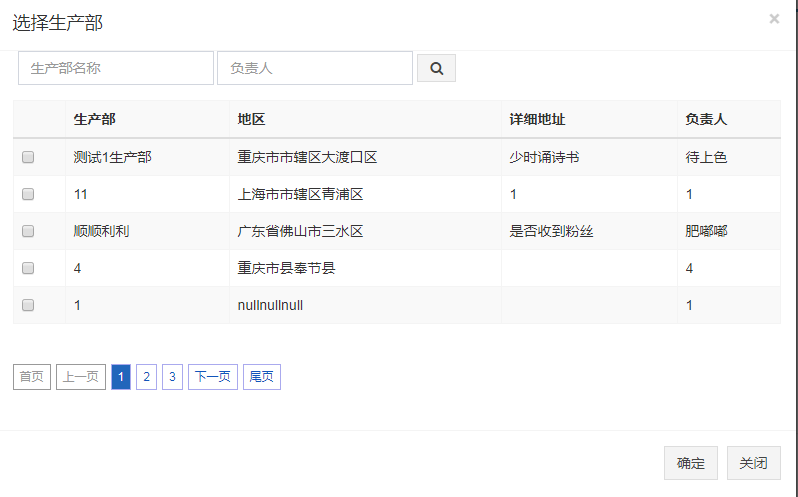
ajax 分页(jquery分页插件pagination) 小例1
<link rel="stylesheet" href="/plugins/jQuery/page/pagination.css"/>
<script src="/plugins/jQuery/page/jquery.pagination.js"></script>
      <!--生产部-->

        <div class="modal fade" id="detailModelTwo">

            <div class="modal-dialog  modal-full " style="z-index:9999;">

                <div class="modal-content" style="width: 800px;height: 550px;margin-left: -50px">

                    <form class="form-horizontal" role="form" method="post">

                        <div class="modal-header">

                            <button type="button" class="close" data-dismiss="modal" aria-label="Close">

                                <span aria-hidden="true">×</span>

                            </button>

                            <h4 class="modal-title" id="twoTitleInfo">选择生产部</h4>

                        </div>

                        <div class="form-inline" style="margin-left: 20px;">

                            <input type="text" name="sFactoryName" id="sFactoryName" class="form-control"

                                   width="50px;"

                                   placeholder="生产部名称">

                            <input type="text" name="sConName" id="sConName" class="form-control"

                                   width="50px;"

                                   placeholder="负责人">

                            <button class="btn btn-default" type="button" onclick="searchAjaxFactory()"><i

                                    class="fa fa-search"></i></button>

                        </div>

                        <div class="modal-body" style="max-height:630px;overflow-y: auto;overflow-x: hidden;">

                            <!--分页s-->

                            <div>

                                <table id="data-table" class="table table-striped table-bordered nowrap" width="100%">

                                    <tr>

                                        <th></th>

                                        <th>生产部</th>

                                        <th>地区</th>

                                        <th>详细地址</th>

                                        <th>负责人</th>

                                    </tr>

                                    <tbody id="pagination-data-factory">

                                    </tbody>

                                </table>

                                <div id="Pagination" class="pagination"></div>

                            </div>

                            <!--分页e-->

                        </div>

                        <div class="modal-footer">

                            <button type="button" class="btn btn-default" onclick="quedingFactory()">确定

                            </button>

                            <button type="button" class="btn btn-default" data-dismiss="modal">关闭</button>

                        </div>

                </div>

            </div>

        </div>
  <script>

            var pageSize = 5;

            //生产部--开始

            function ajaxPageFactory() {

                var total = getAjaxPageTotalFactory();

                $("#Pagination").pagination(total, {

                    callback: handlePaginationClickFactory,

                    prev_text: '上一页', //“前一页”分页按钮上显示的文字    字符串参数,可选,默认是"Prev"

                    next_text: '下一页', //“下一页”分页按钮上显示的文字    字符串参数,可选,默认是"Next"

                    items_per_page: pageSize,//每页显示的条目数    可选参数,默认是10

                    num_display_entries: 3, //连续分页主体部分显示的分页条目数    可选参数,默认是10

                    num_edge_entries: 1 //两侧显示的首尾分页的条目数    可选参数,默认是0

                });

            }

            function handlePaginationClickFactory(new_page_index, pagination_container) {

                var sFactoryName = $('#sFactoryName').val();

                var conName = $('#sConName').val();

                $.ajax({

                    type: "post",

                    url: "/notice/send/ajaxFactoryPage",

                    data: {

                        pageNumber: (new_page_index * pageSize) , //页码偏移量

                        pageSize: pageSize, //每页容量

                        factoryName: sFactoryName,

                        conName: conName

                    },

                    async: false,

                    dataType: "json",

                    success: function (ObjData) {

                        var lists = ObjData.records;

                        var checkes = "";

                        $("#pagination-data-factory").empty();

                        for (var i = 0; i < lists.length; i++) {

                            checkes += '<tr>'

                            checkes += '<td><input type="checkbox" name="check_info" id="fx" value=' + lists[i].id + ' ></td>';

                            checkes += '<td>' + lists[i].factoryName + '</td>';

                            checkes += '<td>' + lists[i].province + lists[i].city + lists[i].country + '</td>';

                            checkes += '<td>' + lists[i].addr + '</td>';

                            checkes += '<td>' + lists[i].conName + '</td>';

                            checkes += '</tr>'

                        }

                        $('#pagination-data-factory').html(checkes);

                    }

                })

                return false;

            }

            function getAjaxPageTotalFactory() {

                var re_total;

                var sFactoryName = $('#sFactoryName').val();

                var conName = $('#sConName').val();

                $.ajax({

                    type: "post",

                    url: "/notice/send/ajaxFactoryPage",

                    data: {
            pageNumber: 0, //页码偏移量
            pageSize: pageSize, //每页容量
                        factoryName: sFactoryName,

                        conName: conName

                    },

                    async: false,

                    dataType: "json",

                    success: function (ObjData) {

                        re_total = ObjData.total;

                    }

                })

                return re_total;

            }

            function getFactory() {

                $("#detailModelTwo").modal('show');

                ajaxPageFactory();

            }

            function searchAjaxFactory() {

                ajaxPageFactory();

            }

            function quedingFactory() {

                var factoryId = "";

                var factoryName = "";

                $("#pagination-data-factory").find('input[type="checkbox"][name="check_info"]:checked').each(function (i) {

                    var checked_info_id = $(this).val();

                    var factoryNameTemp = this.parentNode.nextSibling.innerHTML;

                    factoryId += checked_info_id + ",";

                    factoryName += factoryNameTemp + ",";

                });

                $('#factoryName').val(factoryName);

                $('#factoryId').val(factoryId);

                $("#detailModelTwo").modal('hide');

            }

            //生产部--结束

        </script>
<select id="searchModelAccountList" resultType="java.util.HashMap">
    SELECT
    info.id AS 'id' ,
    info.name AS 'name',
    info.type AS 'type',
    info.account_holder AS 'holder' ,
    info.account_bank AS 'bank',
    info.account AS 'nativePlace'
    FROM account_info info
    where 1=1 and info.del_flag =0
    and info.type in ('1','2','3')
    <if test="accountName != null and accountName != ''">
        and info.name like concat('%',#{accountName},'%')
    </if>
    order by info.name
    LIMIT #{pageNumber},#{pageSize}
</select>
<select id="searchModelAccountListCount" resultType="java.lang.Integer">
    SELECT
    count(0) as total
    FROM account_info info
    where 1=1 and info.del_flag =0
    and info.type in ('1','2','3')
    <if test="accountName != null and accountName != ''">
        and info.name like concat('%',#{accountName},'%')
    </if>
    order by info.name
</select>
@RequestMapping(value = "searchAccountList")
    @ResponseBody
    public Map searchAccountList(HttpServletRequest request, int pageNumber, int pageSize, String accountName, Model model) {
        Map returnMap = new HashMap();
//        String accountName = request.getParameter("accountName");

        List<Map<String, Object>> viewList = accountInfoService.searchModelAccountList(pageNumber, pageSize, accountName);
        int total = accountInfoService.searchModelAccountListCount(accountName);
        returnMap.put("accountList", viewList);
        returnMap.put("accountListTotal", total);
        return returnMap;
    }
ajax 分页(jquery分页插件pagination) 小例1的更多相关文章
- ajax+php (jquery.form插件)实现异步文件上传
<!DOCTYPE html> <html lang="CN"> <head> <title>upload model</ti ...
- jquery 分页控件2
jquery 分页控件(二) 上一章主要是关于分页控件的原理,代码也没有重构.在这一章会附上小插件的下载链接,插件主要就是重构逻辑部分,具体可以下载源文件看下,源代码也有注释.为了测试这个插件是能用的 ...
- jquery 分页控件(二)
上一章主要是关于分页控件的原理,代码也没有重构.在这一章会附上小插件的下载链接,插件主要就是重构逻辑部分,具体可以下载源文件看下,源代码也有注释.为了测试这个插件是能用的,我弄了个简单的asp.net ...
- 25款顶级的jQuery表格插件
jQuery 表格插件可以让你创建各种各样的表格布局,表格布局是报纸和杂志中最常见的布局,现在的网站中也很常见,在这篇文章中,我向大家推荐25个jQuery 的表格插件,你可以任意控制表格的行和列,用 ...
- jQuery 表格插件25
jQuery 表格插件可以让你创建各种各样的表格布局,表格布局是报纸和杂志中最常见的布局,现在的网站中也很常见,在这篇文章中,我向大家推荐25个jQuery 的表格插件,你可以任意控制表格的行和列,用 ...
- 25个顶级的jQuery表格插件
jQuery 表格插件可以让你创建各种各样的表格布局,表格布局是报纸和杂志中最常见的布局,现在的网站中也很常见,在这篇文章中,我向大家推荐25个jQuery 的表格插件,你可以任意控制表格的行和列,用 ...
- Jquery前端分页插件pagination同步加载和异步加载
上一篇文章介绍了Jquery前端分页插件pagination的基本使用方法和使用案例,大致原理就是一次性加载所有的数据再分页.https://www.jianshu.com/p/a1b8b1db025 ...
- Jquery前端分页插件pagination使用
插件描述:JqueryPagination是一个轻量级的jquery分页插件.只需几个简单的配置就可以生成分页控件.并且支持ajax获取数据,自定义请求参数,提供多种方法,事件和回调函数,功能全面的分 ...
- [jQuery]jQuery DataTables插件自定义Ajax分页实现
前言 昨天在博客园的博问上帮一位园友解决了一个问题,我觉得有必要记录一下,万一有人也遇上了呢. 问题描述 园友是做前端的,产品经理要求他使用jQuery DataTables插件显示一个列表,要实现分 ...
- [转] jQuery Infinite Ajax Scroll(ias) 分页插件介绍
原文链接:http://justflyhigh.com/index.php/articlec/index/index.php?s=content&m=aticle&id=91 Infi ...
随机推荐
- 讲课笔记1——meta标签、表格标签
图片属性:src(source): 图片的来源(路径),可以放置本地图片,也可以放网上的图片的url地址 [相对路径: ./:当前目录 ../:跳出当前目录,到上一 ...
- 2010: C语言实验——逆置正整数
2010: C语言实验——逆置正整数 Time Limit: 1 Sec Memory Limit: 64 MBSubmit: 949 Solved: 691[Submit][Status][We ...
- DS博客作业08--课程总结
DS博客作业08--课程总结 1.当初你是如何做出选择计算机专业的决定的? 1.1 经过一年学习,你的看法改变了么,为什么? 1.2 你觉得计算机是你喜欢的领域吗,它是你擅长的领域吗? 为什么? 1. ...
- WinPcap过滤串表达式的语法
注意:这篇文档取自tcpdump的指南.原始的版本 www.tcpdump.org 找到. wpcap的过滤器是以已声明的谓词语法为基础的.过滤器是一个ASCII字符串,它包含了一个过滤表达式.p ...
- webpack执行命令的不同方式
如使用webpack3及之前的版本只需安装webpack3即可,因为之前的webpack里面集成了webpack-cli 1. 使用局部安装webpack和webpack-cli,使用package. ...
- tkinter学习-事件绑定与窗口
阅读目录: 事件绑定 Toplevel组件 标准对话框 事件绑定: 说明:对于每个组件来说,可以通过bind()方法将函数或方法绑定到具体的事件上. 事件序列: 说明:用户需要使用bind()方法将具 ...
- windows显示文件扩展名
搜索打开windows的文件资源管理选项,如下去掉“隐藏已知文件类型的扩展名”即可 打开之后显示如下:
- pycharm添加wordcloud模块时报错:error: Microsoft Visual C++ 14.0 is required. Get it with "Microsoft Visual C++ Build Tools": http://landinghub.visualstudio.com/visual-cpp-build-tools
windows 7 32bit python3.6.3 32bit pycharm2018社区版 32bit 问题说明: 添加wordcloud模块时报错:error: Microsoft Visua ...
- 【转】js里的时间函数集
$(function(){ var mydate = new Date(); var t=mydate.toLocaleString(); $("#time").text(t); ...
- luogu2526 [SHOI2001]小狗散步
注意一个景点只能去一次. #include <iostream> #include <cstring> #include <cstdio> #include < ...