
DeepLearning.ai-Week2-Keras tutorial-the Happy House
1 - Import Packages
import numpy as np

from keras import layers

from keras.layers import Input, Dense, Activation, ZeroPadding2D, BatchNormalization, Flatten, Conv2D

from keras.layers import AveragePooling2D, MaxPooling2D, Dropout, GlobalMaxPooling2D, GlobalAveragePooling2D

from keras.models import Model

from keras.preprocessing import image

from keras.utils import layer_utils

from keras.utils.data_utils import get_file

from keras.applications.imagenet_utils import preprocess_input

import pydot

from IPython.display import SVG

from keras.utils.vis_utils import model_to_dot

from keras.utils import plot_model

from kt_utils import *

import keras.backend as K

K.set_image_data_format('channels_last')

import matplotlib.pyplot as plt

from matplotlib.pyplot import imshow

%matplotlib inline
2 - The Happy House
2.1 - Dataset Description
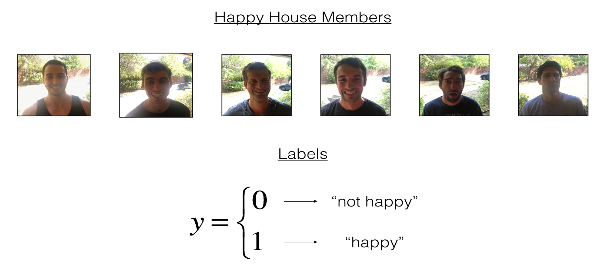
2.2 - Normalize the dataset and learn about its shape
图像大小为(64, 64, 3),训练集有600张图像,测试集有150张图像。
X_train_orig, Y_train_orig, X_test_orig, Y_test_orig, classes = load_dataset()

# Normalize image vectors

X_train = X_train_orig/255.

X_test = X_test_orig/255.

# Reshape

Y_train = Y_train_orig.T

Y_test = Y_test_orig.T

print ("number of training examples = " + str(X_train.shape[0]))

print ("number of test examples = " + str(X_test.shape[0]))

print ("X_train shape: " + str(X_train.shape))

print ("Y_train shape: " + str(Y_train.shape))

print ("X_test shape: " + str(X_test.shape))

print ("Y_test shape: " + str(Y_test.shape))
Result:

number of training examples = 600

number of test examples = 150

X_train shape: (600, 64, 64, 3)

Y_train shape: (600, 1)

X_test shape: (150, 64, 64, 3)

Y_test shape: (150, 1)
3 - Building a model in Keras
这个作业比较开放,模型架构完全有自己决定。但建议使用作业提供的初始架构,然后再进行调整和改进。总之,我们可以修改模型的架构以及超参数。
使用Keras训练和测试模型,有如下步骤:
* 创建模型
* 编译模型:$model.compile(optimizer = "...", loss = "...", metrics = ["accuracy"])$
* 训练模型:$model.fit(x = ..., y = ..., epochs = ..., batch_size = ...)$
* 测试模型:$model.evaluate(x = ..., y = ...)$
综上,即是Create->Compile->Fit/Train->Evaluate/Test。
# GRADED FUNCTION: HappyModel

def HappyModel(input_shape):

    """

    Implementation of the HappyModel.

    Arguments:

    input_shape -- shape of the images of the dataset

    Returns:

    model -- a Model() instance in Keras

    """

    ### START CODE HERE ###

    # Feel free to use the suggested outline in the text above to get started, and run through the whole

    # exercise (including the later portions of this notebook) once. The come back also try out other

    # network architectures as well.

    X_input = Input(input_shape)

    # Zero-Padding: pads the border of X_input with zeroes

    X = ZeroPadding2D((3, 3))(X_input)

    # CONV -> BN -> RELU Block applied to X

    X = Conv2D(32, (7, 7), strides=(1, 1), name="conv0")(X)

    X = BatchNormalization(axis=3, name="bn0")(X)

    X = Activation("relu")(X)

    # MAXPOOL

    X = MaxPooling2D((2, 2), name="max_pool")(X)

    # FLATTEN X (means convert it to a vector) + FULLYCONNECTED

    X = Flatten()(X)

    X = Dense(1, activation="sigmoid", name="fc")(X)

    # Create model. This creates your Keras model instance, you'll use this instance to train/test the model.

    model = Model(inputs=X_input, outputs=X, name="HappyModel")

    ### END CODE HERE ###

    return model
3.1 - 创建模型
### START CODE HERE ### (1 line)

happyModel = HappyModel(X_train[0, :, :, :].shape)

### END CODE HERE ###
3.2 - 编译模型
### START CODE HERE ### (1 line)

happyModel.compile(optimizer="adam", loss="mse", metrics=["accuracy"])

### END CODE HERE ###
3.3 - 训练模型
我选择迭代10次,每一个批次有16个样本。
### START CODE HERE ### (1 line)

happyModel.fit(x=X_train, y=Y_train, epochs=40, batch_size=16)

### END CODE HERE ###
Result:

Epoch 1/10

600/600 [==============================] - 15s 25ms/step - loss: 1.5877 - acc: 0.6433

Epoch 2/10

600/600 [==============================] - 15s 25ms/step - loss: 0.3024 - acc: 0.8617

Epoch 3/10

600/600 [==============================] - 15s 25ms/step - loss: 0.1550 - acc: 0.9317

Epoch 4/10

600/600 [==============================] - 15s 25ms/step - loss: 0.1032 - acc: 0.9683

Epoch 5/10

600/600 [==============================] - 15s 26ms/step - loss: 0.1603 - acc: 0.9367

Epoch 6/10

600/600 [==============================] - 16s 26ms/step - loss: 0.0952 - acc: 0.9733

Epoch 7/10

600/600 [==============================] - 15s 26ms/step - loss: 0.0820 - acc: 0.9767

Epoch 8/10

600/600 [==============================] - 16s 26ms/step - loss: 0.0670 - acc: 0.9833

Epoch 9/10

600/600 [==============================] - 15s 26ms/step - loss: 0.0699 - acc: 0.9750

Epoch 10/10

600/600 [==============================] - 16s 27ms/step - loss: 0.1436 - acc: 0.9467
3.4 - 测试模型
### START CODE HERE ### (1 line)

preds = happyModel.evaluate(x=X_test, y=Y_test)

### END CODE HERE ###

print()

print ("Loss = " + str(preds[0]))

print ("Test Accuracy = " + str(preds[1]))
Result:

150/150 [==============================] - 2s 11ms/step

Loss = 4.14517145475

Test Accuracy = 0.559999998411
4 - Summary
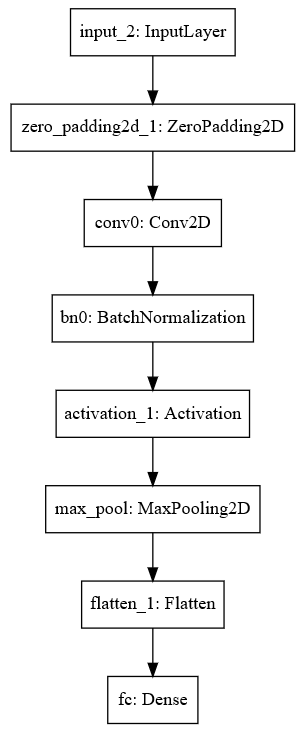
happyModel.summary()
Result:

Layer (type)                 Output Shape              Param #

=================================================================

input_2 (InputLayer)         (None, 64, 64, 3)         0

_________________________________________________________________

zero_padding2d_1 (ZeroPaddin (None, 70, 70, 3)         0

_________________________________________________________________

conv0 (Conv2D)               (None, 64, 64, 32)        4736

_________________________________________________________________

bn0 (BatchNormalization)     (None, 64, 64, 32)        128

_________________________________________________________________

activation_1 (Activation)    (None, 64, 64, 32)        0

_________________________________________________________________

max_pool (MaxPooling2D)      (None, 32, 32, 32)        0

_________________________________________________________________

flatten_1 (Flatten)          (None, 32768)             0

_________________________________________________________________

fc (Dense)                   (None, 1)                 32769

=================================================================

Total params: 37,633

Trainable params: 37,569

Non-trainable params: 64

_________________________________________________________________
plot_model(happyModel, to_file='HappyModel.png')

SVG(model_to_dot(happyModel).create(prog='dot', format='svg'))
Result:
5 - References
https://web.stanford.edu/class/cs230/
DeepLearning.ai-Week2-Keras tutorial-the Happy House的更多相关文章
- DeepLearning.ai学习笔记(三)结构化机器学习项目--week2机器学习策略(2)
一.进行误差分析 很多时候我们发现训练出来的模型有误差后,就会一股脑的想着法子去减少误差.想法固然好,但是有点headlong~ 这节视频中吴大大介绍了一个比较科学的方法,具体的看下面的例子 还是以猫 ...
- DeepLearning.ai学习笔记汇总
第一章 神经网络与深度学习(Neural Network & Deeplearning) DeepLearning.ai学习笔记(一)神经网络和深度学习--Week3浅层神经网络 DeepLe ...
- Coursera深度学习(DeepLearning.ai)编程题&笔记
因为是Jupyter Notebook的形式,所以不方便在博客中展示,具体可在我的github上查看. 第一章 Neural Network & DeepLearning week2 Logi ...
- Coursera机器学习+deeplearning.ai+斯坦福CS231n
日志 20170410 Coursera机器学习 2017.11.28 update deeplearning 台大的机器学习课程:台湾大学林轩田和李宏毅机器学习课程 Coursera机器学习 Wee ...
- 吴恩达deepLearning.ai循环神经网络RNN学习笔记_看图就懂了!!!(理论篇)
前言 目录: RNN提出的背景 - 一个问题 - 为什么不用标准神经网络 - RNN模型怎么解决这个问题 - RNN模型适用的数据特征 - RNN几种类型 RNN模型结构 - RNN block - ...
- 吴恩达deepLearning.ai循环神经网络RNN学习笔记_没有复杂数学公式,看图就懂了!!!(理论篇)
本篇文章被Google中国社区组织人转发,评价: 条理清晰,写的很详细! 被阿里算法工程师点在看! 所以很值得一看! 前言 目录: RNN提出的背景 - 一个问题 - 为什么不用标准神经网络 - RN ...
- 【Deeplearning.ai 】吴恩达深度学习笔记及课后作业目录
吴恩达深度学习课程的课堂笔记以及课后作业 代码下载:https://github.com/douzujun/Deep-Learning-Coursera 吴恩达推荐笔记:https://mp.weix ...
- Coursera DeepLearning.ai Logistic Regression逻辑回归总结
既<Machine Learning>课程后,Andrew Ng又推出了新一系列的课程<DeepLearning.ai>,注册了一下可以试听7天.之后每个月要$49,想想还是有 ...
- Deeplearning.ai课程笔记--汇总
从接触机器学习就了解到Andrew Ng的机器学习课程,后来发现又出来深度学习课程,就开始在网易云课堂上学习deeplearning.ai的课程,Andrew 的课真是的把深入浅出.当然学习这些课程还 ...
- 课程四(Convolutional Neural Networks),第二 周(Deep convolutional models: case studies) —— 2.Programming assignments : Keras Tutorial - The Happy House (not graded)
Keras tutorial - the Happy House Welcome to the first assignment of week 2. In this assignment, you ...
随机推荐
- JS引用类型
a,b都是引用类型,它们实际上指向同一个内存空间,同呼吸共命运
- IO 多路复用介绍
IO多路复用 概念说明 在进行解释之前,首先要说明几个概念: 用户空间和内核空间 进程切换 进程的阻塞 文件描述符 缓存 I/O 用户空间与内核空间 现在操作系统都是采用虚拟存储器,那么对32位操作系 ...
- 应用实战:从Redis到Aerospike,我们踩了这些坑
个推专注为开发者们提供消息推送服务多年.通过个推SDK,手机终端与服务器建立长连接,维持在线状态.然而在网络异常等情况下,消息无法实时送达到终端用户,因而推送服务器建立了一份离线消息列表,以待用户重新 ...
- JSON的简单使用_向前台发送JSON数据
转自:http://www.cnblogs.com/digdeep/p/5574366.html 1.前台页面 <%@ page language="java" conten ...
- Python中表达式与语句
简述 Python中我暂时并未发现谁对着两个名词的明确定义:我对这两个名词的理解就是,表达式就是你想要执行的对象,语句就是你的具体执行操作. 这里应用慕课网老师的一段话,摘自网上"表达式(E ...
- 【openssl】利用openssl完成X509证书和PFX证书之间的互转
利用openssl完成X509证书和PFX证书之间的互转 # OpenSSL的下载与安装: 1.下载地址: 官方网址—— https://www.openssl.org/source/ OpenSSL ...
- 伯克利SocketAPI(一) socket的C语言接口/最简单的服务器和对应的客户端C语言实现
1. 头文件 2. API函数 3. 最简单的服务器和对应的客户端C语言实现 3.1 server #include <sys/types.h> #include <sys/sock ...
- jsp登录注册
只帖源代码,,,,不讲解. 1.Login.jsp <%@ page language="java" import="java.util.*" pageE ...
- Vertica系列:Vertica和Hadoop的互操作性
Vertica 8和 Hadoop 集群的互操作性已经很不错的, 但这块肯定是Vertica研发的重点, 将来可能还有较大的变动. Vertica 集群 和 Hadoop 集群的两种布局方式 集群布局 ...
- SQL Server进阶(十一)临时表、表变量
临时表 本地临时表 适合开销昂贵 结果集是个非常小的集合 -- Local Temporary Tables IF OBJECT_ID('tempdb.dbo.#MyOrderTotalsByYe ...