
一脸懵逼学习Nginx及其安装,Tomcat的安装
1:Nginx的相关概念知识:
1.1:反向代理:
反向代理(Reverse Proxy)方式是指以代理服务器来接受internet上的连接请求,然后将请求转发给内部网络上的服务器,并将从服务器上得到的结果返回给internet上请求连接的客户端,此时代理服务器对外就表现为一个服务器。
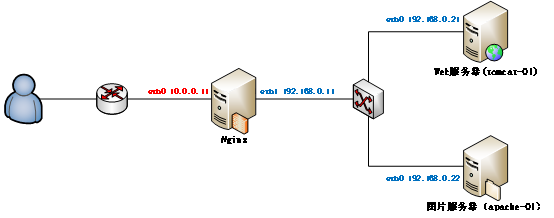
1.2:负载均衡:
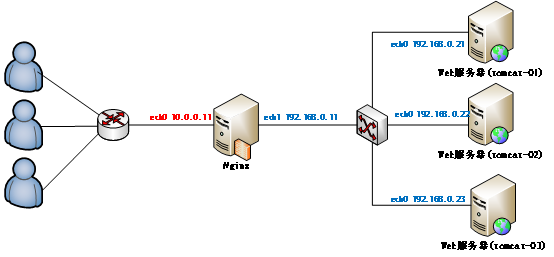
负载均衡,英文名称为Load Balance,是指建立在现有网络结构之上,并提供了一种廉价有效透明的方法扩展网络设备和服务器的带宽、增加吞吐量、加强网络数据处理能力、提高网络的灵活性和可用性。其原理就是数据流量分摊到多个服务器上执行,减轻每台服务器的压力,多台服务器共同完成工作任务,从而提高了数据的吞吐量。
2:Nginx的安装操作:
Nginx的官网:http://nginx.org/
2.1:将下载好的Nginx上传到虚拟机上面,然后进行解压缩操作,上传过程省略,请自行脑补:
[root@master package]# tar -zxvf nginx-1.8.1.tar.gz -C /home/hadoop/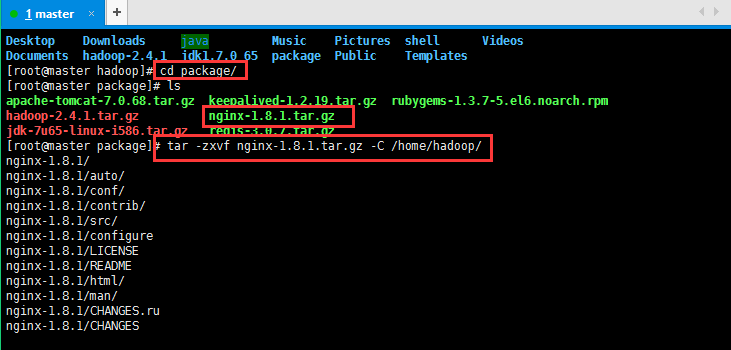
2.2:编译Nginx源码目录:
进入Nginx源码目录:[root@master hadoop]# cd /home/hadoop/nginx-1.8.1/
检查安装环境,并指定将来要安装的路径:
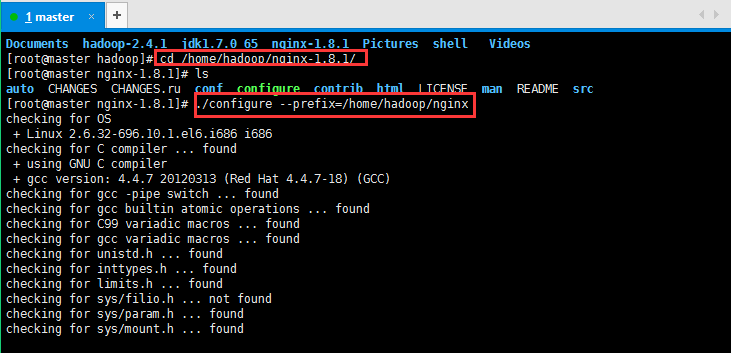
#缺包报错
checking for OS
+ Linux 2.6.32-696.10.1.el6.i686 i686
checking for C compiler ... found
+ using GNU C compiler
+ gcc version: 4.4.7 20120313 (Red Hat 4.4.7-18) (GCC)
checking for gcc -pipe switch ... found
checking for gcc builtin atomic operations ... found
checking for C99 variadic macros ... found
checking for gcc variadic macros ... found
checking for unistd.h ... found
checking for inttypes.h ... found
checking for limits.h ... found
checking for sys/filio.h ... not found
checking for sys/param.h ... found
checking for sys/mount.h ... found
checking for sys/statvfs.h ... found
checking for crypt.h ... found
checking for Linux specific features
checking for epoll ... found
checking for EPOLLRDHUP ... found
checking for O_PATH ... not found
checking for sendfile() ... found
checking for sendfile64() ... found
checking for sys/prctl.h ... found
checking for prctl(PR_SET_DUMPABLE) ... found
checking for sched_setaffinity() ... found
checking for crypt_r() ... found
checking for sys/vfs.h ... found
checking for nobody group ... found
checking for poll() ... found
checking for /dev/poll ... not found
checking for kqueue ... not found
checking for crypt() ... not found
checking for crypt() in libcrypt ... found
checking for F_READAHEAD ... not found
checking for posix_fadvise() ... found
checking for O_DIRECT ... found
checking for F_NOCACHE ... not found
checking for directio() ... not found
checking for statfs() ... found
checking for statvfs() ... found
checking for dlopen() ... not found
checking for dlopen() in libdl ... found
checking for sched_yield() ... found
checking for SO_SETFIB ... not found
checking for SO_ACCEPTFILTER ... not found
checking for TCP_DEFER_ACCEPT ... found
checking for TCP_KEEPIDLE ... found
checking for TCP_FASTOPEN ... not found
checking for TCP_INFO ... found
checking for accept4() ... found
checking for eventfd() ... found
checking for int size ... 4 bytes
checking for long size ... 4 bytes
checking for long long size ... 8 bytes
checking for void * size ... 4 bytes
checking for uint64_t ... found
checking for sig_atomic_t ... found
checking for sig_atomic_t size ... 4 bytes
checking for socklen_t ... found
checking for in_addr_t ... found
checking for in_port_t ... found
checking for rlim_t ... found
checking for uintptr_t ... uintptr_t found
checking for system byte ordering ... little endian
checking for size_t size ... 4 bytes
checking for off_t size ... 8 bytes
checking for time_t size ... 4 bytes
checking for setproctitle() ... not found
checking for pread() ... found
checking for pwrite() ... found
checking for sys_nerr ... found
checking for localtime_r() ... found
checking for posix_memalign() ... found
checking for memalign() ... found
checking for mmap(MAP_ANON|MAP_SHARED) ... found
checking for mmap("/dev/zero", MAP_SHARED) ... found
checking for System V shared memory ... found
checking for POSIX semaphores ... not found
checking for POSIX semaphores in libpthread ... found
checking for struct msghdr.msg_control ... found
checking for ioctl(FIONBIO) ... found
checking for struct tm.tm_gmtoff ... found
checking for struct dirent.d_namlen ... not found
checking for struct dirent.d_type ... found
checking for sysconf(_SC_NPROCESSORS_ONLN) ... found
checking for openat(), fstatat() ... found
checking for getaddrinfo() ... found
checking for PCRE library ... not found
checking for PCRE library in /usr/local/ ... not found
checking for PCRE library in /usr/include/pcre/ ... not found
checking for PCRE library in /usr/pkg/ ... not found
checking for PCRE library in /opt/local/ ... not found./configure: error: the HTTP rewrite module requires the PCRE library.
You can either disable the module by using --without-http_rewrite_module
option, or install the PCRE library into the system, or build the PCRE library
statically from the source with nginx by using --with-pcre=<path> option.
然后安装一下缺少的包:
[root@master nginx-1.8.1]# yum -y install gcc pcre-devel openssl openssl-devel

解决完错误以后再次执行,检查安装环境,并指定将来要安装的路径:
[root@master nginx-1.8.1]# ./configure --prefix=/home/hadoop/nginx
[root@master nginx-1.8.1]# ./configure --prefix=/home/hadoop/nginx
checking for OS
+ Linux 2.6.32-696.10.1.el6.i686 i686
checking for C compiler ... found
+ using GNU C compiler
+ gcc version: 4.4.7 20120313 (Red Hat 4.4.7-18) (GCC)
checking for gcc -pipe switch ... found
checking for gcc builtin atomic operations ... found
checking for C99 variadic macros ... found
checking for gcc variadic macros ... found
checking for unistd.h ... found
checking for inttypes.h ... found
checking for limits.h ... found
checking for sys/filio.h ... not found
checking for sys/param.h ... found
checking for sys/mount.h ... found
checking for sys/statvfs.h ... found
checking for crypt.h ... found
checking for Linux specific features
checking for epoll ... found
checking for EPOLLRDHUP ... found
checking for O_PATH ... not found
checking for sendfile() ... found
checking for sendfile64() ... found
checking for sys/prctl.h ... found
checking for prctl(PR_SET_DUMPABLE) ... found
checking for sched_setaffinity() ... found
checking for crypt_r() ... found
checking for sys/vfs.h ... found
checking for nobody group ... found
checking for poll() ... found
checking for /dev/poll ... not found
checking for kqueue ... not found
checking for crypt() ... not found
checking for crypt() in libcrypt ... found
checking for F_READAHEAD ... not found
checking for posix_fadvise() ... found
checking for O_DIRECT ... found
checking for F_NOCACHE ... not found
checking for directio() ... not found
checking for statfs() ... found
checking for statvfs() ... found
checking for dlopen() ... not found
checking for dlopen() in libdl ... found
checking for sched_yield() ... found
checking for SO_SETFIB ... not found
checking for SO_ACCEPTFILTER ... not found
checking for TCP_DEFER_ACCEPT ... found
checking for TCP_KEEPIDLE ... found
checking for TCP_FASTOPEN ... not found
checking for TCP_INFO ... found
checking for accept4() ... found
checking for eventfd() ... found
checking for int size ... 4 bytes
checking for long size ... 4 bytes
checking for long long size ... 8 bytes
checking for void * size ... 4 bytes
checking for uint64_t ... found
checking for sig_atomic_t ... found
checking for sig_atomic_t size ... 4 bytes
checking for socklen_t ... found
checking for in_addr_t ... found
checking for in_port_t ... found
checking for rlim_t ... found
checking for uintptr_t ... uintptr_t found
checking for system byte ordering ... little endian
checking for size_t size ... 4 bytes
checking for off_t size ... 8 bytes
checking for time_t size ... 4 bytes
checking for setproctitle() ... not found
checking for pread() ... found
checking for pwrite() ... found
checking for sys_nerr ... found
checking for localtime_r() ... found
checking for posix_memalign() ... found
checking for memalign() ... found
checking for mmap(MAP_ANON|MAP_SHARED) ... found
checking for mmap("/dev/zero", MAP_SHARED) ... found
checking for System V shared memory ... found
checking for POSIX semaphores ... not found
checking for POSIX semaphores in libpthread ... found
checking for struct msghdr.msg_control ... found
checking for ioctl(FIONBIO) ... found
checking for struct tm.tm_gmtoff ... found
checking for struct dirent.d_namlen ... not found
checking for struct dirent.d_type ... found
checking for sysconf(_SC_NPROCESSORS_ONLN) ... found
checking for openat(), fstatat() ... found
checking for getaddrinfo() ... found
checking for PCRE library ... found
checking for PCRE JIT support ... not found
checking for md5 in system md library ... not found
checking for md5 in system md5 library ... not found
checking for md5 in system OpenSSL crypto library ... found
checking for sha1 in system md library ... not found
checking for sha1 in system OpenSSL crypto library ... found
checking for zlib library ... found
creating objs/MakefileConfiguration summary
+ using system PCRE library
+ OpenSSL library is not used
+ md5: using system crypto library
+ sha1: using system crypto library
+ using system zlib librarynginx path prefix: "/home/hadoop/nginx"
nginx binary file: "/home/hadoop/nginx/sbin/nginx"
nginx configuration prefix: "/home/hadoop/nginx/conf"
nginx configuration file: "/home/hadoop/nginx/conf/nginx.conf"
nginx pid file: "/home/hadoop/nginx/logs/nginx.pid"
nginx error log file: "/home/hadoop/nginx/logs/error.log"
nginx http access log file: "/home/hadoop/nginx/logs/access.log"
nginx http client request body temporary files: "client_body_temp"
nginx http proxy temporary files: "proxy_temp"
nginx http fastcgi temporary files: "fastcgi_temp"
nginx http uwsgi temporary files: "uwsgi_temp"
nginx http scgi temporary files: "scgi_temp"
2.3:编译安装(make是编译,make install是安装):
[root@master hadoop]# make && make install安装不是一帆风顺的,开始将make && make install写成了make && made install,肯定没有安装成功了,然后我再执行make && make install就出现下面的情况了,然后我重新./configure --prefix=/usr/local/nginx检查安装环境,并指定将来要安装的路径,最后再make && made install,貌似正常编译,安装了,虽然我也不是很清楚,这里贴一下吧先,安装好以后可以测试是否正常:
[root@master hadoop]# make && make install
make: *** No targets specified and no makefile found. Stop.
[root@master hadoop]# make install
make: *** No rule to make target `install'. Stop.
[root@master hadoop]# make && make install
make: *** No targets specified and no makefile found. Stop.
[root@master hadoop]# ./configure --prefix=/home/hadoop/nginx
bash: ./configure: No such file or directory
[root@master hadoop]# cd /home/hadoop/nginx-1.8.1/
[root@master nginx-1.8.1]# ls
auto CHANGES CHANGES.ru conf configure contrib html LICENSE Makefile man objs README src
[root@master nginx-1.8.1]# ./configure --prefix=/home/hadoop/nginx
2.4:安装好以后测试是否正常:
安装好以后指定的目录会生成一些文件,如我的/home/hadoop/nginx目录下面:
启动Nginx的命令:[root@master sbin]# ./nginx

查看端口是否有Nginx进程监听:[root@master sbin]# netstat -ntlp | grep 80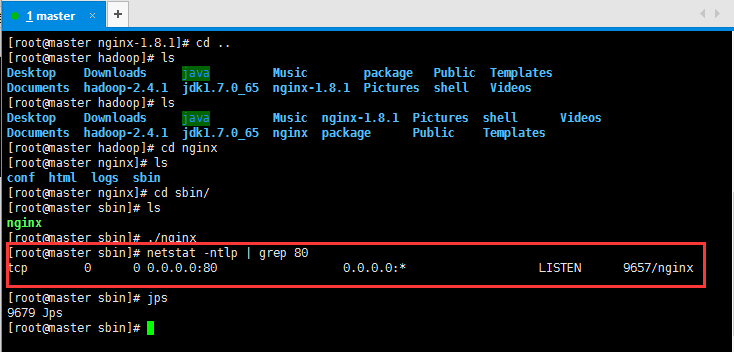
3:配置Nginx:
3.1:配置反向代理:
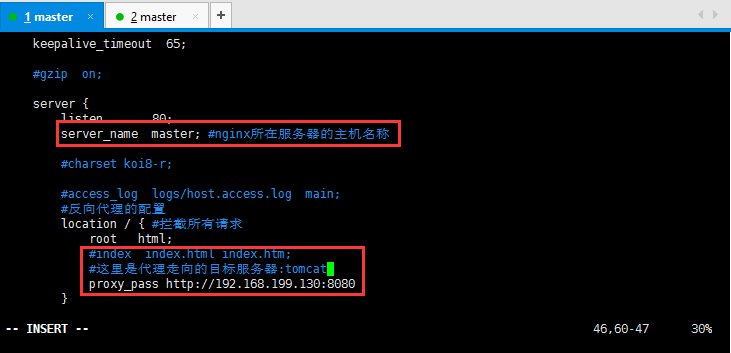
修改Nginx配置文件:
[root@master conf]# cd /home/hadoop/nginx/conf/
[root@master conf]# vim nginx.conf
  server {

        listen       ;

        server_name  master; #nginx所在服务器的主机名称

        #charset koi8-r;

        #access_log  logs/host.access.log  main;

        #反向代理的配置

        location / { #拦截所有请求

            root   html;

            #index  index.html index.htm;

            #这里是代理走向的目标服务器:tomcat

            proxy_pass http://192.168.199.130:8080;

        }
具体配置如下所示:
下面贴图这句话后面proxy_pass http://192.168.199.130:8080;
少了一个分号导致后面启动nginx的时候出现错误:
自己都操点心就可以了:
[root@master sbin]# ./nginx
nginx: [emerg] unexpected "}" in /home/hadoop/nginx/conf/nginx.conf:48
4:安装Tomcat,将下载好的tomcat安装包上传到虚拟机,过程省略,然后解压缩操作:
[root@slaver1 package]# tar -zxvf apache-tomcat-7.0.68.tar.gz -C /home/hadoop/
解压缩好以后启动Tomcat:
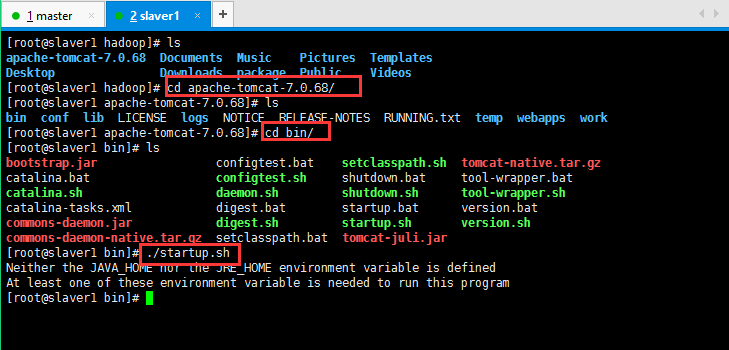
然后没启动起来,貌似说我的jdk没有配置啥的,现在配置一下,配置过程省略,大概如上传压缩包,解压缩,然后配置环境变量:
vim /etc/profile配置好以后使其立即生效:source /etc/profile,最后检查一下是否安装成功:java/javac/java -version
然后启动tomcat,如下所示:
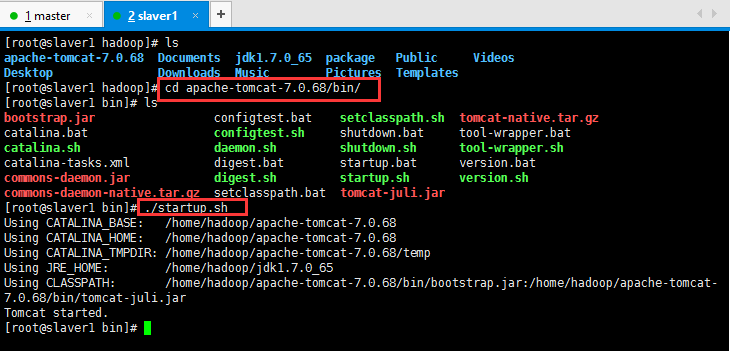
启动好,可以检查一下是否启动成功:
浏览器输入自己的http://192.168.199.131:8080/
如果无法访问,可能是防火墙的原因:service iptables stop关闭防火墙;service iptables status查看防火墙是否关闭成功;
5:现在体现Nginx的功能了,我在master节点安装的Nginx,然后在slaver1节点安装的tomcat:
然后访问master节点,会跳转到slaver1的tomcat页面:
http://192.168.199.130/自己的master节点的名称;
6:Nginx的动静分离:
动态资源 index.jsp
location ~ .*\.(jsp|do|action)$ {
proxy_pass http://ip地址:8080;
}
静态资源:
location ~ .*\.(html|js|css|gif|jpg|jpeg|png)$ {
expires 3d;
}
负载均衡:
在http这个节下面配置一个叫upstream的,后面的名字可以随意取,但是要和location下的proxy_pass http://后的保持一致。
http {
是在http里面的, 已有http, 不是在server里,在server外面
upstream tomcats {
server 192.168.199.130:8080 weight=1;#weight表示多少个
server 192.168.199.131:8080 weight=1;
server 192.168.199.132:8080 weight=1;
}
#卸载server里
#~代表是大小写敏感,.代表是任何非回车字符,*代表多个。
location ~ .*\.(jsp|do|action) {
proxy_pass http://tomcats; #tomcats是后面的tomcat服务器组的逻辑组号
}
}
待续......
一脸懵逼学习Nginx及其安装,Tomcat的安装的更多相关文章
- 一脸懵逼学习Hive的元数据库Mysql方式安装配置
1:要想学习Hive必须将Hadoop启动起来,因为Hive本身没有自己的数据管理功能,全是依赖外部系统,包括分析也是依赖MapReduce: 2:七个节点跑HA集群模式的: 第一步:必须先将Zook ...
- 一脸懵逼学习Hadoop中的序列化机制——流量求和统计MapReduce的程序开发案例——流量求和统计排序
一:序列化概念 序列化(Serialization)是指把结构化对象转化为字节流.反序列化(Deserialization)是序列化的逆过程.即把字节流转回结构化对象.Java序列化(java.io. ...
- JavaWeb学习(一) ---- HTTP以及Tomcat的安装及使用
HTTP 一.协议 双方在交互.通讯的时候,遵循的一种规范,一种规则. 二.HTTP协议 HTTP的全名是:Hypertext Transfer Protocol(超文本传输协议),针对网络上的客户端 ...
- 一脸懵逼学习keepalived(对Nginx进行热备)
1:Keepalived的官方网址:http://www.keepalived.org/ 2:Keepalived:可以实现高可靠: 高可靠的概念: HA(High Available), 高可用性集 ...
- 一脸懵逼学习Hive的安装(将sql语句翻译成MapReduce程序的一个工具)
Hive只在一个节点上安装即可: 1.上传tar包:这个上传就不贴图了,贴一下上传后的,看一下虚拟机吧: 2.解压操作: [root@slaver3 hadoop]# tar -zxvf hive-0 ...
- 一脸懵逼学习基于CentOs的Hadoop集群安装与配置
1:Hadoop分布式计算平台是由Apache软件基金会开发的一个开源分布式计算平台.以Hadoop分布式文件系统(HDFS)和MapReduce(Google MapReduce的开源实现)为核心的 ...
- 一脸懵逼学习KafKa集群的安装搭建--(一种高吞吐量的分布式发布订阅消息系统)
kafka的前言知识: :Kafka是什么? 在流式计算中,Kafka一般用来缓存数据,Storm通过消费Kafka的数据进行计算.kafka是一个生产-消费模型. Producer:生产者,只负责数 ...
- 一脸懵逼学习基于CentOs的Hadoop集群安装与配置(三台机器跑集群)
1:Hadoop分布式计算平台是由Apache软件基金会开发的一个开源分布式计算平台.以Hadoop分布式文件系统(HDFS)和MapReduce(Google MapReduce的开源实现)为核心的 ...
- 一脸懵逼学习HBase---基于HDFS实现的。(Hadoop的数据库,分布式的,大数据量的,随机的,实时的,非关系型数据库)
1:HBase官网网址:http://hbase.apache.org/ 2:HBase表结构:建表时,不需要指定表中的字段,只需要指定若干个列族,插入数据时,列族中可以存储任意多个列(即KEY-VA ...
随机推荐
- python中的正则表达式--re模块
参考博客:https://www.cnblogs.com/tina-python/p/5508402.html 这里说一下python的re模块即正则表达式模块,先列出其中涉及到的各种字符和模式等: ...
- fabric.js PatternBrush
// Original canvas const canvas = new fabric.Canvas('canvas'); fabric.Image.fromURL('https://picsum. ...
- 【笔记】[WIN7x64] ThinkPad E420开机不能按设置关闭触控板的问题
将win7x32重装为Win7x64后,TouchPad(以下简称TP)就不能在开机时按照在控制面板-鼠标中的设置关闭TP, 从而每次开机都必须去点开控制面板->鼠标 才能关闭TP.因为通常不用 ...
- 025_lua脚本语言
一.--cat /opt/nginx/conf/conf.dlua_package_path '/opt/nginx/conf/lua/?.lua;;'; --lua模块路径,其中”;;”表示默认搜索 ...
- ubuntu 安装source insight3.5
版本 ubuntu 16.04 在linux下安装 windows下程序,需要安装wine, wine 是 "“Wine Is Not an Emulator" 缩写. 1) 安装 ...
- 关于iwinfo的调试
在调试 主动扫描时,调用命令 “iwinfo wlan0 scan”时, 在iwinfo中添加的调试语句没有打印和记录到log中去. 后查看iwinfo的makefile发现,在生成iwinfo程序 ...
- svn服务器的搭建备份和还原和svnmanager的使用
svn服务器的搭建备份和还原和svnmanager的使用 一.svn服务端软件的安装和配置 1.安装svn版本库软件 # yum install -y subversion 2.建立svn版本库数据存 ...
- FTP登录提示Can't open data connection for transfer of "/"
服务器: 系统:windows server 2008 R2 standard 是否开启防火墙:是 FTP客户端:Filezilla server 本地: FTP服务端:winscp 使用winscp ...
- js 测试性能
console.time('querySelector');for(var i=0; i<1000; i++){document.querySelector('body');}console.t ...
- JQery插件zClip ----实现粘贴复制功能
使用了这个插件,但是用在table,td中话,我是一个列表来的,对此使用此插件还是有点问题的?点击其中的一个会全部都被选中. <script type="text/javascript ...