
客户端集成IdentityServer4
1. vs code 终端执行 dotnet new webapi --name ClientCredentialApi
2. 找到ValuesController.cs
引用 using Microsoft.AspNetCore.Authorization;
    [Authorize]

    [Route("api/[controller]")]

    [ApiController]

    public class ValuesController : ControllerBase

    {

    }
3. Nuget 导入 IdentityServer4.AccessTokenValidation
4. 修改 Startup.cs
using System;

using System.Collections.Generic;

using System.Linq;

using System.Threading.Tasks;

using Microsoft.AspNetCore.Builder;

using Microsoft.AspNetCore.Hosting;

using Microsoft.AspNetCore.HttpsPolicy;

using Microsoft.AspNetCore.Mvc;

using Microsoft.Extensions.Configuration;

using Microsoft.Extensions.DependencyInjection;

using Microsoft.Extensions.Logging;

using Microsoft.Extensions.Options;

namespace ClientCredentialApi

{

    public class Startup

    {

        public Startup(IConfiguration configuration)

        {

            Configuration = configuration;

        }

        public IConfiguration Configuration { get; }

        // This method gets called by the runtime. Use this method to add services to the container.

        public void ConfigureServices(IServiceCollection services)

        {

            //注册Authentication

            services.AddAuthentication("Bearer").AddIdentityServerAuthentication(options =>

            {

                options.Authority = "https://localhost:5000";

                options.RequireHttpsMetadata = false;

                options.ApiName = "api";

            });

            services.AddMvc().SetCompatibilityVersion(CompatibilityVersion.Version_2_1);

        }

        // This method gets called by the runtime. Use this method to configure the HTTP request pipeline.

        public void Configure(IApplicationBuilder app, IHostingEnvironment env)

        {

            if (env.IsDevelopment())

            {

                app.UseDeveloperExceptionPage();

            }

            else

            {

                app.UseHsts();

            }

            app.UseHttpsRedirection();

            app.UseAuthentication();

            app.UseMvc();

        }

    }

}
5. 启动 " IdentityServer4 登陆中心服务 " ,使用PostMan 调用 http://localhost:5003/connect/token
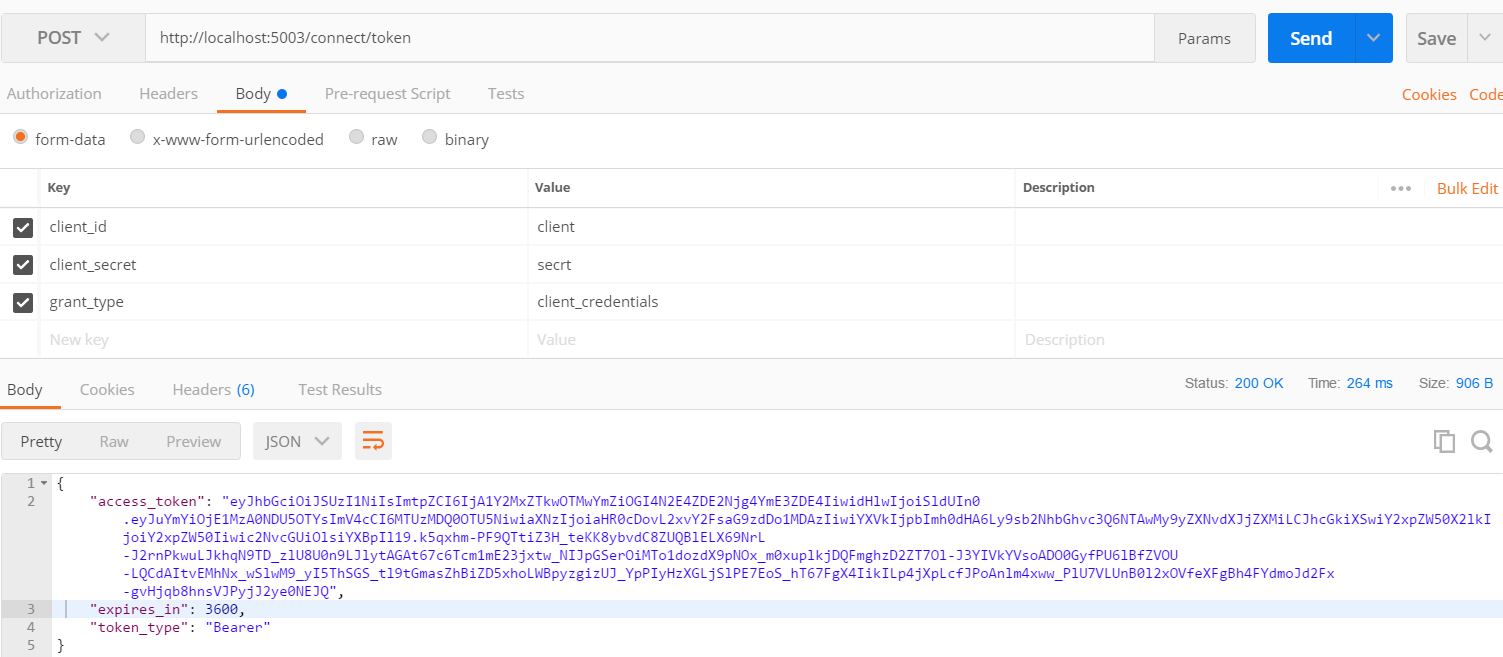
参数
client_id:client
client_secret:secrt
grant_type:client_credentials
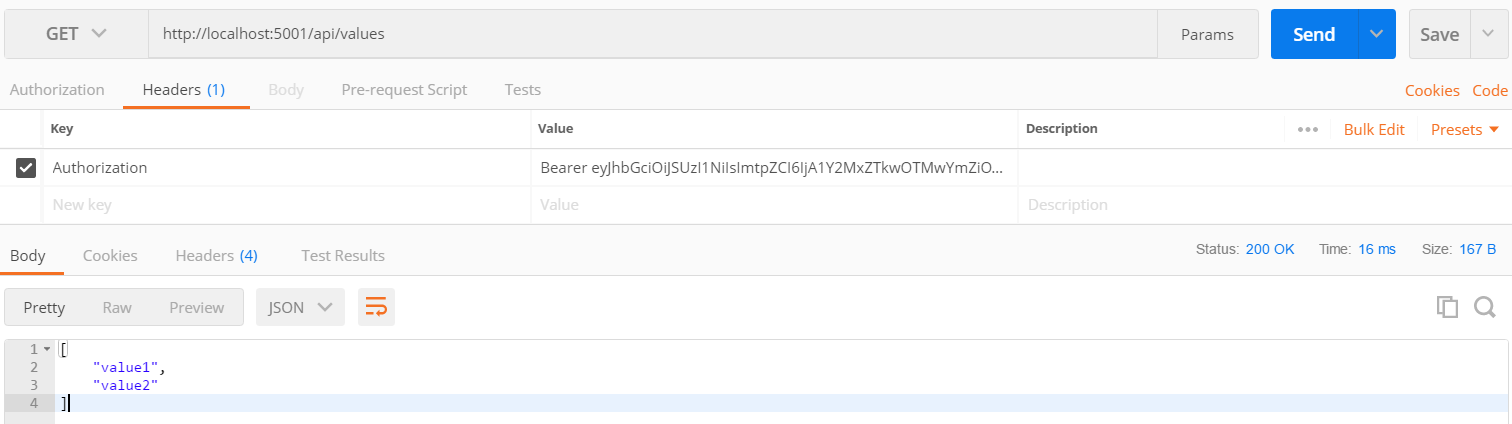
6. 把当前项目也启动,进行验证 , 客户端验证整个过程没有任何毛病
客户端集成IdentityServer4的更多相关文章
- 09.客户端集成IdentityServer
09.客户端集成IdentityServer 新建API的项目 dotnet new webapi --name ClientCredentialApi 在我们上一节课的代码IdentityServe ...
- Envoy实现.NET架构的网关(四)集成IdentityServer4实现OAuth2认证
什么是OAuth2认证 简单说,OAuth 就是一种授权机制.数据的所有者告诉系统,同意授权第三方应用进入系统,获取这些数据.系统从而产生一个短期的进入令牌(token),用来代替密码,供第三方应用使 ...
- 环信 之 iOS 客户端集成四:集成UI
在Podfile文件里加入 pod 'EaseUI', :git => 'https://github.com/easemob/easeui-ios-cocoapods.git' 然后在终端中的 ...
- Asp.NetCoreWebApi图片上传接口(二)集成IdentityServer4授权访问(附源码)
写在前面 本文地址:http://www.cnblogs.com/yilezhu/p/9315644.html 作者:yilezhu 上一篇关于Asp.Net Core Web Api图片上传的文章使 ...
- [置顶] ZK高级特性:Style定制与客户端集成
1.ZK与传统MVC框架的集成 由于ZK应用本质上也是基于标准Web技术Servlet框架,因此与其它MVC框架的集成没有什么特别的, 以一个典型场景为例——为一个现有的Web项目(前端采用WebWo ...
- 携程apollo系列-客户端集成
本文讲解如何在 Java 程序中集成 Apollo 配置, 主要涉及到一些基础用法. 对于一些高级用法, 比如如何加密/解密配置项 (可用于数据库密码配置), 如何动态切换数据源地址,如何动态切换日志 ...
- spark-sql(spark sql cli)客户端集成hive
1.安装hadoop集群 参考:http://www.cnblogs.com/wcwen1990/p/6739151.html 2.安装hive 参考:http://www.cnblogs.com/w ...
- .net core Identity集成IdentityServer4 (1)基本操作
一. 新建asp.net core identity项目 新建项目->asp.net core web应用程序-> web应用程序(模型视图控制器)&更改身份验证为个人. 新建一个 ...
- C# Thrift 实战开发 从PLC到Thrift再到客户端集成开发
About Thrift: 本文并不是说明Thrift设计及原理的,直接拿Thrift来开发一个Demo程序,如果想要了解Thrift的细节,可以访问官方网站:https://thrift.apach ...
随机推荐
- 16进制string转成int
http://blog.csdn.net/wl1524520/article/details/25706521
- db2学习笔记
a.服务端安装 v11.1_win64_expc.zip 官网下载 b.客户端安装 Toad for DB2 Freeware 6.1 百度找找 .建数据库 create database HRA_G ...
- htmlparser学习(原创)
--thumbelina.jar 这是一个演示图片搜索和显示的小程序JFrame Preferences.userNodeForPackage(getClass()); 根据传入的class所在包 ...
- 十年前,女:“对不起,我不会喜欢你的,你不要再坚持了,就好比让 Linux 和 Windows 同时运行在一台PC机上,可能吗?
1.十年前,女:“对不起,我不会喜欢你的,你不要再坚持了,就好比让 Linux 和 Windows 同时运行在一台PC机上,可能吗?”男生听后默默走开, 十年后,在一次虚拟技术大会上,我听到一名虚拟技 ...
- 2018.10.19 NOIP训练 变化的序列(线性dp)
传送门 f[i][j]f[i][j]f[i][j]表示后iii个对答案贡献有jjj个a的方案数. 可以发现最后a,ba,ba,b的总个数一定是n∗(n−1)/2n*(n-1)/2n∗(n−1)/2 因 ...
- 2018.07.18 [NOI2018]归程(return)(kruskal重构树)
传送门 新鲜出炉的noi2018试题. 下面讲讲这题的解法: 首先要学习一个叫做kruskal重构树的东东. 听名字就知道跟kruskal算法有关,没错,原来的kruskal算法就是用并查集实现的,但 ...
- Part 1 - Getting Started(1-3)
https://simpleisbetterthancomplex.com/series/2017/09/04/a-complete-beginners-guide-to-django-part-1. ...
- IntelliJ IDEA 2017版 SpringBoot的web项目补充
一.注解 @SpringBootApplication:Spring Boot项目的核心注解,主要目的是开启自动配置. @Configuration:这是一个配置Sprin ...
- 优秀前端工程师必备: 非常常用的checkbox的骚操作---全选和单选demo
提要: 前端开发的时候, 经常会遇到表格勾选, 单个勾选判断是否全选的事情.趁着有时间, 总结一下以备不时之需! 就像下面这个栗子: 1 源代码: h5 // 全选框 <input type=& ...
- Vue组件通信父传方法给子组件调用
// 父组件中将 :meth='changeCom1' 传入入子组件 , 子组件运行 meth(i) 方法 并给他传参数 ,在父组件可以获取这个参数,并做相应的操作 // 父组件 <temp ...