
【Android】3.14 公交线路查询功能
分类:C#、Android、VS2015、百度地图应用; 创建日期:2016-02-04
一、简介
利用BusLineSearch方法可查询公交线路的详情信息。
二、运行截图
简介:介绍查询公交线路功能
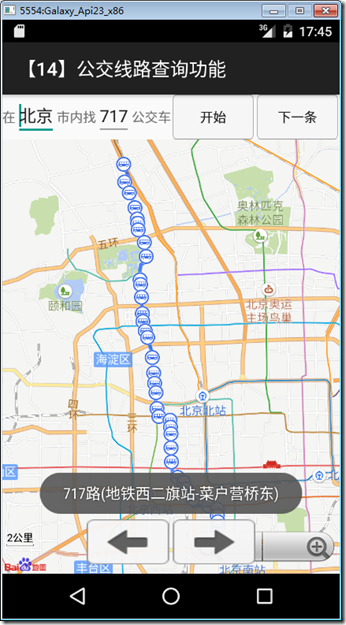
(1)点击“开始”按钮可查询公交线路;
(2)搜索出公交线路后点击“下一条”按钮可查询该线路的反方向公交线路;
本示例运行截图如下:
三、设计步骤
1、添加demo14_busLine.xml文件
在layout文件夹下添加该文件,然后将代码改为下面的内容:
<?xml version="1.0" encoding="utf-8"?>

<LinearLayout xmlns:android="http://schemas.android.com/apk/res/android"

    android:layout_width="fill_parent"

    android:layout_height="fill_parent"

    android:orientation="vertical" >

    <LinearLayout

        xmlns:android="http://schemas.android.com/apk/res/android"

        android:layout_width="fill_parent"

        android:layout_height="wrap_content"

        android:orientation="horizontal" >

        <TextView

            android:layout_width="wrap_content"

            android:layout_height="wrap_content"

            android:text="在" />

        <EditText

            android:id="@+id/city"

            android:layout_width="wrap_content"

            android:layout_height="wrap_content"

            android:text="北京" />

        <TextView

            android:layout_width="wrap_content"

            android:layout_height="wrap_content"

            android:text="市内找" />

        <EditText

            android:id="@+id/searchkey"

            android:layout_width="wrap_content"

            android:layout_height="wrap_content"

            android:text="717" />

        <TextView

            android:layout_width="wrap_content"

            android:layout_height="wrap_content"

            android:text="公交车" />

        <LinearLayout

            xmlns:android="http://schemas.android.com/apk/res/android"

            android:layout_width="fill_parent"

            android:layout_height="wrap_content"

            android:orientation="horizontal" >

            <Button

                android:id="@+id/search"

                android:layout_width="fill_parent"

                android:layout_height="wrap_content"

                android:layout_marginLeft="2dip"

                android:layout_marginRight="2dip"

                android:layout_weight="1"

                android:background="@drawable/button_style"

                android:text="开始" />

            <Button

                android:id="@+id/nextline"

                android:layout_width="fill_parent"

                android:layout_height="wrap_content"

                android:layout_marginLeft="2dip"

                android:layout_marginRight="2dip"

                android:layout_weight="1"

                android:background="@drawable/button_style"

                android:text="下一条" />

        </LinearLayout>

    </LinearLayout>

    <RelativeLayout

        xmlns:android="http://schemas.android.com/apk/res/android"

        android:layout_width="match_parent"

        android:layout_height="match_parent" >

        <fragment

            android:id="@+id/bmapView"

            android:layout_width="fill_parent"

            android:layout_height="fill_parent"

            class="com.baidu.mapapi.map.TextureMapFragment"

            android:clickable="true" />

        <LinearLayout

            xmlns:android="http://schemas.android.com/apk/res/android"

            android:layout_width="wrap_content"

            android:layout_height="wrap_content"

            android:layout_alignParentBottom="true"

            android:layout_alignWithParentIfMissing="false"

            android:layout_centerHorizontal="true"

            android:layout_centerVertical="false"

            android:layout_marginBottom="10dip" >

            <Button

                android:id="@+id/pre"

                android:layout_width="fill_parent"

                android:layout_height="fill_parent"

                android:layout_marginLeft="2dip"

                android:layout_marginRight="2dip"

                android:layout_weight="1.0"

                android:background="@drawable/pre_" />

            <Button

                android:id="@+id/next"

                android:layout_width="fill_parent"

                android:layout_height="fill_parent"

                android:layout_marginLeft="2dip"

                android:layout_marginRight="2dip"

                android:layout_weight="1.0"

                android:background="@drawable/next_" />

        </LinearLayout>

    </RelativeLayout>

</LinearLayout>
2、添加Demo14BusLine.cs文件
在SrcSdkDemos文件夹下添加该文件,然后将代码改为下面的内容:
using Android.App;

using Android.Content.PM;

using Android.OS;

using Android.Views;

using Android.Widget;

using Android.Support.V4.App;

using Com.Baidu.Mapapi.Map;

using Com.Baidu.Mapapi.Model;

using Com.Baidu.Mapapi.Search.Busline;

using Com.Baidu.Mapapi.Search.Core;

using Com.Baidu.Mapapi.Search.Poi;

using System.Collections.Generic;

using BdMapV371Demos.SrcOverlayUtil;

namespace BdMapV371Demos.SrcSdkDemos

{

    /// <summary>

    /// 此demo用来展示如何进行公交线路详情检索,并使用RouteOverlay在地图上绘制 同时展示如何浏览路线节点并弹出泡泡

    /// </summary>

    [Activity(Label = "@string/demo_name_bus",

        ConfigurationChanges = ConfigChanges.Orientation | ConfigChanges.KeyboardHidden,

        ScreenOrientation = ScreenOrientation.Sensor)]

    public class Demo14BusLineSearch : FragmentActivity,

        IOnGetPoiSearchResultListener,

        IOnGetBusLineSearchResultListener,

        BaiduMap.IOnMapClickListener

    {

        private Button mBtnPre = null;// 上一个节点

        private Button mBtnNext = null;// 下一个节点

        private int nodeIndex = -;// 节点索引,供浏览节点时使用

        private BusLineResult route = null;// 保存驾车/步行路线数据的变量,供浏览节点时使用

        private IList<string> busLineIDList = null;

        private int busLineIndex = ;

        // 搜索相关

        private PoiSearch mSearch = null; // 搜索模块,也可去掉地图模块独立使用

        private BusLineSearch mBusLineSearch = null;

        private BaiduMap mBaiduMap = null;

        BusLineOverlay overlay;//公交路线绘制对象

        protected override void OnCreate(Bundle savedInstanceState)

        {

            base.OnCreate(savedInstanceState);

            SetContentView(Resource.Layout.demo14_busline);

            mBtnPre = FindViewById<Button>(Resource.Id.pre);

            mBtnPre.Click += delegate { NodeClick(Resource.Id.pre); };

            mBtnNext = FindViewById<Button>(Resource.Id.next);

            mBtnPre.Click += delegate { NodeClick(Resource.Id.next); };

            mBtnPre.Visibility = ViewStates.Invisible;

            mBtnNext.Visibility = ViewStates.Invisible;

            mBaiduMap = FragmentManager.FindFragmentById<TextureMapFragment>(Resource.Id.bmapView).BaiduMap;

            mBaiduMap.SetOnMapClickListener(this);

            mSearch = PoiSearch.NewInstance();

            mSearch.SetOnGetPoiSearchResultListener(this);

            mBusLineSearch = BusLineSearch.NewInstance();

            mBusLineSearch.SetOnGetBusLineSearchResultListener(this);

            busLineIDList = new List<string>();

            overlay = new BusLineOverlay(mBaiduMap);

            mBaiduMap.SetOnMarkerClickListener(overlay);

            //【开始】按钮

            var btnSearch = FindViewById<Button>(Resource.Id.search);

            btnSearch.Click += delegate

            {

                busLineIDList.Clear();

                busLineIndex = ;

                mBtnPre.Visibility = ViewStates.Invisible;

                mBtnNext.Visibility = ViewStates.Invisible;

                EditText editCity = FindViewById<EditText>(Resource.Id.city);

                EditText editSearchKey = FindViewById<EditText>(Resource.Id.searchkey);

                //// 发起poi检索,从得到所有poi中找到公交线路类型的poi,再使用该poi的uid进行公交详情搜索

                mSearch.SearchInCity(new PoiCitySearchOption()

                    .City(editCity.Text).Keyword(editSearchKey.Text));

            };

            //【下一条】按钮

            var btnNextline = FindViewById<Button>(Resource.Id.nextline);

            btnNextline.Click += delegate

            {

                SearchNextBusline();

            };

        }

        private void SearchNextBusline()

        {

            if (busLineIndex >= busLineIDList.Count)

            {

                busLineIndex = ;

            }

            if (busLineIndex >=  && busLineIndex < busLineIDList.Count

                    && busLineIDList.Count > )

            {

                mBusLineSearch.SearchBusLine(new BusLineSearchOption()

                    .City(FindViewById<EditText>(Resource.Id.city).Text)

                    .Uid(busLineIDList[busLineIndex]));

                busLineIndex++;

            }

        }

        /// <summary>

        /// 节点浏览示例

        /// </summary>

        /// <param name="id">按钮的id</param>

        public void NodeClick(int id)

        {

            if (nodeIndex < - || route == null

                    || nodeIndex >= route.Stations.Count)

                return;

            TextView popupText = new TextView(this);

            popupText.SetBackgroundResource(Resource.Drawable.popup);

            popupText.SetTextColor(Android.Graphics.Color.Black);

            // 上一个节点

            if (id == Resource.Id.pre && nodeIndex > )

            {

                // 索引减

                nodeIndex--;

            }

            // 下一个节点

            if (id == Resource.Id.next && nodeIndex < (route.Stations.Count - ))

            {

                // 索引加

                nodeIndex++;

            }

            if (nodeIndex >= )

            {

                // 移动到指定索引的坐标

                mBaiduMap.SetMapStatus(MapStatusUpdateFactory.NewLatLng(

                    route.Stations[nodeIndex].Location));

                // 弹出泡泡

                popupText.Text = route.Stations[nodeIndex].Title;

                mBaiduMap.ShowInfoWindow(new InfoWindow(popupText,

                    route.Stations[nodeIndex].Location, ));

            }

        }

        protected override void OnPause()

        {

            base.OnPause();

        }

        protected override void OnResume()

        {

            base.OnResume();

        }

        protected override void OnDestroy()

        {

            mSearch.Destroy();

            mBusLineSearch.Destroy();

            base.OnDestroy();

        }

        public void OnGetBusLineResult(BusLineResult result)

        {

            if (result == null || result.Error != SearchResult.ERRORNO.NoError)

            {

                Toast.MakeText(this, "抱歉,未找到结果", ToastLength.Long).Show();

                return;

            }

            mBaiduMap.Clear();

            route = result;

            nodeIndex = -;

            overlay.RemoveFromMap();

            overlay.SetData(result);

            overlay.AddToMap();

            overlay.ZoomToSpan();

            mBtnPre.Visibility = ViewStates.Visible;

            mBtnNext.Visibility = ViewStates.Visible;

            Toast.MakeText(this, result.BusLineName, ToastLength.Short).Show();

        }

        public void OnGetPoiResult(PoiResult result)

        {

            if (result == null || result.Error != SearchResult.ERRORNO.NoError)

            {

                Toast.MakeText(this, "抱歉,未找到结果", ToastLength.Long).Show();

                return;

            }

            // 遍历所有poi,找到类型为公交线路的poi

            busLineIDList.Clear();

            foreach (PoiInfo poi in result.AllPoi)

            {

                if (poi.Type == PoiInfo.POITYPE.BusLine

                        || poi.Type == PoiInfo.POITYPE.SubwayLine)

                {

                    busLineIDList.Add(poi.Uid);

                }

            }

            SearchNextBusline();

            route = null;

        }

        public void OnGetPoiDetailResult(PoiDetailResult result)

        {

        }

        public void OnMapClick(LatLng point)

        {

            mBaiduMap.HideInfoWindow();

        }

        public bool OnMapPoiClick(MapPoi poi)

        {

            return false;

        }

    }

}
3、修改MainActivity.cs
在MainActivity.cs文件的demos字段定义中,去掉【示例14】下面的注释。
运行观察结果。
【Android】3.14 公交线路查询功能的更多相关文章
- AMap公交线路查询
<!doctype html> <html> <head> <meta charset="utf-8"> <meta http ...
- 百度地图公交线路查询,并绘制到地图上并获取所有路径经纬度点(可供echarts 路径图使用)
github地址 https://github.com/a1115040996/MyHTML/tree/gh-pages/BDMap 源代码 <!DOCTYPE html PUBLIC &quo ...
- 【百度地图API】小学生找哥哥——小学生没钱打车,所以此为公交查询功能
原文:[百度地图API]小学生找哥哥--小学生没钱打车,所以此为公交查询功能 任务描述: 有位在魏公村附近上小学的小朋友,要去北京邮电大学找哥哥.他身上钱很少,只够坐公交的.所以,百度地图API快帮帮 ...
- Android百度地图开发(五)公交线路详情搜索、多条线路显示
一.公交线路详情检索 获取公交线路的详情主要分来两步,1.获取公交线路的Uid,2.通过Uid获取公交线路详情. 1.获取公交线路的Uid: /* * 获得公交线路图的Uid,并且根据系Uid发起公交 ...
- 【Android】3.13 路径规划功能
分类:C#.Android.VS2015.百度地图应用: 创建日期:2016-02-04 一.简介 线路规划支持以下功能: 公交信息查询:可对公交详细信息进行查询: 公交换乘查询:根据起.终点,查询策 ...
- 公交线路免费api接口代码
描写叙述:本接口主要是依据城市名称 + 线路名称 模糊查找城市公交线路信息. 开源api接口:http://openapi.aibang.com/bus/lines?app_key=keyvalue ...
- ArcGIS for Android示例解析之空间查询-----QueryTask
转自:http://blog.csdn.net/wozaifeiyang0/article/details/7331450 QueryTask 查询功能在GIS中是一个不可或缺的重要功能,示例中提供了 ...
- 济南最新公交线路一览(BRT)
济南最新公交线路一览(BRT) 济南BRT1路 高速公交线路 黄岗路东5:30-21:30 全福立交桥西5:30-21:30 票价1元,刷卡9折,月票有效 高速公交公司 去程:黄岗路东(BRT) - ...
- 【百度地图API】如何制作公交线路的搜索?如331路
原文:[百度地图API]如何制作公交线路的搜索?如331路 摘要: 从A点到B点的公交导航大家都知道怎么做了,那么单独查询331路公交车的公交路线,如何制作呢?我们一起来学习一下~ --------- ...
随机推荐
- 基于Teigha.Net实现CAD到SHP的转换方案
CAD在测绘领域运用广泛,所以,现在有很多成果都是CAD格式,但其自身存在很多局限性,需将其转为支持更加广泛,存储更加完善的 SHP文件.ArcGIS中直接提供相关转换工具,但不能转换Xdata,Ar ...
- ArcGIS放射状流向地图
今年百度推出了一个百度迁徙,在其他人看是好像是还挺专业的,其实不复杂.下面是百度的迁徙图示例:从图中可以看出从一个城市到另一个城市迁徙的直线路径,多个路径可以反映城市是否为热点城市,即人口流动比较大. ...
- Mapreduce实例-分组排重(group by distinct)
public class GroupComparator implements RawComparator<MyBinaryKey> { @Override public int comp ...
- Performance Testing
To test application performance, add rules using FiddlerScript to the OnBeforeResponse function (exc ...
- java String分配内存空间备忘
栈内存 堆内存 基础类型,对象引用(堆内存地址) 由new创建的对象和数组, 存取速度快 相对于栈内存较慢 数据大小声明周期必须确定 分配的内存由java虚拟机自动垃圾回收器管理.动态分配内存大小 共 ...
- Android Bitmap与String互转(转)
/** * 图片转成string * * @param bitmap * @return */ public static String convertIconToString(Bitmap bitm ...
- Unity 文字爆炸(风化)消失效果 粒子系统应用
利用Unity的粒子系统,使用C#代码控制粒子的位置和速度,实现文字风化爆炸的效果. Unity的东西,不像flash,不能直接放到网页中,没办法了,只能放截图了.有兴趣的可以下载看看:text_ex ...
- Android 英文文档下载地址
通过英文Android API学习Android技术是一个不错选择,当然养鸡的专业户要小心了,以下分享一些下载英文文档的链接(请使用迅雷下载): https://dl-ssl.google.com/a ...
- eclipse 将javaWeb项目转化成maven项目
eclipse 将javaWeb项目转化成maven项目 CreateTime--2018年4月18日16:04:18 Author:Marydon 1.首先,maven项目的标准目录 2.web ...
- 如何通过from语句调用模块的变量名?
# -*- coding: utf-8 -*- #python 27 #xiaodeng #如何通过from语句调用模块的变量名? #my.py def printer(x): print x #如何 ...