
在Azure上搭建L2TP服务器
L2TP是常用的一种point-site的VPN。而目前在Azure上的VPN Gateway只支持IPsec和SSTP两种。如果客户需要L2TP服务器,需要自己在VM中搭建。本文将介绍如何在Azure上搭建基于CentOS65的L2TP服务器。
一、在Azure上创建VM
1. 创建CentOS6.5的VM
在Azure上创建虚拟机时选择CentOS6.5:
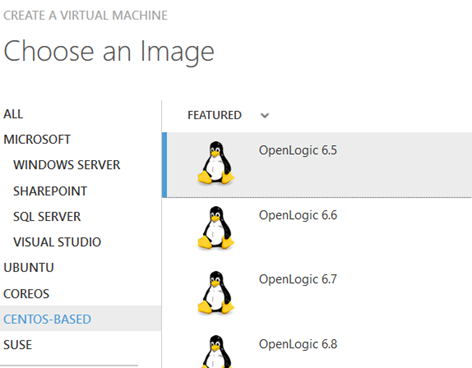
具体创建的过程就不再介绍了。
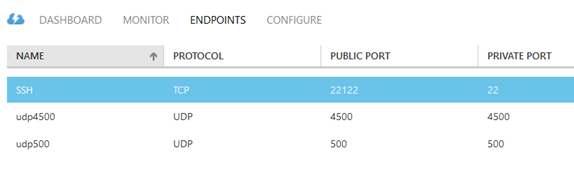
2. 给VM创建Endpoint
L2TP Over IPSec将使用UDP500和UDP4500两个端口,是标准的IPSEC的NAT-T端口。另外22端口也是需要的。具体的配置如下:
二、在VM上安装软件
通过SSH登陆VM。
1. 检查版本,配置YUM源
cat /etc/redhat-release

CentOS release 6.5 (Final)
确认软件版本是CentOS6.5
vim /etc/yum.repos.d/epel.repo

[epel]

name=epel

baseurl=http://mirrors.sohu.com/fedora-epel/6/$basearch

enabled=

gpgcheck=
2. 安装软件
a. 首先通过Yum安装:
yum install -y ppp iptables make gcc gmp-devel xmlto bison flex xmlto libpcap-devel lsof
b. 然后安装IPSEC:
下载最新的IPSEC:
wget https://download.openswan.org/openswan/openswan-2.6.49.tar.gz --no-check-certificate
解压:
tar vxf openswan-2.6..tar.gz
安装:
make programs install
c. 通过Yum安装epel里的xl2tpd:
yum install -y xl2tpd
三、配置各种服务
1. IPSEC的配置
vim /etc/ipsec.conf

# /etc/ipsec.conf - Openswan IPsec configuration file

# This file: /usr/local/share/doc/openswan/ipsec.conf-sample

#

# Manual: ipsec.conf.

version 2.0 # conforms to second version of ipsec.conf specification

# basic configuration

config setup

# Do not set debug options to debug configuration issues!

# plutodebug / klipsdebug = "all", "none" or a combation from below:

# "raw crypt parsing emitting control klips pfkey natt x509 dpd private"

# eg:

# plutodebug="control parsing"

# Again: only enable plutodebug or klipsdebug when asked by a developer

#

# enable to get logs per-peer

# plutoopts="--perpeerlog"

#

# Enable core dumps (might require system changes, like ulimit -C)

# This is required for abrtd to work properly

# Note: incorrect SElinux policies might prevent pluto writing the core

dumpdir=/var/run/pluto/

#

# NAT-TRAVERSAL support, see README.NAT-Traversal

nat_traversal=yes

# exclude networks used on server side by adding %v4:!a.b.c./

# It seems that T-Mobile in the US and Rogers/Fido in Canada are

# using / as "private" address space on their 3G network.

# This range has not been announced via BGP (at least upto --)

virtual_private=%v4:10.0.0.0/,%v4:192.168.0.0/,%v4:172.16.0.0/,%v4:25.0.0.0/,%v6:fd00::/,%v6:fe80::/

# OE is now off by default. Uncomment and change to on, to enable.

oe=off

# which IPsec stack to use. auto will try netkey, then klips then mast

protostack=netkey

#protostack=auto

# Use this to log to a file, or disable logging on embedded systems (like openwrt)

#plutostderrlog=/dev/null

# Add connections here

# sample VPN connection

# for more examples, see /etc/ipsec.d/examples/

#conn sample

# # Left security gateway, subnet behind it, nexthop toward right.

# left=10.0.0.1

# leftsubnet=172.16.0.0/

# leftnexthop=10.22.33.44

# # Right security gateway, subnet behind it, nexthop toward left.

# right=10.12.12.1

# rightsubnet=192.168.0.0/

# rightnexthop=10.101.102.103

# # To authorize this connection, but not actually start it,

# # at startup, uncomment this.

# #auto=add

conn L2TP-PSK-NAT

  rightsubnet=vhost:%priv

  also=L2TP-PSK-noNAT

conn L2TP-PSK-noNAT

  authby=secret

  pfs=no

  auto=add

  keyingtries=

  rekey=no

  ikelifetime=8h

  keylife=1h

  type=transport

  left=10.215.92.31 #AWS EC2 Internal IP

  leftprotoport=/

  right=%any

  rightprotoport=/%any

  dpddelay=

  dpdtimeout=

  dpdaction=clear
2. 配置IPSEC的Security
vim /etc/ipsec.secrets

# This file holds shared secrets or RSA private keys for inter-Pluto

# authentication. See ipsec_pluto() manpage, and HTML documentation.

# RSA private key for this host, authenticating it to any other host

# which knows the public part. Suitable public keys, for ipsec.conf, DNS,

# or configuration of other implementations, can be extracted conveniently

# with "ipsec showhostkey".

# this file is managed with debconf and will contain the automatically created RSA keys

#include /var/lib/openswan/ipsec.secrets.inc

%any %any: PSK "azure"
3. 配置sysctl.conf文件
vim /etc/sysctl.conf

net.ipv4.ip_forward =

net.ipv4.conf.default.rp_filter =

net.ipv4.conf.all.send_redirects =

net.ipv4.conf.default.send_redirects =

net.ipv4.conf.all.log_martians =

net.ipv4.conf.default.log_martians =

net.ipv4.conf.default.accept_source_route =

net.ipv4.conf.all.accept_redirects =

net.ipv4.conf.default.accept_redirects =

net.ipv4.icmp_ignore_bogus_error_responses =
通过下面的命令,是配置生效:
sysctl -p

service ipsec start

ipsec verify
4. 配置xl2tpd
vim /etc/xl2tpd/xl2tpd.conf

;

; This is a minimal sample xl2tpd configuration file for use

; with L2TP over IPsec.

;

; The idea is to provide an L2TP daemon to which remote Windows L2TP/IPsec

; clients connect. In this example, the internal (protected) network

; is 192.168.1.0/. A special IP range within this network is reserved

; for the remote clients: 192.168.1.128/

; (i.e. 192.168.1.128 ... 192.168.1.254)

;

; The listen-addr parameter can be used if you want to bind the L2TP daemon

; to a specific IP address instead of to all interfaces. For instance,

; you could bind it to the interface of the internal LAN (e.g. 192.168.1.98

; in the example below). Yet another IP address (local ip, e.g. 192.168.1.99)

; will be used by xl2tpd as its address on pppX interfaces.

[global]

; listen-addr = 192.168.1.98

;

; requires openswan-2.5. or higher - Also does not yet work in combination

; with kernel mode l2tp as present in linux 2.6.+

; ipsec saref = yes

; Use refinfo of  if using an SAref kernel patch based on openswan 2.6. or

; when using any of the SAref kernel patches for kernels up to 2.6..

; saref refinfo =

;

; force userspace = yes

;

; debug tunnel = yes

ipsec saref = no

[lns default]

ip range = 192.168.1.128-192.168.1.254

local ip = 192.168.1.99

require chap = yes

refuse pap = yes

require authentication = yes

name = LinuxVPNserver

ppp debug = yes

pppoptfile = /etc/ppp/options.xl2tpd

length bit = yes
5. 配置ppp的用户名密码
vim /etc/ppp/chap-secrets

# Secrets for authentication using CHAP

# client server secret IP addresses

user * azure *
6. 配置iptables
iptables -t nat -A POSTROUTING -s 192.168.1.0/ -o eth0 -j MASQUERADE

iptables -I FORWARD -s 192.168.1.0/ -j ACCEPT

iptables -I FORWARD -d 192.168.1.0/ -j ACCEPT

service iptables save
四、设置服务
service ipsec restart

service xl2tpd restart

service iptables restart

chkconfig xl2tpd on

chkconfig iptables on

chkconfig ipsec on
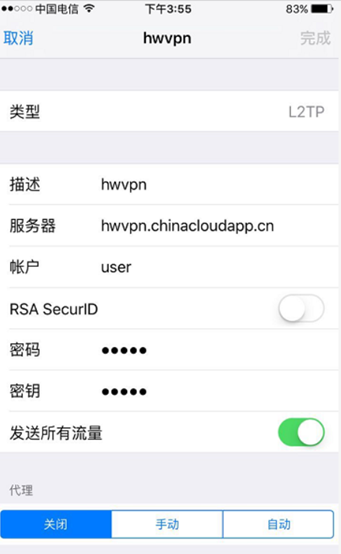
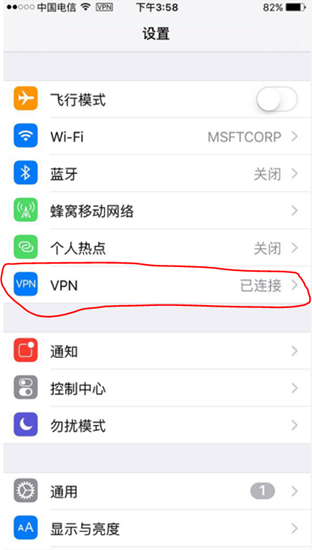
五、设置IPHONE

在Azure上搭建L2TP服务器的更多相关文章
- 微软.NET年芳15:我在Azure上搭建Photon服务器(C#.NET)
网上火热的“微软.NET年芳15”文章,我也得写点什么嘛,毕竟我还是现任的微软MVP. 摘录网上的“.NET 15周年”信息如下: 微软的 .NET 框架本周迎来了 15 岁生日..NET 的第一个版 ...
- Mac上搭建直播服务器Nginx+rtmp
简介 nginx是非常优秀的开源服务器,用它来做hls或者rtmp流媒体服务器是非常不错的选择,本人在网上整理了安装流程,分享给大家并且作备忘. 步骤安装 1.安装Homebrow Homebrew简 ...
- CentOs上搭建git服务器
CentOs上搭建git服务器 首先安装setuptools wget http://pypi.python.org/packages/source/s/setuptools/setuptools-0 ...
- [Windows Azure] 使用 Windows Azure 快速搭建 Redis 服务器
[Windows Azure] 使用 Windows Azure 快速搭建 Redis 服务器 Redis相信玩开源,大数据的朋友们并不陌生,大家最熟悉的使用者就是新浪微博,微博的整体数据缓存都是 ...
- 在路由器上搭建SVN服务器
在路由器上搭建SVN服务器 SVN托管服务大家都不陌生了,我最早开始用的是谷歌提供的SVN,因为在上面托管的项目都是开源的,所以当有些项目不方便在网上公开的时候,就需要自己搭建SVN服务器了.wind ...
- Ubuntu上搭建Git服务器
下面我们就看看,如何在Ubuntu上搭建Git服务器.我们使用VMware虚拟机安装两台Ubantu系统,分别命名为gitServer和gitClient_01. 1.安装OpenSSH并配置SSH无 ...
- Mac上搭建直播服务器Nginx
Mac上搭建直播服务器Nginx 1.安装Homebrew,执行命令 Homebrew简称brew,是Mac OSX上的软件包管理工具,能在Mac中方便的安装软件或者卸载软件,可以说Homebrew就 ...
- CentOS Linux上搭建PPPoE服务器及拨号设置
CentOS Linux上搭建PPPoE服务器及拨号设置 搭建PPPoE,成功了的话,就觉得超级简单,在CentOS Linux更是5步左右就能搞定. 1.安装pppoe,安装完成后,会有pppoe- ...
- 【转】【FTP】之windows8.1上搭建FTP服务器方法
参考地址:<windows8.1上搭建FTP服务器方法>
随机推荐
- 20145239杜文超《网络攻防》- MSF基础应用
20145239杜文超<网络攻防>- MSF基础应用 基础问题回答 1.用自己的话解释什么是exploit,payload,encode? exploit:实现攻击行为的主体,但没有载荷只 ...
- iOS_CLLocation定位
CoreLocation框架可用于定位设备当前经纬度,通过该框架,应用程序可通过附近的蜂窝基站,WIFI信号或者GPS等信息计算用户位置. iOS定位支持的3种模式. (1)G ...
- 时间插件之My97DatePickerBeta
My97DatePickerBeta使用很简单 1.在jsp页面中 引入JS 下载地址:链接: https://pan.baidu.com/s/1bp5uzuv 密码: ya9a <script ...
- oracle 计算时间差
1.计算时间差(相隔星期,天数,小时,分钟,秒) SELECT TO_CHAR(date1,'MMDDYYYY:HH24:MI:SS') date1, TO_CHAR(date2,'MMDDYYYY: ...
- RpcException:No provider available for remote service异常
出现RpcException:No provider available for remote service异常,表示没有可用的服务提供者. 解决思路: 1.检查连接的注册中心是否正确 2.到注册中 ...
- EF与手写Model的区别以及联系
1.在数据库表名上,EF是随意的,但是如果是Model的话,就应该在建立数据库的时候考虑到讲数据库表名变为复数,如Movie.cs 数据库应该为Movies
- Python词云的中文问题
image= Image.open('F:/__identity/course/建模/九寨沟地震/四川地图.jpg') fig = plt.figure(figsize=(20, 16)) graph ...
- XML文件解析-DOM4J方式和SAX方式
最近遇到的工作内容都是和xml内容解析相关的. 1图片数据以base64编码的方式保存在xml的一个标签中,xml文件通过接口的方式发送给我,然后我去解析出图片数据,对图片进行进一步处理. 2.xml ...
- 论文笔记 — L2-Net: Deep Learning of Discriminative Patch Descriptor in Euclidean Space
论文: 本文主要贡献: 1.提出了一种新的采样策略,使网络在少数的epoch迭代中,接触百万量级的训练样本: 2.基于局部图像块匹配问题,强调度量描述子的相对距离: 3.在中间特征图上加入额外的监督: ...
- VSCode设置中文语言显示
Vscode是一款开源的跨平台编辑器.默认情况下,vscode使用的语言为英文(us),如何将其显示语言修改成中文了? 1)打开vscode工具: 2)使用快捷键组合[Ctrl+Shift+p],在搜 ...