
【转】【已解决】Android中ActionBar中不显示overflow(就是三个点的那个按钮)--不错
原文网址:http://www.crifan.com/android_actionbar_three_dot_overflow_not_show/
【问题】
折腾:
【记录】继续尝试给Android程序的右上角的ActionBar中添加三个点的选项按钮
期间,已经按照官网的教程:
Action Bar | Android Developers
去添加代码,增加menu,然后显示在ActionBar中了。
但是遇到的问题是:
对于menu的item,没有指定android:showAsAction为ifRoom的话,结果对于:
PAD来说,也还是会直接显示在ActionBar上面,而没有出现所希望出现的overflow按钮,即三个点的那个按钮;
并且,对于手机来说,由于ActionBar的空间有限,结果:
始终都显示不出来对应的menu了。。。
现在希望:
当没有指定android:showAsAction为ifRoom的时候:
可以让overflow显示出来
并且对于手机来说,也应该显示出来。
【解决过程】
1.搜:
android actionbar not show overflow
参考:
Android action bar not showing overflow – Stack Overflow
但是别人都说那种错误不太好,所以暂时不用。
2.参考:
android – Overflow Actions on ActionBar not showing – Stack Overflow
说是:
如果设备有物理上的Menu键,则overflow按钮就不会显示,这个是本身android的设计就这么定的。
3.所以去看看其给的链接:
How to force overflow menu on android actionbar compat? – Stack Overflow
但是其所给出的官网链接,就是我前面看的:
Action Bar | Android Developers
但我是没看到有这种说法啊。。。
4.再参考:
android – How to force action bar overflow icon to show – Stack Overflow
其解释的相对比较清楚。
然后对于讨论:
中,也说的很清楚。
我个人意见是:
很明显,不应该依赖于物理上是否有MENU键,而决定是否显示三个点的按钮。
而应该是:
无论是否有物理按键,结果都显示三个点的overflow按钮。
然后看到评论里面的人,也是和我同样的观点。
但是反过来可以看出:
google那帮定UI的人,对于是否始终显示overflow按钮这点,不知道怎么想的
这么明显的UI的逻辑,竟然被其搞得这么复杂。。。。
哎,看来还是定规矩的人,考虑实在不周啊。。。
稍微动点脑子,都可以想到:
如果是否显示overflow需要依赖物理MENU按键的话,那么:
搞得有物理MENU和没物理MENU的手机,UI逻辑就不一致
并且有物理MENU键的手机,需要额外按一次MENU键,才能看到更多的菜单->明显很麻烦。
并且也侧面地鼓励android手机生厂商,需要去多弄个MENU键->增加物理成本
5.算了,不吐槽了。
去试试那个,hack的,强制出现overflow的代码:
|
1
2
3
4
5
6
7
8
9
10
11
12
13
14
15
16
17
18
19
20
21
22
|
public class MainActivity xxx{ @Override protected void onCreate(Bundle savedInstanceState) { ... getOverflowMenu(); } //force to show overflow menu in actionbar private void getOverflowMenu() { try { ViewConfiguration config = ViewConfiguration.get(this); Field menuKeyField = ViewConfiguration.class.getDeclaredField("sHasPermanentMenuKey"); if(menuKeyField != null) { menuKeyField.setAccessible(true); menuKeyField.setBoolean(config, false); } } catch (Exception e) { e.printStackTrace(); } } |
结果在4.2.2的PAD上,还是无法显示出来overflow。
6.换个4.1.2的手机试试,然后是可以显示出来overflow的:
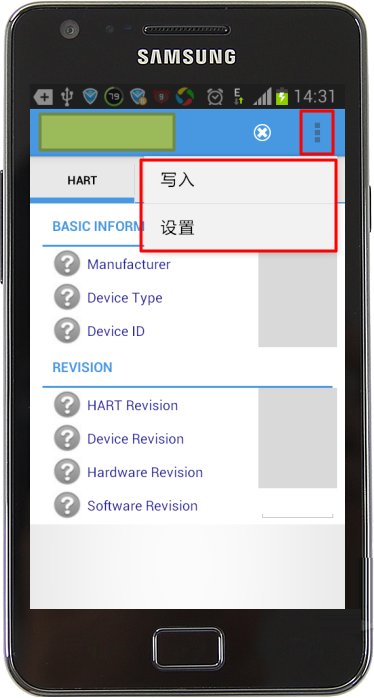
所以现在结果是:
对于ActionBar空间够大的PAD来说,即使加了上述代码,但是对于用了ifRoom的话,也还是无法强制显示出来overflow的。
7.那再去试试,对于:
|
1
2
3
4
5
6
7
8
9
10
11
12
13
14
15
16
17
18
19
20
21
22
|
<item android:id="@+id/menu_discard" android:icon="@drawable/error_white" android:orderInCategory="1" android:showAsAction="ifRoom|withText" android:title="@string/discard"/> <item android:id="@+id/menu_send" android:icon="@drawable/forward_white" android:orderInCategory="2" android:showAsAction="ifRoom|withText" android:title="@string/send"/> <item android:id="@+id/menu_settings" android:icon="@drawable/settings" android:orderInCategory="3" android:showAsAction="withText" android:title="@string/settings"/></menu> |
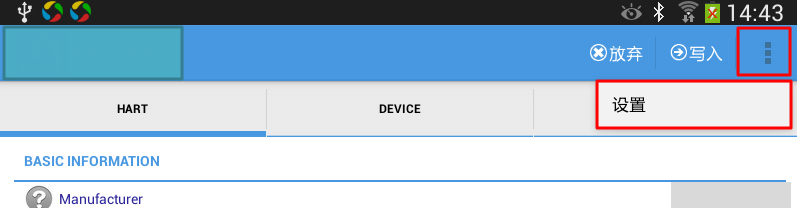
以及加了getOverflowMenu,在PAD上效果:
然后是可以显示出来对应的overflow的:
8.另外,对于之前:
android – How to force action bar overflow icon to show – Stack Overflow
的讨论,看起来:
对于上述的hack的代码getOverflowMenu来说,即使是用于更新的4.4.的android中,应该也是无害的:
因为如果得到的menuKeyField为null的话,啥都不做,所以也是没啥副作用的。
此处倒是想去测试android 4.4的效果的,但是由于即没有4.4的实际设备,也没有4.4的支持x86加速的AVD虚拟机,所以就不去测试了。
【总结】
1.Android中的ActionBar中的那三个点的按钮,专业名字叫做:overflow button或overflow menu
2.overflow在新的Android 3.0+的系统中,默认是不显示的:
对应的:
- 对于很多PAD来说:ActionBar中空间足够显示的话,那么对应各个menu菜单,都直接显示在ActionBar中;
- 对于很多手机来说:ActionBar中没有足够的控件显示所有的菜单的话,余下的菜单,就被藏起来了->只有有物理菜单(MENU)键的Android设备,点击MENU键,才能出现多余的菜单;
3.想要让overflow始终都显示的话:
先去添加别的高手破解后强制overflow显示的那段代码getOverflowMenu,加到Activity的onCreate中:
|
1
2
3
4
5
6
7
8
9
10
11
12
13
14
15
16
17
18
19
20
21
22
23
|
public class XxxActivity{ @Override protected void onCreate(Bundle savedInstanceState) { ... getOverflowMenu(); } //force to show overflow menu in actionbar for android 4.4 below private void getOverflowMenu() { try { ViewConfiguration config = ViewConfiguration.get(this); Field menuKeyField = ViewConfiguration.class.getDeclaredField("sHasPermanentMenuKey"); if(menuKeyField != null) { menuKeyField.setAccessible(true); menuKeyField.setBoolean(config, false); } } catch (Exception e) { e.printStackTrace(); } }} |
然后接下来,要根据ActionBar是否有足够空间显示所有menu菜单,来决定menu的android:showAsAction是否添加ifRoom:
- 对于很多PAD来说:ActionBar中空间足够显示的话,那么对应的menu菜单,只有不设置为ifRoom,然后才可以被放到overflow中:
- 举例:
|
1
2
3
4
5
6
7
8
9
10
11
12
13
14
15
16
17
18
19
20
21
22
|
<item android:id="@+id/menu_discard" android:icon="@drawable/error_white" android:orderInCategory="1" android:showAsAction="ifRoom|withText" android:title="@string/discard"/> <item android:id="@+id/menu_send" android:icon="@drawable/forward_white" android:orderInCategory="2" android:showAsAction="ifRoom|withText" android:title="@string/send"/> <item android:id="@+id/menu_settings" android:icon="@drawable/settings" android:orderInCategory="3" android:showAsAction="withText" android:title="@string/settings"/></menu> |
- 对于menu_settings是可以被放到overflow按钮中的。
- 对于很多手机来说:ActionBar中没有足够的控件显示所有的菜单的话,即使是设置了ifRoom,很多菜单本来也也还是无法全部显示,所以:即使设置了ifRoom的menu的item,以及没有设置ifRoom的menu的item,都会被放到overflow中的
- 举例:
|
1
2
3
4
5
6
7
8
9
10
11
12
13
14
15
16
17
18
19
20
21
22
|
<item android:id="@+id/menu_discard" android:icon="@drawable/error_white" android:orderInCategory="1" android:showAsAction="ifRoom|withText" android:title="@string/discard"/> <item android:id="@+id/menu_send" android:icon="@drawable/forward_white" android:orderInCategory="2" android:showAsAction="ifRoom|withText" android:title="@string/send"/> <item android:id="@+id/menu_settings" android:icon="@drawable/settings" android:orderInCategory="3" android:showAsAction="withText" android:title="@string/settings"/></menu> |
- 其中:
- 如果手机宽度不多,只能显示一个菜单按钮的话,那么ActionBar中只显示menu_discard,余下的,虽然已经设置了ifRoom的menu_send,和没有设置ifRoom的menu_settings,都会被放到overflow中。
【转】【已解决】Android中ActionBar中不显示overflow(就是三个点的那个按钮)--不错的更多相关文章
- 我的Android进阶之旅------>如何解决Android 5.0中出现的警告: Service Intent must be explicit:
我的Android进阶之旅-->如何解决Android 5.0中出现的警告: java.lang.IllegalArgumentException: Service Intent must be ...
- 我的Android进阶之旅------>怎样解决Android 5.0中出现的警告: Service Intent must be explicit:
我的Android进阶之旅-->怎样解决Android 5.0中出现的警告: java.lang.IllegalArgumentException: Service Intent must be ...
- 【已解决】关于IDEA中 Tomcat 控制台打印日志中文乱码的解决
在 Idea 上面使用 Tomcat 时,发现控制台打印信息的时候,出行中文乱码问题; 可以通过以下几种解决办法 1:在-Dfile.encoding=UTF-8 在vm中设置编码方式 2.然后从Fi ...
- 解决android studio项目中Failded to sync Gradle project 'XXXX' Cause:failed to find target with hash string 'android-16'问题
之前在github上通过import module导入一个项目,结果报错,提示找不到sdk相应的版本xx,而我的compileSdkVersion明明写的是23不是xx,查了半天也没解决.最后只好下载 ...
- 【已解决】React项目中按需引入ant-design报错TypeError: injectBabelPlugin is not a function
react项目中ant-design按需加载,使用react-app-rewired的时候报错 运行npm start或者yarn start报如下错误: TypeError: injectBabel ...
- 对android中ActionBar中setDisplayHomeAsUpEnabled和setHomeButtonEnabled和setDisplayShowHomeEnabled方法的理解(转)
setHomeButtonEnabled这个小于4.0版本的默认值为true的.但是在4.0及其以上是false,该方法的作用:决定左上角的图标是否可以点击.没有向左的小图标. true 图标可以点击 ...
- 如何解决Android 5.0中出现的警告:Service Intent must be explicit
有些时候我们使用Service的时需要采用隐私启动的方式,但是Android 5.0一出来后,其中有个特性就是Service Intent must be explitict,也就是说从Lollip ...
- 解决Android 5.0中出现的警告:Service Intent must be explicit
extends:http://www.eoeandroid.com/thread-568853-1-1.html 本帖最后由 469874851 于 2015-3-11 18:15 编辑 有些时候我们 ...
- 对android中ActionBar中setDisplayHomeAsUpEnabled和setHomeButtonEnabled和setDisplayShowHomeEnabled方法的理解
转自: http://blog.csdn.net/lovexieyuan520/article/details/9974929 http://blog.csdn.net/cyp331203/artic ...
随机推荐
- Android(java)学习笔记202:Handler消息机制的原理和实现
联合学习 Android 异步消息处理机制 让你深入理解 Looper.Handler.Message三者关系 1. 首先我们通过一个实例案例来引出一个异常: (1)布局文件activity_m ...
- 关于text-align无法居中的问题
昨天项目,一直出现一个无法居中的问题,最后发现竟然是text-align的问题,才发现自己对text-align的理解还是不够透彻,于是在此再举例分析下. css中的元素一共有三类:块元素.行内块和内 ...
- C## 输出Hello world
首先新建一个项目 然后在文件D:\C##Obj\HelloWorld\HelloWorld\Program.cs using System; using System.Collections.Gene ...
- datagrid后台给每列添加js方法
protected void dgExhList_ItemDataBound(object sender, DataGridItemEventArgs e) { string param = &quo ...
- IEqualityComparer 去重
1.去除list里某重复字段值的数据(相当于group by) public class CorrController { //方法 public void DoGet() { List<tes ...
- C#操作求出SQL中某一字段所有行的和方法!
DataTable table = xx.sqlcha(sql1);//调数据库 ; foreach(DataRow row in table.Rows)//遍历所查出记录所有行 { v = v + ...
- innerHTML/outerHTML; innerText/outerText; textContent
innerHTML v.s. outerHTML Element.innerHTML Reference: https://developer.mozilla.org/en-US/docs/Web/A ...
- Builder 模式
Builder 模式和 AbstractFactory 模式在功能上很相似,因为都是用来创建大的复杂的对象,它们的区别是:Builder 模式强调的是一步步创建对象,并通过相同的创建过程可以获得不同的 ...
- iOS打包ipa 让别人设备安装你的App
首先推荐一本书<一步一步学习iOS 5编程(第二版) – PDF 中文版>在一本学习IOS入门很不错的书籍,目前,这是第一本介绍iOS 5.x 和 Xcode 4.3 的中文版书籍,尤其适 ...
- 『重构--改善既有代码的设计』读书笔记----Self Encapsulate Field
如果你直接访问一个字段,你就会和这个字段直接的耦合关系变得笨拙.也就是说当这个字段权限更改,或者名称更改之后你的客户端代码都需要做相应的改变,此时你可以为这个字段建立设值和取值函数并且只以这些函数来访 ...