
ANDROID_MARS学习笔记_S02_008_ANIMATION第二种使用方式:xml
一、简介
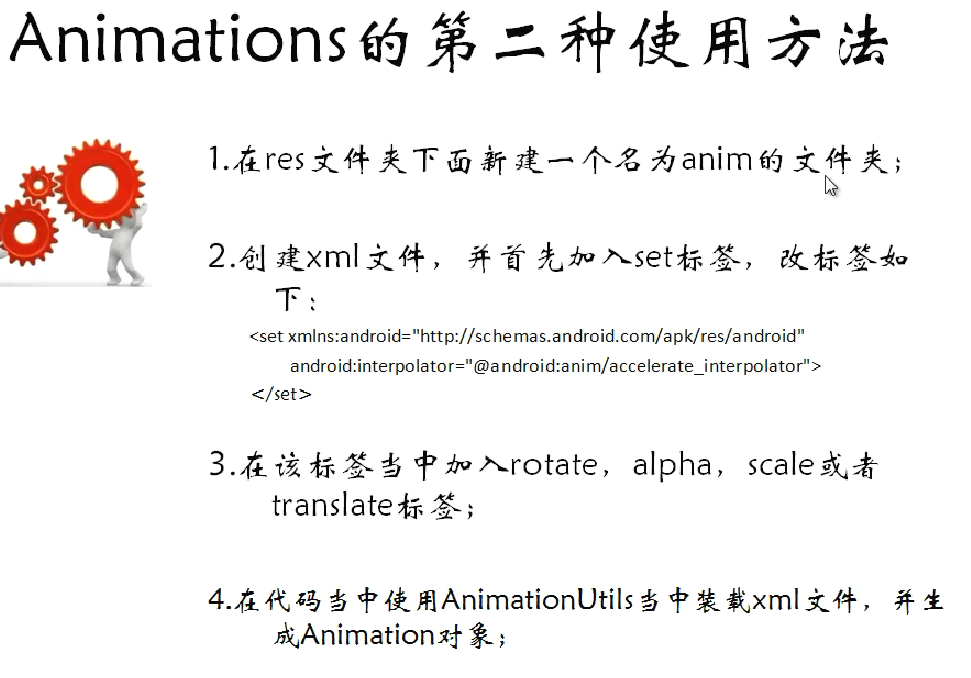
二、代码
1.res\anim下的xml
(1)alpha.xml.xml
 <?xml version="1.0" encoding="utf-8"?>

 <set xmlns:android="http://schemas.android.com/apk/res/android"

     android:interpolator="@android:anim/accelerate_interpolator">

     <alpha

         android:fromAlpha="1.0"

         android:toAlpha="0.0"

         android:startOffset="500"

         android:duration="1000"/>

 </set>
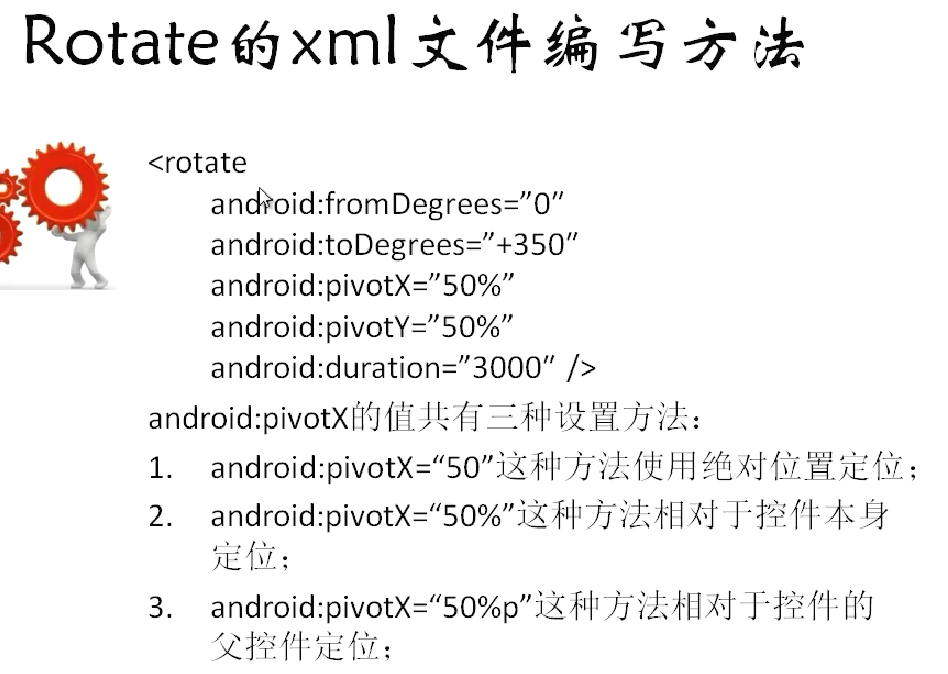
(2)rotate.xml
 <?xml version="1.0" encoding="utf-8"?>

 <set xmlns:android="http://schemas.android.com/apk/res/android"

     android:interpolator="@android:anim/accelerate_interpolator">

     <rotate

         android:fromDegrees="0"

         android:toDegrees="720"

         android:pivotX="50%"

         android:pivotY="100%"

         android:duration="3000"/>

 </set>
(3)scale.xml
 <?xml version="1.0" encoding="utf-8"?>

 <set xmlns:android="http://schemas.android.com/apk/res/android"

     android:interpolator="@android:anim/accelerate_interpolator">

     <scale

         android:fromXScale="1.0"

         android:toXScale="0.0"

         android:fromYScale="1.0"

         android:toYScale="0.0"

         android:pivotX="50%"

         android:pivotY="50%"

         android:duration="2000"/>

 </set>
(4)tranlate.xml
 <?xml version="1.0" encoding="utf-8"?>

 <set xmlns:android="http://schemas.android.com/apk/res/android"

     android:interpolator="@android:anim/accelerate_interpolator">

     <translate

         android:fromXDelta="50%"

         android:toXDelta="100%"

         android:fromYDelta="0%"

         android:toYDelta="100%"

         android:duration="2000"/>

 </set>
2.java
(1)MainActivity.java
 package com.animation2;

 import android.app.Activity;

 import android.os.Bundle;

 import android.view.View;

 import android.view.View.OnClickListener;

 import android.view.animation.Animation;

 import android.view.animation.AnimationUtils;

 import android.widget.Button;

 import android.widget.ImageView;

 public class MainActivity extends Activity {

     private ImageView imageView = null;

     private Button rotateButton = null;

     private Button scaleButton = null;

     private Button alphaButton = null;

     private Button translateButton = null;

     @Override

     protected void onCreate(Bundle savedInstanceState) {

         super.onCreate(savedInstanceState);

         setContentView(R.layout.activity_main);

         imageView = (ImageView) findViewById(R.id.imageViewId);

         rotateButton = (Button) findViewById(R.id.rotateButtonId);

         rotateButton.setOnClickListener(new RotateButtonListener());

         scaleButton = (Button) findViewById(R.id.scaleButtonId);

         scaleButton.setOnClickListener(new ScaleButtonListener());

         alphaButton = (Button) findViewById(R.id.alphaButtonId);

         alphaButton.setOnClickListener(new AlphaButtonListener());

         translateButton = (Button) findViewById(R.id.translateButtonId);

         translateButton.setOnClickListener(new TranslateButtonListener());

     }

     class TranslateButtonListener implements OnClickListener {

         @Override

         public void onClick(View v) {

             Animation animation = AnimationUtils.loadAnimation(MainActivity.this, R.anim.tranlate);

             imageView.startAnimation(animation);

         }

     }

     class AlphaButtonListener implements OnClickListener {

         @Override

         public void onClick(View v) {

             Animation animation = AnimationUtils.loadAnimation(MainActivity.this, R.anim.alpha);

             imageView.startAnimation(animation);

         }

     }

     class ScaleButtonListener implements OnClickListener {

         @Override

         public void onClick(View v) {

             Animation animation = AnimationUtils.loadAnimation(MainActivity.this, R.anim.scale);

             imageView.startAnimation(animation);

         }

     }

     class RotateButtonListener implements OnClickListener {

         @Override

         public void onClick(View v) {

             Animation animation = AnimationUtils.loadAnimation(MainActivity.this, R.anim.rotate);

             imageView.startAnimation(animation);

         }

     }

 }
ANDROID_MARS学习笔记_S02_008_ANIMATION第二种使用方式:xml的更多相关文章
- ANDROID_MARS学习笔记_S02_007_Animation第一种使用方式:代码
一.简介 二.代码1.xml(1)activity_main.xml <?xml version="1.0" encoding="utf-8"?> ...
- JavaScript新手学习笔记3——三种排序方式(冒泡排序、插入排序、快速排序)
每种编程语言学到数组的时候,都会讲到排序算法,当时学C语言的时候,卡在排序算法.今天来总结一下javascript中如何实现三种排序算法. 1.冒泡排序(默认升序排列哦) 原理: 冒泡排序的原理,顾名 ...
- Stealth视频教程学习笔记(第二章)
Stealth视频教程学习笔记(第二章) 本文是对Unity官方视频教程Stealth的学习笔记.在此之前,本人整理了Stealth视频的英文字幕,并放到了优酷上.本文将分别对各个视频进行学习总结,提 ...
- .NET Remoting学习笔记(二)激活方式
目录 .NET Remoting学习笔记(一)概念 .NET Remoting学习笔记(二)激活方式 .NET Remoting学习笔记(三)信道 参考:百度百科 ♂风车车.Net 激活方式概念 在 ...
- 【转载】.NET Remoting学习笔记(二)激活方式
目录 .NET Remoting学习笔记(一)概念 .NET Remoting学习笔记(二)激活方式 .NET Remoting学习笔记(三)信道 参考:百度百科 ♂风车车.Net 激活方式概念 在访 ...
- 红帽学习笔记[RHCSA] 第二周
目录 红帽学习笔记[RHCSA]第二周 环境 第七课[网络配置相关] 在Vmware中添加网卡 将网卡添加到虚拟机上 关于网卡命名规则 配置网络 网络配置命令总结 更改hostname 关于SSH的一 ...
- Introduction to 3D Game Programming with DirectX 12 学习笔记之 --- 第二十章:阴影贴图
原文:Introduction to 3D Game Programming with DirectX 12 学习笔记之 --- 第二十章:阴影贴图 本章介绍一种在游戏和应用中,模拟动态阴影的基本阴影 ...
- Introduction to 3D Game Programming with DirectX 12 学习笔记之 --- 第二十二章:四元数(QUATERNIONS)
原文:Introduction to 3D Game Programming with DirectX 12 学习笔记之 --- 第二十二章:四元数(QUATERNIONS) 学习目标 回顾复数,以及 ...
- Introduction to 3D Game Programming with DirectX 12 学习笔记之 --- 第二十一章:环境光遮蔽(AMBIENT OCCLUSION)
原文:Introduction to 3D Game Programming with DirectX 12 学习笔记之 --- 第二十一章:环境光遮蔽(AMBIENT OCCLUSION) 学习目标 ...
随机推荐
- Eratosthenes筛选法
说到素数,最基本的算是一百以内的那些数了.这些数在数学竟赛中常常会被用到.比如说有这样一道题:“一百以内有多少在加2后仍然是素数的素数?”11和17就是这样的素数.如果对素数很熟悉的话,就能迅速得出答 ...
- C#字符串拼接怎么转义背景图片
C#字符串拼接怎么转义背景图片 StringBuilder sb = new StringBuilder(); sb.Append("<div style=\"backg ...
- Extjs搜索域使用
要在使用的panel在预先加载搜索域类requires : ["Ext.ux.form.SearchField"],
- linux中的常用命令
cat tail -f 日 志 文 件 说 明 /var/log/message 系统启动后的信息和错误日志,是Red Hat Linux中最常用的日志之一 /var/log/secure 与安全相关 ...
- 【我们都爱Paul Hegarty】斯坦福IOS8公开课个人笔记1 IOS8概述
首先感谢网易公开课和SwiftV课堂的朋友们辛苦翻译,这个系列是我学习斯坦福IOS8公开课的个人心得体会和笔记,希望能给大家带来启发. 首先我们要知道IOS系统中的结构情况,从贴近硬件的底层到贴近用户 ...
- ios开发之UIView的frame、bounds跟center属性的区别(附图)
博文暂时想到什么写什么,不顺理成章,不顺章成篇. 先看几个概念 坐标点Poit:向右侧为X轴正方向的值x,原点下侧为Y轴正方向的值y 大小Size:由宽度width和高度height构成,表示一个矩形 ...
- NSArray函数
1.判断是否包含某一个元素,返回1则表示有 - (BOOL)countainsObject:(id)anObject BOOL isContain = [arrayboy containsObject ...
- 如何在浏览器网页中实现java小应用程序的功能
我们知道,java语言的运用就是面向对象实现功能,和c不同,java语言对于程序员来说,运用起来更为简便. 小应用程序与应用程序不同,小应用程序只能在与Java兼容的容器中运行,可以嵌入在HTML网页 ...
- 在Linux系统下安装大于mysql5.5版本的数据库
linux下mysql 5.5的安装方法: 1.安装所需要系统库相关库文件 gcc等开发包,在安装linux系统的时候安装. 2.创建mysql安装目录 # mkdir -p /usr/lo ...
- 高并发编程陷阱之check and set
今天公司CTO跟隔壁部门开技术会,旁听了一下.所讲的内容感觉好高大上啊!简单记录一下 场景是这样的: if(check(id)===true) { }else{ set(id); } 什么意思呢? 就 ...