
ANDROID_MARS学习笔记_S02_008_ANIMATION第二种使用方式:xml
一、简介
二、代码
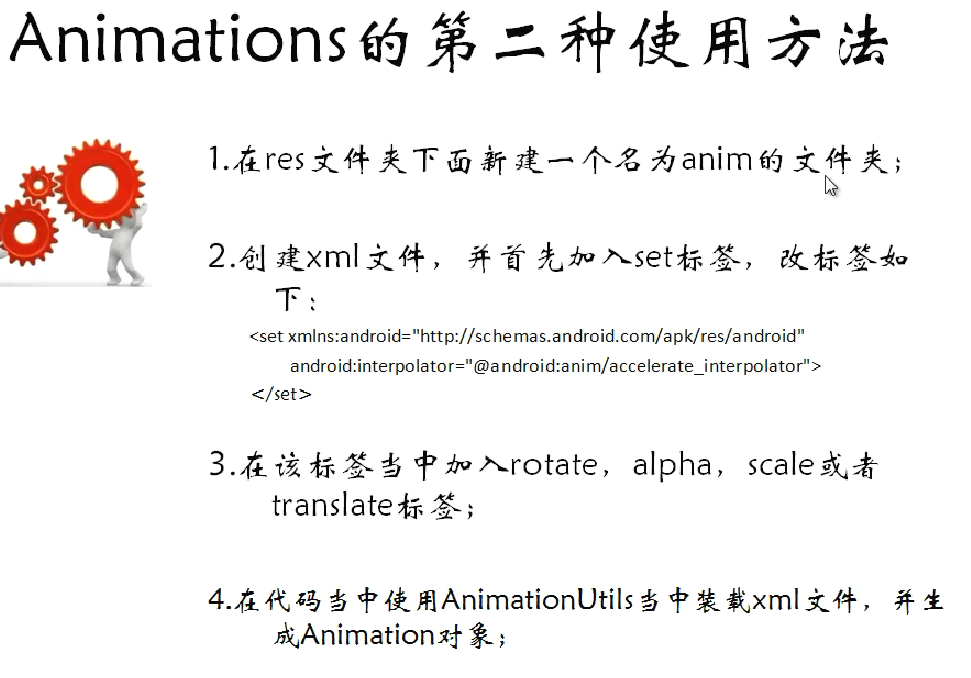
1.res\anim下的xml
(1)alpha.xml.xml
 <?xml version="1.0" encoding="utf-8"?>

 <set xmlns:android="http://schemas.android.com/apk/res/android"

     android:interpolator="@android:anim/accelerate_interpolator">

     <alpha

         android:fromAlpha="1.0"

         android:toAlpha="0.0"

         android:startOffset="500"

         android:duration="1000"/>

 </set>
(2)rotate.xml
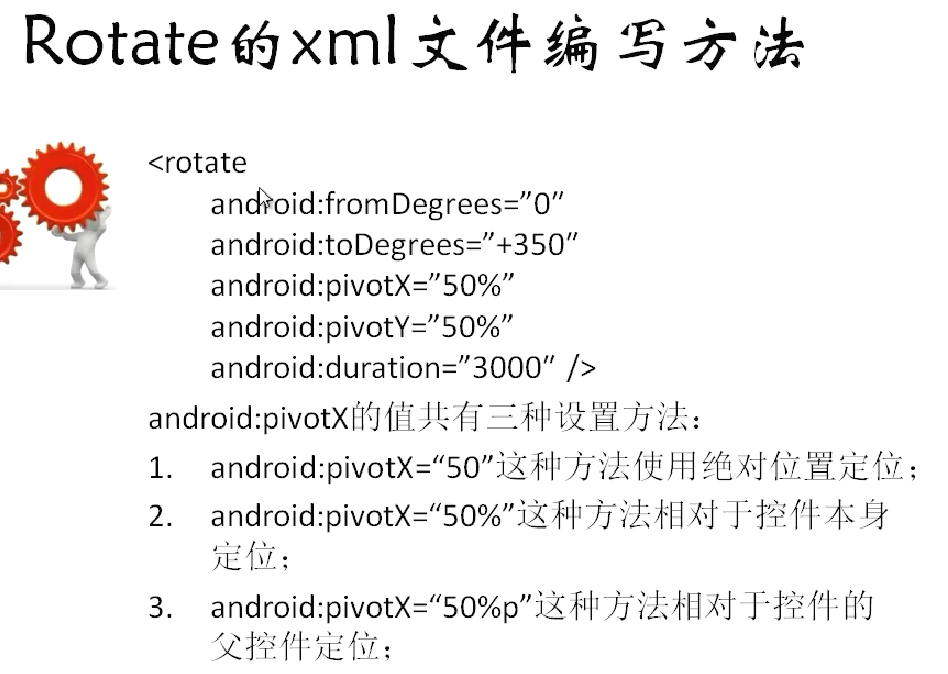
 <?xml version="1.0" encoding="utf-8"?>

 <set xmlns:android="http://schemas.android.com/apk/res/android"

     android:interpolator="@android:anim/accelerate_interpolator">

     <rotate

         android:fromDegrees="0"

         android:toDegrees="720"

         android:pivotX="50%"

         android:pivotY="100%"

         android:duration="3000"/>

 </set>
(3)scale.xml
 <?xml version="1.0" encoding="utf-8"?>

 <set xmlns:android="http://schemas.android.com/apk/res/android"

     android:interpolator="@android:anim/accelerate_interpolator">

     <scale

         android:fromXScale="1.0"

         android:toXScale="0.0"

         android:fromYScale="1.0"

         android:toYScale="0.0"

         android:pivotX="50%"

         android:pivotY="50%"

         android:duration="2000"/>

 </set>
(4)tranlate.xml
 <?xml version="1.0" encoding="utf-8"?>

 <set xmlns:android="http://schemas.android.com/apk/res/android"

     android:interpolator="@android:anim/accelerate_interpolator">

     <translate

         android:fromXDelta="50%"

         android:toXDelta="100%"

         android:fromYDelta="0%"

         android:toYDelta="100%"

         android:duration="2000"/>

 </set>
2.java
(1)MainActivity.java
 package com.animation2;

 import android.app.Activity;

 import android.os.Bundle;

 import android.view.View;

 import android.view.View.OnClickListener;

 import android.view.animation.Animation;

 import android.view.animation.AnimationUtils;

 import android.widget.Button;

 import android.widget.ImageView;

 public class MainActivity extends Activity {

     private ImageView imageView = null;

     private Button rotateButton = null;

     private Button scaleButton = null;

     private Button alphaButton = null;

     private Button translateButton = null;

     @Override

     protected void onCreate(Bundle savedInstanceState) {

         super.onCreate(savedInstanceState);

         setContentView(R.layout.activity_main);

         imageView = (ImageView) findViewById(R.id.imageViewId);

         rotateButton = (Button) findViewById(R.id.rotateButtonId);

         rotateButton.setOnClickListener(new RotateButtonListener());

         scaleButton = (Button) findViewById(R.id.scaleButtonId);

         scaleButton.setOnClickListener(new ScaleButtonListener());

         alphaButton = (Button) findViewById(R.id.alphaButtonId);

         alphaButton.setOnClickListener(new AlphaButtonListener());

         translateButton = (Button) findViewById(R.id.translateButtonId);

         translateButton.setOnClickListener(new TranslateButtonListener());

     }

     class TranslateButtonListener implements OnClickListener {

         @Override

         public void onClick(View v) {

             Animation animation = AnimationUtils.loadAnimation(MainActivity.this, R.anim.tranlate);

             imageView.startAnimation(animation);

         }

     }

     class AlphaButtonListener implements OnClickListener {

         @Override

         public void onClick(View v) {

             Animation animation = AnimationUtils.loadAnimation(MainActivity.this, R.anim.alpha);

             imageView.startAnimation(animation);

         }

     }

     class ScaleButtonListener implements OnClickListener {

         @Override

         public void onClick(View v) {

             Animation animation = AnimationUtils.loadAnimation(MainActivity.this, R.anim.scale);

             imageView.startAnimation(animation);

         }

     }

     class RotateButtonListener implements OnClickListener {

         @Override

         public void onClick(View v) {

             Animation animation = AnimationUtils.loadAnimation(MainActivity.this, R.anim.rotate);

             imageView.startAnimation(animation);

         }

     }

 }
ANDROID_MARS学习笔记_S02_008_ANIMATION第二种使用方式:xml的更多相关文章
- ANDROID_MARS学习笔记_S02_007_Animation第一种使用方式:代码
一.简介 二.代码1.xml(1)activity_main.xml <?xml version="1.0" encoding="utf-8"?> ...
- JavaScript新手学习笔记3——三种排序方式(冒泡排序、插入排序、快速排序)
每种编程语言学到数组的时候,都会讲到排序算法,当时学C语言的时候,卡在排序算法.今天来总结一下javascript中如何实现三种排序算法. 1.冒泡排序(默认升序排列哦) 原理: 冒泡排序的原理,顾名 ...
- Stealth视频教程学习笔记(第二章)
Stealth视频教程学习笔记(第二章) 本文是对Unity官方视频教程Stealth的学习笔记.在此之前,本人整理了Stealth视频的英文字幕,并放到了优酷上.本文将分别对各个视频进行学习总结,提 ...
- .NET Remoting学习笔记(二)激活方式
目录 .NET Remoting学习笔记(一)概念 .NET Remoting学习笔记(二)激活方式 .NET Remoting学习笔记(三)信道 参考:百度百科 ♂风车车.Net 激活方式概念 在 ...
- 【转载】.NET Remoting学习笔记(二)激活方式
目录 .NET Remoting学习笔记(一)概念 .NET Remoting学习笔记(二)激活方式 .NET Remoting学习笔记(三)信道 参考:百度百科 ♂风车车.Net 激活方式概念 在访 ...
- 红帽学习笔记[RHCSA] 第二周
目录 红帽学习笔记[RHCSA]第二周 环境 第七课[网络配置相关] 在Vmware中添加网卡 将网卡添加到虚拟机上 关于网卡命名规则 配置网络 网络配置命令总结 更改hostname 关于SSH的一 ...
- Introduction to 3D Game Programming with DirectX 12 学习笔记之 --- 第二十章:阴影贴图
原文:Introduction to 3D Game Programming with DirectX 12 学习笔记之 --- 第二十章:阴影贴图 本章介绍一种在游戏和应用中,模拟动态阴影的基本阴影 ...
- Introduction to 3D Game Programming with DirectX 12 学习笔记之 --- 第二十二章:四元数(QUATERNIONS)
原文:Introduction to 3D Game Programming with DirectX 12 学习笔记之 --- 第二十二章:四元数(QUATERNIONS) 学习目标 回顾复数,以及 ...
- Introduction to 3D Game Programming with DirectX 12 学习笔记之 --- 第二十一章:环境光遮蔽(AMBIENT OCCLUSION)
原文:Introduction to 3D Game Programming with DirectX 12 学习笔记之 --- 第二十一章:环境光遮蔽(AMBIENT OCCLUSION) 学习目标 ...
随机推荐
- c#局域网文件搬移
/// kongxiang--2013.7.23 /// using System;using System.Collections.Generic;using System.Linq;using S ...
- Mysql 冷备份批处理
@Rem Generate today date @echo wscript.echo dateadd("d",0,date)>GetOldDate.vbs @for /f ...
- zookeeper实现商品秒杀抢购
package com.test; import java.io.IOException; import java.util.List; import java.util.concurrent.Cyc ...
- selenium2.0处理case实例(二)
本文通过具体代码处理过程, 来展示selenium中一些比较不常用的类的用法 1.javascriptExcutor,通过将driver强转成JavascriptExecutor类型, 调用execu ...
- C# ACM poj1006
中国剩余定理 public static void acm1006(int a, int b, int c, int d) { * ; * ; * ; * * ; ) * z; ) * y; ) * ...
- net下 Mysql Linq的使用, 更新数据,增加数据,删除数据
net下访问mysql主要有2种方法: 1.字符串拼接访问 a.mysql官网下载并安装mysql-connector-net. b项目中引用mysql.data等 所有增删改查可以通过拼接sql语句 ...
- oninput和onpropertychange
时常会有监听输入框输入的场景,比如新浪微博的发微博输入框: 还有边输入边提示: 以及form表单边输入边验证,当内容为空提示或者改变输入框的样式达到提示效果. 在IE中是onpropertychang ...
- ZOJ 2625 Rearrange Them(DP)
题目链接:http://acm.zju.edu.cn/onlinejudge/showProblem.do?problemId=1625 题目大意:将n个数重新排列,使得每个数的前一个数都不能和之前的 ...
- 3.MySQL之创建/删除用户
登录mysql服务器后可使用grant命令来创建用户并赋予相关权限. mysql> use mysql; Reading table information for completion of ...
- Linux内核中的通用双向循环链表
开发中接触Linux越来越多,休息放松之余,免不了翻看翻看神秘的Linux的内核.看到双向链表时,觉得挺有意思的,此文记下. 作为众多基础数据结构中的一员,双向循环链表在各种“教科书”中的实现是相当的 ...