
Spring全家桶之spring boot(四)
spring boot拦截器、过滤器、servlet和健康检查机制
spring boot拦截器
spring boot配置拦截器与原来大致相同,只是需要在拦截器的配置类上添加@Configuration注解,让spirng boot将拦截器加入spring容器中。
1、首先这里我们像之前一样创建一个普通的拦截器
package com.scm.mybatis.Interceptor;

import org.springframework.web.servlet.HandlerInterceptor;

import org.springframework.web.servlet.ModelAndView;

import javax.servlet.http.HttpServletRequest;

import javax.servlet.http.HttpServletResponse;

public class MyInterceptor implements HandlerInterceptor {

    @Override

    public boolean preHandle(HttpServletRequest request, HttpServletResponse response, Object handler) throws Exception {

        System.out.println("拦截器的preHandle()方法");

        return true;

    }

    @Override

    public void postHandle(HttpServletRequest request, HttpServletResponse response, Object handler, ModelAndView modelAndView) throws Exception {

        System.out.println("拦截器的postHandle()方法");

    }

    @Override

    public void afterCompletion(HttpServletRequest request, HttpServletResponse response, Object handler, Exception ex) throws Exception {

        System.out.println("拦截器的afterCompletion()方法");

    }

}
2、创建一个拦截器配置类
package com.scm.mybatis.Interceptor;

import org.springframework.context.annotation.Configuration;

import org.springframework.web.servlet.config.annotation.InterceptorRegistration;

import org.springframework.web.servlet.config.annotation.InterceptorRegistry;

import org.springframework.web.servlet.config.annotation.WebMvcConfigurer;

@Configuration

public class InterceptorConfig implements WebMvcConfigurer {

    @Override

    public void addInterceptors(InterceptorRegistry registry) {

        InterceptorRegistration r = registry.addInterceptor(new MyInterceptor());

        r.addPathPatterns("/*");

        r.excludePathPatterns("/myInterceptor");

    }

}
这里需要注意的一点就是要加入@Configuration注解,表示该类会被加入到spring容器中。addPathPatterns()表示要拦截的请求,excludePathPatterns()表示不拦截的请求。当然我们可以创建多个拦截器,在拦截器的配置类上加上@Configuration注解即可。
3、创建一个controller
package com.scm.mybatis.controller;

import org.springframework.web.bind.annotation.GetMapping;

import org.springframework.web.bind.annotation.RestController;

@RestController

public class InController {

    @GetMapping("/Interceptor")

    public String Interceptor1(){

        return "The request is intercepted";//被拦截的请求

    }

    @GetMapping("/myInterceptor")

    public String Interceptor2(){

        return "The request is not intercepted";//不被拦截的请求

    }

}
之后在浏览器中输入相应的url进行测试。"Interceptor" 请求会输出 "The request is intercepted", "myInterceptor"请求输出" The request is not intercepted"。
spring boot过滤器(两种方式)
方式一:创建普通的filter
1、首先创建一个普通的过滤器,过滤器中我们过滤掉有请求,我们在自定义的过滤器上加上一个@WebFilter注解。
package com.scm.mybatis.Filter;

import javax.servlet.*;

import javax.servlet.annotation.WebFilter;

import java.io.IOException;

@WebFilter("/*")

public class MyFilter implements Filter {

    @Override

    public void init(FilterConfig filterConfig) throws ServletException {

        System.out.println("过滤器init()方法");

    }

    @Override

    public void doFilter(ServletRequest servletRequest, ServletResponse servletResponse, FilterChain filterChain) throws IOException, ServletException {

        System.out.println("过滤器doFilter()方法");

    }

    @Override

    public void destroy() {

        System.out.println("过滤器destroy()方法");

    }

}
2、接着我们在主函数启动入口上加入一个@ServletComponentScan注解,加上该注解之后spring boot会扫描servlet相关的所有注解。比如@WebServlet、@WebFilter、@WebListener,注解中的参数就是我们自定义过滤器的所在包。
package com.scm.mybatis;

import org.springframework.boot.SpringApplication;

import org.springframework.boot.autoconfigure.SpringBootApplication;

import org.springframework.boot.web.servlet.ServletComponentScan;

@SpringBootApplication

@ServletComponentScan("com.scm.mybatis.Filter")

public class Application {

    public static void main(String[] args) {

        SpringApplication.run(Application.class, args);

    }

}
3、创建Filter的controller
package com.scm.mybatis.controller;

import org.springframework.web.bind.annotation.GetMapping;

import org.springframework.web.bind.annotation.RestController;

@RestController

public class filterController {

    @GetMapping("/myFilter")

    public String filterTest(){

        return "This is a Filter";

    }

}
当然我们还可根据需求过滤掉我们所需要的请求,只需要修改@WebFilter()中的参数就可以了,这里就不在展示了。
方式二:创建一个过滤器的配置类,这里MyFilter上不需要@WebFilter注解,启动类上也不需要@ServletComponentScan注解了,不同的就是需要添加一个过滤器配置类。
package com.scm.mybatis.Filter;

import org.springframework.boot.web.servlet.FilterRegistrationBean;

import org.springframework.context.annotation.Bean;

import org.springframework.context.annotation.Configuration;

@Configuration

public class FilterConfig {

    @Bean

    public FilterRegistrationBean myFilterRegistration() {

        FilterRegistrationBean registration = new FilterRegistrationBean(new MyFilter());

        registration.addUrlPatterns("/*");

        return registration;

    }

}
@Bean标签就相当于以前spring配置文件中的bean标签。第二种方式中只需要将第一种方式的MyFilter类中的@WebFilter注解删除其他内容一样,启动类上的@ServletComponentScan也要删除,controller与第一种方式相同。
spring boot配置servlet
spring boot配置servlet与配置过滤器相同,同样有两种方式。
方式一:通过@WebServlet和@ServletComponentScan注解
1、首先创建一个servlet,这里同样是在MyServlet类上加上@WebServlet注解。
package com.scm.mybatis.servlet;

import javax.servlet.ServletException;

import javax.servlet.annotation.WebServlet;

import javax.servlet.http.HttpServlet;

import javax.servlet.http.HttpServletRequest;

import javax.servlet.http.HttpServletResponse;

import java.io.IOException;

@WebServlet("/myServlet")

public class MyServlet extends HttpServlet {

    private static final long serialVersionUID = -4134217146900871026L;

    @Override

    protected void doGet(HttpServletRequest req, HttpServletResponse resp) throws ServletException, IOException {

        resp.getWriter().print("This is my servlet");

    }

    @Override

    protected void doPost(HttpServletRequest req, HttpServletResponse resp) throws ServletException, IOException {

        this.doGet(req, resp);

    }

}
2、在主函数启动入口加上@ServletComponentScan注解,之前我们说过该注解可以扫描到@WebServlet注解。
package com.scm.mybatis;

import org.springframework.boot.SpringApplication;

import org.springframework.boot.autoconfigure.SpringBootApplication;

import org.springframework.boot.web.servlet.ServletComponentScan;

@SpringBootApplication

@ServletComponentScan("com.scm.mybatis.servlet")

public class Application {

    public static void main(String[] args) {

        SpringApplication.run(Application.class, args);

    }

}
方式二:创建一个servlet配置类
这里我们将servlet请求参数写在ServletRegistrationBean()方法内。
package com.scm.mybatis.servlet;

import org.springframework.boot.web.servlet.ServletRegistrationBean;

import org.springframework.context.annotation.Bean;

import org.springframework.context.annotation.Configuration;

@Configuration

public class ServletConfig {

    @Bean

    public ServletRegistrationBean myServletRegistrationBean(){

        ServletRegistrationBean registration = new ServletRegistrationBean(new MyServlet(), "/myServlet");

        return registration;

    }

}
将方式一中@WebServlet和@ServletComponentScan注解删除之后,其他均相同。
spring boot健康检查机制
健康检查机制在我们开发阶段用处并不大,但是将项目部署到生产环境之后就要对项目进行运维,这时就会用到健康检查机制,通过该机制我们可以实时监控项目的状态。在生产环境中,需要实时监控程序的可用性,出现问题之后我们需要快速定位,spring-boot 的 actuator 功能提供了很多监控所需的接口。actuator是spring boot提供的对应用系统的自省和监控的集成功能,可以对应用系统进行配置查看、健康检查、相关功能统计等;方便运维人员查看spring boot的运行状况。
使用actuator(client端)
spring boot为actuator提供了起步依赖starter,我们需要在pom中添加下面starter。
<!--web依赖-->

<dependency>

    <groupId>org.springframework.boot</groupId>

    <artifactId>spring-boot-starter-web</artifactId>

</dependency>

<!--添加actuator依赖-->

<dependency>

    <groupId>org.springframework.boot</groupId>

    <artifactId>spring-boot-starter-actuator</artifactId>

</dependency>

<!--spring boot admin依赖 该依赖是集成的,而不是spring官方的-->

<dependency>

    <groupId>de.codecentric</groupId>

    <artifactId>spring-boot-admin-starter-client</artifactId>

</dependency>
如果不想手动添加,我们在创建模块时将以上依赖勾选即可,勾选后pom.xml中会自动生成相关依赖。
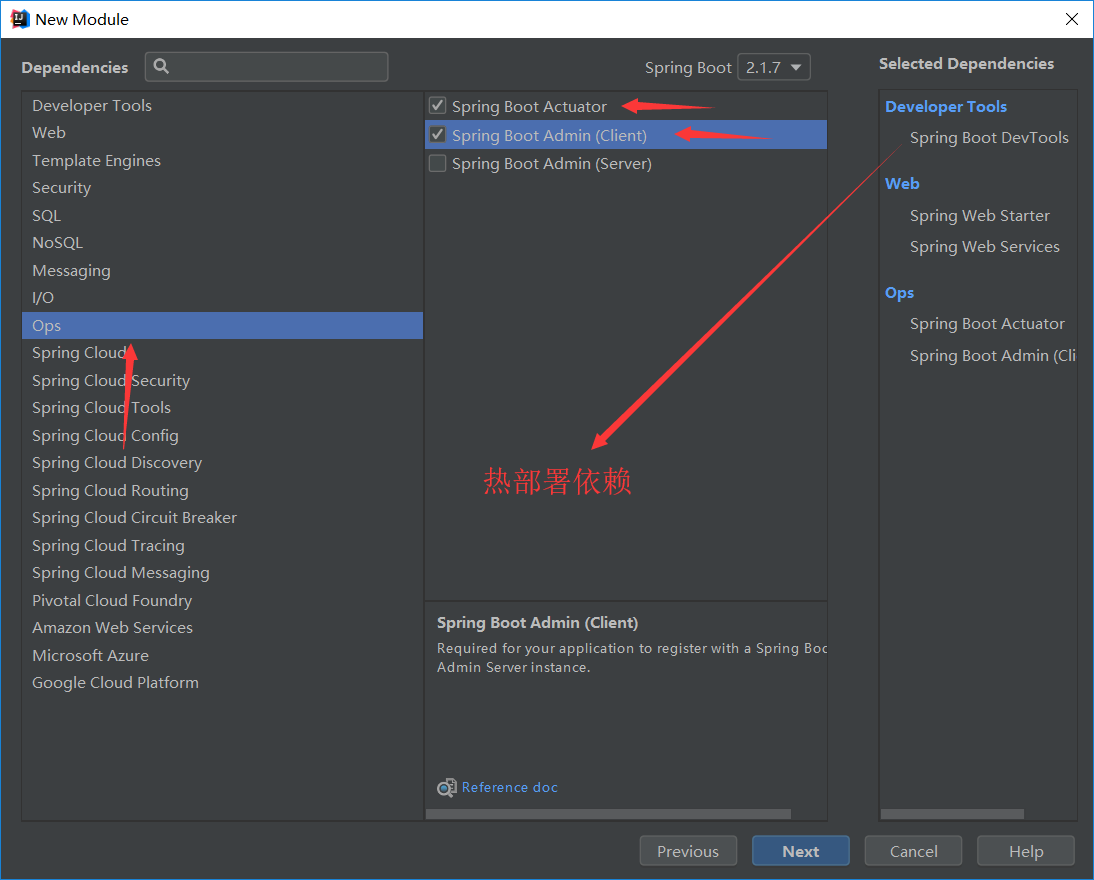
我们先创建一个actuator-client,在client端中添加完相关依赖之后我们只需要在application.properties添加相关配置项即可。
#设置actuator监控端口

management.server.port=8088

#开启所有监控,默认只开启health和info

management.endpoints.web.exposure.include=*

#添加info信息

info.author=scm

info.url=www.baidu.com
上述代码分析:
1、般程序运行默认端口为8080,这里我们将actuator-client端口设置为8088。
2、management.endpoints.web.exposure.include作用是开启所有的监控,里边有项目的一些信息,默认只开启了health和info,还有其他如bean可以查看spring容器中有哪些bean对象。如果想要具体了解可以查看spring官网文档,地址如下。从文档部分截图看出health和info是默认开启的。
https://docs.spring.io/spring-boot/docs/2.1.7.RELEASE/reference/html/production-ready-endpoints.html

3、上边说到了info,那么在actuator中info到底是什么呢?Info其实就是开发者自定义的一些信息。例如我们在上述代码中写入了info.author和info.url(info.后的参数可以是任意的),启动spring boot之后,我们可以在浏览器中输入如下代码查看相关信息。注意输入时端口号要与配置文件中端口号一致,端口号之后要加上actuator。也可以将info改为health和bean查看其他相关信息。如果我们在配置文件中没有开启所有监控那么除了info和health之外其他是无法查看的。
http://localhost:8088/actuator/info
在actuator中提供了很多接口,通过这些接口可以监控一些信息,这里列举一部分:
beans
展示了bean的别名、类型、是否单例、类的地址、依赖等信息。
env
展示了系统环境变量的配置信息,包括使用的环境变量、JVM 属性等。
health
描述了应用程序的整体健康状态,UP 表明应用程序是健康的。
mappings
URl路径和控制器的映射关系。
spring boot admin图形化界面(server端)
上面通过actuator提供的rest接口,返回的数据都是json格式,这个对于不懂json格式的人来说不太方便,因此就产生了spring boot admin,它提供了图形化界面,通过界面来展示这些数据。在actuator-client客户端一般放入一些业务逻辑,通常会再创建一个actuator-server服务端来专用于监控。
以下是需要添加的相关依赖,或在创建模块时直接勾选,无需手动添加。
        <dependency>

            <groupId>org.springframework.boot</groupId>

            <artifactId>spring-boot-starter-actuator</artifactId>

        </dependency>

        <dependency>

            <groupId>org.springframework.boot</groupId>

            <artifactId>spring-boot-starter-web</artifactId>

        </dependency>

        <dependency>

            <groupId>org.springframework.boot</groupId>

            <artifactId>spring-boot-starter-web-services</artifactId>

        </dependency>

        <dependency>

            <groupId>de.codecentric</groupId>

            <artifactId>spring-boot-admin-starter-server</artifactId>

        </dependency>

        <dependency>

            <groupId>org.springframework.boot</groupId>

            <artifactId>spring-boot-devtools</artifactId>

            <scope>runtime</scope>

            <optional>true</optional>

        </dependency>
与之前不一样的是这里我们需要勾选Server,之前我们勾选的是Client。
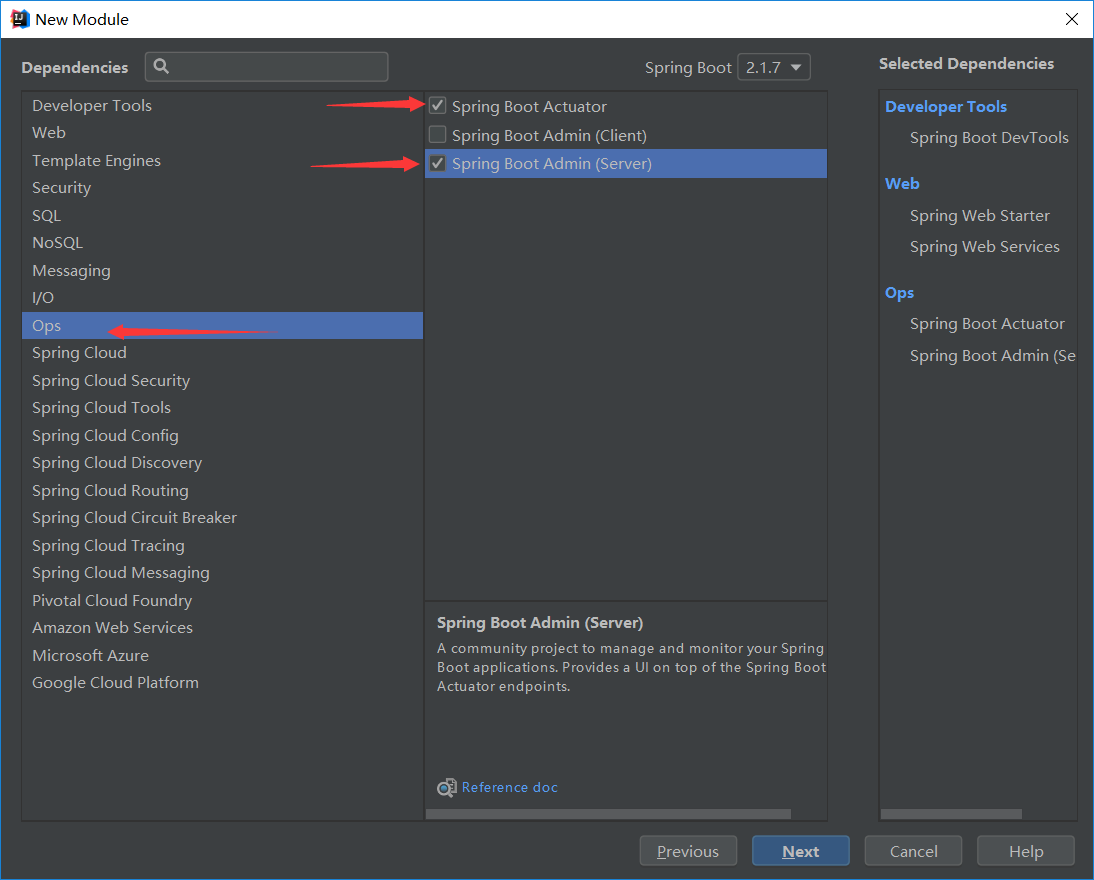
1、创建完actuator-server之后需要在application.properties配置文件中配置服务端端口
#server端端口号

server.port=8089
2、在actuator-server的主函数启动入口上需要加上@EnableAdminServer注解用于开启SBA服务。
package com.monkey.server;

import de.codecentric.boot.admin.server.config.EnableAdminServer;

import org.springframework.boot.SpringApplication;

import org.springframework.boot.autoconfigure.SpringBootApplication;

@SpringBootApplication

@EnableAdminServer//开启SBA服务

public class ApplicationServer {

    public static void main(String[] args) {

        SpringApplication.run(ApplicationServer.class, args);

    }

}
上面的项目是作为server端,将之前的spring boot项目作为client端,由server端统一监控client端。client的模块中,在配置文件里面添加下面内容:
3、在actuator-client端的application.properties配置文件中我们还需要指定服务端的主机地址,添加如下代码:
#配置actuator admin主机地址

spring.boot.admin.client.url=http://localhost:8089
全部完成之后,启动server和client,访问server端,http://localhost:8089 就可以看到spring boot admin的页面了。访问的地址为actuator-server端的端口号。
健康检查机制总结:
1、需要创建actuator-clietn和actuator-server两个模块(client端可以创建多个,如果创建多个在server端都可以看到),两个模块所添加的依赖不完全相同,具体参考上述。
2、client需要配置client端端口号、开启所有监控服务、可以使用info添加自定义信息、还要指定server端的地址。
3、server需要配置server端端口号、在主函数启动入口添加@EnableAdminServer注解用于开启SBA服务。
4、通过地址栏访问client端时要在端口号之后加上actuator,之后加上rest接口名。要想访问server端直接输入server端口号即可,但要将client和server端两个启动入口同时开启。
Spring全家桶之spring boot(四)的更多相关文章
- Spring全家桶之spring boot(三)
spring boot集成mybatis 众所周知,spring与springmvc可以无缝集成,而mybatis不是spring旗下的框架,因此需要进行配置,当然,这里的配置也是非常简单的. 1.首 ...
- Spring全家桶之spring boot(二)
spring boot的两种配置文件: 虽然spring boot可以帮助我们进行一些配置项,但是有些内容还是需要开发者自己进行配置,因此spring boot提供了配置文件以供开发者配置.sprin ...
- Spring全家桶之spring boot(一)
spring boot框架抛弃了繁琐的xml配置过程,采用大量的默认配置简化我们的开发过程.使用spring boot之后就不用像以前使用ssm的时候添加那么多配置文件了,spring boot除了支 ...
- Spring全家桶之spring boot(五)
Thymeleaf简介 Thymeleaf是一个流行的模板引擎,该模板引擎采用Java语言开发,模板引擎是一个技术名词,是跨领域跨平台的概念,在Java语言体系下有模板引擎,在C#.PHP语言体系下也 ...
- Spring全家桶之springMVC(四)
路径变量PathVariable PathVariable Controller除了可以接收表单提交的数据之外,还可以获取url中携带的变量,即路径变量,此时需要使用@PathVariable ...
- 10分钟详解Spring全家桶7大知识点
Spring框架自2002年诞生以来一直备受开发者青睐,它包括SpringMVC.SpringBoot.Spring Cloud.Spring Cloud Dataflow等解决方案.有人亲切的称之为 ...
- Java秋招面试复习大纲(二):Spring全家桶+MyBatis+MongDB+微服务
前言 对于那些想面试高级 Java 岗位的同学来说,除了算法属于比较「天方夜谭」的题目外,剩下针对实际工作的题目就属于真正的本事了,热门技术的细节和难点成为了面试时主要考察的内容. 这里说「天方夜谭」 ...
- 一文解读Spring全家桶 (转)
Spring框架自2002年诞生以来一直备受开发者青睐,它包括SpringMVC.SpringBoot.Spring Cloud.Spring Cloud Dataflow等解决方案.有人亲切的称之为 ...
- 【转】Spring全家桶
Spring框架自诞生以来一直备受开发者青睐,有人亲切的称之为:Spring 全家桶.它包括SpringMVC.SpringBoot.Spring Cloud.Spring Cloud Dataflo ...
随机推荐
- HTML+CSS教程(三)marquee滚动效果
一.marquee 1.marquee标签的属性scrollHeight:获取对象的滚动高度.scrollLeft:设置或获取位于对象左边界和窗口中目前可见内容的最左端之间的距离.scrollTop: ...
- 尝试用Vue.js开发网页小游戏的过程
准备 首先去官方下载并安装VSCODE,下载地址 https://code.visualstudio.com/.安装后打开会发现是英文版的,需要去安装插件来汉化.具体是在扩展插件搜索chinese,选 ...
- vim的常用指令
vim的常用指令如下: 光标运动: h,j , k, l (上/下/左/右) 删除字符: x 删除行 : dd 模式退出 : Esc,Insert(或者i) 退出编辑器 : q 强制退出不保存: q! ...
- Python自学从入门到就业之函数基础(小白必看)
函数介绍 <1>什么是函数 请看如下代码: print(" _ooOoo_ ") print(" o8888888o ") print(" ...
- PHP(ThinkPHP5.0) + PHPMailer 进行邮箱发送验证码
GitHub下载最新版第三方类库PHPMailer: 第一步: 打开网址https://github.com/PHPMailer/PHPMailer/ 下载PHPMailer,PHPMailer 需要 ...
- 我做了一个 HTML 可视化编辑工具,有前途吗?
疫情在家的这段时间,我做了一个 HTML 可视化编辑工具,做的时候信心满满,差不多完成了,现在反而不如以前信心足了,这玩意有用吗?代码地址: https://github.com/vularsoft/ ...
- 在IBM Cloud中运行Fabric
文章目录 打包智能合约 创建IBM Cloud services 创建fabric网络 创建org和相应的节点 创建order org和相应节点 创建和加入channel 导入智能合约 上篇文章我们讲 ...
- 标准库模块time,datetime
在Python中,通常有这几种方式来表示时间: 1)时间戳 2)格式化的时间字符串 3)元组(struct_time)共九个元素. 由于Python的time模块实现主要调用C库,所以各个平台可能有所 ...
- wampserver安装之后无法打开localhost
2019独角兽企业重金招聘Python工程师标准>>> 如上图 是服务未成功启动 服务成功启动标志 修改服务器监听端口 在安装完wampserver,打开,如果在状态栏上的图标不是绿 ...
- element UI排坑记(一):判断tabs组件是否切换
之所以将这个问题列在排坑记之中,是因为官方组件的一个属性颇有些隐蔽,这个问题曾经折腾了本人较多时间,始终思维固着,且使用搜索引擎也不容易搜索到答案,故记之.然而实际解决却是相当简单的. 一.问题描述 ...