
解决CentOS7用yum安装软件显示错误:cannot find a valid baseurl for repo: base/7/x86_64
使用yun安装软件时有时会报repo文件的错误,, 主要问题出自于CentOS-Base.repo文件
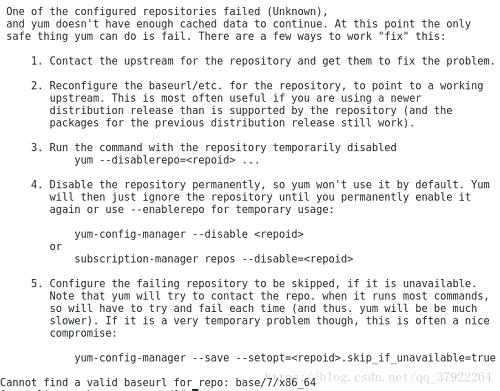
解决方案:将这个文件后缀名修改使这个文件无效
[root@localhost ~]# cd /etc/yum.repos.d/
[root@localhost yum.repos.d]# mv CentOS-Base.repo CentOS-Base.repo.bak
[root@localhost yum.repos.d]# ls
CentOS-Base.repo.bak CentOS-Debuginfo.repo CentOS-Media.repo CentOS-Vault.repo
CentOS-CR.repo CentOS-fasttrack.repo CentOS-Sources.repo
接下来可以继续进行yum的安装
===================================================================================
Centos7系统安装yum遇到的问题failure: repodata/repomd.xml from base: [Errno 256] No more mirrors to try. http:
原创果冻先生的专栏 最后发布于2018-06-10 17:50:03 阅读数 45807 收藏
展开
当遇到这个问题的时候,发现网上也有很多人也在问同样的问题。但是发现大家问的问题,很少有人能解释得很清楚,而且很多人的解决方法复杂且不能解决问题。我查了近二十篇博客和文章,对照做了,但是基本解决不了问题。
http://mirrors.ustc.edu.cn/help/centos.html
http://mirrors.163.com/.help/centos.html
https://blog.csdn.net/dreamchasering/article/details/77160477
https://blog.csdn.net/shaoqiufeng/article/details/78785806
https://blog.csdn.net/orangleliu/article/details/40588799
https://www.cnblogs.com/yizhichun/p/6339742.html
https://blog.csdn.net/james_jr10/article/details/78357600(这个好像很厉害,但是写得不清晰,误我前程啊)
https://segmentfault.com/q/1010000000716991/a-1020000000717340
你来看看,这些问题有多少人问?但是能解决实际问题的却很少!!!
下面由我给出一种最简单最有效的方法。耐心看下去哦!
问题所在:
[root@cit-server6-s1-372 yum.repos.d]# yum makecache
Loaded plugins: fastestmirror
base | 5.6 kB 00:00:00
http://mirrors.163.com/centos/7/os/x86_64/repodata/repomd.xml: [Errno -1] Error importing repomd.xml for base: Damaged repomd.xml file
Trying other mirror.
One of the configured repositories failed (CentOS-7 - Base - 163.com),
and yum doesn't have enough cached data to continue. At this point the only
safe thing yum can do is fail. There are a few ways to work "fix" this:
1. Contact the upstream for the repository and get them to fix the problem.
2. Reconfigure the baseurl/etc. for the repository, to point to a working
upstream. This is most often useful if you are using a newer
distribution release than is supported by the repository (and the
packages for the previous distribution release still work).
3. Disable the repository, so yum won't use it by default. Yum will then
just ignore the repository until you permanently enable it again or use
--enablerepo for temporary usage:
yum-config-manager --disable base
4. Configure the failing repository to be skipped, if it is unavailable.
Note that yum will try to contact the repo. when it runs most commands,
so will have to try and fail each time (and thus. yum will be be much
slower). If it is a very temporary problem though, this is often a nice
compromise:
yum-config-manager --save --setopt=base.skip_if_unavailable=true
failure: repodata/repomd.xml from base: [Errno 256] No more mirrors to try.
http://mirrors.163.com/centos/7/os/x86_64/repodata/repomd.xml: [Errno -1] Error importing repomd.xml for base: Damaged repomd.xml file
[root@cit-server6-s1-372 yum.repos.d]#
错误所在的问题:
主要问题在于yum源问题。
下面开始解决问题:
4.下载yum依赖包
[root@localhost ~]# wget http://vault.centos.org/7.2.1511/os/x86_64/Packages/yum-plugin-fastestmirror-1.1.31-34.el7.noarch.rpm
--2020-02-09 16:01:35-- http://vault.centos.org/7.2.1511/os/x86_64/Packages/yum-plugin-fastestmirror-1.1.31-34.el7.noarch.rpm
正在解析主机 vault.centos.org (vault.centos.org)... 208.100.23.71
正在连接 vault.centos.org (vault.centos.org)|208.100.23.71|:80... 已连接。
已发出 HTTP 请求,正在等待回应... 200 OK
长度:30600 (30K) [application/x-rpm]
正在保存至: “yum-plugin-fastestmirror-1.1.31-34.el7.noarch.rpm”
100%[==================================================================================================================>] 30,600 6.47KB/s 用时 4.6s
2020-02-09 16:01:40 (6.47 KB/s) - 已保存 “yum-plugin-fastestmirror-1.1.31-34.el7.noarch.rpm” [30600/30600])
[root@localhost ~]# wget http://vault.centos.org/7.2.1511/os/x86_64/Packages/yum-metadata-parser-1.1.4-10.el7.x86_64.rpm
--2020-02-09 16:01:43-- http://vault.centos.org/7.2.1511/os/x86_64/Packages/yum-metadata-parser-1.1.4-10.el7.x86_64.rpm
正在解析主机 vault.centos.org (vault.centos.org)... 208.100.23.71
正在连接 vault.centos.org (vault.centos.org)|208.100.23.71|:80... 已连接。
已发出 HTTP 请求,正在等待回应... 200 OK
长度:28348 (28K) [application/x-rpm]
正在保存至: “yum-metadata-parser-1.1.4-10.el7.x86_64.rpm”
100%[==================================================================================================================>] 28,348 2.16KB/s 用时 6.4s
2020-02-09 16:01:50 (4.34 KB/s) - 已保存 “yum-metadata-parser-1.1.4-10.el7.x86_64.rpm” [28348/28348])
[root@localhost ~]# ls
anaconda-ks.cfg initial-setup-ks.cfg yum-plugin-fastestmirror-1.1.31-34.el7.noarch.rpm 模板 图片 下载 桌面
core.8499 yum-metadata-parser-1.1.4-10.el7.x86_64.rpm 公共 视频 文档 音乐
[root@localhost ~]# mv yum-* /etc/yum.
yum.conf yum.repos.d/
[root@localhost ~]# mv yum-* /etc/yum.repos.d/
[root@localhost ~]# ls
anaconda-ks.cfg core.8499 initial-setup-ks.cfg 公共 模板 视频 图片 文档 下载 音乐 桌面
[root@localhost ~]# cd /etc/yum.repos.d/
[root@localhost yum.repos.d]# ls
a Centos-7.repo docker-ce.repo local.repo yum-metadata-parser-1.1.4-10.el7.x86_64.rpm yum-plugin-fastestmirror-1.1.31-34.el7.noarch.rpm
[root@localhost yum.repos.d]# rpm -ivh yum-metadata-parser-1.1.4-10.el7.x86_64.rpm
准备中... ################################# [100%]
软件包 yum-metadata-parser-1.1.4-10.el7.x86_64 已经安装
[root@localhost yum.repos.d]# rpm -ivh yum-plugin-fastestmirror-1.1.31-34.el7.noarch.rpm
准备中... ################################# [100%]
软件包 yum-plugin-fastestmirror-1.1.31-50.el7.noarch (比 yum-plugin-fastestmirror-1.1.31-34.el7.noarch 还要新) 已经安装
file /usr/lib/yum-plugins/fastestmirror.py from install of yum-plugin-fastestmirror-1.1.31-34.el7.noarch conflicts with file from package yum-plugin-fastestmirror-1.1.31-50.el7.noarch
file /usr/lib/yum-plugins/fastestmirror.pyc from install of yum-plugin-fastestmirror-1.1.31-34.el7.noarch conflicts with file from package yum-plugin-fastestmirror-1.1.31-50.el7.noarch
file /usr/lib/yum-plugins/fastestmirror.pyo from install of yum-plugin-fastestmirror-1.1.31-34.el7.noarch conflicts with file from package yum-plugin-fastestmirror-1.1.31-50.el7.noarch
[root@localhost yum.repos.d]# ls
a Centos-7.repo docker-ce.repo local.repo yum-metadata-parser-1.1.4-10.el7.x86_64.rpm yum-plugin-fastestmirror-1.1.31-34.el7.noarch.rpm
[root@localhost yum.repos.d]# cd a/
[root@localhost a]# ls
CentOS-Base.repo CentOS-CR.repo CentOS-Debuginfo.repo CentOS-fasttrack.repo CentOS-Media.repo CentOS-Sources.repo CentOS-Vault.repo
[root@localhost a]# cp CentOS-Base.repo CentOS-Base.repo.bak
[root@localhost a]# mv CentOS-Base.repo ../
[root@localhost a]# cd ../
[root@localhost yum.repos.d]# ls
a CentOS-Base.repo local.repo yum-plugin-fastestmirror-1.1.31-34.el7.noarch.rpm
Centos-7.repo docker-ce.repo yum-metadata-parser-1.1.4-10.el7.x86_64.rpm
[root@localhost yum.repos.d]# mv /etc/yum.repos.d/CentOS-Base.repo /etc/yum.repos.d/CentOS-Base.repo.backup
[root@localhost yum.repos.d]# yum clean all
[root@localhost yum.repos.d]# yum makecache
解决CentOS7用yum安装软件显示错误:cannot find a valid baseurl for repo: base/7/x86_64的更多相关文章
- 解决方法:CentOS7用yum安装软件显示错误:cannot find a valid baseurl for repo: base/7/x86_64
在Linux学习中,发现使用yum安装软件出现以下的错误: 百度了各种方法,很多人也发现光是修改REBOOT=yes也没用,多次进行挂载.修改网卡配置文件.重置IP地址.重启网络.创建又删除配置文件的 ...
- 【已解决】CentOS7使用yum安装Docker显示错误:cannot find a valid baseurl for repo: base/7/x86_64
不得不说,Docker 要求 CentOS 系统的内核版本高于 3.10,这就让有些人开始头疼了,而要查看具体的版本可以用以下命令 uname -r 当然,CentOS 6.8版本也能安装Docker ...
- Cent OS 6/7 中通过yum安装软件时提示cannot find a valid baseurl...的解决方法
目录 1 问题描述 2 解决方法一 (Cent OS 7中有效) 3 解决方法二 (Cent OS 7中无效) 1 问题描述 新申请了虚拟机, 系统版本是Cent OS 7.2. 在安装软件的过程中, ...
- 安装centos mini版,无法联网,用yum安装软件提示 cannot find a valid baseurl for repo:base/7/x86_64 的解决方法
*无法联网的明显表现会有: cannot find a valid baseurl for repo:base/7/x86_64 1.yum install出现 Error: cannot find ...
- CENTOS7错误:Cannot find a valid baseurl for repo: base/7/x86_6
CENTOS7错误:Cannot find a valid baseurl for repo: base/7/x86_6 解决办法: 1.进入/etc/sysconfig/network-script ...
- Linux安装Apache报错:Cannot find a valid baseurl for repo: base/7/x86_64解决方案
最近使用CentOS7学习,安装安装Apache时候,使用yum安装Apache报错:本文适合CentOS7和RHEL7 # yum install httpd 出现:cannot find a va ...
- 安装CentOS7文字界面版后,无法联网,用yum安装软件提示 cannot find a valid baseurl for repo:base/7/x86_64 的解决方法
*无法联网的明显表现会有: 1.yum install出现 Error: cannot find a valid baseurl or repo:base 2.ping host会提示unknown ...
- 安装CentOS7后,无法联网,用yum安装软件提示 cannot find a valid baseurl for repo:base/7/x86_64 的解决方法
无法联网的明显表现会有: 1.yum install出现 Error: cannot find a valid baseurl or repo:base 2.ping host会提示unknown h ...
- 用yum安装软件提示 cannot find a valid baseurl for repo:base/7/x86_64 的解决方法
*无法联网的明显表现会有: 1.yum install出现 Error: cannot find a valid baseurl or repo:base 2.ping host会提示unknown ...
随机推荐
- mediasoup-demo安装记录
环境CentOS 7 64位 VMWare12虚拟机(win10主机),安装好NodeJS 10.13(大于8.9就可以) 已按照GitHub说明拉下来代码,配置好Node环境,开始执行npm sta ...
- 《绘图前设置:像素格式——PIXELFORMATDESCRIPT、设备上下文、渲染上下文》
转载地址:https://www.cnblogs.com/wiener-zyj/p/4159745.html 像素格式——PIXELFORMATDESCRIPT.设备上下文.渲染上下文 在OpenG ...
- go语言 二叉树
package main import ( "fmt" "reflect" ) type BinaryNode struct { Data interface{ ...
- 解决用 VB 中用 ADO 访问 数据库时 SQL 查询处理 Null 值的问题( 使用 iff(isNull(字段), 为空时的值,不为空时的值) 来处理)
程序的环境是 VB6 + ADO + Access,在用 SQL 语句查询时,希望把两个字段合并成一个字段,但其中一个字段 Null 值直接导致两个字段合并后也变成了 Null 值.之前只能用 VB ...
- 建立Web Service 接口及调用
WEB SERVICE 接口: [WebMethod] public string MaterialRequest(string jsonText) { string WorkNo; string P ...
- ToolStripComboBox的DataSource和DataTable使用技巧
可以使用Items属性private void GetData() //一下数据均为测试{toolStripComboBox1.Items.Clear(); DataTabl ...
- 吴裕雄 python 机器学习——数据预处理二元化OneHotEncoder模型
from sklearn.preprocessing import OneHotEncoder #数据预处理二元化OneHotEncoder模型 def test_OneHotEncoder(): X ...
- vue 实现todolist,包含添加,删除,统计,清空,隐藏功能
vue 实现todolist,包含添加,删除,统计,清空,隐藏功能 添加:生成列表结构(v-for+数组).获取用户输入(v-model).通过回车新增数据(v-on+.enter) 删除:点击删除指 ...
- RLE压缩算法详解
from:http://data.biancheng.net/view/152.html RLE压缩算法(下简称RLE算法)的基本思路是把数据按照线性序列分成两种情况:一种是连续的重复数据块,另一种是 ...
- PHP 基础 自动类型转换之比较运算符
<?php var_dump(' 123fg456'>=122); var_dump('some string' == 0); var_dump(123.0 == '123d456'); ...