
Linux查看设置系统时区
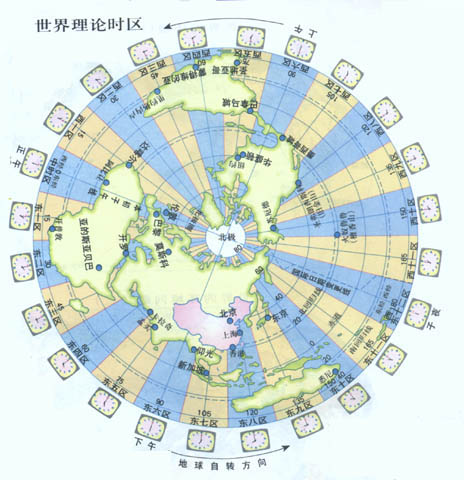
关于时区的概念,其实初中地理课已经涉及,很多人都多少了解一些,可能只是细节搞不太清楚。为什么会将地球分为不同时区呢?因为地球总是自西向东自转,东边总比西边先看到太阳,东边的时间也总比西边的早。东边时刻与西边时刻的差值不仅要以时计,而且还要以分和秒来计算。整个地球分为二十四时区,每个时区都有自己的本地时间。在国际无线电通信场合,为了统一起见,使用一个统一的时间,称为通用协调时(UTC, Universal Time Coordinated)。UTC与格林尼治平均时(GMT, Greenwich Mean Time)一样,都与英国伦敦的本地时相同。
关于时间的几个标准,如下所示,具体可以Google、Baidu搜索一下。
CST:中国标准时间(China Standard Time),这个解释可能是针对RedHat Linux。
UTC:协调世界时,又称世界标准时间,简称UTC,从英文国际时间/法文协调时间”Universal Time/Temps Cordonné”而来。中国大陆、香港、澳门、台湾、蒙古国、新加坡、马来西亚、菲律宾、澳洲西部的时间与UTC的时差均为+8,也就是UTC+8。
GMT:格林尼治标准时间(旧译格林威治平均时间或格林威治标准时间;英语:Greenwich Mean Time,GMT)是指位于英国伦敦郊区的皇家格林尼治天文台的标准时间,因为本初子午线被定义在通过那里的经线。
关于时区分布图,大家可以参考http://www.timedate.cn/time/timezone.htm,我们国家跨越了东五区、东六区、东七区、东八区、东九区五个时区,一般都统一采用东八区计时时间。
Linux系统如何查看设置所在的时区呢?
1:使用date命令查看时区
[root@db-server ~]# date -R
Sun, 11 Jan 2015 07:10:28 -0800
[root@db-server ~]#
如上RFC 2822 format所示,上面命令输出了-0800表示西八区,是美国旧金山所在的时区,下面表示我们国家的东八区(+0800)
[root@lnx01 ~]# date -R
Sun, 11 Jan 2015 23:06:02 +0800
2:查看clock系统配置文件
[root@db-server ~]# more /etc/sysconfig/clock
ZONE="America/Los_Angeles"
UTC=true
ARC=false
如上所示,表示该系统设置的时区为“America/Los_Angeles”,也就是西八区。
Linux系统如何设置系统所在的时区呢?
方法1:使用tzselect设置时区
例子,将系统时区设置为东八区(北京时间)
[root@db-server ~]# tzselect
Please identify a location so that time zone rules can be set correctly.
Please select a continent or ocean.
1) Africa
2) Americas
3) Antarctica
4) Arctic Ocean
5) Asia
6) Atlantic Ocean
7) Australia
8) Europe
9) Indian Ocean
10) Pacific Ocean
11) none - I want to specify the time zone using the Posix TZ format.
#? 5
Please select a country.
1) Afghanistan 18) Israel 35) Palestine
2) Armenia 19) Japan 36) Philippines
3) Azerbaijan 20) Jordan 37) Qatar
4) Bahrain 21) Kazakhstan 38) Russia
5) Bangladesh 22) Korea (North) 39) Saudi Arabia
6) Bhutan 23) Korea (South) 40) Singapore
7) Brunei 24) Kuwait 41) Sri Lanka
8) Cambodia 25) Kyrgyzstan 42) Syria
9) China 26) Laos 43) Taiwan
10) Cyprus 27) Lebanon 44) Tajikistan
11) East Timor 28) Macau 45) Thailand
12) Georgia 29) Malaysia 46) Turkmenistan
13) Hong Kong 30) Mongolia 47) United Arab Emirates
14) India 31) Myanmar (Burma) 48) Uzbekistan
15) Indonesia 32) Nepal 49) Vietnam
16) Iran 33) Oman 50) Yemen
17) Iraq 34) Pakistan
#? 9
Please select one of the following time zone regions.
1) east China - Beijing, Guangdong, Shanghai, etc.
2) Heilongjiang (except Mohe), Jilin
3) central China - Sichuan, Yunnan, Guangxi, Shaanxi, Guizhou, etc.
4) most of Tibet & Xinjiang
5) west Tibet & Xinjiang
#? 1
The following information has been given:
China
east China - Beijing, Guangdong, Shanghai, etc.
Therefore TZ='Asia/Shanghai' will be used.
Local time is now: Sun Jan 11 23:31:51 CST 2015.
Universal Time is now: Sun Jan 11 15:31:51 UTC 2015.
Is the above information OK?
1) Yes
2) No
#? yes
Please enter 1 for Yes, or 2 for No.
#? 1
You can make this change permanent for yourself by appending the line
TZ='Asia/Shanghai'; export TZ
to the file '.profile' in your home directory; then log out and log in again.
Here is that TZ value again, this time on standard output so that you
can use the /usr/bin/tzselect command in shell scripts:
Asia/Shanghai
注意:tzselect命令只告诉你选择的时区的写法,并不会生效。所以现在它还不是东8区北京时间。你可以在.profile、.bash_profile或者/etc/profile中设置正确的TZ环境变量并导出。 例如在.bash_profile里面设置 TZ='Asia/Shanghai'; export TZ并使其生效。
[root@db-server ~]# source .bash_profile
[root@db-server ~]# date
Sun Jan 11 23:37:40 CST 2015
方法2:复制相应的时区文件,替换系统时区文件;或者创建链接文件
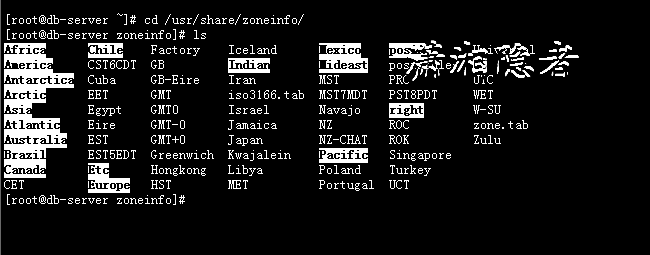
在/usr/share/zoneinfo/下面有很多时区文件,如下所示,可以复制这些时区文件覆盖/etc/localtime文件,或修改符号链接/etc/locatime对应的文件
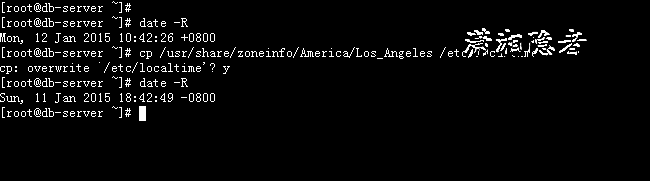
[root@db-server ~]# date -R
Mon, 12 Jan 2015 10:42:26 +0800
[root@db-server ~]# cp /usr/share/zoneinfo/America/Los_Angeles /etc/localtime
cp: overwrite `/etc/localtime'? y
[root@db-server ~]# date -R
Sun, 11 Jan 2015 18:42:49 -0800
[root@db-server ~]#
注意如果有时候,执行了上面命令后,使用date -R发现时区设置没有生效,有可能是因为你在profile或.bash_profile里面设置了TZ,如下案例所示:
[root@db-server ~]# date -R
Sun, 11 Jan 2015 18:42:49 -0800
[root@db-server ~]# vi .bash_profile
# .bash_profile
# Get the aliases and functions
if [ -f ~/.bashrc ]; then
. ~/.bashrc
fi
# User specific environment and startup programs
PATH=$PATH:$HOME/bin
TZ='Asia/Shanghai'; export TZ
export PATH
unset USERNAME
~
~
".bash_profile" 14L, 221C written
[root@db-server ~]# source .bash_profile
[root@db-server ~]# date -R
Mon, 12 Jan 2015 10:44:35 +0800
方式2:修改链接/etc/locatime的时区文件
[root@db-server ~]# ln /usr/share/zoneinfo/Asia/Shanghai /etc/localtime
ln: creating hard link `/etc/localtime' to `/usr/share/zoneinfo/Asia/Shanghai': File exists
[root@db-server ~]# rm /etc/localtime
rm: remove regular file `/etc/localtime'? y
[root@db-server ~]# ln -sf /usr/share/zoneinfo/Asia/Shanghai /etc/localtime
[root@db-server ~]# date -R
Mon, 12 Jan 2015 10:56:10 +0800
[root@db-server ~]#
方法3:使用timeconfig设置时区
timeconfig命令仅限于RedHat Linux 和 CentOS。
参 数:
--arc 使用Alpha硬件结构的格式存储系统时间。
--back 在互动式界面里,显示Back钮而非Cancel钮。
--test 仅作测试,并不真的改变系统的时区。
--utc 把硬件时钟上的时间视为CUT,有时也称为UTC或UCT。

感觉这个timeconfig命令在命令界面使用起来并不好用。给人的感觉非常别扭。用户体验非常糟糕。如下所示,看起来也很糟糕。
[root@db-server ~]# timeconfig --utc "Asia/Shanghai"

方法4:使用dpkg-reconfigure tzdata设置时区
这个仅仅适用于Debian,手头没有环境,没有实验过,在此不作过多阐述。
参考资料:
http://blog.sina.com.cn/s/blog_573a052b0100pgt1.html
http://www.dapig.cn/view/3511.html
Linux查看设置系统时区的更多相关文章
- Linux 查看设置系统语言
一.简介 在Linux的系统中经常碰到字符集导致的错误,本文总结了设置修改系统语言环境的方法步骤. 二.操作步骤 执行如下指令,查看当前使用的系统语言 echo $LANG 执行如下指令,查看系统安装 ...
- Linux中设置系统时间和时区
之前公司里有需求要做机器与服务器做时间同步,服务器发送时间戳和时区过来,机器这边根据接收到的时间戳和时区来改时间. 其实很简单,百度上应该也有很多博客有类似的教程,但是这里强调一点,百度上的博客里写的 ...
- Linux查看及设置系统时区
一.什么是时区呢? 关于时区的概念,其实初中地理课已经涉及,很多人都多少了解一些,可能只是细节搞不太清楚.为什么会将地球分为不同时区呢?因为地球总是自西向东自转,东边总比西边先看到太阳,东边的时间也总 ...
- 转载:Linux下查看/修改系统时区、时间
一.查看和修改Linux的时区 1. 查看当前时区 命令 : "date -R" 2. 修改设置Linux服务器时区 方法 A 命令 : "tzselect" ...
- Linux设置系统时区
https://www.xlsys.cn/1741.html 如果你的 Linux 系统时区配置不正确,必需要手动调整到正确的当地时区.NTP 对时间的同步处理只计算当地时间与 UTC 时间的偏移量, ...
- Linux下修改系统时区
使用 /etc/localtime 文件修改时区 先查看一下当前的时区,下面这个例子中使用 UTC 即世界统一标准时区.假设你可能需要改为美国西部标准时间,即太平洋时间. # date Thu Aug ...
- linux date 设置系统时间
设置 系统时间 注意时间格式 date -s "date" [root@localhost c]# date -s "2019-05-29 10:58:00" ...
- Linux查看当前系统的发行版信息
lsb_release命令用来查看当前系统的发行版信息(prints certain LSB (Linux Standard Base) and Distribution information.). ...
- Linux查看当前系统登录用户、登录日志、登录错误日志
1.查看当前系统的登录用户 w who 2.查看成功登录历史记录 last -n 3.查看尝试登录失败的历史记录 lastb -n 4.显示每个用户最近一次登录成功的信息 lastlog
随机推荐
- opencv 之 icvCreateHidHaarClassifierCascade 分类器信息初始化函数部分详细代码注释。
请看注释.这个函数,是人脸识别主函数,里面出现过的函数之一,作用是初始化分类器的数据,就是一个xml文件的数据初始化. static CvHidHaarClassifierCascade* icvCr ...
- 浅析Openflow
这应该算是我在博客园的第一篇技术性的文章. OH,不,这不是一篇技术性的文章,只是一篇很好玩的浅显分析接触到的技术的文章.只是个人的理解,并没有任何的代码和执行的操作.初次带来的,是从08年开始火起来 ...
- Unity调用Android类方法
Unity调用Android类方法 1. 添加Unity的classes.jar文件 创建一个Android工程AndroidUnityDemo. 由于Unity的版本不同,直接在Unity安装包文 ...
- reflow和repaint(摘录自张鑫旭的翻译)
//正文开始 关于回流(reflows)与重绘(repaints),我已经在twitter和delicious上发布,但是并没有在演讲中提到或是以文章形式发布. 第一次让我开始思考关于回流(reflo ...
- 细说Cookie
阅读目录 开始 Cookie 概述 Cookie的写.读过程 使用Cookie保存复杂对象 Js中读写Cookie Cookie在Session中的应用 Cookie在身份验证中的应用 Cookie的 ...
- C#程序开发中经常遇到的10条实用的代码
1 读取操作系统和CLR的版本 OperatingSystem os = System.Environment.OSVersion; Console.WriteLine("Platform: ...
- Windows 10预览版14316开启Bash命令支持
00x0 前言 4月7日凌晨,微软推送了最新的Windows 10一周年更新预览版14316,其中重要的是原生支持Linux Bash命令行支持. 00x1 问题 如何开启Linux Bash命令行? ...
- 策略模式 - Strategy
Strategy Pattern,定义算法家族,分别封装起来,互相之间可替换,此模式让算法的变化不会影响到使用算法的客户端. // 上下文类(Context):用一个ConcreteStratege来 ...
- 转载:《TypeScript 中文入门教程》 14、输入.d.ts文件
版权 文章转载自:https://github.com/zhongsp 建议您直接跳转到上面的网址查看最新版本. 介绍 当使用外部JavaScript库或新的宿主API时,你需要一个声明文件(.d.t ...
- gSOAP MTOM
前言 需要准备的知识:wsdl,soap,gSOAP,C++,fidder. 首先介绍几个相关的概念 1.MTOM基础概念 MTOM(Message Transmission Optimiz ...