
django之创建第2个项目
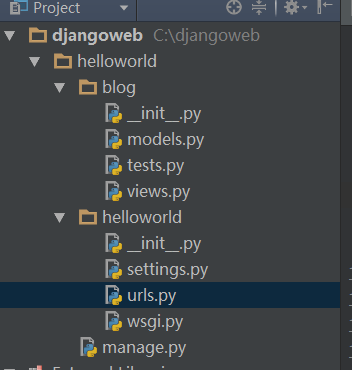
如上为项目结构
1、创建项目helloworld
2、把目录切换到django/helloworld目录下创建blog站点
3、需要修改的信息如下:
1)修改blog站点的views.py
# Create your views here.

#coding:utf-8

from django.http import HttpResponse

def index(request):

    return HttpResponse("hello,Django")
2)修改setting.py文件
# Django settings for helloworld project.

DEBUG = True

TEMPLATE_DEBUG = DEBUG

ADMINS = (

    # ('Your Name', 'your_email@example.com'),

)

MANAGERS = ADMINS

DATABASES = {

    'default': {

        'ENGINE': 'django.db.backends.', # Add 'postgresql_psycopg2', 'mysql', 'sqlite3' or 'oracle'.

        'NAME': '',                      # Or path to database file if using sqlite3.

        # The following settings are not used with sqlite3:

        'USER': '',

        'PASSWORD': '',

        'HOST': '',                      # Empty for localhost through domain sockets or '127.0.0.1' for localhost through TCP.

        'PORT': '',                      # Set to empty string for default.

    }

}

# Hosts/domain names that are valid for this site; required if DEBUG is False

# See https://docs.djangoproject.com/en/1.5/ref/settings/#allowed-hosts

ALLOWED_HOSTS = []

# Local time zone for this installation. Choices can be found here:

# http://en.wikipedia.org/wiki/List_of_tz_zones_by_name

# although not all choices may be available on all operating systems.

# In a Windows environment this must be set to your system time zone.

TIME_ZONE = 'Asia/Shanghai'

# Language code for this installation. All choices can be found here:

# http://www.i18nguy.com/unicode/language-identifiers.html

LANGUAGE_CODE = 'zh-cn'

SITE_ID = 1

# If you set this to False, Django will make some optimizations so as not

# to load the internationalization machinery.

USE_I18N = True

# If you set this to False, Django will not format dates, numbers and

# calendars according to the current locale.

USE_L10N = True

# If you set this to False, Django will not use timezone-aware datetimes.

USE_TZ = True

# Absolute filesystem path to the directory that will hold user-uploaded files.

# Example: "/var/www/example.com/media/"

MEDIA_ROOT = ''

# URL that handles the media served from MEDIA_ROOT. Make sure to use a

# trailing slash.

# Examples: "http://example.com/media/", "http://media.example.com/"

MEDIA_URL = ''

# Absolute path to the directory static files should be collected to.

# Don't put anything in this directory yourself; store your static files

# in apps' "static/" subdirectories and in STATICFILES_DIRS.

# Example: "/var/www/example.com/static/"

STATIC_ROOT = ''

# URL prefix for static files.

# Example: "http://example.com/static/", "http://static.example.com/"

STATIC_URL = '/static/'

# Additional locations of static files

STATICFILES_DIRS = (

    # Put strings here, like "/home/html/static" or "C:/www/django/static".

    # Always use forward slashes, even on Windows.

    # Don't forget to use absolute paths, not relative paths.

)

# List of finder classes that know how to find static files in

# various locations.

STATICFILES_FINDERS = (

    'django.contrib.staticfiles.finders.FileSystemFinder',

    'django.contrib.staticfiles.finders.AppDirectoriesFinder',

#    'django.contrib.staticfiles.finders.DefaultStorageFinder',

)

# Make this unique, and don't share it with anybody.

SECRET_KEY = 'q-$_k0g=jx3!n-#a&ul@if1rpd5_rc_l)j3pw4x84hd=hma_@+'

# List of callables that know how to import templates from various sources.

TEMPLATE_LOADERS = (

    'django.template.loaders.filesystem.Loader',

    'django.template.loaders.app_directories.Loader',

#     'django.template.loaders.eggs.Loader',

)

MIDDLEWARE_CLASSES = (

    'django.middleware.common.CommonMiddleware',

    'django.contrib.sessions.middleware.SessionMiddleware',

    'django.middleware.csrf.CsrfViewMiddleware',

    'django.contrib.auth.middleware.AuthenticationMiddleware',

    'django.contrib.messages.middleware.MessageMiddleware',

    # Uncomment the next line for simple clickjacking protection:

    # 'django.middleware.clickjacking.XFrameOptionsMiddleware',

)

ROOT_URLCONF = 'helloworld.urls'

# Python dotted path to the WSGI application used by Django's runserver.

WSGI_APPLICATION = 'helloworld.wsgi.application'

TEMPLATE_DIRS = (

    # Put strings here, like "/home/html/django_templates" or "C:/www/django/templates".

    # Always use forward slashes, even on Windows.

    # Don't forget to use absolute paths, not relative paths.

)

INSTALLED_APPS = (

    'django.contrib.auth',

    'django.contrib.contenttypes',

    'django.contrib.sessions',

    'django.contrib.sites',

    'django.contrib.messages',

    'django.contrib.staticfiles',

    # Uncomment the next line to enable the admin:

    # 'django.contrib.admin',

    # Uncomment the next line to enable admin documentation:

    # 'django.contrib.admindocs',

    'blog',

)

SESSION_SERIALIZER = 'django.contrib.sessions.serializers.JSONSerializer'

# A sample logging configuration. The only tangible logging

# performed by this configuration is to send an email to

# the site admins on every HTTP 500 error when DEBUG=False.

# See http://docs.djangoproject.com/en/dev/topics/logging for

# more details on how to customize your logging configuration.

LOGGING = {

    'version': 1,

    'disable_existing_loggers': False,

    'filters': {

        'require_debug_false': {

            '()': 'django.utils.log.RequireDebugFalse'

        }

    },

    'handlers': {

        'mail_admins': {

            'level': 'ERROR',

            'filters': ['require_debug_false'],

            'class': 'django.utils.log.AdminEmailHandler'

        }

    },

    'loggers': {

        'django.request': {

            'handlers': ['mail_admins'],

            'level': 'ERROR',

            'propagate': True,

        },

    }

}
3)修改urls.py文件
from django.conf.urls import patterns, include, url

#注意这里不需要导入index所在的包,但是最新的版本可能需要导入才行

# Uncomment the next two lines to enable the admin:

# from django.contrib import admin

# admin.autodiscovhelloworlder()

urlpatterns = patterns('',

    # Examples:

    # url(r'^$', 'helloworld.views.home', name='home'),

    # url(r'^helloworld/', include('helloworld.foo.urls')),

    # Uncomment the admin/doc line below to enable admin documentation:

    # url(r'^admin/doc/', include('django.contrib.admindocs.urls')),

    # Uncomment the next line to enable the admin:

    # url(r'^admin/', include(admin.site.urls)),

    #url(r'^$', 'blog.views.index'),

    url(r'^blog/index/$', 'blog.views.index'),

)
输出结果:

django之创建第2个项目的更多相关文章
- django之创建第12个项目-加载图片
百度云盘:django之创建第12个项目-加载图片 1.setting配置 #静态文件相关配置 # URL prefix for static files. # Example: "http ...
- django之创建第11个项目-页面整合
目的:将如下众多html页面整合到一个index.html页面中. 百度云盘:django之创建第11个项目-页面整合 用下面的方式实现: <!DOCTYPE html> <head ...
- django之创建第10-1个项目-图片上传并记录上传时间
1.百度云盘:django之创建第10-1个项目-图片上传并记录上传时间 2.主要修改的配置文件有3个,forms.views和models3个文件以及html 3.forms.py文件修改 #cod ...
- django之创建第10个项目-图片上传方式1
1.upload.HTMl <html xmlns="http://www.w3.org/1999/xhtml" xml:lang="en" lang=& ...
- django之创建第9个项目-管理后台admin
django之创建第9个项目-管理后台admin配置 1.配置setting文件INSTALLED_APPS = ( 'django.contrib.auth', 'django.cont ...
- django之创建第8-3个项目-数据库数据提取之高级操作
1.配置test2.html <!DOCTYPE html> <html lang="en"> <head> <meta charset= ...
- django之创建第8-1个项目-数据库之增删改查/数据库数据显示在html页面
1.为test.DB数据库预先创建下面数据 1 张三 16 2015-01-02 12 李四 17 2015-01-04 13 王五 14 ...
- django之创建第8个项目-数据库配置及同步研究
1.sqlitestudio-2.1.5数据库可视化工具--百度云盘下载 2.编写C:\djangoweb\helloworld\blog\models.py文件 # Create your mode ...
- django之创建第7-4个项目-配置views文件实现url传值
即:怎么实现url?name=xiaodeng&age=28等类似传值处理 1.配置views文件 # Create your views here. #coding:utf-8 from d ...
- django之创建第7-3个项目-在站点blog下单独创建urls.py文件
1.在站点blog下单独创建urls.py文件 # -*- coding: UTF-8 -*- from django.conf.urls import patterns, include, url ...
随机推荐
- Asp.Net Mvc表单提交之List集合
一.说明 1.Asp.Net Mvc中Action的参数可以自动接收和反序列化form表单的值, 2.对于name=value类型,只要Action参数的变量名和input的name相同就行,不区分大 ...
- float浮点数的四舍五入
瑞生网http://www.rationmcu.com版权所有 前几天,有个小伙伴在做实验过程中,发现了一个奇怪的现象,这个现象就是… 他在用printf输出浮点数的时候,想把数据保留到小数点后的两位 ...
- 网络编程之webclient和httpwebrequest的使用
(1)Lambda表达式 “Lambda表达式”是一个匿名函数,它可以包含表达式和语句,并且可用于创建委托或表达式树类型. 所有 Lambda 表达式都使用 Lambda 运算符 =>,该运算符 ...
- K3C官改固件更新frp客户端
k3c官改1.2 frpc版本是v0.13,本文介绍如何升级到最新版. 1. 下载最新版frp,发布页:https://github.com/fatedier/frp/releases选择mips版, ...
- QT TCP网络编程
首先介绍一下TCP:(Transmission Control Protocol 传输控制协议)是一种面向连接的.可靠的.基于字节流的传输层通信协议.相比而言UDP,就是开放式.无连接.不可靠的传输层 ...
- 简单实现网页另存为word或者excel
最近在弄网页的导出,在网上找了很多的方法,最后用一种较为简单的方法实现,这次的寻找和解决问题的过程使我加深了对封装和面向对对象的理解更加深刻!在B/S阶段,有很多已经封装好的类,而且在所有的页面都是一 ...
- linux和windows时间同步问题(UTC&localtime)
Linux使用 UTC,但是windows默认使用localtime.解决的办法如下(重启后生效). 进入windows使用regedit写入DWORD值(设置成十六进制"1"): ...
- 用css3和jQuery制作精美的表单
用css3和jQuery制作一个简单的精美表单 html代码如下: <span class="title">Mask Your Input Forms and Make ...
- Zend Studio 实用快捷键大全
编辑功能 组合键 实现功能 适用条件 Ctrl+/ 单行注释.当前为php代码时,则在光标所在行添加双斜杠行注释,选择多行则每一行都添加双斜杠:而当代码为html时则在行前后添加<!-- --& ...
- LDR 和MOV 指令区别
ARM是RISC结构,数据从内存到CPU之间的移动只能通过L/S指令来完成,也就是ldr/str指令.比如想把数据从内存中某处读取到寄存器中,只能使用ldr比如:ldr r0, 0x12345678就 ...