
Word Add-in 函数调用顺序
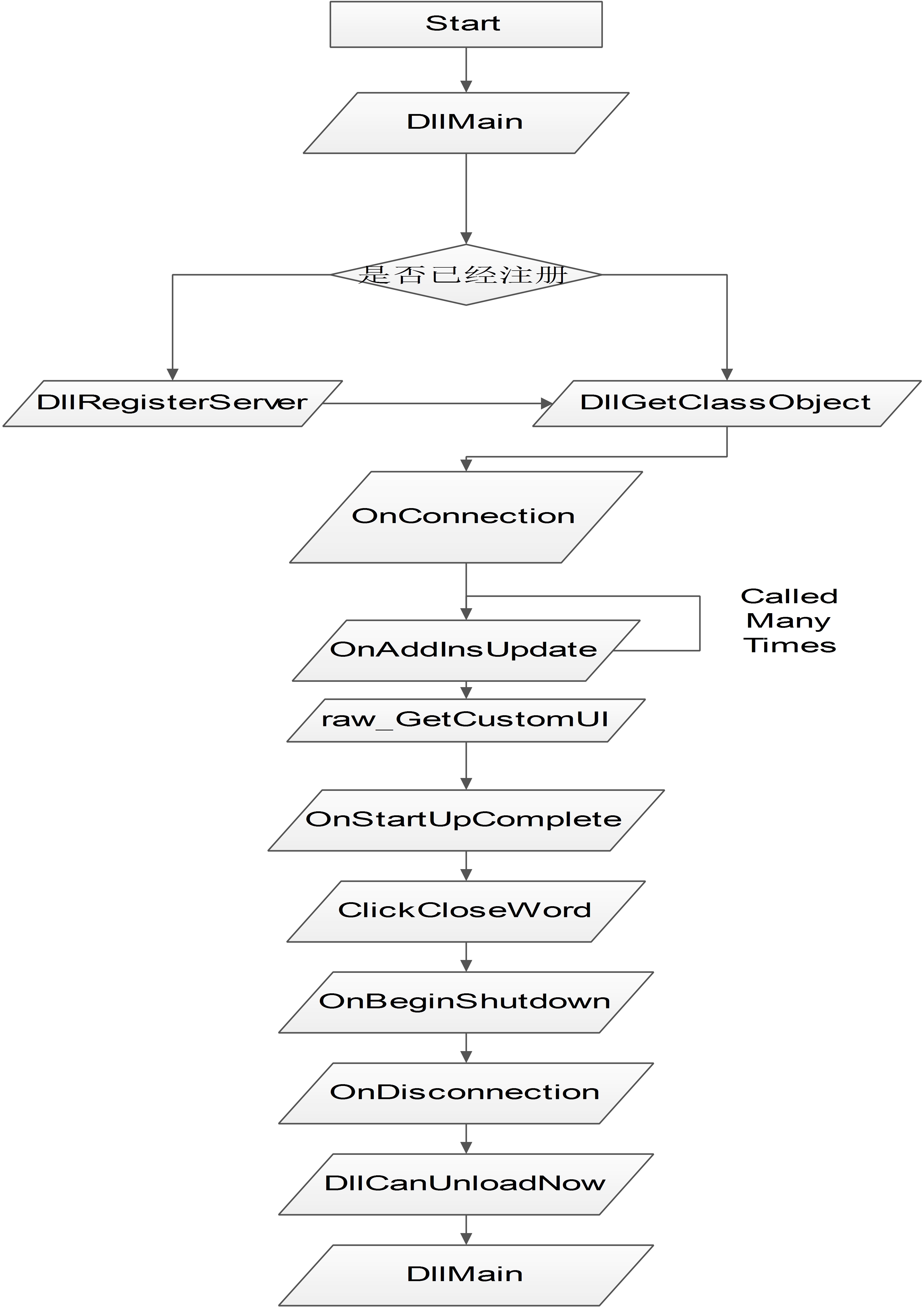
这个图表明的函数的调用顺序,主要代码如下:
 // MyAddin.cpp : Implementation of DLL Exports.

 // Note: Proxy/Stub Information

 //      To merge the proxy/stub code into the object DLL, add the file

 //      dlldatax.c to the project.  Make sure precompiled headers

 //      are turned off for this file, and add _MERGE_PROXYSTUB to the

 //      defines for the project.

 //

 //      If you are not running WinNT4.0 or Win95 with DCOM, then you

 //      need to remove the following define from dlldatax.c

 //      #define _WIN32_WINNT 0x0400

 //

 //      Further, if you are running MIDL without /Oicf switch, you also

 //      need to remove the following define from dlldatax.c.

 //      #define USE_STUBLESS_PROXY

 //

 //      Modify the custom build rule for MyAddin.idl by adding the following

 //      files to the Outputs.

 //          MyAddin_p.c

 //          dlldata.c

 //      To build a separate proxy/stub DLL,

 //      run nmake -f MyAddinps.mk in the project directory.

 #include "stdafx.h"

 #include "resource.h"

 #include <initguid.h>

 #include "MyAddin.h"

 #include "dlldatax.h"

 #include "MyAddin_i.c"

 #include "WordAddin.h"

 #ifdef _MERGE_PROXYSTUB

 extern "C" HINSTANCE hProxyDll;

 #endif

 CComModule _Module;

 BEGIN_OBJECT_MAP(ObjectMap)

 OBJECT_ENTRY(CLSID_WordAddin, CWordAddin)

 END_OBJECT_MAP()

 /////////////////////////////////////////////////////////////////////////////

 // DLL Entry Point

 extern "C"

 BOOL WINAPI DllMain(HINSTANCE hInstance, DWORD dwReason, LPVOID lpReserved)

 {

         MessageBox(NULL,"DllMain",NULL,MB_OK);

     lpReserved;

 #ifdef _MERGE_PROXYSTUB

     if (!PrxDllMain(hInstance, dwReason, lpReserved))

         return FALSE;

 #endif

     if (dwReason == DLL_PROCESS_ATTACH)

     {

         _Module.Init(ObjectMap, hInstance, &LIBID_MYADDINLib);

         DisableThreadLibraryCalls(hInstance);

     }

     else if (dwReason == DLL_PROCESS_DETACH)

         _Module.Term();

     return TRUE;    // ok

 }

 /////////////////////////////////////////////////////////////////////////////

 // Used to determine whether the DLL can be unloaded by OLE

 STDAPI DllCanUnloadNow(void)

 {

     MessageBox(NULL,"DllCanUnloadNow",NULL,MB_OK);

 #ifdef _MERGE_PROXYSTUB

     if (PrxDllCanUnloadNow() != S_OK)

         return S_FALSE;

 #endif

     return (_Module.GetLockCount()==) ? S_OK : S_FALSE;

 }

 /////////////////////////////////////////////////////////////////////////////

 // Returns a class factory to create an object of the requested type

 STDAPI DllGetClassObject(REFCLSID rclsid, REFIID riid, LPVOID* ppv)

 {

         MessageBox(NULL,"DllGetClassObject",NULL,MB_OK);

 #ifdef _MERGE_PROXYSTUB

     if (PrxDllGetClassObject(rclsid, riid, ppv) == S_OK)

         return S_OK;

 #endif

     return _Module.GetClassObject(rclsid, riid, ppv);

 }

 /////////////////////////////////////////////////////////////////////////////

 // DllRegisterServer - Adds entries to the system registry

 STDAPI DllRegisterServer(void)

 {

     MessageBox(NULL,"DllRegisterServer",NULL,MB_OK);

 #ifdef _MERGE_PROXYSTUB

     HRESULT hRes = PrxDllRegisterServer();

     if (FAILED(hRes))

         return hRes;

 #endif

     // registers object, typelib and all interfaces in typelib

     return _Module.RegisterServer(TRUE);

 }

 /////////////////////////////////////////////////////////////////////////////

 // DllUnregisterServer - Removes entries from the system registry

 STDAPI DllUnregisterServer(void)

 {

     MessageBox(NULL,"DllUnregisterServer",NULL,MB_OK);

 #ifdef _MERGE_PROXYSTUB

     PrxDllUnregisterServer();

 #endif

     return _Module.UnregisterServer(TRUE);

 }
还有一份代码如下:
 // WordAddin.h : Declaration of the CWordAddin

 #ifndef __WORDADDIN_H_

 #define __WORDADDIN_H_

 #include "resource.h"       // main symbols

 #include "stdafx.h"

 #include "StdAfx.h"

 #import "C:\Program Files\Common Files\designer\MSADDNDR.dll" raw_interfaces_only, raw_native_types, no_namespace, named_guids

 extern _ATL_FUNC_INFO OnClickButtonInfo;

 /////////////////////////////////////////////////////////////////////////////

 // CWordAddin

 class ATL_NO_VTABLE CWordAddin :

     public CComObjectRootEx<CComSingleThreadModel>,

     public CComCoClass<CWordAddin, &CLSID_WordAddin>,

     public IDispatchImpl<IWordAddin, &IID_IWordAddin, &LIBID_MYADDINLib>,

     public IDispatchImpl<_IDTExtensibility2, &IID__IDTExtensibility2, &LIBID_AddInDesignerObjects>,

     public IDispEventSimpleImpl<,CWordAddin,&__uuidof(Office::_CommandBarButtonEvents)>,

     public IDispatchImpl<IRibbonExtensibility, &IID_IRibbonExtensibility, &LIBID_Office>

 {

 public:

     CWordAddin()

     {

         int i = ;

     }

 DECLARE_REGISTRY_RESOURCEID(IDR_WORDADDIN)

 DECLARE_PROTECT_FINAL_CONSTRUCT()

 BEGIN_COM_MAP(CWordAddin)

     COM_INTERFACE_ENTRY(IWordAddin)

 //DEL     COM_INTERFACE_ENTRY(IDispatch)

     COM_INTERFACE_ENTRY2(IDispatch, IWordAddin)

     COM_INTERFACE_ENTRY(_IDTExtensibility2)

     COM_INTERFACE_ENTRY(IRibbonExtensibility)

 END_COM_MAP()

 BEGIN_SINK_MAP(CWordAddin)

 SINK_ENTRY_INFO(, __uuidof(Office::_CommandBarButtonEvents),/*dispid*/ 0x01, OnClickButton1, &OnClickButtonInfo)

 END_SINK_MAP()

 // IWordAddin

 public:

     STDMETHOD(OnMyButton)(/*[in]*/IDispatch* pIDispControl);

     CComQIPtr <Word::_Application> m_spApp;

     CComPtr < Office::_CommandBarButton> m_spCmdButton;

     typedef IDispEventSimpleImpl</*nID =*/ ,CWordAddin, &__uuidof(Office::_CommandBarButtonEvents)> CommandButton1Events;

 // _IDTExtensibility2

     STDMETHOD(OnConnection)(IDispatch * Application, ext_ConnectMode ConnectMode, IDispatch * AddInInst, SAFEARRAY * * custom)

     {

         ::MessageBox(NULL,"OnConnection","",MB_OK);

         OutputDebugString("OnConnection");

         //Delete it for the Office 2007

         CComPtr < Office::_CommandBars> spCmdBars;

         CComQIPtr <Word::_Application> spApp(Application);

         m_spApp = spApp;

         ATLASSERT(spApp);

         HRESULT hr = spApp->get_CommandBars(&spCmdBars);

         if(FAILED(hr))

             return hr;

         ATLASSERT(spCmdBars);

         CComVariant vName("MyAddin");

         CComPtr <Office::CommandBar> spNewCmdBar;

         CComVariant vPos();

         CComVariant vTemp(VARIANT_TRUE);

         CComVariant vEmpty(DISP_E_PARAMNOTFOUND, VT_ERROR);

         spNewCmdBar = spCmdBars->Add(vName, vPos, vEmpty, vTemp);

         CComPtr < Office::CommandBarControls> spBarControls;

         spBarControls = spNewCmdBar->GetControls();

         ATLASSERT(spBarControls);

         CComVariant vToolBarType();

         CComVariant vShow(VARIANT_TRUE);

         CComPtr < Office::CommandBarControl> spNewBar;

         spNewBar = spBarControls->Add(vToolBarType, vEmpty, vEmpty, vEmpty, vShow);

         ATLASSERT(spNewBar);

         CComQIPtr < Office::_CommandBarButton> spCmdButton(spNewBar);

         ATLASSERT(spCmdButton);

         HBITMAP hBmp =(HBITMAP)::LoadImage(_Module.GetResourceInstance(),

             MAKEINTRESOURCE(IDB_BITMAP),IMAGE_BITMAP,,,LR_LOADMAP3DCOLORS);

         ::OpenClipboard(NULL);

         ::EmptyClipboard();

         ::SetClipboardData(CF_BITMAP, (HANDLE)hBmp);

         ::CloseClipboard();

         ::DeleteObject(hBmp);

         spCmdButton->PutStyle(Office::msoButtonIconAndCaption);

         hr = spCmdButton->PasteFace();

         if (FAILED(hr))

             return hr;

         spCmdButton->PutVisible(VARIANT_TRUE);

         spCmdButton->PutCaption(OLESTR("myAddin"));

         spCmdButton->PutEnabled(VARIANT_TRUE);

         spCmdButton->PutTooltipText(OLESTR("test1"));

         spCmdButton->PutTag(OLESTR("test1"));

         spNewCmdBar->PutVisible(VARIANT_TRUE);

         m_spCmdButton = spCmdButton;

         CommandButton1Events::DispEventAdvise((IDispatch*)m_spCmdButton);

         return S_OK;

     }

     STDMETHOD(OnDisconnection)(ext_DisconnectMode RemoveMode, SAFEARRAY * * custom)

     {

         MessageBox(NULL,"OnDisconnection",NULL,MB_OK);

         if(m_spCmdButton != NULL)

             CommandButton1Events::DispEventUnadvise((IDispatch*)m_spCmdButton);

         return S_OK;

     }

     STDMETHOD(OnAddInsUpdate)(SAFEARRAY * * custom)

     {

         MessageBox(NULL,"OnAddInsUpdate",NULL,MB_OK);

         return S_OK;

     }

     STDMETHOD(OnStartupComplete)(SAFEARRAY * * custom)

     {

         MessageBox(NULL,"OnStartupComplete",NULL,MB_OK);

         return S_OK;

     }

     STDMETHOD(OnBeginShutdown)(SAFEARRAY * * custom)

     {

         MessageBox(NULL,"OnBeginShutdown",NULL,MB_OK);

         return S_OK;

     }

     void __stdcall OnClickButton1(IDispatch * /*Office::_CommandBarButton**/ Ctrl,VARIANT_BOOL * CancelDefault);

     // IRibbonExtensibility

     STDMETHOD(raw_GetCustomUI)(BSTR RibbonID, BSTR * RibbonXml)

     {

         MessageBox(NULL,"raw_GetCustomUI",NULL,MB_OK);

         OutputDebugString("raw_GetCustomUI");

         char szRibbon[MAX_PATH*] = {0x00};

         LoadString(_Module.GetModuleInstance(),IDS_RIBBON_XML, \

             szRibbon, MAX_PATH*);

         if (RibbonXml == NULL)

             return E_POINTER;

         OutputDebugString(szRibbon);

         CComBSTR bstr(szRibbon);

         bstr.CopyTo(RibbonXml);//use this to avoid heap destroy

         bstr.Empty();

         return S_OK;

     }

 };

 #endif //__WORDADDIN_H_
这是两个主要的文件。
注意两个问题:
160         CComBSTR bstr(szRibbon);

161         bstr.CopyTo(RibbonXml);//use this to avoid heap destroy

162         bstr.Empty();
这三行代码是为了防止程序退出时,插件对word的内存进行修改,导致堆错误,Word会Crash。函数的含义请参考MSDN。
Word Add-in 函数调用顺序的更多相关文章
- java初始化构造函数调用顺序
类初始化时构造函数调用顺序: (1)初始化对象的存储空间为零或null值: (2)调用父类构造函数: (3)按顺序分别调用类成员变量和实例成员变量的初始化表达式: (4)调用本身构造函数. 例子 ...
- c++深/浅拷贝 && 构造函数析构函数调用顺序练习题
1.深/浅拷贝 编译器为我们提供的合成拷贝构造函数以及合成的拷贝赋值运算符都是浅拷贝.浅拷贝只是做简单的复制,如果在类的构造函数中new出了内存,浅拷贝只会简单的复制一份指向该内存的指针,而不会再开辟 ...
- python函数调用顺序、高阶函数、嵌套函数、闭包详解
一:函数调用顺序:其他高级语言类似,Python 不允许在函数未声明之前,对其进行引用或者调用错误示范: def foo(): print 'in the foo' bar() foo() 报错: i ...
- 一个能让你了解所有函数调用顺序的Android库
http://mobile.51cto.com/android-536059.htm 原理 本库其实并没有什么黑科技,本库也没有java代码,核心就是2个build.gradle中的task.首先,原 ...
- iOS开发app启动原理及视图和控制器的函数调用顺序
main()函数是整个程序的入口,在程序启动之前,系统会调用exec()函数.在Unix中exec和system的不同在于,system是用shell来调用程序,相当于fork+exec+waitpi ...
- python 函数调用顺序
def foo(): print ('in the foo') bar() def bar(): print ('in the bar') foo() 1.foo函数进入内存 2.bar函数进入内存 ...
- C# 构造函数调用顺序
了解C#的一个类的加载过程,对于语言机制的理解和写出高效的语言很有帮助,这里简单介绍一下类的实例的构造函数调用过程.C#类的实例的构造过程是,先为实例的数据字段分配内存,并对所有字段按字节置零(0或者 ...
- c++构造函数析构函数调用顺序
#include <iostream> using namespace std; class A { public: A () { cout<<"A 构造 " ...
- cocos2dx--两个场景切换各函数调用顺序
场景A切换到场景B,有切换特效 调用顺序例如以下:(AAABABABA) A:构造函数 A:onEnter A:onEnterTransitionDidFinish B:构造函数 A:onExitTr ...
随机推荐
- html2canvas - 微信中长按存图 - 将h5活动结果保存到本地
现在有很多在微信里流行的h5活动页.这些小h5大部分都是简单的交互然后得出一个abcd早就拟定好的结果,根据你的选项分几种情况,最终得到其中一个作为你测试的答案.比如这个就是最后那张结果图: 当时自己 ...
- Dropbox 在 Ubuntu 上需要认证授权的问题
在 Ubuntu 上,通过 Ubuntu软件中心 搜索下载安装了 Dropbox . 运行时,弹出如下图的提示. 输入密码,点击 授权 后,没有出现 Dropbox 的运行界面. 再次点击运行,仍会出 ...
- python函数定义语法总结
见下面代码及注释: def calc(value): sum=0 for m in value: sum=sum+m return sum data=[1,2,3,4,5,6,7,8,9,10] pr ...
- Windows NTLM Hash和Hash传递、Key传递攻击
Hash(Key) 获取 工具: Mimikatz 用法: .\mimikatz.exe privilege::debug #查看权限 sekurlsa::logonpasswords #获取hash ...
- .NET 高性能WEB架构-比较容易改造方式 - .NET架构
下面列出的一些,是我们常见而且比较容易去优化的方式,当然细节方面非常多,仅供参考: 1.数据库依然选择SQL Server数据库(最新的sqlserver功能是很强大的)和使用订阅发布进行单写多读的读 ...
- PostgreSQL9.3安装tds_fdw扩展
PostgreSQL从9.x开始支持所谓的外表的功能,就是在PostgreSQL中通过安装一些扩展再进行一些配置可以在本地建立一个外表映射到其他不同类型的数据库(可以大致理解为跨越PostgreSQL ...
- where are you from
where are you from 如果问美国人这句话的话,他们一般会说: I'm from California. I'm from Pennsylvanian. 一般是说州,而不是说Americ ...
- Shell脚本导入外部脚本内容
vim subscript.sh #!/bin/bash tool="ApacheSpark" vim main.sh #!/bin/bash source /home/wx/su ...
- C#控制台窗口居中显示(转)
private struct RECT { public int left, top, right, bottom; } [DllImport("kernel32.dll", Se ...
- ubuntu-server-18.04 设置开机启动脚本
ubuntu-16.10 开始不再使用initd管理系统,改用systemd systemd is now used for user sessions. System sessions had al ...