
pandas 中的DataFrame.where()使用
pandas.DataFrame.where
DataFrame.where(cond, other=nan, inplace=False, axis=None, level=None, try_cast=False, raise_on_error=True)
inplace : boolean, default False
Whether to perform the operation in place on the data
axis : alignment axis if needed, default None
level : alignment level if needed, default None
try_cast : boolean, default False
try to cast the result back to the input type (if possible),
raise_on_error : boolean, default True
Whether to raise on invalid data types (e.g. trying to where on strings)
also see DataFrame.mask()
Notes
The where method is an application of the if-then idiom. For each element in the calling DataFrame, if cond is True the element is used; otherwise the corresponding element from the DataFrame other is used.
The signature for DataFrame.where() differs from numpy.where(). Roughly df1.where(m, df2) is equivalent to np.where(m, df1, df2).
For further details and examples see the where documentation in indexing.
Examples
>>> s = pd.Series(range(5))

>>> s.where(s > 0)

0    NaN

1    1.0

2    2.0

3    3.0

4    4.0
>>> df = pd.DataFrame(np.arange(10).reshape(-1, 2), columns=['A', 'B'])

>>> m = df % 3 == 0

>>> df.where(m, -df)

   A  B

0  0 -1

1 -2  3

2 -4 -5

3  6 -7

4 -8  9

>>> df.where(m, -df) == np.where(m, df, -df)

      A     B

0  True  True

1  True  True

2  True  True

3  True  True

4  True  True

>>> df.where(m, -df) == df.mask(~m, -df)

      A     B

0  True  True

1  True  True

2  True  True

3  True  True

4  True  True

参考文档numpy或pandas文档
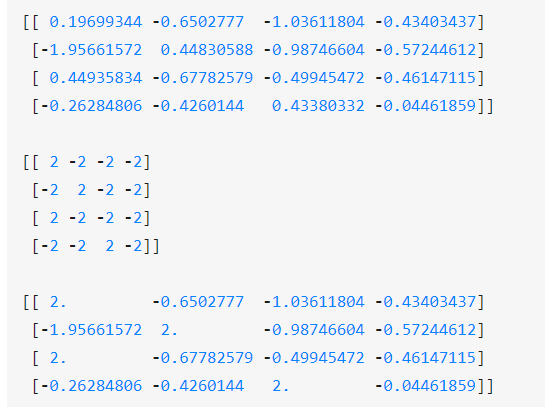
arr = np.random.randn(4,4)
pandas 中的DataFrame.where()使用的更多相关文章
- python数据分析pandas中的DataFrame数据清洗
pandas中的DataFrame中的空数据处理方法: 方法一:直接删除 1.查看行或列是否有空格(以下的df为DataFrame类型,axis=0,代表列,axis=1代表行,以下的返回值都是行或列 ...
- pandas中遍历dataframe的每一个元素
假如有一个需求场景需要遍历一个csv或excel中的每一个元素,判断这个元素是否含有某个关键字 那么可以用python的pandas库来实现. 方法一: pandas的dataframe有一个很好用的 ...
- Pandas中的DataFrame按指定顺序输出所有列的方法
问题: 输出新建的DataFrame对象时,DataFrame中各列的显示顺序和DataFrame定义中的顺序不一致. 例如: import pandas as pd grades = [48,99, ...
- 【Python学习】解决pandas中打印DataFrame行列显示不全的问题
在使用pandas的DataFrame打印时,如果表太长或者太宽会自动只给前后一些行列,但有时候因为一些需要,可能想看到所有的行列. 所以只需要加一下的代码就行了. #显示所有列 pd.set_opt ...
- pandas中,dataframe 进行数据合并-pd.concat()
``# 通过数据框列向(左右)合并 a = pd.DataFrame(X_train) b = pd.DataFrame(y_train) # 合并数据框(合并前需要将数据设置成DataFrame格式 ...
- pandas中关于DataFrame 去除省略号
#显示所有列 pd.set_option('display.max_columns', None) #显示所有行 pd.set_option('display.max_rows', None) #设置 ...
- Pandas数据帧(DataFrame)
数据帧(DataFrame)是二维数据结构,即数据以行和列的表格方式排列. 数据帧(DataFrame)的功能特点: 潜在的列是不同的类型 大小可变 标记轴(行和列) 可以对行和列执行算术运算 结构体 ...
- python – 基于pandas中的列中的值从DataFrame中选择行
如何从基于pandas中某些列的值的DataFrame中选择行?在SQL中我将使用: select * from table where colume_name = some_value. 我试图看看 ...
- Python之Pandas中Series、DataFrame
Python之Pandas中Series.DataFrame实践 1. pandas的数据结构Series 1.1 Series是一种类似于一维数组的对象,它由一组数据(各种NumPy数据类型)以及一 ...
随机推荐
- linux下主流的三种远程技术
远程登录操作对于租用服务器的用户来说都不陌生.特别是租用国外服务器的用户来说,更是家常便饭.通过远程登录操作,即使我们人在深圳,也能无差别的操作远在美国的服务器.而对于linux系统下的服务器,目前主 ...
- Dubbo -- 系统学习 笔记 -- 示例 -- 多协议
Dubbo -- 系统学习 笔记 -- 目录 示例 想完整的运行起来,请参见:快速启动,这里只列出各种场景的配置方式 多协议 可以自行扩展协议,参见:协议扩展 (1) 不同服务不同协议 比如:不同服务 ...
- Dubbo -- 系统学习 笔记 -- 示例 -- 只注册
Dubbo -- 系统学习 笔记 -- 目录 示例 想完整的运行起来,请参见:快速启动,这里只列出各种场景的配置方式 只注册 问题 如果有两个镜像环境,两个注册中心,有一个服务只在其中一个注册中心有部 ...
- ios开发之--NSNumber的使用
什么是NSNumber? NSArray/NSDictionary中只能存放oc对象,不能存放基本数据类型,如果想把基本数据类型放进去,需要先把基本数据类型转换成OC对象, 代码如下: ; ; flo ...
- 【Python】Excel处理
1.包导入 from openpyxl import Workbook from openpyxl import load_workbook from openpyxl.compat import r ...
- Weblogic CVE-2018-2894 漏洞复现
0x01 前言 Oracle官方发布了7月份的关键补丁更新CPU(Critical Patch Update),其中针对可造成远程代码执行的高危漏洞 CVE-2018-2894 进行修复:http:/ ...
- ScrollView 定位
1.固定到顶部scroll_view.requestFocusFromTouch();scroll_view.setScrollX(0); 2.固定到指定位置 int[] location = new ...
- 两台Linux主机互传文件可以使用SCP命令来实现
当两台linux主机之间要互传文件时可使用SCP命令来实现 复制文件: (1)将本地文件拷贝到远程 scp 文件名 --用户名@计算机IP或者计算机名称:远程路径 (2)从远程将文件拷回本地 scp ...
- Struts2(五)数据校验
一.概述 在提交表单数据时,如果数据需要保存到数据库,空输入等可能会引发一些异常,为了避免引起用户的输入引起底层异常,通常在进行业务逻辑操作之前,先执行基本的数据校验. 下面通过两种方式来阐述Stru ...
- Bootstrap - select2
1.调整select2下拉框的宽度 <style> .select2-container .select2-choice { height: 28px; line-height: 28px ...