
Android 底部菜单固定到底部
今天搞了很久的一个问题,导航菜单没有固定到底部,因为上面是ListView,可是没内容,于是就浮动上去了。
效果如下:
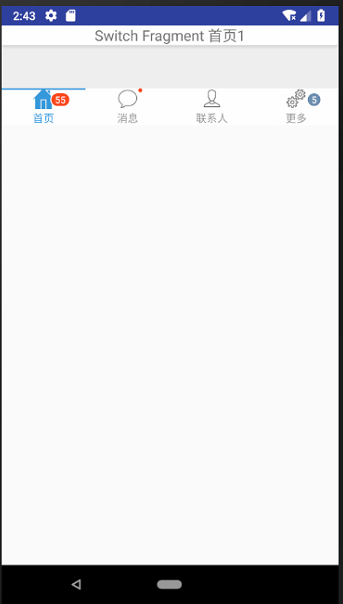
这里采用的是一个碎片,代码是:
<LinearLayout

xmlns:android="http://schemas.android.com/apk/res/android"

android:layout_width="match_parent"

android:layout_height="wrap_content"

android:orientation="vertical"

    >

<TextView

    android:id="@+id/card_title_tv"

    android:layout_width="match_parent"

    android:layout_height="wrap_content"

    android:background="@drawable/background_card"

    android:gravity="center"

    android:textSize="18sp"/>

<ListView

    android:id="@+id/jonrney_list_item"

    android:layout_width="match_parent"

    android:layout_height="match_parent"

    android:layout_marginBottom="48dp"

    />

</LinearLayout>
出问题了,百度了很多,试了很多的办法,没用。
主页面代码:
<?xml version="1.0" encoding="utf-8"?>

<android.support.constraint.ConstraintLayout

    xmlns:android="http://schemas.android.com/apk/res/android"

    xmlns:app="http://schemas.android.com/apk/res-auto"

    xmlns:tl="http://schemas.android.com/apk/res-auto"

    xmlns:tools="http://schemas.android.com/tools"

    android:id="@+id/container"

    android:layout_width="match_parent"

    android:layout_height="wrap_content"

    android:background="#eeeeee"

    android:scrollbars="none"

    >

    <LinearLayout

        android:layout_width="match_parent"

        android:layout_height="match_parent"

        android:orientation="vertical">

        <!--android:background="@color/colorPrimaryDark"-->

        <!--内容-->

        <FrameLayout

            android:id="@+id/fl_change"

            android:layout_weight=""

            android:layout_width="match_parent"

            android:layout_height="match_parent"

            app:layout_constraintLeft_toLeftOf="parent"

            app:layout_constraintRight_toRightOf="parent"

            >

        </FrameLayout>

   <!--  <LinearLayout

        xmlns:android="http://schemas.android.com/apk/res/android"

        android:layout_width="fill_parent"

        android:layout_height="wrap_content"

        android:id="@+id/bottom"

        android:layout_alignParentBottom="true"  >-->

<!--底部-->

        <com.flyco.tablayout.CommonTabLayout

            android:id="@+id/tl_3"

            android:layout_width="match_parent"

            android:layout_height="wrap_content"

            android:background="#ffffff"

            app:layout_constraintBottom_toBottomOf="parent"

            app:layout_constraintLeft_toLeftOf="parent"

            app:layout_constraintRight_toRightOf="parent"

            tl:tl_indicator_gravity="TOP"

            tl:tl_indicator_color="#2C97DE"

            tl:tl_textSelectColor="#2C97DE"

            tl:tl_textUnselectColor="#66000000"

            tl:tl_underline_height="2dp"/>

   <!-- </LinearLayout>-->

        <!--android:layout_alignParentBottom="true"-->

    </LinearLayout>

</android.support.constraint.ConstraintLayout >
最后发现是这段代码惹的麻烦:android:layout_height="wrap_content"
也是自己对这个属性没有了解清楚,不知道从哪里copy来的一个代码,这个属性代码自动浮动,根据内容更改大小。所以就造成了我现在的情况。
所以改成:android:layout_height="match_parent" 就好了。

Android 底部菜单固定到底部的更多相关文章
- 解决 scroll() position:fixed 抖动、导航菜单固定头部(底部)跟随屏幕滚动
一.导航栏或者页脚正常情况下固定在页面的相应位置,当页面滚动后,导航栏或者页脚固定在页面的顶部或者底部的情景 一般就是将该块的代码样式的position设置为fixed.固定在顶部的话,将top设置为 ...
- Android底部菜单的实现
前言:以前制作菜单使用TabHost,但是android 3.0以上就被废弃了,google已经不建议使这个类了.ActionBar也是菜单,不过在头部,算是导航了 ===本文就介绍怎么制作底部菜单= ...
- Xamarin.Android 解决打开软键盘导致底部菜单上移问题
在界面布局中有EditText控件,该控件一旦获取焦点则打开软键盘,如果布局中有底部菜单,那么底部菜单可能会被软键盘顶在其上面,看如下效果: 解决方法:在活动绑定界面之前写上下段代码即可 Window ...
- Android应用主界面底部菜单实现
介绍 现在绝大多数主流的应用主界面,都会包含一个底部菜单,就拿腾讯的QQ与微信来说,看起来是这样的 <---我是底部菜单 原理 在很久以前,可以通过TabActivity实现相关功能,自从Fr ...
- Android自定义控件系列(四)—底部菜单(下)
转载请注明出处:http://www.cnblogs.com/landptf/p/6290862.html 在app中经常会用到底部菜单的控件,每次都需要写好多代码,今天我们用到了前几篇博客里的控件来 ...
- Android中软键盘弹出时底部菜单上移问题
当在Android的layout设计里面如果输入框过多,则在输入弹出软键盘的时候,下面的输入框会有一部分被软件盘挡住,从而不能获取焦点输入. 解决办法: 方法一:在你的activity中的oncrea ...
- [Android] Android 使用 FragmentTabHost + Fragment 实现 微信 底部菜单
Android 使用 FragmentTabHost + Fragment 实现 微信 底部菜单 利用FragmentTabHost实现底部菜单,在该底部菜单中,包括了4个TabSpec,每个TabS ...
- Xamarin.Android 利用Fragment实现底部菜单
效果图: 第一步:添加引用 引用 Crosslight.Xamarin.Android.Support.v7.AppCompat 这个包. 第二步:绘制Main和Fragment界面 fg_home. ...
- [Android] Android 让UI控件固定于底部的几种方法
Android 让UI控件固定于底部的几种方法1.采用linearlayout布局:android:layout_height="0dp" <!-- 这里不能设置fill_p ...
随机推荐
- iOS 修改UITabBar的默认点击行为
项目截图 当我接到如上图这个需求的时候,评估了一下.感觉如上图的效果用自定义UITabBar的方式就可以实现了(做法类似新浪微博的自定义UITabBar中的不规则按钮),没错,就是干.一番折腾之后,我 ...
- java php 等,路径 上级路径,上上级路径表示方法
如何表示上级目录 ../表示源文件所在目录的上一级目录,../../表示源文件所在目录的上上级目录,以此类推. ../表示源文件所在目录的上一级目录,../../表示源文件所在目录的上上级目录,以此类 ...
- [译]async/await中使用阻塞式代码导致死锁 百万数据排序:优化的选择排序(堆排序)
[译]async/await中使用阻塞式代码导致死锁 这篇博文主要是讲解在async/await中使用阻塞式代码导致死锁的问题,以及如何避免出现这种死锁.内容主要是从作者Stephen Cleary的 ...
- React icon bak
- Cg入门11:Vertex Shader - 几何变换 —MVP矩阵变换(旋转、缩放)
旋转.缩放demo C# Code: Shader Code: watermark/2/text/aHR0cDovL2Jsb2cuY3Nkbi5uZXQv/font/5a6L5L2T/fontsize ...
- 例说Linux内核链表(一)
介绍 众所周知,Linux内核大部分是使用GNU C语言写的.C不同于其它的语言,它不具备一个好的数据结构对象或者标准对象库的支持. 所以能够借用Linux内核源代码树的循环双链表是一件非常值得让人高 ...
- stm8 stvd工程头文件包含方式
方式一:在Include Files上右键 add files to folder把.h文件添加到该组下, 添加完编译成功之后,下面窗口会多出一个预处理包含路径(若有错误没有编译成功,则看不到) 方 ...
- 增量式pid和位置式PID参数整定过程对比
//增量式PID float IncPIDCalc(PID_Typedef* PIDx,float SetValue,float MeaValue)//err»ý·Ö·ÖÀë³£Êý { PIDx-& ...
- How to get current timestamps in Java
How to get current timestamps in Java Timestamp timestamp = new Timestamp(System.currentTimeMillis() ...
- [置顶] app后端设计--总目录
版权声明:本文为博主原创文章,未经博主允许不得转载. 做了3年app相关的系统架构,api设计,先后在3个创业公司中工作,经历过手机网页端,Android客户端,iphone客户端,现就职于app云后 ...