
U3D的有限状态机系统
或许广大程序员之前接触过游戏状态机,这已不是个新鲜的词汇了。其重要性我也不必多说了,但今天我要讲到的一个状态机框架或许您以前并未遇到过。所以,我觉得有必要将自己的心得分享一下。下面是一个链接:
http://wiki.unity3d.com/index.php/Finite_State_Machine。
接下来我所要讲的就是基于此状态机框架。首先声明一下,这个状态机框架并不是我写的(我现在还没这个能力呢!),我只是想分享从中得到的一点点感悟,仅此而已。好了,我们开始吧!
首先从此链接上映入眼帘的是两个脚本加一个例子,由于是全英文的,估计大部分人不愿意碰这玩意,没办法,这就是瓶颈。如果你想更进一步的必须得越过这道坎,这就是核心竞争力!不过现在你不读也行,因为我会一步一步为您解刨这个状态机系统的。我想我这是帮人还是害人呢?您认为呢?脚本如下:
using UnityEngine;

using System.Collections;

using System.Collections.Generic;

public enum Transition

{

//定义了一个Transition(转换)类型的枚举变量,所以我们接下来要根据实际情况扩展此枚举变量。

    NullTransition = ,

}

public enum StateID

{

//定义了一个StateId(状态ID)类型的枚举变量,所以我们接下来也要根据实际情况扩展此枚举变量。

    NullStateID = ,

}

public abstract class FSMState//抽象类,我们必须继承它才可以在脚本中实例化并使用它

{

    protected Dictionary<Transition, StateID> map = new Dictionary<Transition, StateID>();

    /*这个成员变量是一个Dictionary类型,就相当于java中的Map类型,存储的是一个个的关联对。此刻我们存储的关联对类型就是上面我们定义的连个枚举类型。那么接下来我们猜也能才出来我们一定会向其添加关联对,可能还会移除此关联对。那么这个东西的用处我们现在还是很迷茫,不要紧,继续向下看吧!没问题的。*/

    protected StateID stateID;

    public StateID ID { get { return stateID; } }

    public void AddTransition(Transition trans, StateID id)//增加关联对(转换,状态ID)

    {

        // Check if anyone of the args is invalid

        if (trans == Transition.NullTransition)//如果增加的转换是个NullTransition(空转换),直接Debug.LogError,然后返回

        {

            Debug.LogError("FSMState ERROR: NullTransition is not allowed for a real transition");

            return;

        }

        if (id == StateID.NullStateID)//如果状态ID是NullStateID(空状态ID),怎么办?还是Debug.LoError,然后返回

        {

            Debug.LogError("FSMState ERROR: NullStateID is not allowed for a real ID");

            return;

        }

        if (map.ContainsKey(trans))//如果将要增加的关联对是之前就存在与关联容器中,也照样Debug.LogError,之后返回被调用处

        {

            Debug.LogError("FSMState ERROR: State " + stateID.ToString() + " already has transition " + trans.ToString() +

                       "Impossible to assign to another state");

            return;

        }

        map.Add(trans, id);//冲破了这些阻碍的话,终归可以添加此关联对了,下面的DeleteTransition函数就不用我写注释了吧!

    }

    public void DeleteTransition(Transition trans)//删除关联对函数,前提是里面要有这个关联对啊!

    {

        if (trans == Transition.NullTransition)

        {

            Debug.LogError("FSMState ERROR: NullTransition is not allowed");

            return;

        }

        if (map.ContainsKey(trans))

        {

            map.Remove(trans);

            return;

        }

        Debug.LogError("FSMState ERROR: Transition " + trans.ToString() + " passed to " + stateID.ToString() +

                       " was not on the state's transition list");

    }

    public StateID GetOutputState(Transition trans)//此函数由下面这个脚本FSMSystem.cs中的PerformTransition函数调用。是用来检索状态的。

    {

        if (map.ContainsKey(trans))

        {

            return map[trans];

        }

        return StateID.NullStateID;

    }

    public virtual void DoBeforeEntering() { }//从名字就可以看出它的作用是什么,但是我们得在FSMSystem.cs中得到答案。

    public virtual void DoBeforeLeaving() { }

    public abstract void Reason(GameObject player, GameObject npc);

    /*这个函数与下面这个函数是这个类中最重要的函数。Reason函数负责监听环境条件的改变并触发相应的事件转换。Act函数的作用在于表现当前状态下NPC的行为。我们得在这个抽象类的子类中覆写这两个方法。

*/

    public abstract void Act(GameObject player, GameObject npc);

}
using UnityEngine;

using System.Collections;

using System.Collections.Generic;

public class FSMSystem {

    private List<FSMState> states;//此类中植入一个类型为FSMState的List容器

    // The only way one can change the state of the FSM is by performing a transition

    //唯一你可以改变FSM中的状态的方法是事先一个转换,这样讲估计有点难以理解,不过我会通过例子来讲解的。

    // Don't change the CurrentState directly  不要直接修改CurrentState的值。

    private StateID currentStateID ;

    public StateID CurrentStateID { get { return currentStateID; } }//记住,不要直接修改这个变量,之所以让他公有是因为得让其他脚本调用这个变量。

    private FSMState currentState;//记录当前状态

    public FSMState CurrentState { get { return currentState; } }//同上

    public FSMSystem()

    {

        states = new List<FSMState>();//实例化states。

    }

    public void AddState(FSMState s)//增加状态转换对

    {

        if (s == null)

        {

            Debug.LogError("FSM ERROR: Null reference is not allowed");

        }

        if (states.Count == )
/*第一次添加时必定执行这块代码,因为一开始states是空的,并且这块代码设置了第一次添加的状态是默认的当前状态。这一点读者一定要理解,不然对于后面的东西读者会非常困惑的,因为其他地方没有地方设置运行后默认的当前状态。*/

        {

            states.Add(s);

            currentState = s;

            currentStateID = s.ID;//这里实例化了这两个成员变量

            return;

        }

         foreach (FSMState state in states)//排除相同的状态

        {

            if (state.ID == s.ID)

            {

                Debug.LogError("FSM ERROR: Impossible to add state " + s.ID.ToString() +

                               " because state has already been added");

                return;

            }

        }

        states.Add(s);//这一句代码第一次不执行,因为第一次states是空的,执行到上面的if里面后立即返回了

    }

    public void DeleteState(StateID id)//跟据ID来从容器states中定向移除FSMState实例

    {

        if (id == StateID.NullStateID)

        {

            Debug.LogError("FSM ERROR: NullStateID is not allowed for a real state");

            return;

        }

        foreach (FSMState state in states)

        {

            if (state.ID == id)

            {

                states.Remove(state);

                return;

            }

        }

        Debug.LogError("FSM ERROR: Impossible to delete state " + id.ToString() + ". It was not on the list of states");

    }

    public void PerformTransition(Transition trans)//执行转换

    {

        if (trans == Transition.NullTransition)

        {

            Debug.LogError("FSM ERROR: NullTransition is not allowed for a real transition");

        }

        // Check if the currentState has the transition passed as argument

        StateID id = currentState.GetOutputState(trans);//这下我们得回到当初我所说讲到的FSMState.cs中的那个检索状态的函数。如果检索不出来,就返回NullStateId,即执行下面if语句。

        if (id == StateID.NullStateID)

        {

            Debug.LogError("FSM ERROR: State " + currentStateID.ToString() + " does not have a target state " +

                           " for transition " + trans.ToString());

            return;

        }

        currentStateID = id;//还是那句话,如果查到了有这个状态,那么我们就将其赋值给成员变量currentStateID。

        foreach (FSMState state in states)//遍历此状态容器

        {

            if (state.ID == currentStateID)

            {

                currentState.DoBeforeLeaving();//我们在转换之前或许要做点什么吧!,所以我们如有需要,得在FSMState实现类中覆写一下这个方法

                currentState = state;//好了,做完了转换之前的预备工作(DoBeforeLeaving),是时候该转换状态了

                currentState.DoBeforeEntering();//状态转换完成之后,有可能得先为新状态做点事吧,那么我们也得DoBeforeEntering函数

                break;

            }

        }

    }

}
我想大家对此脚本已有了一定的理解了,但是估计还不知道怎么用吧!我给的链接上有一个Example例子,但是光看这个要想想熟练运用这个状态机系统确实得花一番心思。所以我来一步一步地解剖这个例子:
using System;

using System.Collections.Generic;

using System.Text;

using UnityEngine;

[RequireComponent(typeof(Rigidbody))]

public class NPCControl : MonoBehaviour

{

    public GameObject player;//主角

    public Transform[] path;//多个寻路点

    private FSMSystem fsm;//内置一个fsm

    public void SetTransition(Transition t) //转换状态

    {

         fsm.PerformTransition(t);

     }

    public void Start()

    {

        MakeFSM();//首先初始化状态机,执行MakeFSM函数

    }

    public void FixedUpdate()//作为驱动源

    {

        fsm.CurrentState.Reason(player, gameObject);//定期(默认是0.02秒,在Edit->rojectSetting->Time中可以发现)调用当前FSMState中的Reason函数,用以检测外界环境是否发生变化,并且根据发生的变化来执行某些事件

        fsm.CurrentState.Act(player, gameObject);//定期执行当前状态下的某些行为

    }

        // The NPC has two states: FollowPath and ChasePlayer

        // If it's on the first state and SawPlayer transition is fired, it changes to ChasePlayer

        // If it's on ChasePlayerState and LostPlayer transition is fired, it returns to FollowPath

    private void MakeFSM()

    {

        FollowPathState follow = new FollowPathState(path);//定义并实例化FSMState

        follow.AddTransition(Transition.SawPlayer, StateID.ChasingPlayer);//向其添加转换对

ChasePlayerState chase = new ChasePlayerState();

        chase.AddTransition(Transition.LostPlayer, StateID.FollowingPath);

        //我画一张图,你们就明白了这句话了:
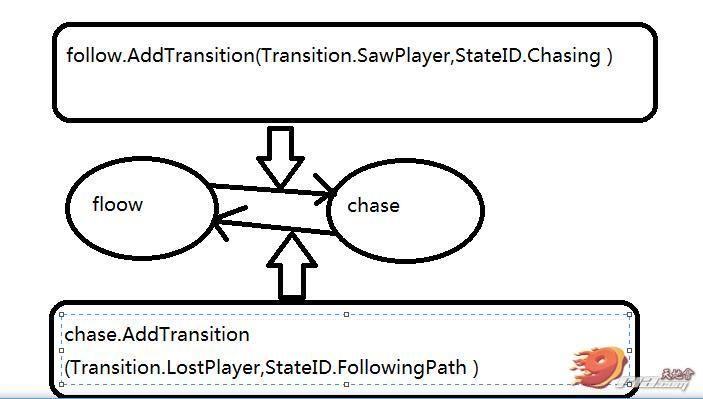
那个实心的箭头代表的代码就是上面圆角矩形里面的代码。看了之后我们因该明白了那两句代码的现实意义了吧!即定义转换,也就是floow状态可以与chase互相转换,如果我们填充的状态中出现了别的状态比如说:state0,此时状态floow就不能转换到state0了,同样state0也无法转换到floow。
***************************************************
 fsm = new FSMSystem();//实例化fsm

        fsm.AddState(follow);//将follow装载到fsm中

        fsm.AddState(chase);//将chase装载到fsm中

    }

}

public class FollowPathState : FSMState

/*继承抽象类FSMState,但是得注意一点:我们得在抽象类FSMState脚本中的两个枚举变量分别加入对应的枚举变量,比如在Transition中加入SawPlayer,LostPlayer;在StateID中加入ChasingPlayer,FollowingPath。*/

{

    private int currentWayPoint;

    private Transform[] waypoints;

    public FollowPathState(Transform[] wp)

    {

        waypoints = wp;

        currentWayPoint = ;

        stateID = StateID.FollowingPath;

    }

    public override void Reason(GameObject player, GameObject npc)

    {

        // If the Player passes less than 15 meters away in front of the NPC

        RaycastHit hit;

        if (Physics.Raycast(npc.transform.position, npc.transform.forward, out hit, 15F))

        {

            if (hit.transform.gameObject.tag == "player")

                npc.GetComponent<NPCControl>().SetTransition(Transition.SawPlayer);//当射线射到的物体的标签为Player时,触发转换。

        }

    }

    public override void Act(GameObject player, GameObject npc)//当NPC当前状态为follow时不断执行以下行为。下面那个类的用法也是一样的。

    {

        // Follow the path of waypoints

                // Find the direction of the current way point

        Vector3 vel = npc.rigidbody.velocity;

        Vector3 moveDir = waypoints[currentWayPoint].position - npc.transform.position;

        if (moveDir.magnitude < )

        {

            currentWayPoint++;

            if (currentWayPoint >= waypoints.Length)

            {

                currentWayPoint = ;

            }

        }

        else

        {

            vel = moveDir.normalized * ;

            // Rotate towards the waypoint

            npc.transform.rotation = Quaternion.Slerp(npc.transform.rotation,

                                                      Quaternion.LookRotation(moveDir),

                                                       * Time.deltaTime);

            npc.transform.eulerAngles = new Vector3(, npc.transform.eulerAngles.y, );

        }

        // Apply the Velocity

        npc.rigidbody.velocity = vel;

    }

} // FollowPathState

public class ChasePlayerState : FSMState//同上。

{

    public ChasePlayerState()

    {

        stateID = StateID.ChasingPlayer;

    }

    public override void Reason(GameObject player, GameObject npc)

    {

        // If the player has gone 30 meters away from the NPC, fire LostPlayer transition

        if (Vector3.Distance(npc.transform.position, player.transform.position) >= )

            npc.GetComponent<NPCControl>().SetTransition(Transition.LostPlayer);

    }

    public override void Act(GameObject player, GameObject npc)

    {

        // Follow the path of waypoints

                // Find the direction of the player

        Vector3 vel = npc.rigidbody.velocity;

        Vector3 moveDir = player.transform.position - npc.transform.position;

        // Rotate towards the waypoint

        npc.transform.rotation = Quaternion.Slerp(npc.transform.rotation,

                                                  Quaternion.LookRotation(moveDir),

                                                   * Time.deltaTime);

        npc.transform.eulerAngles = new Vector3(, npc.transform.eulerAngles.y, );

        vel = moveDir.normalized * ;

        // Apply the new Velocity

        npc.rigidbody.velocity = vel;

    }

}
我来总结一下,此状态机框架的用法如下:首先我们得填充抽象类FSMState中的两个枚举类型,然后针对具体情况继承此抽象类并设计脚本,且脚本中必须有一个FSMSystem类型成员变量(可以仿照上面的例子),并且要在Update或FIxedUpdate等函数中不断驱动此状态机运行。且首先我们得用一些FSMState实例来装载此状态机系统实例。而且我们得对每一个FSMState实例添加转换对,控制该状态转换的方向。最后在每个FSMState子类中覆写Reson与Act函数。其中Reson是监听外界条件变化的并且执行某些转换,而Act是表现当前状态行为的函数。
了解了这些,你还觉得自己不会用这个FSMSystem吗?多用用就好了,下次见!
原文链接:http://www.narkii.com/club/thread-272375-1.html
U3D的有限状态机系统的更多相关文章
- Unity FSM 有限状态机
翻译了一下unity wiki上对于有限状态机的案例,等有空时在详细写一下.在场景中添加两个游戏物体,一个为玩家并修改其Tag为Player,另一个为NPC为其添加NPCControl脚本,并为其将玩 ...
- U3D游戏开发商思考
代码驱动带来的技术题 游戏碎片化.U3D 引擎有个非常有力的特色,就是实时编译执行.这意味着不管在不论什么时候,仅仅要按下执行图标,当前的场景就会进入可执行状态. 这导致了游戏在开发的过程中常常陷入一 ...
- Unity 状态转化机器
using System; using System.Collections; using System.Collections.Generic; using UnityEngine; /** 有限状 ...
- 修改RectTransform的值
用uGUI的时候.经常需要动态改变RectTransform的值,
- 游戏世界之Unity3D的基础认识
1.写在前面 Unity3D是由Unity Technologies开发的一个让你轻松创建诸如三维视频游戏.建筑可视化.实时三维动画等类型互动内容的多平台的综合型游戏开发工具,是一个全面整合的专业游戏 ...
- Unity3D游戏开发之开发游戏带来的问题
昨日曾就某投资人把移动团队失败原因之中的一个归于选择Unity引擎进行了一番评论,工具本身无罪,但怎样理解工具.正确使用Unity引擎确实须要讨论,在选择Unity之前你也许须要了解下这个引擎实际开发 ...
- Unity3D编辑器扩展(一)——定义自己的菜单按钮
Unity3D 引擎的编辑器拥有很强的扩展性,用的好可以帮我们省很多事情.在这里记录下如何去扩展 Unity3D 的编辑器,定制属于我们自己的开发环境. 本篇主要讲解在 Unity3D 引擎的各个窗口 ...
- Unity3d操作的一些技巧知识点和BUG解决方案
自己记录一些东西,转载请良心注明出处. 1.如何同时打开两个UNITY3D项目. 有时候需要对比,或者需要添加另一个项目的某资源到目前项目,同时打开两个项目看起来会比较明了.如果直接打开的话, ...
- cocos2d-x进化为2.5D的一些想法
首先我得说Unity3D已经做的非常好了,搞这些东西意义真心不大.详细Unity3D有什么优势我之前也写过两篇文章来阐述自己的想法. 假设我的下一份工作是U3D的话,预计我就不会 ...
随机推荐
- 初学Android的几个常见问题
1.关于开发环境搭配,可以到网站http://developer.android.com/sdk/index.html下载adt-bundle-windows-x86-20131030.zip,里面包 ...
- hashMap 根据已有知识知道的
public V put(K key, V value) { //假如table为空 if (table == EMPTY_TABLE) { inflateTable(threshold); } // ...
- python 进行后端分页详细代码
后端分页 两个接口 思路: 1. 先得到最大页和最小页数(1, 20) --> 传递给前端, 这样前端就可以知道有多少个页数 2. 通过传递页数得到当前页对应数据库的最大值和最小值 3. 通过s ...
- (笔记)Linux下查看CPU使用率的命令
1.top 使用权限:所有使用者 使用方式:top [-] [d delay] [q] [c] [S] [s] [i] [n] [b] 说明:即时显示process的动态 d :改变显示的更新速度,或 ...
- 第三百五十三节,Python分布式爬虫打造搜索引擎Scrapy精讲—scrapy的暂停与重启
第三百五十三节,Python分布式爬虫打造搜索引擎Scrapy精讲—scrapy的暂停与重启 scrapy的每一个爬虫,暂停时可以记录暂停状态以及爬取了哪些url,重启时可以从暂停状态开始爬取过的UR ...
- Java数组超出范围时如何处理多个异常?
在Java编程中,数组超出范围时如何处理多个异常? 此示例显示如何使用System类的System.err.println()方法处理多个异常方法. package com.yiibai; publi ...
- e838. 使JTabbedPane中的卡片能用按键的方式选取
Setting a mnemonic on a tab allows the tab to be selected with a keystroke. For example, if the mnem ...
- Aspose.Words对于Word的操作
对于word操作一般是对已有word模板的操作,直接新建的不考虑,网上教程很多,自己看吧一般有以下几种办法(忘了具体几种了,一般情况下以下就够了)1.通过书签替换顾名思义,就是先定义一个书签,然后在书 ...
- Centos下查看cpu、磁盘、内存使用情况以及如何清理内存
核查服务器基本情况 查看内存使用情况 free -m 查看cpu使用情况 top #查看进程运行情况 查看磁盘以及分区情况 df -h 查看网络情况 ifconfig 查看端口使用情况 #1.方法一 ...
- 命令行编译C++程序
使用命令行来编译C++程序,我们可以有两种方法: 方法一: 1. 依次打开开始程序->Visual Studio 2010 –>Visual Studio tool ...