
npm install current-device js 端判断程序运行的设备
https://github.com/matthewhudson/current-device
CURRENT-DEVICE
This module makes it easy to write conditional CSS and/or JavaScript based on device operating system (iOS, Android, Blackberry, Windows, MacOs, Firefox OS, MeeGo, AppleTV, etc), orientation (Portrait vs. Landscape), and type (Tablet vs. Mobile).
EXAMPLES
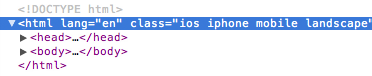
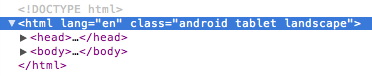
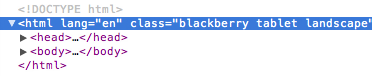
This module inserts CSS classes into the <html> element.
iPhone
Android Tablet
Blackberry Tablet
DEVICE SUPPORT
- iOS: iPhone, iPod, iPad
- Android: Phones & Tablets
- Blackberry: Phones & Tablets
- Windows: Phones & Tablets
- Firefox OS: Phones & Tablets
USAGE
Just include the script. The script then updates the <html> section with the appropriate classes based on the device's characteristics.
Installation
npm install current-device
And then import it:
// using es modules

import device from "current-device";

// common.js

const device = require("current-device").default;
Or use script tags and globals.
<script src="https://unpkg.com/current-device/umd/current-device.min.js"></script>
And then access it off the global like so:
console.log("device.mobile() === %s", device.mobile());
CONDITIONAL CSS
The following tables map which CSS classes are added based on device and orientation.
Device CSS Class Names
| Device | CSS Classes |
|---|---|
| iPad | ios ipad tablet |
| iPhone | ios iphone mobile |
| iPod | ios ipod mobile |
| Android Phone | android mobile |
| Android Tablet | android tablet |
| BlackBerry Phone | blackberry mobile |
| BlackBerry Tablet | blackberry tablet |
| Windows Phone | windows mobile |
| Windows Tablet | windows tablet |
| Firefox OS Phone | fxos mobile |
| Firefox OS Tablet | fxos tablet |
| MeeGo | meego |
| Desktop | desktop |
| Television | television |
Orientation CSS Class Names
| Orientation | CSS Classes |
|---|---|
| Landscape | landscape |
| Portrait | portrait |
CONDITIONAL JAVASCRIPT
This module also includes support for conditional JavaScript, allowing you to write checks on the following device characteristics:
Device JavaScript Methods
| Device | JavaScript Method |
|---|---|
| Mobile | device.mobile() |
| Tablet | device.tablet() |
| Desktop | device.desktop() |
| iOS | device.ios() |
| iPad | device.ipad() |
| iPhone | device.iphone() |
| iPod | device.ipod() |
| Android | device.android() |
| Android Phone | device.androidPhone() |
| Android Tablet | device.androidTablet() |
| BlackBerry | device.blackberry() |
| BlackBerry Phone | device.blackberryPhone() |
| BlackBerry Tablet | device.blackberryTablet() |
| Windows | device.windows() |
| Windows Phone | device.windowsPhone() |
| Windows Tablet | device.windowsTablet() |
| Firefox OS | device.fxos() |
| Firefox OS Phone | device.fxosPhone() |
| Firefox OS Tablet | device.fxosTablet() |
| MeeGo | device.meego() |
| Television | device.television() |
Orientation JavaScript Methods
| Orientation | JavaScript Method |
|---|---|
| Landscape | device.landscape() |
| Portrait | device.portrait() |
Orientation JavaScript Callback
device.onChangeOrientation(newOrientation => {

  console.log(`New orientation is ${newOrientation}`);

});
Utility Methods
device.noConflict()
Run current-device in noConflict mode, returning the device variable to its previous owner. Returns a reference to the device object.
const currentDevice = device.noConflict();
Useful Properties
Access these properties on the device object to get the first match on that attribute without looping through all of its getter methods.
| JS Property | Returns |
|---|---|
| device.type | 'mobile', 'tablet', 'desktop', or 'unknown' |
| device.orientation | 'landscape', 'portrait', or 'unknown' |
| device.os | 'ios', 'iphone', 'ipad', 'ipod', 'android', 'blackberry', 'windows', 'macos', 'fxos', 'meego', 'television', or 'unknown' |
BEST PRACTICES
Environment detection has a high rate of misuse. Often times, folks will attempt to work around browser feature support problems by checking for the affected browser and doing something different in response. The preferred solution for those kinds of problems, of course, is to check for the feature, not the browser (ala Modernizr).
However, that common misuse of device detection doesn't mean it should never be done. For example, current-device could be employed to change the interface of your web app such that it uses interaction patterns and UI elements common to the device it's being presented on. Android devices might get a slightly different treatment than Windows or iOS, for instance. Another valid use-case is guiding users to different app stores depending on the device they're using.
In short, check for features when you need features, and check for the browser when you need the browser.
Contributors
Thanks goes to these wonderful people (emoji key):
 Matthew Hudson |
 Rafael Terán |
 Allan |
 martinwepner |
This project follows the all-contributors specification. Contributions of any kind welcome!
npm install current-device js 端判断程序运行的设备的更多相关文章
- NPM install -save 和 -save-dev 傻傻分不清
本文原文地址:https://www.limitcode.com/detail/59a15b1a69e95702e0780249.html 回顾 npm install 命令 最近在写Node程序的时 ...
- 下载一个vue项目执行npm install 后运行项目npm run dev后出错 - 问题解决
在SVN上拉下来一个vue项目,上面没有提交项目里面的node_modules文件夹,所以要自己执行 npm install 安装,但安装完后运行项目后却报错了: $ npm run dev > ...
- 运行npm install命令的时候会发生什么?
摘要:我们日常在下载第三方依赖的时候,都会用到一个命令npm install,那么你知道,在运行这个命令的时候都会发生什么吗? 本文分享自华为云社区<运行npm install命令的时候会发生什 ...
- This usually happens because your environment has changed since running `npm install`
此时运行按照提示执行 npm rebuild node-sass 命令,(如若不行,则先运行npm install node-sass命令执行) 然后再运行 node命令,启动服务.
- 通过JS语句判断WEB网站的访问端是电脑还是手机
通过JS语句判断WEB网站的访问端是电脑还是手机,以显示不同的页面! 目录腾讯网的适配代码如何判断访问网站的机器类型-如何判断ipadJS 判断浏览器客户端类型(ipad,iphone,android ...
- js如何判断用户是在pc端和还是移动端访问
js如何判断用户是在pc端和还是移动端访问 来源:A5技术交流 作者:wofa 时间:2014-04-25收藏本页 最近一直在忙我们团队的项目“咖啡之翼”,在这个项目中,我们为移动平台提供了一个优秀的 ...
- NW.js构建PC收银端安装程序的指南
1.首先下载nw.js的SDK: https://nwjs.org.cn/download.html 2.SDK目录下新建myapp文件夹: 3.myapp文件夹内新建package.json文件: ...
- [Node.js] npm init && npm install
npm init: For create package.json file which will recode the dependence. npm install: You can also w ...
- ☀【Grunt】package.json, Gruntfile.js, npm install, grunt
npm install --registry http://registry.npm.taobao.org/ 切换源 Grunt.js 在前端项目中的实战http://beiyuu.com/grunt ...
- $ npm install opencv ? 你试试?! 在windows环境下,使用node.js调用opencv攻略
博主之前写过一篇文章<html5与EmguCV前后端实现——人脸识别篇>,叙述的是opencv和C#的故事.最近在公司服务器上更新了一套nodejs环境,早就听闻npm上有opencv模块 ...
随机推荐
- Spring框架之IOC和AOP底层原理
1.1简介 Spring:春天-->软件行业的春天 2002,首次推出了Spring框架的雏:interface21框架! Spring框架即以interface21框架为基础,经过重新设计, ...
- 五款最优秀的java微服务框架
微服务被广泛用于创建多功能的应用程序,通过组合每个功能部分并将它们逐层放在一个单元中.许多人可能没有意识到微服务是一组小型服务中制作单个应用程序的方法,每个服务都独立运行(进程). java微服务框架 ...
- css 文字溢出省略号
前言 css 文字溢出后显示省略号,这是一个非常常规的操作,但是你会发现在网上很多给出的例子两行之后显示省略号,却没有用. 这是为什么呢?please look follow. 正文 在一行省略的: ...
- js 词法作用域
前言 什么是作用域? 作用域(scope),程序设计概念,通常来说,一段程序代码中所用到的名字并不总是有效/可用的,而限定这个名字的可用性的代码范围就是这个名字的作用域. 白话文:作用域就是变量在哪块 ...
- Android Studio制作简单登录界面
实现目标 应用线性布局设计登录界面,要求点击输入学号时弹出数字键盘界面,点击输入密码时弹出字母键盘,出现的文字.数字.尺寸等全部在values文件夹下相应.xml文件中设置好,使用时直接引用.当用户名 ...
- 《c#高级编程》第2章C#2.0中的更改(一)——泛型
一.实例 当我们需要编写一些通用的代码,但是不确定它们将处理的数据类型时,泛型就非常有用了.下面是一个简单的 C# 泛型示例: using System; public class Example { ...
- Linux命令之查找CPU资源利用情况(lscpu和top详解)
1.lscpu命令:获取CPU架构完整详细信息,例如架构信息,CPU模式,CPU频率,CPU核心数.线程数.缓存大小. 在终端输入"lscpu": 参数详解: [Architect ...
- 技术解读:Dragonfly 基于 P2P 的智能镜像加速系统 | 龙蜥技术
简介: 结合 Dragonfly 子项目 Nydus 进行按需加载可以最大限度提升镜像下载速度. 编者按:上世纪末期,基于 C/S 模式的思想,人们发展了 HTTP . FTP 等应用层协议.然而 C ...
- 玩转DB里的数据 — 阿里云DMS任务编排之简介和实操
1.任务编排介绍 数据库是企业IT系统里的重要基础设施,里面存储了大量有价值的数据资产,如:交易数据.客户数据.订单数据,等等.其实,数据库在企业里一直扮演着一个数据生产者(Producer)的角色, ...
- Dubbo 跨语言调用神兽:dubbo-go-pixiu
简介: Pixiu 是基于 Dubbogo 的云原生.高性能.可扩展的微服务 API 网关.作为一款网关产品,Pixiu 帮助用户轻松创建.发布.维护.监控和保护任意规模的 API ,接受和处理成千上 ...