
configparser封装后报错:configparser.NoSectionError: No section: 'LoginElement'
前言
这是目录结构
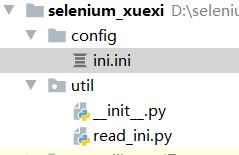
先贴一下源代码
# read_ini.py

import configparser

class ReadIni():

    """读取 ini.ini 配置文件"""

    def __init__(self, file_name=None, note=None):

        if file_name == None:

            file_name = '../config/ini.ini'

        if note == None:

            self.note = 'LoginElement'

        else:

            self.note = note

        self.cf = self.load_file(file_name)

    # 加载文件

    def load_file(self, file_name):

        cf = configparser.ConfigParser()

        cf.read(file_name)

        return cf

    # 获取key

    def get_value(self, key):

        return self.cf.get(self.note, key)
# ini.ini

[LoginElement]

username=name>username

userpassword=name>password

usersubmit=xpath>//*[@id="login-form"]/div[3]/input
在 Python 控制台 运行的代码
from util.read_ini import ReadIni

a = ReadIni()

a.get_value('username')
然后我们会神奇的发现 报了一个错误: configparser.NoSectionError: No section: 'LoginElement'
分析
可以看见报错的信息是没有找到 LoginElement 这个节点,可是ini.ini 这个文件中是有这个节点,为啥找不到了???

然后决定先从第一步开始分析:这个文件有没有加载到(很多时候都是因为文件路径产生的问题)
现在写的是相对路径,先改成绝对路径试下。。。。。
改完路径后你就会发现,你的问题已经解决了
总结
这个问题的原因是因为配置文件没有加载到,在加载文件的时候尽可能的使用 绝对路径,记得格式化文件路径,防止文件路径错误
configparser封装后报错:configparser.NoSectionError: No section: 'LoginElement'的更多相关文章
- python 读取配置文件总是报错 configparser.NoSectionError: No section:
本文为作者原创,禁止转载,违者必究法律责任!!! python 读取配置文件总是报错 configparser.NoSectionError: No section: 无论是 python2的版本,还 ...
- zabbix安装unixODBC配置完之后报错
zabbix安装unixODBC配置完之后报错 libmysqlclient_16 not defined in file libmysqlclient_r.so.16 分析 我没有使用centos6 ...
- 我用VS2012在Nuget中安装Signalr之后报错
我用VS2012在Nuget中安装Signalr之后报错 “/”应用程序中的服务器错误. The following errors occurred while attempting to load ...
- 服务器的SVN项目版本较低,check out 下来后报错
check out下来后报错提示: svn: E155036: Please see the 'svn upgrade' commandsvn: E155036: Working copy '/hom ...
- 项目导入之后报错:The import javax.servlet cannot be resolved
项目导入之后报错:The import javax.servlet cannot be resolved 解决方法:在Eclipse中,右击项目,选择Build Path->configure ...
- Android 加了自定义Application后报错 Unable to instantiate activity ComponentInfo ClassNotFoundException
在Android自定义一个类继承集成Application后,并在AndroidManifest.xml里面配置了application的name属性为该类名称后报错: Unable to insta ...
- maven项目检出后报错(包括编译报错和运行报错)的常见检查处理方式
maven项目检出后报错(包括编译报错和运行报错)的常见检查处理方式: 1.更改项目的jdk为我们安装的jdk2.更改build配置里的 output folder 目录为 xxx项目名/target ...
- 解决mac安装homebrew后报错-bash: brew: command not found
解决mac安装homebrew后报错-bash: brew: command not found 参照官网上很简单的一句安装命令, /usr/bin/ruby -e "$(curl ...
- 【Devops】【docker】【CI/CD】jenkins源码管理,添加SSH地址后报错+Jenkins构建报错:Please make sure you have the correct access rights and the repository exists.
jenkins源码管理,添加SSH地址后报错: Could not read from remote repository. Please make sure you have the correct ...
- git添加公钥后报错sign_and_send_pubkey: signing failed: agent refused operation
在服务器添加完公钥后报错 sign_and_send_pubkey: signing failed: agent refused operation 解决方案: eval "$(ssh-ag ...
随机推荐
- 关于无法查看hadoop的防火墙状态解决方法
可以参考这两位博主写的 https://www.055401.com/computer/376.html https://blog.csdn.net/weixin_52596632/article/d ...
- 为什么带NOLOCK的查询语句还会造成阻塞
背景 客户反映HIS数据库在11点出现了长时间的阻塞,直到手动KILL掉阻塞的源头.请我们协助分析原因,最终定位到.NET程序中使用的SqlDataReader未正常关闭导致. 现象 登录SQL专家云 ...
- Java 常用类 String类与其他结构之间的转换-----String 与 基本数据类型,包装类之间的转换
1 /* 2 涉及到String类与其他结构之间的转换 3 4 */ 5 6 //String 与 基本数据类型,包装类之间的转换 7 //String --->基本数据类型,包装类:调用包装类 ...
- inputNextFocus vue - js 跳转 下一个 tab
inputNextFocus vue - js 跳转 下一个 tab <template> <Input v-model="val1" ref="inp ...
- C#实现软件开机自启动(不需要管理员权限)
目录 原理简介 使用方法 完整代码 原理简介 本文参考C#/WPF/WinForm/程序实现软件开机自动启动的两种常用方法,将里面中的第一种方法做了封装成AutoStart类,使用时直接两三行代码就可 ...
- 使用 libreoffice 批量化转化文件为 .pdf 并合并
介绍使用 libreoffice 批量化将文件转化为 .pdf 然后合并.pdf文件的方法 很多人知道,在 Linux 系统中 WPS 是办公软件中很棒的选择.但其实 libreoffice 也是一个 ...
- 手撕fft系列之频移fftshift源码解析
壹: fft在数字信号处理领域是一个神一样的存在.要好好熟悉一下.这里给出频移的算法源码解析. 所谓的频移,就是把数字信号的频频顺序打乱,移动一些.这个在防止啸叫和辅听领域应用十分广泛. 贰: 这个源 ...
- nginx和tomcat 反向代理 部署实例 直接运行
1 前言 1.1 目的 为了正确的部署"ngix+memcached"特编写此部署手册,使安装人员可以通过部署手册知道如何部署系统,也为需要安装该系统的安装人员正确.快速的部署本系 ...
- day11-实现Spring底层机制-01
实现Spring底层机制-01 主要实现:初始化IOC容器+依赖注入+BeanPostProcessor机制+AOP 前面我们实际上已经使用代码简单实现了: Spring XML 注入 bean (S ...
- [TM4]TM4C123G使用笔记
[TM4]TM4C123G使用笔记 TI的板子真让人头大甚至重装了两遍KEIL5 如何用keil5新建工程可以参考如下博客: https://blog.csdn.net/D_XingGuang/art ...