
3D圆饼图,可修改颜色,图片等,具体见代码:
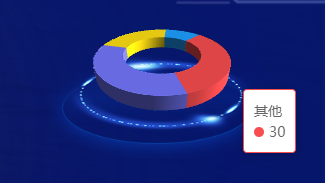
组件代码:
<template>
<!-- 饼图 -->
<div :id="histogramId" v-bind:style="{height:height,width:width}"></div>
</template>
<script src="https://unpkg.com/echarts-gl@2/dist/echarts-gl.min.js"></script>
<script type="text/ecmascript-6">
export default {
props:{
//id
histogramId:{
type:String,
default:''
},
//组件的高度
height: {
type: String,
default: '160px'
},
//组件的宽度
width: {
type: String,
default: '500px'
},
//legend 样式
legend:{
type:Object,
default:()=>{
return{
legendIcon:'rect', //circle,rect ,roundRect,triangle,diamond,pin,arrow,none
legendWidth:10,
legendHeight:10,
legendGrap:20,
bottom:'0%',
top:'5%',
right:'0%',
color:'#ffffff',
fontSize:12,
legendShow:false
}
}
},
graphic:{
type:Array,
default:()=>[
{threeDiImg:'http://218.56.180.213:8029/static/file/pic/202305/picFgwCEgfJ1684914835410.png',imgWidth:220, imgHeight:98,threeDiLeft:'20%',threeDiTop:'35%'},
{threeDiImg:'http://218.56.180.213:8029/static/file/pic/202305/picu4HDaEi21684914867656.png',imgWidth:185, imgHeight:77,threeDiLeft:'24%',threeDiTop:'31%'}
]
},
grid3D:{
type:Object,
default:()=>{
return{
threeTop:'-15%',
threeLeft:'-7%',
threeDistance:170,
radius:0.59, //之前默认0.59
alpha:30,
autoRotateSpeed:30,
height:40
}
}
},
imgGridData: {
type: Array,
default: () => [
{name: '开放式', value: 10}, {name: '封闭式', value: 20}, {name: '混合式', value: 30},{name: '其他', value: 30}
]
},
colors:{
type:Array,
default:()=>["#1D9FFF", "#FFDE14", "#7376FA", "#F74D4F", "#04AF52"]
},
},
data() {
return {
threeHIgh: "",
imgPieData: [],
};
},
methods: {
initPie() {
var that = this;
that.threeHIgh = that.$echarts.init(document.getElementById(that.histogramId));
var option;
let selectedIndex = "";
let hoveredIndex = "";
var colors = that.colors;
var dataOld = that.imgGridData;
var data = [],
color = "";
for (var i = 0; i < dataOld.length; i++) {
if (i % 5 == 0) {
color = colors[i];
} else if (i % 5 == 1) {
color = colors[i];
} else if (i % 5 == 2) {
color =colors[i];
} else if (i % 5 == 3) {
color = colors[i];
} else if (i % 5 == 4) {
color = colors[i];
}
let item = {
name: dataOld[i].name,
value: dataOld[i].value,
itemStyle: {
color: color,
},
};
data.push(item);
}
option = getPie3D(
data,
that.grid3D.radius //这个是只饼图倾斜的角度
);
// 生成扇形的曲面参数方程
function getParametricEquation(startRatio, endRatio, isSelected, isHovered, k, h) {
// 计算
const midRatio = (startRatio + endRatio) / 2;
const startRadian = startRatio * Math.PI * 2;
const endRadian = endRatio * Math.PI * 2;
const midRadian = midRatio * Math.PI * 2;
// 如果只有一个扇形,则不实现选中效果。
if (startRatio === 0 && endRatio === 1) {
// eslint-disable-next-line no-param-reassign
isSelected = false;
}
// 通过扇形内径/外径的值,换算出辅助参数 k(默认值 1/3)
// eslint-disable-next-line no-param-reassign
k = typeof k !== "undefined" ? k : 1 / 3;
// 计算选中效果分别在 x 轴、y 轴方向上的位移(未选中,则位移均为 0)
const offsetX = isSelected ? Math.cos(midRadian) * 0.1 : 0;
const offsetY = isSelected ? Math.sin(midRadian) * 0.1 : 0;
// 计算高亮效果的放大比例(未高亮,则比例为 1)
const hoverRate = isHovered ? 1.05 : 1;
// 返回曲面参数方程
return {
u: {
min: -Math.PI,
max: Math.PI * 3,
step: Math.PI / 32,
},
v: {
min: 0,
max: Math.PI * 2,
step: Math.PI / 20,
},
x(u, v) {
if (u < startRadian) {
return offsetX + Math.cos(startRadian) * (1 + Math.cos(v) * k) * hoverRate;
}
if (u > endRadian) {
return offsetX + Math.cos(endRadian) * (1 + Math.cos(v) * k) * hoverRate;
}
return offsetX + Math.cos(u) * (1 + Math.cos(v) * k) * hoverRate;
},
y(u, v) {
if (u < startRadian) {
return offsetY + Math.sin(startRadian) * (1 + Math.cos(v) * k) * hoverRate;
}
if (u > endRadian) {
return offsetY + Math.sin(endRadian) * (1 + Math.cos(v) * k) * hoverRate;
}
return offsetY + Math.sin(u) * (1 + Math.cos(v) * k) * hoverRate;
},
z(u, v) {
if (u < -Math.PI * 0.5) {
return Math.sin(u);
}
if (u > Math.PI * 2.5) {
return Math.sin(u) * h * 0.1;
}
// 当前图形的高度是Z根据h(每个value的值决定的)
return Math.sin(v) > 0 ? 1 * h * 0.1 : -1;
},
};
}
// 生成模拟 3D 饼图的配置项
function getPie3D(pieData, internalDiameterRatio) {
const series = [];
// 总和
let sumValue = 0;
let startValue = 0;
let endValue = 0;
const legendData = [];
const k = typeof internalDiameterRatio !== "undefined" ? (1 - internalDiameterRatio) / (1 + internalDiameterRatio) : 1 / 3;
// 为每一个饼图数据,生成一个 series-surface 配置
for (let i = 0; i < pieData.length; i += 1) {
sumValue += pieData[i].value;
const seriesItem = {
name: typeof pieData[i].name === "undefined" ? `series${i}` : pieData[i].name,
num: typeof pieData[i].value === "undefined" ? `series${i}` : pieData[i].value,
type: "surface",
parametric: true,
wireframe: {
show: false,
},
pieData: pieData[i],
pieStatus: {
selected: false,
hovered: false,
k,
},
};
if (typeof pieData[i].itemStyle !== "undefined") {
const { itemStyle } = pieData[i];
// eslint-disable-next-line no-unused-expressions
typeof pieData[i].itemStyle.color !== "undefined" ? (itemStyle.color = pieData[i].itemStyle.color) : null;
// eslint-disable-next-line no-unused-expressions
typeof pieData[i].itemStyle.opacity !== "undefined" ? (itemStyle.opacity = pieData[i].itemStyle.opacity) : null;
seriesItem.itemStyle = itemStyle;
}
series.push(seriesItem);
}
// 使用上一次遍历时,计算出的数据和 sumValue,调用 getParametricEquation 函数,
// 向每个 series-surface 传入不同的参数方程 series-surface.parametricEquation,也就是实现每一个扇形。
for (let i = 0; i < series.length; i += 1) {
endValue = startValue + series[i].pieData.value;
series[i].pieData.startRatio = startValue / sumValue;
series[i].pieData.endRatio = endValue / sumValue;
series[i].parametricEquation = getParametricEquation(
series[i].pieData.startRatio,
series[i].pieData.endRatio,
false,
false,
k,
that.grid3D.height
// 我这里做了一个处理,使除了第一个之外的值都是10
// series[i].pieData.value === series[0].pieData.value ? 35 : 10
// (series[i].pieData.value = 35)
);
startValue = endValue;
legendData.push(series[i].name);
}
//graphic的个数,图片的个数
var graphicArr = []
for(var i = 0;i<that.graphic.length;i++){
let item = {
type: "image",
z: 0,
style: {
// image: require("../../../static/images/echarts/circle_bg.png"),
image: that.graphic[i].threeDiImg,
width: that.graphic[i].imgWidth,
height: that.graphic[i].imgHeight,
},
left: that.graphic[i].threeDiLeft,
top: that.graphic[i].threeDiTop,
position: [100, 100],
}
graphicArr.push(item)
}
// 准备待返回的配置项,把准备好的 legendData、series 传入。
const option = {
// animation: false,
tooltip: {
formatter: (params) => {
if (params.seriesName !== "mouseoutSeries") {
return `${params.seriesName}<br/><span style="z-index:10;display:inline-block;margin-right:5px;border-radius:10px;width:10px;height:10px;background-color:${params.color};"></span>${
option.series[params.seriesIndex].pieData.value
}`;
}
return "";
},
},
legend: {
icon: that.legend.legendIcon,
show: that.legend.legendShow,
data: legendData,
top: 10,
width: 50,
itemWidth: that.legend.legendWidth,
itemHeight: that.legend.legendHeight,
itemGap: that.legend.legendGrap,
right: that.legend.right,
top:that.legend.top,
textStyle: {
align: "right",
// verticalAlign: 'middle',
rich: {
name: {
verticalAlign: "right",
color: "#A7CBF4",
fontSize: 12,
align: "left",
},
value: {
color: "rgba(255,255,255,0.9)",
fontSize: 12,
align: "left",
},
rate: {
color: "rgba(255,255,255,0.9)",
fontSize: 12,
align: "right",
},
},
},
formatter: (name) => {
if (dataOld.length) {
const item = dataOld.filter((item) => item.name === name)[0];
return `{name|${name} }{value|${item.value}}`;
// return `{name|${name} }{value| ${item.value}} `;
}
},
},
graphic: {
// elements: [
// {
// type: "image",
// z: 0,
// style: {
// // image: require("../../../static/images/echarts/circle_bg.png"),
// image: that.graphic.threeDiImg,
// width: that.graphic.imgWidth,
// height: that.graphic.imgHeight,
// },
// left: that.graphic.threeDiLeft,
// top: that.graphic.threeDiTop,
// position: [100, 100],
// },
// ],
elements:graphicArr
},
xAxis3D: {
min: -1,
max: 1,
},
yAxis3D: {
min: -1,
max: 1,
},
zAxis3D: {
min: -1,
max: 1,
},
grid3D: {
show: false,
boxHeight: 5,
top: that.grid3D.threeTop,
left: that.grid3D.threeLeft,
zlevel: 10,
viewControl: {
// 3d效果可以放大、旋转等,请自己去查看官方配置
alpha: that.grid3D.alpha,
rotateSensitivity: 1,
zoomSensitivity: 0,
panSensitivity: 0,
autoRotate: true,
autoRotateSpeed: that.grid3D.autoRotateSpeed, //这是旋转的速度
distance: that.grid3D.threeDistance,
},
// 后处理特效可以为画面添加高光、景深、环境光遮蔽(SSAO)、调色等效果。可以让整个画面更富有质感。
postEffect: {
// 配置这项会出现锯齿,请自己去查看官方配置有办法解决
enable: false,
bloom: {
enable: true,
bloomIntensity: 0.1,
},
SSAO: {
enable: true,
quality: "medium",
radius: 2,
},
// temporalSuperSampling: {
// enable: true,
// },
},
},
series,
};
that.threeHIgh.setOption(option);
return option;
}
// 修正取消高亮失败的 bug
// 监听 mouseover,近似实现高亮(放大)效果
that.threeHIgh.on("mouseover", function (params) {
// 准备重新渲染扇形所需的参数
let isSelected;
let isHovered;
let startRatio;
let endRatio;
let k;
let i;
// 如果触发 mouseover 的扇形当前已高亮,则不做操作
if (hoveredIndex === params.seriesIndex || params.seriesIndex === undefined) {
return;
// 否则进行高亮及必要的取消高亮操作
} else {
// 如果当前有高亮的扇形,取消其高亮状态(对 option 更新)
if (hoveredIndex !== "") {
// 从 option.series 中读取重新渲染扇形所需的参数,将是否高亮设置为 false。
isSelected = option.series[hoveredIndex].pieStatus.selected;
isHovered = false;
startRatio = option.series[hoveredIndex].pieData.startRatio;
endRatio = option.series[hoveredIndex].pieData.endRatio;
k = option.series[hoveredIndex].pieStatus.k;
i = option.series[hoveredIndex].pieData.value === option.series[0].pieData.value ? 35 : 10;
// 对当前点击的扇形,执行取消高亮操作(对 option 更新)
option.series[hoveredIndex].parametricEquation = getParametricEquation(startRatio, endRatio, isSelected, isHovered, k, 40);
option.series[hoveredIndex].pieStatus.hovered = isHovered;
// 将此前记录的上次选中的扇形对应的系列号 seriesIndex 清空
hoveredIndex = "";
}
// 如果触发 mouseover 的扇形不是透明圆环,将其高亮(对 option 更新)
if (params.seriesName !== "mouseoutSeries") {
// 从 option.series 中读取重新渲染扇形所需的参数,将是否高亮设置为 true。
isSelected = option.series[params.seriesIndex].pieStatus.selected;
isHovered = true;
startRatio = option.series[params.seriesIndex].pieData.startRatio;
endRatio = option.series[params.seriesIndex].pieData.endRatio;
k = option.series[params.seriesIndex].pieStatus.k;
// 对当前点击的扇形,执行高亮操作(对 option 更新)
// option.series[params.seriesIndex].pieData.value + 5
option.series[params.seriesIndex].parametricEquation = getParametricEquation(startRatio, endRatio, isSelected, isHovered, k, 60);
option.series[params.seriesIndex].pieStatus.hovered = isHovered;
// 记录上次高亮的扇形对应的系列号 seriesIndex
hoveredIndex = params.seriesIndex;
}
// 使用更新后的 option,渲染图表
that.threeHIgh.setOption(option);
}
});
// 修正取消高亮失败的 bug
that.threeHIgh.on("globalout", function () {
if (hoveredIndex !== "") {
// 从 option.series 中读取重新渲染扇形所需的参数,将是否高亮设置为 true。
let isSelected = option.series[hoveredIndex].pieStatus.selected;
let isHovered = false;
let k = option.series[hoveredIndex].pieStatus.k;
let startRatio = option.series[hoveredIndex].pieData.startRatio;
let endRatio = option.series[hoveredIndex].pieData.endRatio;
// 对当前点击的扇形,执行取消高亮操作(对 option 更新)
i = option.series[hoveredIndex].pieData.value === option.series[0].pieData.value ? 35 : 10;
option.series[hoveredIndex].parametricEquation = getParametricEquation(startRatio, endRatio, isSelected, isHovered, k, 40);
option.series[hoveredIndex].pieStatus.hovered = isHovered;
// 将此前记录的上次选中的扇形对应的系列号 seriesIndex 清空
hoveredIndex = "";
}
// 使用更新后的 option,渲染图表
that.threeHIgh.setOption(option);
});
// //点击
// that.threeHIgh.on('click', function (params) {
// //向父级传递index
// that.$emit('pieAll', params.dataIndex)
// });
},
},
watch: {
// pieData: {
// handler(newVal, oldVal) {
// this.initPie();
// },
// deep: true,
// },
width: function () {
this.threeHIgh.resize();
},
imgGridData: {
handler(newVal, oldVal) {
this.imgPieData = newVal;
this.$nextTick(function () {
this.initPie();
});
},
deep: true,
},
},
mounted() {
// this.initSingleColorZhu()
// 新建一个promise对象
let newPromise = new Promise((resolve) => {
resolve();
});
var that = this;
//然后异步执行echarts的初始化函数
newPromise.then(() => {
// 此dom为echarts图标展示dom
that.$nextTick(function () {
that.initPie();
});
});
},
};
</script>
3D圆饼图,可修改颜色,图片等,具体见代码:的更多相关文章
- DirectX 使用 Vortice 从零开始控制台创建 Direct2D1 窗口修改颜色
本文将告诉大家如何使用 Vortice 底层库从零开始,从一个控制台项目,开始搭建一个最简单的使用 Direct2D1 的 DirectX 应用.本文属于入门级博客,期望本文能让大家了解 Vortic ...
- IOS 绘制圆饼图 简单实现的代码有注释
今天为大家带来IOS 绘图中圆饼的实现 .h文件 #import <UIKit/UIKit.h> @interface ZXCircle : UIView @end .m文件 #impor ...
- Qt中设置widget背景颜色/图片的注意事项(使用样式表 setStyleSheet())
在Qt中设置widget背景颜色或者图片方法很多种:重写paintEvent() , 调色板QPalette , 样式表setStyleSheet等等. 但是各种方法都有其注意事项,如果不注意则很容易 ...
- GankApp 侧滑和title修改颜色的完整项目app
GankApp 侧滑和title修改颜色的完整项目app GankApp 侧滑和title修改颜色的完整项目app,本项目主要由侧滑框架和4.4以及以上的头部title颜色调整和, 首页viewpag ...
- ie上画圆饼图
概述 主要运用到CSS3的transform.js.jq实现饼状图效果 详细 代码下载:http://www.demodashi.com/demo/10579.html 一.准备工作 1.主要运用到C ...
- 2018-10-20-C#-从零开始写-SharpDx-应用-初始化dx修改颜色
title author date CreateTime categories C# 从零开始写 SharpDx 应用 初始化dx修改颜色 lindexi 2018-10-20 17:34:37 +0 ...
- C# 从零开始写 SharpDx 应用 初始化dx修改颜色
原文:C# 从零开始写 SharpDx 应用 初始化dx修改颜色 版权声明:博客已迁移到 https://blog.lindexi.com 欢迎访问.如果当前博客图片看不到,请到 https://bl ...
- 家庭版记账本app开发之关于(数据库查找出数据)圆饼图的生成
这次完成的主要的怎样从数据库中调出数据.之后通过相关的数据,生成想要的圆饼图.以方便用户更加直观的看见关于账本的基本情况. 在圆饼图生成中用到了一些外部资源 具体的import如下: import c ...
- html+js+highcharts绘制圆饼图表的简单实例
下面我就为大家带来一篇html+js+highcharts绘制圆饼图表的简单实例.我觉得挺不错的,现在就分享给大家,也给大家做个参考.一起跟随我过来看看吧 实例如下: 1 2 3 4 5 6 7 8 ...
- iOS圆饼图和圆环的绘制,并且添加引线
在开发中经常遇到统计之类的需求,特此封装了一个简单的圆饼图和圆环图,效果图如下 代码下载地址:https://github.com/minyahui/MYHCricleView.git
随机推荐
- xv6book阅读 chapter2
一个操作系统至少应该满足三个需求:多路复用.隔离.交互.本章主要介绍如何组织操作系统来实现以上的三个需求,本文关注的是一种围绕单核进行设计的方法,这种设计是被许多uinx操作系统所使用的.Xv6运行在 ...
- 【Vue】表单数据双向绑定 vue生命周期 fetch和axios发送请求 Vue全局组件
目录 昨日回顾 表单数据双向绑定(重要) checkbox单选 --- 布尔值 checkbox多选 --- 数组 radio单选 --- 字符串 给后端发送数据 购物车案例 全选按钮 商品添加删除 ...
- 聚合查询 分组查询 F与Q查询 添加新字段
目录 聚合查询 aggregate 聚合函数 起别名 分组查询 annotate 注释函数 起别名 分组查询报错 分组查询练习 总结 添加新字段 F与Q查询 F查询 字符串拼接 concat方法 Q查 ...
- JSP 学习笔记 | 一、JSP 原理理解
前文:IDEA | 使用Maven创建Web项目并配置Tomcat JSP(全称:Java Server Pages):Java 服务端页面.是一种动态的网页技术,其中既可以定义 HTML.JS.CS ...
- Codeforces Round #689 (Div. 2, based on Zed Code Competition) 个人题解
1461A. String Generation void solve() { int n, k; cin >> n >> k; for (int i = 1; i <= ...
- vue3引入使用svg图标
vue3使用svg图标 安装 // 通过命令安装2个插件 npm i vite-plugin-svg-icons -D npm i fast-glob -D 在vue.config.js中配置 //v ...
- mysql8.0环境搭建linux
本文主要介绍如何在linux环境(64位)下搭建mysql8.0的数据库环境 1.到指定目录下下载安装包 [root@minio3 ~]# cd /usr/local/src [root@minio3 ...
- C# 用树形列表 动态 显示菜单
如图 页面加载 private void Form1_Load(object sender, EventArgs e) { GetMenu(treeView1, menuStrip1);//将menu ...
- java进阶(27)--HashSet与TreeSet
一.HashSet: 1.特点:无序不可重复,实际上为放入HashMap中的key部分. 2.举例说明:
- java垮平台的原理-垃圾回收-day1
目录 1. 跨平台原理 2. 垃圾回收 3. DOS的几个基本命令 4. PATH环境变量的作用 5 java的安装 6. 第一个java程序 6. 另外两个环境变量CLASS_PATH 与JAVA_ ...