
AnswerOpenCV(1001-1007)一周佳作欣赏
外国不过十一,所以利用十一假期,看看他们都在干什么。
Contour Single blob with multiple object
Hi to everyone.
I'm developing an object shape identification application and struck up with separating close objects using contour, Since close objects are identified as single contour. Is there way to separate the objects?
Things I have tried:1. I have tried Image segmentation with distance transform and Watershed algorithm - It works for few images only2. I have tried to separate the objects manual using the distance between two points as mentioned in http://answers.opencv.org/question/71... - I struck up with choosing the points that will separate the object.
I have attached a sample contour for the reference.
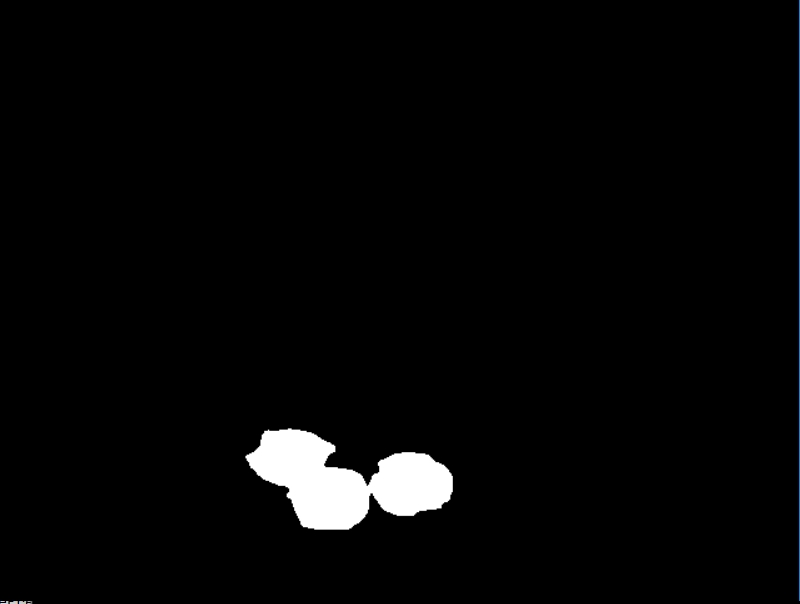
Please suggest any comments to separate the objects.
分析:这个问题其实在阈值处理之前就出现了,我们常见的想法是对图像进行预处理,比如HSV 分割,或者在阈值处理的时候想一些方法。
二、性能优化
http://answers.opencv.org/question/109754/optimizing-splitmerge-for-clahe/
Optimizing split/merge for clahe
I am trying to squeeze the last ms from a tracking loop. One of the time consuminig parts is doing adaptive contrast enhancement (clahe), which is a necessary part. The results are great, but I am wondering whether I could avoid some copying/splitting/merge or apply other optimizations.
Basically I do the following in tight loop:
cv::cvtColor(rgb, hsv, cv::COLOR_BGR2HSV);

std::vector<cv::Mat> hsvChannels;

cv::split(hsv, hsvChannels);

m_clahe->apply(hsvChannels[2], hsvChannels[2]); /* m_clahe constructed outside loop */

cv::merge(hsvChannels, hsvOut);

cv::cvtColor(hsvOut, rgbOut, cv::COLOR_HSV2BGR);
On the test machine, the above snippet takes about 8ms (on 1Mpix images), The actual clahe part takes only 1-2 ms.
1 answer
You can save quite a bit. First, get rid of the vector. Then, outside the loop, create a Mat for the V channel only.
Then use extractChannel and insertChannel to access the channel you're using. It only accesses the one channel, instead of all three like split does.
The reason you put the Mat outside the loop is to avoid reallocating it every pass through the loop. Right now you're allocating and deallocating three Mats every pass.
test code:
#include "opencv2/imgproc.hpp"
#include "opencv2/highgui.hpp"
#include <iostream>

using namespace std;
using namespace cv;

int main(){

TickMeter tm;
Ptr<CLAHE> clahe = createCLAHE();
    clahe->setClipLimit(4);
    vector <Mat> hsvChannels;
    Mat img, hsv1, hsv2, hsvChannels2, diff;
    img = imread("lena.jpg");
    cvtColor (img, hsv1, COLOR_BGR2HSV);
    cvtColor (img, hsv2, COLOR_BGR2HSV);
    tm.start();
for (int i = 0; i < 1000; i++)
{
        split(hsv2, hsvChannels);
        clahe->apply(hsvChannels[2], hsvChannels[2]);
        merge(hsvChannels, hsv2);
}
    tm.stop();
    cout<< tm << endl;
    tm.reset();
    tm.start();

for (int i = 0; i < 1000; i++)
{
        extractChannel(hsv1, hsvChannels2, 2);
        clahe->apply(hsvChannels2, hsvChannels2);
        insertChannel(hsvChannels2, hsv1, 2);
}
    tm.stop();
    cout<< tm;
    absdiff(hsv1, hsv2, diff);
    imshow("diff", diff*255);
    waitKey();
}
我运行这段代码的结果为:
4.63716sec
3.80283sec
应该说其中关键的一句就是使用:
extractChannel(hsv1, hsvChannels2, 2);
代替
split(hsv2, hsvChannels);
能够单句提高1MS左右时间,而这种费时的方法是我目前经常采用的,应该说这题很有较益。
三、基本算法
Compare two images and highlight the difference
Hi - First I'm a total n00b so please be kind. I'd like to create a target shooting app that allows me to us the camera on my android device to see where I hit the target from shot to shot. The device will be stationary with very little to no movement. My thinking is that I'd access the camera and zoom as needed on the target. Once ready I'd hit a button that would start taking pictures every x seconds. Each picture would be compared to the previous one to see if there was a change - the change being I hit the target. If a change was detected the two imaged would be saved, the device would stop taking picture, the image with the change would be displayed on the device and the spot of change would be highlighted. When I was ready for the next shot, I would hit a button on the device and the process would start over. If I was done shooting, there would be a button to stop.
Any help in getting this project off the ground would be greatly appreciated.
This will be a very basic algorithm just to evaluate your use case. It can be improved a lot.
(i) In your case, the first step is to identify whether there is a change or not between 2 frames. It can be identified by using a simple StandardDeviation measurement. Set a threshold for acceptable difference in deviation.
Mat prevFrame, currentFrame;

for(;;)
{
    //Getting a frame from the video capture device.
    cap >> currentFrame;

    if( prevFrame.data )
    {
         //Finding the standard deviations of current and previous frame.
         Scalar prevStdDev, currentStdDev;
         meanStdDev(prevFrame, Scalar(), prevStdDev);
         meanStdDev(currentFrame, Scalar(), currentStdDev);

          //Decision Making.
          if(abs(currentStdDev - prevStdDev) < ACCEPTED_DEVIATION)
          {
               Save the images and break out of the loop.
          }
    }

    //To exit from the loop, if there is a keypress event.
    if(waitKey(30)>=0)
        break;

    //For swapping the previous and current frame.
    swap(prevFrame, currentFrame);
}
(ii) The first step will only identify the change in frames. In order to locate the position where the change occured, find the difference between the two saved frames using AbsDiff. Using this difference image mask, find the contours and finally mark the region with a bounding rectangle.
Hope this answers your question.
这道题难道不是对absdiff的应用吗?直接absdiff,然后阈值,数数就可以了。
四、系统配置
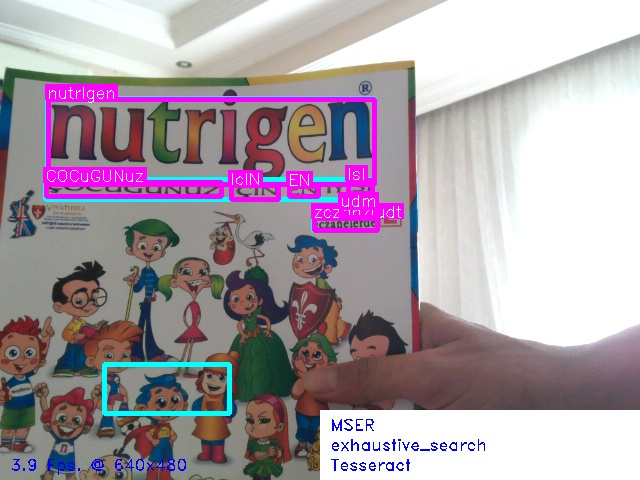
opencv OCRTesseract::create v3.05
I have the version of tesseract 3.05 and opencv3.2 installed and tested. But when I tried the end-to-end-recognition demo code, I discovered that tesseract was not found using OCRTesseract::create and checked the documentation to find that the interface is for v3.02. Is it possible to use it with Tesseract v3.05 ? How?
How to create OpenCV binary files from source with tesseract ( Windows )
i tried to explain the steps
Step 1.download https://github.com/DanBloomberg/lepto...
extract it in a dir like "E:/leptonica-1.74.4"
run cmake
where is the source code : E:/leptonica-1.74.4
where to build binaries : E:/leptonica-1.74.4/build
click Configure buttonselect compiler
see "Configuring done"click Generate button and see "Generating done"
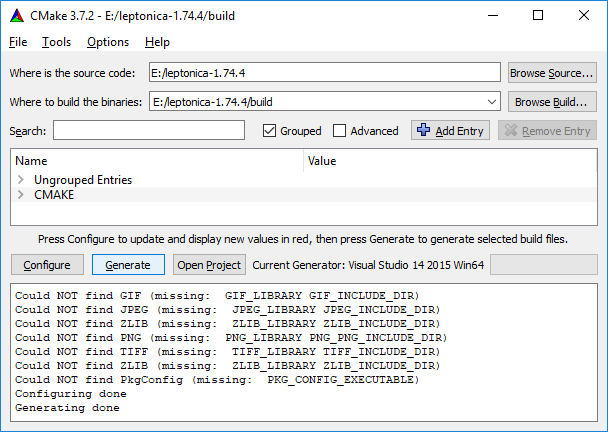
Open Visual Studio 2015 >> file >> open "E:\leptonica-1.74.4\build\ALL_BUILD.vcxproj"select release, build ALL BUILD
see "Build: 3 succeeded" and be sure E:\leptonica-master\build\src\Release\leptonica-1.74.4.lib and E:\leptonica-1.74.4\build\bin\Release\leptonica-1.74.4.dll have been created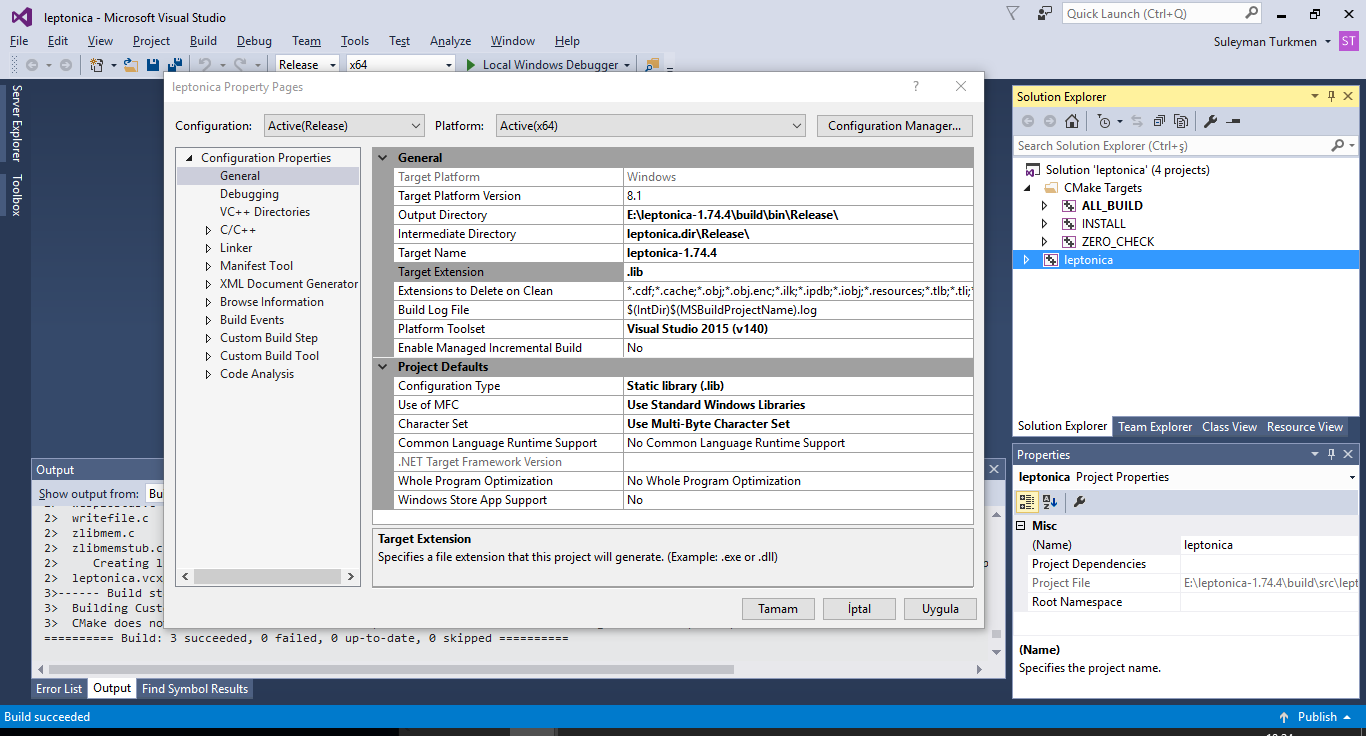
Step 2.download https://github.com/tesseract-ocr/tess...
extract it in a dir like "E:/tesseract-3.05.01"
create a directory E:\tesseract-3.05.01\Files\leptonica\include
copy *.h from E:\leptonica-master\src into E:\tesseract-3.05.01\Files\leptonica\includecopy *.h from E:\leptonica-master\build\src into E:\tesseract-3.05.01\Files\leptonica\include
run cmake
where is the source code : E:/tesseract-3.05.01
where to build binaries : E:/tesseract-3.05.01/build
click Configure buttonselect compiler
set Leptonica_DIR to E:/leptonica-1.74.4\buildclick Configure button againsee "Configuring done"click Generate button and see "Generating done"
Open Visual Studio 2015 >> file >> open "E:/tesseract-3.05.01\build\ALL_BUILD.vcxproj"build ALL_BUILD
be sure E:\tesseract-3.05.01\build\Release\tesseract305.lib and E:\tesseract-3.05.01\build\bin\Release\tesseract305.dll generated
Step 3.create directory E:\tesseract-3.05.01\include\tesseract
copy all *.h files from
E:\tesseract-3.05.01\api
E:\tesseract-3.05.01\ccmain
E:\tesseract-3.05.01\ccutil
E:\tesseract-3.05.01\ccstruct
to E:/tesseract-3.05.01/include\tesseract
in OpenCV cmake set Tesseract_INCLUDE_DIR : E:/tesseract-3.05.01/include
set tesseract_LIBRARY E:/tesseract-3.05.01/build/Release/tesseract305.lib
set Lept_LIBRARY E:/leptonica-master/build/src/Release/leptonica-1.74.4.lib
when you click Configure button you will see "Tesseract: YES" it means everything is OK
make other settings and generate. Compile ....
禾路按语:OCR问题,一直都是图像处理的经典问题。那么tesseract是这个方向的非常经典的项目,包括east一起进行结合研究。
五、算法问题
Pyramid Blending with Single input and Non-Vertical Boundar
Hi All,
Here is the input image.
Say you do not have the other half of the images. Is it still possible to do with Laplacian pyramid blending?
I tried stuffing the image directly into the algorithm. I put weights as opposite triangles. The result comes out the same as the input.My another guess is splitting the triangles. Do gaussian and Laplacian pyramid on each separately, and then merge them.
But the challenge is how do we apply Laplacian matrix on triangular data. What do we fill on the missing half? I tried 0. It made the boundary very bright.
If pyramid blending is not the best approach for this. What other methods do you recommend me to look into for blending?
Any help is much appreciated!
Comments
Thank you for your comment. I tried doing that (explained by my 2nd paragraph). The output is the same as the original image. Please note where I want to merge is NOT vertical. So I do not get what you meant by "line blend".
这个问题需要实现的是mulitband blend,而且实现的是倾斜过来的融合,应该说很奇怪,不知道在什么环境下会有这样的需求,但是如果作为算法问题来说的话,还是很有价值的。首先需要解决的是倾斜的line bend,值得思考。
六、新玩意
DroidCam with OpenCV
With my previous laptop (Windows7) I was connecting to my phone camera via DroidCam and using videoCapture in OpenCV with Visual Studio, and there was no problem. But now I have a laptop with Windows 10, and when I connect the same way it shows orange screen all the time. Actually DroidCam app in my laptop works fine, it shows the video. However while using OpenCV videoCapture from Visual Studio it shows orange screen.
Thanks in advance
Disable laptop webcam from device manager and then restart. Then it works
七、算法研究
OpenCV / C++ - Filling holes
Hello there,
For a personnel projet, I'm trying to detect object and there shadow. These are the result I have for now:Original:

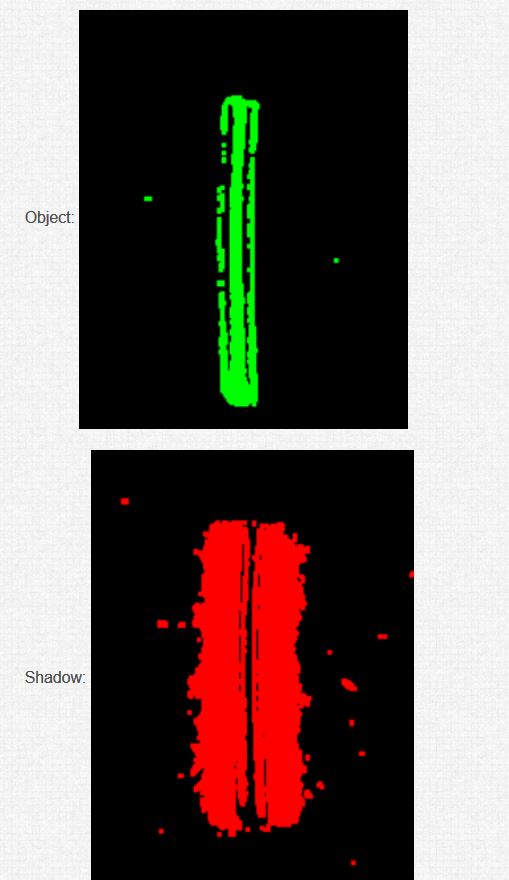
Object:
Shadow:
The external contours of the object are quite good, but as you can see, my object is not full.Same for the shadow.I would like to get full contours, filled, for the object and its shadow, and I don't know how to get better than this (I juste use "dilate" for the moment).Does someone knows a way to obtain a better result please?Regards.
有趣的问题,研究看看。
Hi to everyone.
I'm developing an object shape identification application and struck up with separating close objects using contour, Since close objects are identified as single contour. Is there way to separate the objects?
Things I have tried:1. I have tried Image segmentation with distance transform and Watershed algorithm - It works for few images only2. I have tried to separate the objects manual using the distance between two points as mentioned in http://answers.opencv.org/question/71... - I struck up with choosing the points that will separate the object.
I have attached a sample contour for the reference.
Please suggest any comments to separate the objects.
Optimizing split/merge for clahe
I am trying to squeeze the last ms from a tracking loop. One of the time consuminig parts is doing adaptive contrast enhancement (clahe), which is a necessary part. The results are great, but I am wondering whether I could avoid some copying/splitting/merge or apply other optimizations.
Basically I do the following in tight loop:
cv::cvtColor(rgb, hsv, cv::COLOR_BGR2HSV);
std::vector<cv::Mat> hsvChannels;
cv::split(hsv, hsvChannels);
m_clahe->apply(hsvChannels[2], hsvChannels[2]); /* m_clahe constructed outside loop */
cv::merge(hsvChannels, hsvOut);
cv::cvtColor(hsvOut, rgbOut, cv::COLOR_HSV2BGR);
On the test machine, the above snippet takes about 8ms (on 1Mpix images), The actual clahe part takes only 1-2 ms.
I am trying to squeeze the last ms from a tracking loop. One of the time consuminig parts is doing adaptive contrast enhancement (clahe), which is a necessary part. The results are great, but I am wondering whether I could avoid some copying/splitting/merge or apply other optimizations.
Basically I do the following in tight loop:
cv::cvtColor(rgb, hsv, cv::COLOR_BGR2HSV);
std::vector<cv::Mat> hsvChannels;
cv::split(hsv, hsvChannels);
m_clahe->apply(hsvChannels[2], hsvChannels[2]); /* m_clahe constructed outside loop */
cv::merge(hsvChannels, hsvOut);
cv::cvtColor(hsvOut, rgbOut, cv::COLOR_HSV2BGR);
On the test machine, the above snippet takes about 8ms (on 1Mpix images), The actual clahe part takes only 1-2 ms.
1 answer
You can save quite a bit. First, get rid of the vector. Then, outside the loop, create a Mat for the V channel only.
Then use extractChannel and insertChannel to access the channel you're using. It only accesses the one channel, instead of all three like split does.
The reason you put the Mat outside the loop is to avoid reallocating it every pass through the loop. Right now you're allocating and deallocating three Mats every pass.
test code:
#include "opencv2/imgproc.hpp"
#include "opencv2/highgui.hpp"
#include <iostream>
using namespace std;
using namespace cv;
int main(){
TickMeter tm;
Ptr<CLAHE> clahe = createCLAHE();
clahe->setClipLimit(4);
vector <Mat> hsvChannels;
Mat img, hsv1, hsv2, hsvChannels2, diff;
img = imread("lena.jpg");
cvtColor (img, hsv1, COLOR_BGR2HSV);
cvtColor (img, hsv2, COLOR_BGR2HSV);
tm.start();
for (int i = 0; i < 1000; i++)
{
split(hsv2, hsvChannels);
clahe->apply(hsvChannels[2], hsvChannels[2]);
merge(hsvChannels, hsv2);
}
tm.stop();
cout<< tm << endl;
tm.reset();
tm.start();
for (int i = 0; i < 1000; i++)
{
extractChannel(hsv1, hsvChannels2, 2);
clahe->apply(hsvChannels2, hsvChannels2);
insertChannel(hsvChannels2, hsv1, 2);
}
tm.stop();
cout<< tm;
absdiff(hsv1, hsv2, diff);
imshow("diff", diff*255);
waitKey();
}
三、基本算法
Compare two images and highlight the difference
Hi - First I'm a total n00b so please be kind. I'd like to create a target shooting app that allows me to us the camera on my android device to see where I hit the target from shot to shot. The device will be stationary with very little to no movement. My thinking is that I'd access the camera and zoom as needed on the target. Once ready I'd hit a button that would start taking pictures every x seconds. Each picture would be compared to the previous one to see if there was a change - the change being I hit the target. If a change was detected the two imaged would be saved, the device would stop taking picture, the image with the change would be displayed on the device and the spot of change would be highlighted. When I was ready for the next shot, I would hit a button on the device and the process would start over. If I was done shooting, there would be a button to stop.
Any help in getting this project off the ground would be greatly appreciated.
Hi - First I'm a total n00b so please be kind. I'd like to create a target shooting app that allows me to us the camera on my android device to see where I hit the target from shot to shot. The device will be stationary with very little to no movement. My thinking is that I'd access the camera and zoom as needed on the target. Once ready I'd hit a button that would start taking pictures every x seconds. Each picture would be compared to the previous one to see if there was a change - the change being I hit the target. If a change was detected the two imaged would be saved, the device would stop taking picture, the image with the change would be displayed on the device and the spot of change would be highlighted. When I was ready for the next shot, I would hit a button on the device and the process would start over. If I was done shooting, there would be a button to stop.
Any help in getting this project off the ground would be greatly appreciated.
This will be a very basic algorithm just to evaluate your use case. It can be improved a lot.
(i) In your case, the first step is to identify whether there is a change or not between 2 frames. It can be identified by using a simple StandardDeviation measurement. Set a threshold for acceptable difference in deviation.
Mat prevFrame, currentFrame;
for(;;)
{
//Getting a frame from the video capture device.
cap >> currentFrame;
if( prevFrame.data )
{
//Finding the standard deviations of current and previous frame.
Scalar prevStdDev, currentStdDev;
meanStdDev(prevFrame, Scalar(), prevStdDev);
meanStdDev(currentFrame, Scalar(), currentStdDev);
//Decision Making.
if(abs(currentStdDev - prevStdDev) < ACCEPTED_DEVIATION)
{
Save the images and break out of the loop.
}
}
//To exit from the loop, if there is a keypress event.
if(waitKey(30)>=0)
break;
//For swapping the previous and current frame.
swap(prevFrame, currentFrame);
}
(ii) The first step will only identify the change in frames. In order to locate the position where the change occured, find the difference between the two saved frames using AbsDiff. Using this difference image mask, find the contours and finally mark the region with a bounding rectangle.
Hope this answers your question.
这道题难道不是对absdiff的应用吗?直接absdiff,然后阈值,数数就可以了。
opencv OCRTesseract::create v3.05
I have the version of tesseract 3.05 and opencv3.2 installed and tested. But when I tried the end-to-end-recognition demo code, I discovered that tesseract was not found using OCRTesseract::create and checked the documentation to find that the interface is for v3.02. Is it possible to use it with Tesseract v3.05 ? How?
I have the version of tesseract 3.05 and opencv3.2 installed and tested. But when I tried the end-to-end-recognition demo code, I discovered that tesseract was not found using OCRTesseract::create and checked the documentation to find that the interface is for v3.02. Is it possible to use it with Tesseract v3.05 ? How?
How to create OpenCV binary files from source with tesseract ( Windows )
i tried to explain the steps
Step 1.download https://github.com/DanBloomberg/lepto...
extract it in a dir like "E:/leptonica-1.74.4"
run cmake
where is the source code : E:/leptonica-1.74.4
where to build binaries : E:/leptonica-1.74.4/build
click Configure buttonselect compiler
see "Configuring done"click Generate button and see "Generating done"
Open Visual Studio 2015 >> file >> open "E:\leptonica-1.74.4\build\ALL_BUILD.vcxproj"select release, build ALL BUILD
see "Build: 3 succeeded" and be sure E:\leptonica-master\build\src\Release\leptonica-1.74.4.lib and E:\leptonica-1.74.4\build\bin\Release\leptonica-1.74.4.dll have been created
Step 2.download https://github.com/tesseract-ocr/tess...
extract it in a dir like "E:/tesseract-3.05.01"
create a directory E:\tesseract-3.05.01\Files\leptonica\include
copy *.h from E:\leptonica-master\src into E:\tesseract-3.05.01\Files\leptonica\includecopy *.h from E:\leptonica-master\build\src into E:\tesseract-3.05.01\Files\leptonica\include
run cmake
where is the source code : E:/tesseract-3.05.01
where to build binaries : E:/tesseract-3.05.01/build
click Configure buttonselect compiler
set Leptonica_DIR to E:/leptonica-1.74.4\buildclick Configure button againsee "Configuring done"click Generate button and see "Generating done"
Open Visual Studio 2015 >> file >> open "E:/tesseract-3.05.01\build\ALL_BUILD.vcxproj"build ALL_BUILD
be sure E:\tesseract-3.05.01\build\Release\tesseract305.lib and E:\tesseract-3.05.01\build\bin\Release\tesseract305.dll generated
Step 3.create directory E:\tesseract-3.05.01\include\tesseract
copy all *.h files from
E:\tesseract-3.05.01\api
E:\tesseract-3.05.01\ccmain
E:\tesseract-3.05.01\ccutil
E:\tesseract-3.05.01\ccstruct
to E:/tesseract-3.05.01/include\tesseract
in OpenCV cmake set Tesseract_INCLUDE_DIR : E:/tesseract-3.05.01/include
set tesseract_LIBRARY E:/tesseract-3.05.01/build/Release/tesseract305.lib
set Lept_LIBRARY E:/leptonica-master/build/src/Release/leptonica-1.74.4.lib
when you click Configure button you will see "Tesseract: YES" it means everything is OK
make other settings and generate. Compile ....
Pyramid Blending with Single input and Non-Vertical Boundar
Hi All,
Here is the input image.
Say you do not have the other half of the images. Is it still possible to do with Laplacian pyramid blending?
I tried stuffing the image directly into the algorithm. I put weights as opposite triangles. The result comes out the same as the input.My another guess is splitting the triangles. Do gaussian and Laplacian pyramid on each separately, and then merge them.
But the challenge is how do we apply Laplacian matrix on triangular data. What do we fill on the missing half? I tried 0. It made the boundary very bright.
If pyramid blending is not the best approach for this. What other methods do you recommend me to look into for blending?
Any help is much appreciated!
Comments
Thank you for your comment. I tried doing that (explained by my 2nd paragraph). The output is the same as the original image. Please note where I want to merge is NOT vertical. So I do not get what you meant by "line blend".
这个问题需要实现的是mulitband blend,而且实现的是倾斜过来的融合,应该说很奇怪,不知道在什么环境下会有这样的需求,但是如果作为算法问题来说的话,还是很有价值的。首先需要解决的是倾斜的line bend,值得思考。
六、新玩意
DroidCam with OpenCV
With my previous laptop (Windows7) I was connecting to my phone camera via DroidCam and using videoCapture in OpenCV with Visual Studio, and there was no problem. But now I have a laptop with Windows 10, and when I connect the same way it shows orange screen all the time. Actually DroidCam app in my laptop works fine, it shows the video. However while using OpenCV videoCapture from Visual Studio it shows orange screen.
Thanks in advance
Disable laptop webcam from device manager and then restart. Then it works
七、算法研究
OpenCV / C++ - Filling holes
Hello there,
For a personnel projet, I'm trying to detect object and there shadow. These are the result I have for now:Original:
Object:
Shadow:
The external contours of the object are quite good, but as you can see, my object is not full.Same for the shadow.I would like to get full contours, filled, for the object and its shadow, and I don't know how to get better than this (I juste use "dilate" for the moment).Does someone knows a way to obtain a better result please?Regards.
有趣的问题,研究看看。
Hi All,
Here is the input image.
Say you do not have the other half of the images. Is it still possible to do with Laplacian pyramid blending?
I tried stuffing the image directly into the algorithm. I put weights as opposite triangles. The result comes out the same as the input.My another guess is splitting the triangles. Do gaussian and Laplacian pyramid on each separately, and then merge them.
But the challenge is how do we apply Laplacian matrix on triangular data. What do we fill on the missing half? I tried 0. It made the boundary very bright.
If pyramid blending is not the best approach for this. What other methods do you recommend me to look into for blending?
Any help is much appreciated!

Thank you for your comment. I tried doing that (explained by my 2nd paragraph). The output is the same as the original image. Please note where I want to merge is NOT vertical. So I do not get what you meant by "line blend".
这个问题需要实现的是mulitband blend,而且实现的是倾斜过来的融合,应该说很奇怪,不知道在什么环境下会有这样的需求,但是如果作为算法问题来说的话,还是很有价值的。首先需要解决的是倾斜的line bend,值得思考。
DroidCam with OpenCV
With my previous laptop (Windows7) I was connecting to my phone camera via DroidCam and using videoCapture in OpenCV with Visual Studio, and there was no problem. But now I have a laptop with Windows 10, and when I connect the same way it shows orange screen all the time. Actually DroidCam app in my laptop works fine, it shows the video. However while using OpenCV videoCapture from Visual Studio it shows orange screen.
Thanks in advance
Disable laptop webcam from device manager and then restart. Then it works
七、算法研究
OpenCV / C++ - Filling holes
Hello there,
For a personnel projet, I'm trying to detect object and there shadow. These are the result I have for now:Original:
Object:
Shadow:
The external contours of the object are quite good, but as you can see, my object is not full.Same for the shadow.I would like to get full contours, filled, for the object and its shadow, and I don't know how to get better than this (I juste use "dilate" for the moment).Does someone knows a way to obtain a better result please?Regards.
有趣的问题,研究看看。
With my previous laptop (Windows7) I was connecting to my phone camera via DroidCam and using videoCapture in OpenCV with Visual Studio, and there was no problem. But now I have a laptop with Windows 10, and when I connect the same way it shows orange screen all the time. Actually DroidCam app in my laptop works fine, it shows the video. However while using OpenCV videoCapture from Visual Studio it shows orange screen.
Thanks in advance
OpenCV / C++ - Filling holes
Hello there,
For a personnel projet, I'm trying to detect object and there shadow. These are the result I have for now:Original:
Object:
Shadow:
The external contours of the object are quite good, but as you can see, my object is not full.Same for the shadow.I would like to get full contours, filled, for the object and its shadow, and I don't know how to get better than this (I juste use "dilate" for the moment).Does someone knows a way to obtain a better result please?Regards.
有趣的问题,研究看看。
Hello there,
For a personnel projet, I'm trying to detect object and there shadow. These are the result I have for now:Original:
Object:
Shadow:
The external contours of the object are quite good, but as you can see, my object is not full.Same for the shadow.I would like to get full contours, filled, for the object and its shadow, and I don't know how to get better than this (I juste use "dilate" for the moment).Does someone knows a way to obtain a better result please?Regards.
有趣的问题,研究看看。
AnswerOpenCV(1001-1007)一周佳作欣赏的更多相关文章
- AnswerOpenCV(0826-0901)一周佳作欣赏
1.OpenCV to detect how missing tooth in equipment Hello everyone. I am just starting with OpenCV and ...
- AnswerOpenCV一周佳作欣赏(0615-0622)
一.How to make auto-adjustments(brightness and contrast) for image Android Opencv Image Correction i' ...
- (原创)古典主义——平凡之美 佳作欣赏(摄影,欣赏)
文中图片摘自腾讯文化网:www.cal.qq.com 1.Abstract 生活本就是平淡的,如同真理一般寂静.平时生活中不经意的瞬间,也有它本来的美丽.下面一组图是上上个世纪到上个世纪末一个 ...
- [PHP]全国省市区信息,mysql数据库记录
下载地址: https://files.cnblogs.com/files/wukong1688/T_Area.zip 或者也可以复制如下内容: CREATE TABLE IF NOT EXISTS ...
- Python爬虫之抓取豆瓣影评数据
脚本功能: 1.访问豆瓣最受欢迎影评页面(http://movie.douban.com/review/best/?start=0),抓取所有影评数据中的标题.作者.影片以及影评信息 2.将抓取的信息 ...
- 城市代码表mysql
只有代码: # ************************************************************ # Sequel Pro SQL dump # Version ...
- jnhs中国的省市县区邮编坐标mysql数据表
https://blog.csdn.net/sln2432713617/article/details/79412896 -- 1.之前项目中需要全国的省市区数据,在网上找了很多,发现数据要么不全,要 ...
- T-SQL 查询语句总结
我们使用一下两张表作为范例: select * from [dbo].[employee] select * from [dbo].[dept] 1.select语句 DISTINCT:去掉记录中的重 ...
- 2017年4月16日 一周AnswerOpenCV佳作赏析
2017年4月16日 一周AnswerOpenCV佳作赏析 1.HelloHow to smooth edge of text in binary image, based on threshold. ...
随机推荐
- Entity Framework Code First(Mysql)
1.添加NuGet包 引用NuGet包:EntityFramework6.1.3.MySql.Data.Entity6.9.8 2.修改配置 SqlServer配置: <add name=&qu ...
- MS16-032 漏洞复现
exploit-db的详情: https://www.exploit-db.com/exploits/39574/ Windows: Secondary Logon Standard Handles ...
- VS 应用模板 所交税和实发工资的运算
double SFGZ, SL, SSKCS, YFGZ,a,YJS; //应发工资(基本工资),税率,速算扣除数,应发工资,判断标准,交多少税 //double QZD = 3500;//起征点 无 ...
- VS编译后直接复制DLL库文件到其他目录下
项目目录:SourceCode\公共组件\KApiClient\ 要复制的目的目录: SourceCode\公共组件\DllLibrary\ApiClient 则在项目 KApiClient下添加如下 ...
- 福布斯最佳雇主榜:谷歌母公司Alphabet再登榜首 微软次之
http://www.sohu.com/a/259018538_114774 站长之家(ChinaZ.com) 10月12日 消息:在福布斯发布的最新全球最佳雇主榜单中,谷歌母公司Alphabet以满 ...
- css实现文字太长,显示省略号
/*显示为省略号*/ overflow:hidden;/*隐藏*/ white-space:nowrap;/*文本不进行换行*/text-overflow:ellipsis;/*省略号*/ /*强制 ...
- jQuery筛选--first()和last()
first() 概述 获取匹配的第一个元素 last() 概述 获取匹配的最后个元素 <!DOCTYPE html> <html> <head> < ...
- maven工程的common模块jar上传至仓库并被其它模块依赖
.parent pom和common pom 都需要添加 <distributionManagement> <repository> <id>nexus</i ...
- python练习题-打印斐波拉契数列前n项
打印斐波拉契数列前n项 #encoding=utf-8 def fibs(num): result =[0,1] for i in range(num-2): result. ...
- LUHN 模10 算法 银行卡校验
信用卡Luhn算法(模10)具体的校验过程如下: 1.从卡号最后一位数字开始,逆向将奇数位(1.3.5等等)相加. 2.从卡号最后一位数字开始,逆向将偶数位数字,先乘以2(如果乘积为两位数,则将其减去 ...