
阿里云配置ssh
1、申请证书,从我的域名列表 右侧的操作栏中点击- ssl
2、配置 nginx config -> /etc/nginx/sites-enabled/default
底部添加:(我的是django+nginx,所以利用uwsgi转发请求) , 然后重启nginx服务 service nginx restart
server {

    listen 443 ssl;

    server_name vip.dayu1.net;

    ssl_certificate cert/1525771112168.pem;

    ssl_certificate_key cert/1525771112168.key;

    server_tokens off;

    fastcgi_param   HTTPS               on;

    fastcgi_param   HTTP_SCHEME         https;

    access_log      /var/log/nginx/identifyImg.access.log;

    error_log       /var/log/nginx/identifyImg.error.log;

    location /api {

        include uwsgi_params;

        uwsgi_pass 127.0.0.1:8000;

        uwsgi_read_timeout 600;

    }

    location / {

        expires 30d;

        autoindex on;

        add_header Cache-Control private;

        alias /var/www/vsport_web/web/;

        try_files $uri $uri/ /index.html;

    }

}
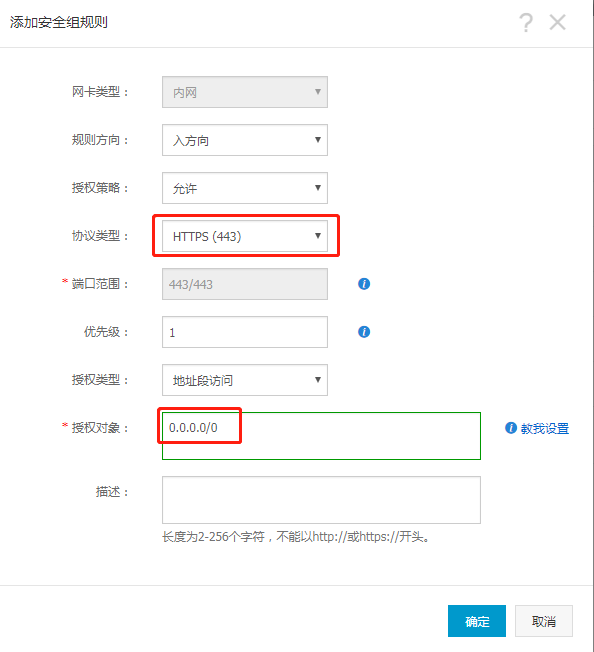
3、非常坑的一步,在阿里云-控制台-ecs服务器-安全组规则中添加 默认的ssh端口开放
阿里云配置ssh的更多相关文章
- 阿里云配置 https 证书
阿里云配置中心 https://yundun.console.aliyun.com/?p=cas#/cas/home 证书审核通过后复制到 ecs scp /path/filename usernam ...
- 阿里云配置HTTPS
阿里云配置HTTPS 2018-05-29 16:00:56 by SemiconductorKING 最近申请域名配置了一下HTTPS协议,记录一下配置过程. 准备 备案过的域名,一个SSL证书(免 ...
- 阿里云配置通用服务的坑 ssh: connect to host 47.103.101.102 port 22: Connection refused
1.~ wjw$ ssh root@47.103.101.102 ssh: connect to host 47.103.101.102 port 22: Connection refused ssh ...
- 【阿里云配置端口开放】使用 iptables
要知道: 1.目前(16年-12-10)阿里云主机只要有服务开启,所有端口是默认开启的.这样很不好,安全做法是,需要开启外网端口时,由开发人员去配置. 2.想要开放端口,就需要使用iptables命令 ...
- 阿里云配置mysql navcat远程连接
默认是不能用客户端远程连接的,阿里云提供的help.docx里面做了设置说明,mysql密码默认存放在/alidata/account.log 首先登录: mysql -u root -h local ...
- [转]阿里云配置mysql远程连接
默认是不能用客户端远程连接的,阿里云提供的help.docx里面做了设置说明,mysql密码默认存放在/alidata/account.log 首先登录: mysql -u root -h local ...
- RHEL/CentOS/Fedora常用的 CentOS 5/6/7 yum 源(EPEL、Remi、RPMForge、RPMFusion, ius,163,sohu,阿里云)配置
RHEL以及他的衍生发行版如CentOS.Scientific Linux为了稳定,官方的rpm repository提供的rpm包往往是很滞后的,当然了,这样做这是无可厚非的,毕竟这是服务器版本,安 ...
- openssl CA 自签证书,阿里云配置tomcat https
<一,openssl CA自签发证书> 1,生成私钥 openssl genrsa 1024 > private.key;
- 阿里云 配置apache+python+django 环境 适合菜鸟
云服务器环境:阿里云服务:20G+1M带宽+centos+512M 一.python安装: 刚开始没有好好利用centos 的yum方法.采用wget从python官网上下载的2.7.5版本.解压安装 ...
随机推荐
- win8.1安装密钥
https://zhidao.baidu.com/question/374064869043943484.html
- 【Oracle】【6】去掉字符串最后一个特殊字符
--去除字符串末尾的省字,若无省字则无变化 SELECT DISTINCT TRIM('省' FROM PROVINCE) PROVINCE FROM ADDRESS 参考博客: 1,使用oracle ...
- hash、hashchange事件
1.hash即URL中"#"字符后面的部分. ①使用浏览器访问网页时,如果网页URL中带有hash,页面就会定位到id(或name)与hash值一样的元素的位置: ②hash还有另 ...
- Python 3.X 要使用urllib.request 来抓取网络资源。转
Python 3.X 要使用urllib.request 来抓取网络资源. 最简单的方式: #coding=utf-8 import urllib.request response = urllib. ...
- 11. Container With Most Water C++
知识点:双指针遍历大大减少不必要的比较和计算 方法1:Brute Force(执行时间惨不忍睹,共进行n(n-1)/2次比较) class Solution { public: int maxArea ...
- 使用MongoDB数据库(1)(三十五)
MongoDB简介 MongoDB是一个基于分布式文件存储的数据库,它是一个介于关系数据库和非关系数据库之间的产品,其主要目标是在键/值存储方式(提供了高性能和高度伸缩性)和传统的RDBMS系统(具有 ...
- [Java] 各种流的分类及区别
https://www.cnblogs.com/lca1826/p/6427177.html 流在Java中是指计算中流动的缓冲区. 从外部设备流向中央处理器的数据流成为“输入流”,反之成为“输出流” ...
- SpringBoot主程序类,主入口类
主程序类,主入口类 /** * @SpringBootApplication 来标注一个主程序类,说明这是一个Spring Boot应用 */ @SpringBootApplication publi ...
- Matlab函数
any() 相当于或操作,只要有1,就返回1 all() 相当于与操作,只要有0,就返回0 C = union(A,B): C为A和B的并集.去掉相同元素. C = intersect(A,B) C为 ...
- PHP7 ci框架session存文件,登录的时候session不能读取
config.php配置 $config['sess_driver'] = 'files';//以文件存储session $config['sess_cookie_name'] = 'ci_sessi ...