
orocos_kdl学习(一):坐标系变换
KDL中提供了点(point)、坐标系(frame)、刚体速度(twist),以及6维力/力矩(wrench)等基本几何元素,具体可以参考 Geometric primitives 文档。
Creating a Frame, Vector and Rotation
PyKDL中创建一个坐标系时有下面4种构造函数:
__init__()         # Construct an identity frame

__init__(rot, pos) # Construct a frame from a rotation and a vector

# Parameters:

# pos (Vector) – the position of the frame origin

# rot (Rotation) – the rotation of the frame

__init__(pos)      # Construct a frame from a vector, with identity rotation

# Parameters:

# pos (Vector) – the position of the frame origin

__init__(rot)      # Construct a frame from a rotation, with origin at 0, 0, 0

# Parameters:

# rot (Rotation) – the rotation of the frame
下面是一个例子:
#! /usr/bin/env python

import PyKDL

# create a vector which describes both a 3D vector and a 3D point in space

v = PyKDL.Vector(1,3,5)

# create a rotation from Roll Pitch, Yaw angles

r1 = PyKDL.Rotation.RPY(1.2, 3.4, 0)

# create a rotation from ZYX Euler angles

r2 = PyKDL.Rotation.EulerZYX(0, 1, 0)

# create a rotation from a rotation matrix

r3 = PyKDL.Rotation(1,0,0, 0,1,0, 0,0,1)

# create a frame from a vector and a rotation

f = PyKDL.Frame(r2, v)

print f
结果将如下所示,前9个元素为代表坐标系姿态的旋转矩阵,后三个元素为坐标系f的原点在参考坐标系中的坐标。
[[    0.540302,           0,    0.841471;

            0,           1,           0;

    -0.841471,           0,    0.540302]

[           1,           3,           5]]
根据机器人学导论(Introduction to Robotics Mechanics and Control)附录中的12种欧拉角表示方法,ZYX欧拉角代表的旋转矩阵为:

代入数据验证,KDL的计算与理论一致。
Extracting information from a Frame, Vector and Rotation
PyKDL中坐标系类Frame的成员M为其旋转矩阵,p为其原点坐标。
#! /usr/bin/env python

import PyKDL

# frame

f = PyKDL.Frame(PyKDL.Rotation.RPY(0,1,0),

                PyKDL.Vector(3,2,4))

# get the origin (a Vector) of the frame

origin = f.p

# get the x component of the origin

x = origin.x()

x = origin[0]

print x

# get the rotation of the frame

rot = f.M

print rot

# get ZYX Euler angles from the rotation

[Rz, Ry, Rx] = rot.GetEulerZYX()

print Rz,Ry,Rx

# get the RPY (fixed axis) from the rotation

[R, P, Y] = rot.GetRPY()

print R,P,Y
将上述获取到的数据打印出来,结果如下:
3.0

[    0.540302,           0,    0.841471;

            0,           1,           0;

    -0.841471,           0,    0.540302]

0.0 1.0 0.0

0.0 1.0 0.0
注意GetEulerZYX和GetRPY的结果是一样的,这其实不是巧合。因为坐标系的旋转有24种方式(本质上只有12种结果):绕自身坐标系旋转有12种方式(欧拉角),绕固定参考坐标系旋转也有12种方式(RPY就是其中一种)。EulerZYX按照Z→Y→X的顺序绕自身坐标轴分别旋转$\alpha$、$\beta$、$\gamma$角;RPY按照X→Y→Z的顺序绕固定坐标系旋转$\gamma$、$\beta$、$\alpha$角,这两种方式最后得到的旋转矩阵是一样的。

Transforming a point
frame既可以用来描述一个坐标系的位置和姿态,也可以用于变换。下面创建了一个frame,然后用其对一个空间向量或点进行坐标变换:
#! /usr/bin/env python

import PyKDL

# define a frame

f = PyKDL.Frame(PyKDL.Rotation.RPY(0,1,0),

                PyKDL.Vector(3,2,4))

# define a point

p = PyKDL.Vector(1, 0, 0)

print p

# transform this point with f

p = f * p

print p
Creating from ROS types
tf_conversions这个package包含了一系列转换函数,用于将tf类型的数据(point, vector, pose, etc) 转换为与其它库同类型的数据,比如KDL和Eigen。用下面的命令在catkin_ws/src中创建一个测试包:
catkin_create_pkg test rospy tf geometry_msgs
test.py程序如下(注意修改权限chmod +x test.py):
#! /usr/bin/env python

import rospy

import PyKDL

from tf_conversions import posemath

from geometry_msgs.msg import Pose

# you have a Pose message

pose = Pose()

pose.position.x = 1

pose.position.y = 1

pose.position.z = 1

pose.orientation.x = pose.orientation.y = pose.orientation.z = 0

pose.orientation.w = 1

# convert the pose into a kdl frame

f1 = posemath.fromMsg(pose)

# create another kdl frame

f2 = PyKDL.Frame(PyKDL.Rotation.RPY(0,1,0),

                 PyKDL.Vector(3,2,4))

# Combine the two frames

f = f1 * f2

print f

[x, y, z, w] = f.M.GetQuaternion()

print x,y,z,w

# and convert the result back to a pose message

pose = posemath.toMsg(f)

pub = rospy.Publisher('pose', Pose, queue_size=1)

rospy.init_node('test', anonymous=True)

rate = rospy.Rate(1) # 1hz

while not rospy.is_shutdown():

    pub.publish(pose)

    rate.sleep()
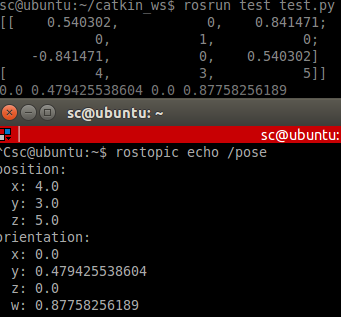
通过posemath.toMsg可以将KDL中的frame转换为geometry_msgs/Pose类型的消息。最后为了验证,创建了一个Publisher将这个消息发布到pose话题上。使用catkin_make编译后运行结果如下:
参考:
Orocos Kinematics and Dynamics
kdl / Tutorials / Frame transformations (Python)
orocos_kdl学习(一):坐标系变换的更多相关文章
- 5. svg学习笔记-坐标系变换
之前我们编写图形元素的时候,编写好了位置大小就是固定的,通过坐标系变换,可以移动缩放,旋转图形,但必须声明的是,进行变换时是图形相对于坐标系的变化,就是图形是不发生变化的,而是坐标系发生了变化,比如缩 ...
- ROS Learning-014 learning_tf(编程) 坐标系变换(tf)广播员 (Python版)
ROS Indigo learning_tf-01 坐标系变换(tf)广播员 (Python版) 我使用的虚拟机软件:VMware Workstation 11 使用的Ubuntu系统:Ubuntu ...
- 【转】QPainter中坐标系变换问题
转自:http://blog.sina.com.cn/s/blog_67cf08270100ww0p.html 一.坐标系简介. Qt中每一个窗口都有一个坐标系,默认的,窗口左上角为坐标原点,然后水平 ...
- BZOJ3210: 花神的浇花集会(坐标系变换)
题面 传送门 题解 坐标系变换把切比雪夫距离转化为曼哈顿距离 那么对于所有的\(x\)坐标中,肯定是中位数最优了,\(y\)坐标同理 然而有可能这个新的点不合法,也就是说不存在\((x+y,x-y)\ ...
- OSG数学基础:坐标系变换
三维实体对象需要经过一系列的坐标变换才能正确.真实地显示在屏幕上.在一个场景中,当读者对场景中的物体进行各种变换及相关操作时,坐标系变换是非常频繁的. 坐标系变换通常包括:世界坐标系-物体坐标系变换. ...
- CSS学习笔记2-2d变换和过渡属性
前言:今天又是一个周末,心情不错,趁着闲暇之余,把剩下来的CSS3学习的内容全部整理出来,练习用的源码也稍微整理了一下. 2D转换 transform:translate||rotate||scale ...
- svg坐标系变换
svg的坐标变换有三个属性来决定:viewport, viewBox, 和 preserveAspectRatio,我发现三篇比较详细的博客,转载如下: 理解SVG坐标系和变换:视窗,viewBox和 ...
- orocos_kdl学习(二):KDL Tree与机器人运动学
KDL(Kinematics and Dynamics Library)中定义了一个树来代表机器人的运动学和动力学参数,ROS中的kdl_parser提供了工具能将机器人描述文件URDF转换为KDL ...
- 洛谷P3964 [TJOI2013]松鼠聚会(坐标系变换)
题面 传送门 题解 对于两个点\((x_i,y_i)\)和\(x_j,y_j\),我们定义它们之间的曼哈顿距离为 \[|x_i-x_j|+|y_i-y_j|\] 定义它们的切比雪夫距离为 \[\max ...
随机推荐
- 线程使用中常见的错误-“System.InvalidOperationException”线程间操作无效: 从不是创建控件“ ”的线程访问它。
“System.InvalidOperationException”类型的未经处理的异常在 System.Windows.Forms.dll 中发生 其他信息: 线程间操作无效: 从不是创建控件“la ...
- sql如何截取字符
---MSSQL1 .SUBSTRING返回字符.binary.text 或 image 表达式的一部分.有关可与该函数一起使用的有效 Microsoft? SQL Server? 数据类型的更多信息 ...
- ubuntu基本用法
• Linux上vim编辑器缩进的设置 • 从零开始UNIX环境高级编程(0):Linux下运行第一个程序
- js手机端和pc端加载不同的样式
function loadCSS() { if((navigator.userAgent.match(/(phone|pad|pod|iPhone|iPod|ios|iPad|Android| ...
- BZOJ1968 [Ahoi2005]COMMON 约数研究 数论
欢迎访问~原文出处——博客园-zhouzhendong 去博客园看该题解 题目传送门 - BZOJ1968 题意概括 求 ΣF(i) (1<=i<=n)N<=1000000 F( ...
- Here We Go(relians) Again HDU2722
处理完输入就是很简单的一题 但是输入好难 勉强找到一种能看懂的... #include<iostream> #include<stdio.h> #include<str ...
- 012 Spark在IDEA中打jar包,并在集群上运行(包括local模式,standalone模式,yarn模式的集群运行)
一:打包成jar 1.修改代码 2.使用maven打包 但是目录中有中文,会出现打包错误 3.第二种方式 4.下一步 5.下一步 6.下一步 7.下一步 8.下一步 9.完成 二:在集群上运行(loc ...
- 为什么macos开机黑屏但是有声音?
一般使用时间久了,或者升级系统就会出现这个情况.完全关机,然后按开机键,再按command+option+R+P.不要松手,等重启几次,响几次(3次左右).然后松手等它自己重启即可. mac开机黑 ...
- Python爬虫之Beautiful Soup解析库的使用(五)
Python爬虫之Beautiful Soup解析库的使用 Beautiful Soup-介绍 Python第三方库,用于从HTML或XML中提取数据官方:http://www.crummv.com/ ...
- 不一样的go语言之入门篇-Hello World
这是<不一样的go语言>的开篇之作,我尝试以java语言转变者的角度来聊一聊go语言.所以今天先从go语言的基础开始,即语法. 学习一门新的编程语言,必从语法开始.但需要注意的是, ...