
springboot实战(汪云飞)学习-1-1
java EE开发的颠覆者 spring boot 实战 随书学习-1
1.学习案例都是maven项目,首先要在eclipse 中配置 maven,主要修改maven的配置文件:配置文件下载链接: https://github.com/liuch0228/springboot-wangyunfei-learn ,最主要的是修改镜像地址,这里使用阿里云的镜像:
 <mirrors>

     <!-- mirror

      | Specifies a repository mirror site to use instead of a given repository. The repository that

      | this mirror serves has an ID that matches the mirrorOf element of this mirror. IDs are used

      | for inheritance and direct lookup purposes, and must be unique across the set of mirrors.

      |

     <mirror>

       <id>mirrorId</id>

       <mirrorOf>repositoryId</mirrorOf>

       <name>Human Readable Name for this Mirror.</name>

       <url>http://my.repository.com/repo/path</url>

     </mirror>

      -->

      <mirror>

             <id>aliyun</id>

             <name>aliyun Maven</name>

             <mirrorOf>*</mirrorOf>

             <url>http://maven.aliyun.com/nexus/content/groups/public/</url>

      </mirror>

   </mirrors>
2. 新建一个maven项目


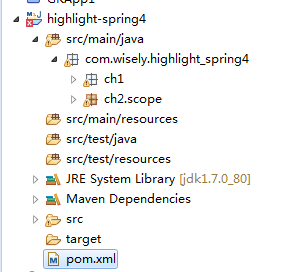
pom文件修改,添加spring相关依赖
 <project xmlns="http://maven.apache.org/POM/4.0.0" xmlns:xsi="http://www.w3.org/2001/XMLSchema-instance"

     xsi:schemaLocation="http://maven.apache.org/POM/4.0.0 http://maven.apache.org/xsd/maven-4.0.0.xsd">

     <modelVersion>4.0.0</modelVersion>

     <groupId>com.wisely</groupId>

     <artifactId>highlight-spring4</artifactId>

     <version>0.0.1-SNAPSHOT</version>

     <!-- 在properties中定义一个名字为java.version的变量,在dependency中引用 -->

     <properties>

10         <java.version>1.7</java.version>

11     </properties>

     <!-- 添加pom依赖 -->

     <dependencies>

     <!-- 添加spring-context依赖 -->

15         <dependency>

16             <groupId>org.springframework</groupId>

17             <artifactId>spring-context</artifactId>

18             <version>4.1.6.RELEASE</version>

19         </dependency>

         <!-- 添加AOP依赖 -->

22         <dependency>

23             <groupId>org.springframework</groupId>

24             <artifactId>spring-aop</artifactId>

25             <version>4.1.6.RELEASE</version>

26         </dependency>

         <!-- 添加AspectJ依赖 -->

28         <dependency>

29             <groupId>org.aspectj</groupId>

30             <artifactId>aspectjrt</artifactId>

31             <version>1.8.5</version>

32         </dependency>

33         <dependency>

34             <groupId>org.aspectj</groupId>

35             <artifactId>aspectjweaver</artifactId>

36             <version>1.8.5</version>

37         </dependency>

     </dependencies>

     <!-- 编译插件依赖 -->

     <build>

         <plugins>

             <plugin>

44                 <groupId>org.apache.maven.plugins</groupId>

45                 <artifactId>maven-compiler-plugin</artifactId>

46                 <version>2.3.2</version>

47                 <configuration>

48                     <source>${java.version}</source> <!-- 通过变量指定编译源代码使用的jdk版本 -->

49                     <target>${java.version}</target> <!-- 通过变量指定目标代码使用的jdk版本 -->

50                 </configuration>

51             </plugin>

         </plugins>

     </build>

 </project>
改完保存后,鼠标右键单击项目,maven update project,下载依赖jar包:

3.依赖注入示例:
3.1 FunctionService 类
 package com.wisely.highlight_spring4.ch1.di;

 import org.springframework.stereotype.Service;

 /**

  * 定义功能类的bean

  * @Service注解声明当前FunctionService类是spring管理的一个bean

  * 声明bean的注解还有:

  * @Repository 数据访问层使用

  * @Controller 展现层使用

  * @Component  声明被spring管理的组件(也就是自动注入spring容器),没有明确角色

  * @author Administrator

  *

  */

 @Service

 public class FunctionService {

     public String sayHello(String word) {

         return "hello " + word + " !";

     }

 }
3.2 UseFunctionService 类
 package com.wisely.highlight_spring4.ch1.di;

 import org.springframework.beans.factory.annotation.Autowired;

 import org.springframework.stereotype.Service;

 /**

  * 声明使用功能类FunctionService的bean

  * @Service 声明UseFunctionService类是spring管理的一个Bean

  * @author Administrator

  *

  */

 @Service

 public class UseFunctionService {

     /*@Autowired 把FunctionService的实体bean注入到UseFunctionService类中

      * 让UseFunctionService具备FunctionService的功能 ———— 组合关系

      * */

     @Autowired

     private FunctionService functionService;

     public String sayHello(String word) {

         return functionService.sayHello(word);

     }

 }
3.3 Java配置类
java配置是spring4.x推荐的配置方式,可以完全替代xml配置,也是springboot推荐的配置方式。Java 配置是通过@Configuration和@Bean来实现的。
@Configuration 声明当前类是一个配置类 ,@ComponentScan 注解自动扫描指定包下的所有使用@Service @Component @Repository 和@Controller的类,将它们注册为spring的Bean
 package com.wisely.highlight_spring4.ch1.di;

 import org.springframework.context.annotation.ComponentScan;

 import org.springframework.context.annotation.Configuration;

 /**

  * spring配置类

  * @Configuration 声明当前类是一个配置类

  * @ComponentScan 注解自动扫描指定包下的所有使用@Service @Component @Repository

  * 和@Controller的类,并注册为Bean

  * @author Administrator

  *

  */

 @Configuration

 @ComponentScan("com.wisely.highlight_spring4.ch1.di")

 public class DiConfig {

 }
主测试类:获取spring容器实例context ,然后拿context获取注册的bean, 调用bean的方法
 package com.wisely.highlight_spring4.ch1.di;

 import org.springframework.context.annotation.AnnotationConfigApplicationContext;

 public class MainTest {

     public static void main(String[] args) {

         //1.使用AnnotationConfigApplicationContext最为spring容器,接受一个配置类作为参数

         AnnotationConfigApplicationContext context = new AnnotationConfigApplicationContext(DiConfig.class);

         //2.获得声明配置的UseFunctionService 的bean

         UseFunctionService useFunctionService = context.getBean(UseFunctionService.class);

         //3.调用bean的方法

         System.out.println(useFunctionService.sayHello("world"));

         context.close();

     }

 }
运行结果如下:

springboot实战(汪云飞)学习-1-1的更多相关文章
- springboot实战(汪云飞)学习-1-2
java EE开发的颠覆者 spring boot 实战 随书学习-1 接上一篇,Java配置的学习(还是上一篇的项目中,添加新的包和代码): java配置是spring4.x推荐的配置方式,可以完全 ...
- 【IT名人堂】何云飞:阿里云数据库的架构演进之路
[IT名人堂]何云飞:阿里云数据库的架构演进之路 原文转载自:IT168 如果说淘宝革了零售的命,那么DT革了企业IT消费的命.在阿里巴巴看来,DT时代,企业IT消费的模式变成了“云服务+数据”, ...
- SpringBoot实战 之 异常处理篇
在互联网时代,我们所开发的应用大多是直面用户的,程序中的任何一点小疏忽都可能导致用户的流失,而程序出现异常往往又是不可避免的,那该如何减少程序异常对用户体验的影响呢?其实方法很简单,对异常进行捕获,然 ...
- SpringBoot整合阿里云OSS文件上传、下载、查看、删除
1. 开发前准备 1.1 前置知识 java基础以及SpringBoot简单基础知识即可. 1.2 环境参数 开发工具:IDEA 基础环境:Maven+JDK8 所用技术:SpringBoot.lom ...
- apollo客户端springboot实战(四)
1. apollo客户端springboot实战(四) 1.1. 前言 经过前几张入门学习,基本已经完成了apollo环境的搭建和简单客户端例子,但我们现在流行的通常是springboot的客户端 ...
- SpringBoot实战之异常处理篇
在互联网时代,我们所开发的应用大多是直面用户的,程序中的任何一点小疏忽都可能导致用户的流失,而程序出现异常往往又是不可避免的,那该如何减少程序异常对用户体验的影响呢?其实方法很简单,对异常进行捕获,然 ...
- Docker深入浅出系列 | 单机Nginx+Springboot实战
目录 Nginx+Springboot实战 前期准备 实战目标 实战步骤 创建Docker网络 搭建Mysql容器 搭建额度服务集群 搭建Nginx服务 验证额度服务 附录 Nginx+Springb ...
- springboot实战开发全套教程,让开发像搭积木一样简单!Github星标已上10W+!
前言 先说一下,这份教程在github上面星标已上10W,下面我会一一给大家举例出来全部内容,原链接后面我会发出来!首先我讲一下接下来我们会讲到的知识和技术,对比讲解了多种同类技术的使用手日区别,大家 ...
- 《Node.js开发实战详解》学习笔记
<Node.js开发实战详解>学习笔记 ——持续更新中 一.NodeJS设计模式 1 . 单例模式 顾名思义,单例就是保证一个类只有一个实例,实现的方法是,先判断实例是否存在,如果存在则直 ...
随机推荐
- JS replace方法
var str = '1abc2defg3hijk'; str.replace(/\d/g,function(a,b,c,d){ console.log("a:",a);// 匹配 ...
- 最长上升子序列(LIS)题目合集
有关最长上升子序列的详细算法解释在http://www.cnblogs.com/denghaiquan/p/6679952.html 1)51nod 1134 一题裸的最长上升子序列,由于N<= ...
- day05—JavaScript之函数调用
转行学开发,代码100天——2018-03-21 JavaScript中的函数调用有4种方式: 方式一:直接通过函数名调用 在 HTML 中默认的全局对象是 HTML 页面本身,所以函数是属于 HTM ...
- spring4.1.8扩展实战之四:感知spring容器变化(SmartLifecycle接口)
本章是<spring4.1.8扩展实战>的第四篇,如果业务上需要在spring容器启动和关闭的时候做一些操作,可以自定义SmartLifecycle接口的实现类来扩展,本章我们通过先分析再 ...
- 安装mysql数据库-centos7
mysql官网下载地址:https://dev.mysql.com/downloads/mysql/ 参考安装:https://blog.51cto.com/snowlai/2140451?sourc ...
- 关于在eclipse中配置tomcat的各种坑
先说在windows下的,java环境什么的就不再记录了,记住装java ee之前,先要装好java se这样java ee才能顺利安装. 主要是安装好tomcat之后,在eclipse中进行配置的时 ...
- HashMap -双列集合的遍历与常用的方法
package cn.learn.Map; /* java.util.Hashtable<k,y> implements Map<k,v> 早期双列集合,jdk1.0开始 同步 ...
- Codeforces - 1176E - Cover it! - bfs
https://codeforc.es/contest/1176/problem/E 久了不写bfs了.一开始用dfs写,的确用dfs是很有问题的,一些奇怪的情况就会导致多染一些色. 注意无向图的边要 ...
- Mybatis-技术专区-中的条件查询createCriteria example里面的条件
之前用Mybatis框架反向的实体,还有实体里面的Example,之前只是知道Example里面放的是条件查询的方法,可以一直不知道怎么用,到今天才开始知道怎么简单的用. 在我们前台查询的时候会有许多 ...
- NHibernet 事务 修改操作,事务没提交,数据库数据却同步(修改)了
Nhibernet 缓存 由于查询出来的数据和缓存关联,更新之后就算事务没执行提交操作,数据库依旧会更新,解决方法, 清空缓存,实例不和缓存关联,如下面标红代码 public bool UpdateT ...