
c# WPF——创建带有图标的TreeView
1.使用数据模板对TreeViewItem进行更改
2.xaml中重写TreeviewItem的控件模板
3.继承TreeViewItem(TreeView中的元素),后台进行控件重写。(介绍此方法)
代码:
     ImageSource iconSource;//图标对象

        TextBlock textBlock;

        Image icon;//treeviewitem中的图标

        public TreeViewWithIcons()

        {

            StackPanel stack = new StackPanel();

            stack.Orientation = Orientation.Horizontal;

            Header = stack;

            //Uncomment this code If you want to add an Image after the Node-HeaderText

            //textBlock = new TextBlock();

            //textBlock.VerticalAlignment = VerticalAlignment.Center;

            //stack.Children.Add(textBlock);

            icon = new Image();

            icon.VerticalAlignment = VerticalAlignment.Center;

            icon.Height = ;

            icon.Width = ;

            icon.Margin = new Thickness(, , , );

            icon.Source = iconSource;

            stack.Children.Add(icon);

            //Add the HeaderText After Adding the icon

            textBlock = new TextBlock();

            textBlock.VerticalAlignment = VerticalAlignment.Center;

            stack.Children.Add(textBlock);

        }
将TreeviewItem的header设置成stackpanel,将图标和文本以横向填充进该stackpanel
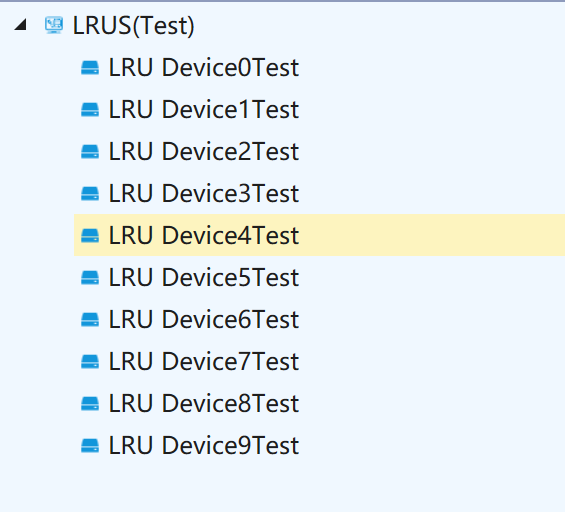
完整代码:
public class TreeViewWithIcons : TreeViewItem

    {

        ImageSource iconSource;

        TextBlock textBlock;

        Image icon;

        public TreeViewWithIcons()

        {

            StackPanel stack = new StackPanel();

            stack.Orientation = Orientation.Horizontal;

            Header = stack;

            //Uncomment this code If you want to add an Image after the Node-HeaderText

            //textBlock = new TextBlock();

            //textBlock.VerticalAlignment = VerticalAlignment.Center;

            //stack.Children.Add(textBlock);

            icon = new Image();

            icon.VerticalAlignment = VerticalAlignment.Center;

            icon.Height = ;

            icon.Width = ;

            icon.Margin = new Thickness(, , , );

            icon.Source = iconSource;

            stack.Children.Add(icon);

            //Add the HeaderText After Adding the icon

            textBlock = new TextBlock();

            textBlock.VerticalAlignment = VerticalAlignment.Center;

            stack.Children.Add(textBlock);

        }

        public ImageSource Icon

        {

            set

            {

                iconSource = value;

                icon.Source = iconSource;

            }

            get

            {

                return iconSource;

            }

        }

        protected override void OnUnselected(RoutedEventArgs args)

        {

            base.OnUnselected(args);

            icon.Source = iconSource;

        }

        protected override void OnSelected(RoutedEventArgs args)

        {

            base.OnSelected(args);

            icon.Source = iconSource;

        }

        /// <summary>

        /// Gets/Sets the HeaderText of TreeViewWithIcons

        /// </summary>

        public string HeaderText

        {

            set

            {

                textBlock.Text = value;

            }

            get

            {

                return textBlock.Text;

            }

        }

    }
c# WPF——创建带有图标的TreeView的更多相关文章
- WPF 带CheckBox、图标的TreeView
WPF 带CheckBox.图标的TreeView 在WPF实际项目开发的时候,经常会用到带CheckBox的TreeView,虽然微软在WPF的TreeView中没有提供该功能,但是微软在WPF中提 ...
- WPF 带CheckBox、图标的TreeView(转)
在WPF实际项目开发的时候,经常会用到带CheckBox的TreeView,虽然微软在WPF的TreeView中没有提供该功能,但是微软在WPF中提供强大的ItemTemplate模板功能和自定义样式 ...
- 带有图标的MessageBox
MessageBoxUtils类的代码如下: Ext.define('org.pine.util.MessageBoxUtils', { singleton: true, /** 普通信息提示框 */ ...
- 使用StarUML创建类图
使用StarUML创建类图 http://www.flyne.org/article/379 1.综述(What) StarUML是一种生成类图和其他类型的UML图表的工具.本文是一个使用StarUM ...
- 利用WPF创建含多种交互特性的无边框窗体
咳咳,标题一口气读下来确实有点累,让我先解释一下.另外文章底部有演示程序的下载. 本文介绍利用WPF创建一个含有以下特性的窗口: 有窗口阴影,比如QQ窗口外围只有几像素的阴影: 支持透明且无边框,为了 ...
- 如何用Rational rose创建类图
UML中各种图形概要: 图名 对照 说明 用例图 use case diagram 用例图表明系统做什么,与谁交互.用例是系统提供的功能,参与者是系统与谁交互,参与者可以是人.系统或其他实体.一个系统 ...
- 潜移默化学会WPF(难点控件treeview)--改造TreeView(CheckBox多选择版本),递归绑定数据
原文:潜移默化学会WPF(难点控件treeview)--改造TreeView(CheckBox多选择版本),递归绑定数据 目前自己对treeview的感慨很多 今天先讲 面对这种 表结构的数据 的其中 ...
- Qt 怎样生成带图标的exe
一.问题描述 当我们在 Windows 下用 VS 生成 exe 程序时,如果窗口程序指定了图标,那么生成的 exe 程序便是指定的图标模样. 但是,当使用 Qt Creator 编译程序却不同.即使 ...
- 【百度地图API】如何快速创建带有标注的地图?——快速创建地图工具+如何标注商家
原文:[百度地图API]如何快速创建带有标注的地图?--快速创建地图工具+如何标注商家 摘要: 如果你不会程序,如果你不想写代码. 如果你想拥有一张自己的地图,如果你想在该地图上标注出你商店的位置. ...
随机推荐
- mkswap - 建立一个linux交换区
总览 mkswap [-c] [-vN] [-f] device [size] 描述 mkswap 在一个设备上或者在一个文件里创建一个linux交换区. (该交换区创建后,必须使用 swapon 命 ...
- Java web项目搭建系列之一 Eclipse中新建Maven项目
前提条件: 已经安装好JDK 已经安装好Maven 已经安装好Eclipse 已经安装好Maven插件 在Eclipse中新建Maven项目 [File]→[New]→[Other...] [Mave ...
- 用element-ui进行文件的上传
在进项的项目中,我使用vue配合element搭建的项目,现在需要用到上传文件的写法!现在列举下我的项目中所使用的上传文件的方法! <el-upload style="display: ...
- 神经风格转换 (Neural-Style-Transfer-Papers)
原文:https://github.com/ycjing/Neural-Style-Transfer-Papers Neural-Style-Transfer-Papers Selected pape ...
- muduo
https://blog.csdn.net/zxm342698145/article/details/80689016 https://blog.csdn.net/u010087886/article ...
- eclipse多个项目提交到同一个仓库(码云)
参考博客:Eclipse提交多个项目到同一个仓库 https://blog.csdn.net/qq_30764991/article/details/80379365 步骤一:码云建立个远程仓库 步骤 ...
- 超好用的input模糊搜索 jq模糊搜索,
上来先展示效果:默认展示效果: 输入内容: 上代码: css部分: <style type="text/css"> * { padding:; margin:; } h ...
- 配置本地yum仓库
前言 我们知道yum工具是基于rpm的,其一个重要的特性就是可以自动解决依赖问题,但是yum的本质依旧是把后缀名.rpm的包下载到本地,然后按次序安装之.但是每次执行yum install x ...
- bzoj2959: 长跑 LCT+并查集+边双联通
题目传送门 https://lydsy.com/JudgeOnline/problem.php?id=2959 题解 调了半天,终于调完了. 显然题目要求是求出目前从 \(A\) 到 \(B\) 的可 ...
- Flask【第7篇】:Flask中的wtforms使用
flask中的wtforms使用 一.简单介绍flask中的wtforms WTForms是一个支持多个web框架的form组件,主要用于对用户请求数据进行验证. 安装: pip3 install w ...