
【weex】h5weex-example
这个就是一个练手的基础性的demo,不过也是有很多值得学习的东西的
效果如下
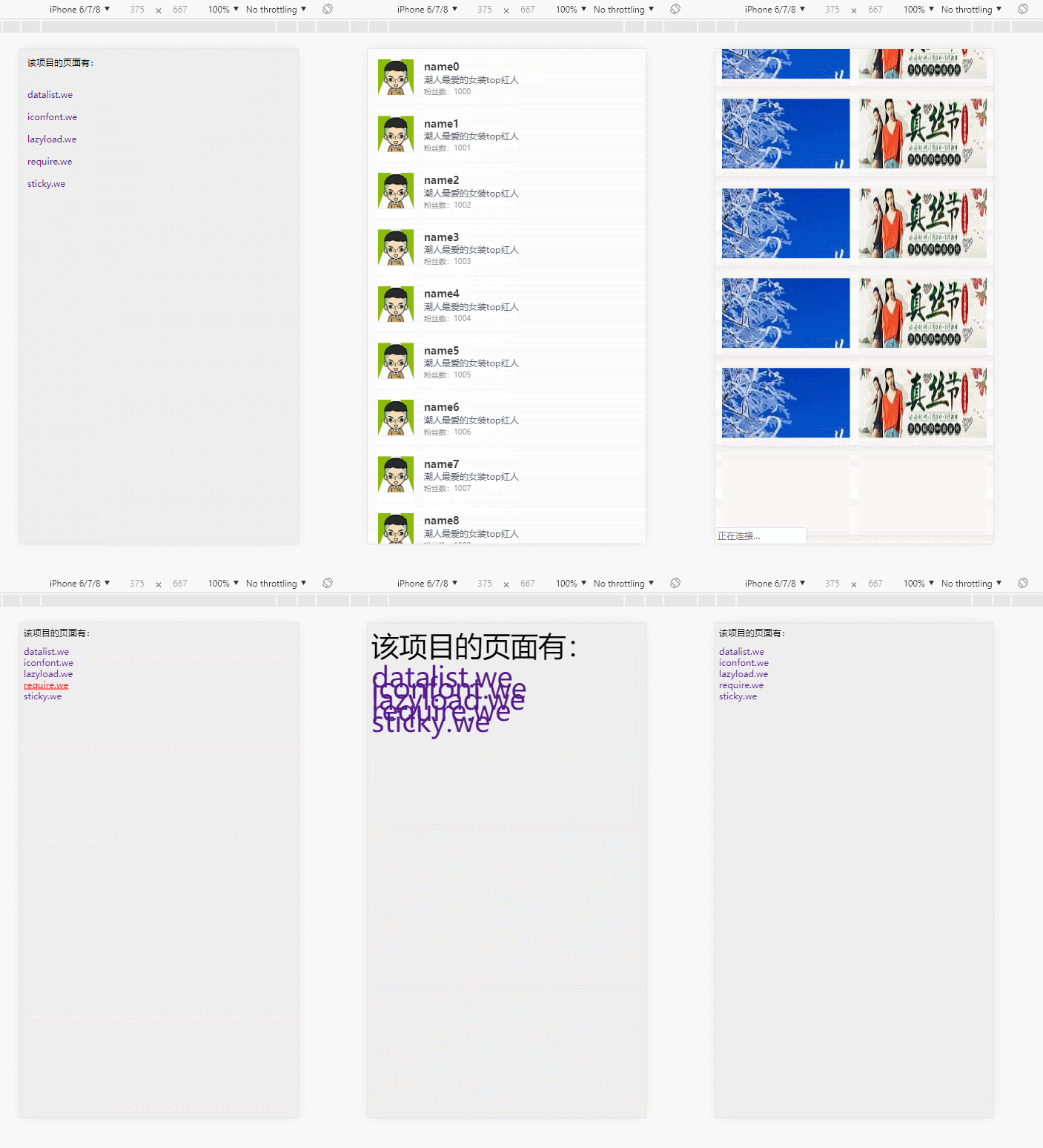
项目地址为:https://github.com/h5weex/h5weex-example
可能是我找到的项目比较少,很少有博主能够让我吹爆它的彩虹屁的~
博主readme中的tnpm就按照平时的npm install就好,它还提到了一个
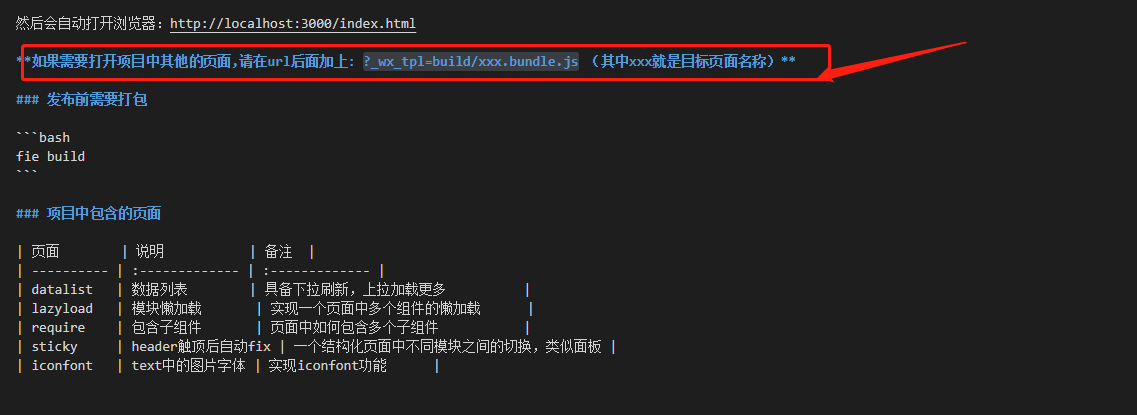
我觉得非常的有意思,weex的jsbundle用于客户端运行,如果要用 web 的形式打开这个 weex 页面,需要新建一个 html 文件,
把这个 jsbundle 文件以 script 脚本的方式引入。看链接
接下来我们来看项目
先把.we文件变成.vue文件
接下来分析代码

代码为
<!DOCTYPE html>

<html>

<head>

  <meta charset="utf-8">

  <title>h5weex</title>

  <meta name="apple-mobile-web-app-capable" content="yes" />

  <meta name="apple-mobile-web-app-status-bar-style" content="black" />

  <meta name="apple-touch-fullscreen" content="yes" />

  <meta name="format-detection" content="telephone=no, email=no" />

  <style>

    html, body, #weex {

      width: 100%;

      height: 100%;

      background: #eeeeee;

    }

  </style>

  <!-- lib.flexible -->

  <script src="//g.alicdn.com/mtb/lib-flexible/0.3.4/??flexible_css.js,flexible.js"></script>

  <script src="//g.alicdn.com/weex/weex-html5/0.3.5/weex.min.js"></script>

</head>

<body>

  <div id="weex"></div>

  <script>

  (function () {

    function getUrlParam (key) {

      var reg = new RegExp('[?|&]' + key + '=([^&]+)');

      var match = location.search.match(reg);

      return match && match[1];

    }

    var loader = getUrlParam('loader') || 'xhr';

    var page = getUrlParam('_wx_tpl') || '';

    if(page == ''){

      var pagelist = ['datalist','iconfont','lazyload','require','sticky'];

      var htmlstr = '<h3 style="padding:10px;">该项目的页面有:</h3><ul style="padding:10px;">';

      for(var i in pagelist){

        htmlstr += '<li style="height:30px;line-height:30px;"><a href="index.html?_wx_tpl=build/'+pagelist[i]+'.bundle.js">'+pagelist[i]+'.we</a></li>';

      }

      htmlstr += '</ul>';

      document.getElementById('weex').innerHTML = htmlstr;

    }

    else {

      window.weex.init({

        appId: location.href,

        loader: loader,

        source: page,

        rootId: 'weex'

      });

    }

  })();

  </script>

</body>

</html>
这个详情页还有做下拉加载更多的功能哦
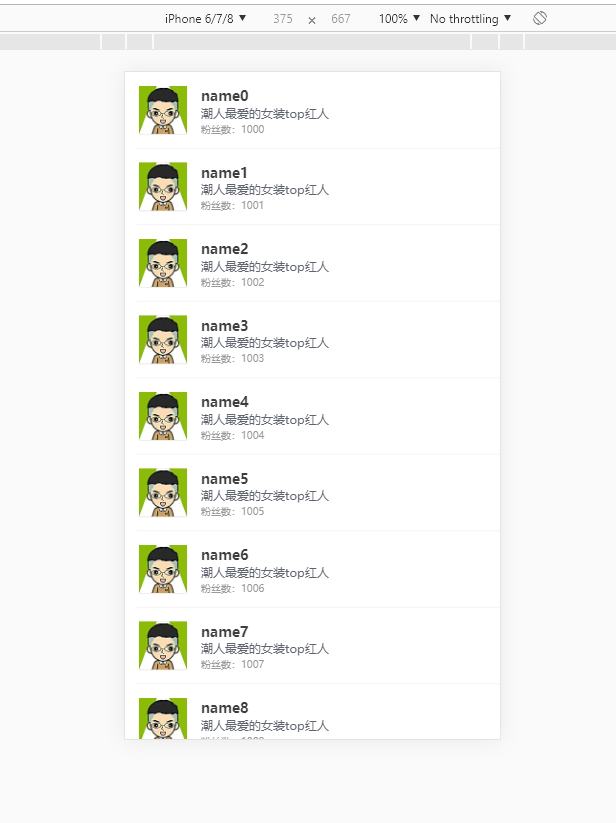
封装了一个图片和粉丝数目的组件,还可以点击跳转到淘宝
//account.vue

<template>

    <div class="account-item" index="{{$index}}">

        <div class="account-main">

            <div class="account-logo" onclick="goTargetUrl">

                <div class="account-logo-border">

                    <image class="account-logo-pic" src="{{logourl}}"></image>

                </div>

            </div>

            <div class="account-info" onclick="goTargetUrl">

                <text class="desc account-name">{{name}}</text>

                <text class="desc account-doc">{{reason}}</text>

                <text class="desc account-fans">粉丝数:{{fans}}</text>

            </div>

        </div>

    </div>

</template>

<style>

    .account-item {

        flex-direction: column;

        width: 750;

    }

    .account-main {

        flex-direction: row;

        padding: 24;

        padding-left: 0;

        margin-left: 24;

        border-width: 0;

        border-style: solid;

        border-color: #E7E7E7;

        border-bottom-width: 1;

    }

    .account-logo-border {

        width: 104;

        height: 104;

        background-image: url("//gw.alicdn.com/tps/TB1KMYqNXXXXXcoXXXXXXXXXXXX-104-104.png");

    }

    .account-logo-pic {

        width: 96;

        height: 96;

        margin: 4;

        align-items: center;

        justify-content: center;

        background-color: #cccccc;

    }

    .account-info {

        flex: 1;

        margin-left: 24;

        margin-right: 24;

        height: 104;

    }

    .desc {

        margin-bottom: 4;

        overflow: hidden;

        text-overflow: ellipsis;

        white-space: nowrap;

        display: block;

        lines: 1;

    }

    .account-name {

        margin-top: 4;

        font-size: 28;

        color: #3E3E3E;

        height: 34;

        font-weight: bold;

    }

    .account-doc {

        font-size: 24;

        color: #5F646E;

        height: 30;

    }

    .account-fans {

        font-size: 20;

        height: 26;

        color: #999;

    }

</style>

<script>

module.exports = {

    data: {

        logourl: '',

        reason: '',

        name: '',

        fans: 1000,

        url: ''

    },

    methods: {

        goTargetUrl: function(e) {

            require('@weex-module/event').openURL(this.url);

        }

    }

}

</script>
接下来分析详情页的代码,里面引用了weex的refresh和loading组件

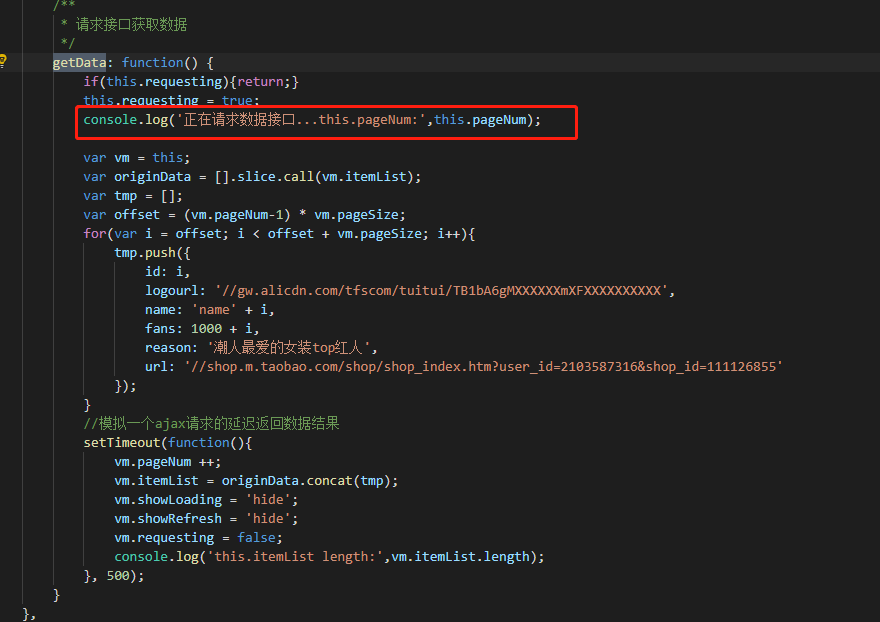
完整代码为
//detail.vue

<template>

    <list show-scrollbar="false" class="list" onloadmore="loadMore" loadmoreoffset="0">

        <refresh class="refresh" display="{{showRefresh}}" onrefresh="onrefresh">

            <text class="loading-text">{{refreshText}}</text>

        </refresh>

        <cell repeat={{itemList}} track-by="id">

            <account

                append="tree"

                logourl="{{logourl}}"

                name="{{name}}"

                fans="{{fans}}"

                reason="{{reason}}"

                url="{{url}}">

            </account>

        </cell>

        <loading class="loading" display="{{showLoading}}" onloading="onloading">

            <loading-indicator class="loading-image" if="{{showLoadingImage}}"></loading-indicator>

            <text class="loading-text">{{loadingText}}</text>

        </loading>

    </list>

</template>

<style>

    .refresh {

        height: 120;

        width: 750;

        background-color: #ffffff;

        flex-direction: row;

        align-items: center;

        justify-content: center;

    }

    .list {

        flex-direction: column;

        background-color: #ffffff;

        width: 750;

    }

    .loading {

        height: 120;

        width: 750;

        margin-top: 20;

        background-color: #ffffff;

        flex-direction: row;

        align-items: center;

        justify-content: center;

    }

    .loading-text {

        text-align: center;

        color: #666666;

        font-size: 28;

        margin-left: 30;

    }

    .loading-image {

        height: 30;

        width: 30;

        color: #333333;

    }

</style>

<script>

require('../c/account.vue');

</script>

<script>

module.exports = {

    data: {

        requesting: false,

        showRefresh: 'hide',

        refreshText: '下拉释放刷新',

        showLoading: 'hide',

        showLoadingImage: true,

        loadingText: '数据加载中...',

        pageNum: 1,

        pageSize: 10,

        itemList: []

    },

    methods: {

        /**

         * 加载更多

         */

        loadMore: function () {

            console.log('onloadmore,this pageNum:', this.pageNum);

            var vm = this;

            //正在刷新的时候不响应loadmore

            if(vm.showRefresh == 'show'){

                return;

            }

            vm.showLoading = 'show';

            //最大加载50条

            if(vm.pageNum >= 6){

                vm.showLoadingImage = false;

                vm.loadingText = '没有更多数据了';

                setTimeout(function(){

                    vm.showLoading = 'hide';

                }, 500);

                return;

            }

            vm.getData();

        },

        /**

         * 只有当loadmore不执行了,并且触底了才触发

         */

        onloading: function (e) {

            console.log('onloading');

            var vm = this;

            vm.showLoading = 'show';

            setTimeout(function() {

                vm.showLoading = 'hide';

            }, 500);

        },

        /**

         * 触顶才会触发

         */

        onrefresh: function(e) {

            console.log('onrefresh');

            var vm = this;

            vm.showRefresh = 'show';

            //数据重置

            vm.pageNum = 1;

            vm.itemList = [];

            vm.loadingText = '数据加载中...';

            vm.showLoading = 'hide';

            vm.showLoadingImage = true;

            //开始刷新

            vm.getData();

        },

        /**

         * 请求接口获取数据

         */

        getData: function() {

            if(this.requesting){return;}

            this.requesting = true;

            console.log('正在请求数据接口...this.pageNum:',this.pageNum);

            var vm = this;

            var originData = [].slice.call(vm.itemList);

            var tmp = [];

            var offset = (vm.pageNum-1) * vm.pageSize;

            for(var i = offset; i < offset + vm.pageSize; i++){

                tmp.push({

                    id: i,

                    logourl: '//gw.alicdn.com/tfscom/tuitui/TB1bA6gMXXXXXXmXFXXXXXXXXXX',

                    name: 'name' + i,

                    fans: 1000 + i,

                    reason: '潮人最爱的女装top红人',

                    url: '//shop.m.taobao.com/shop/shop_index.htm?user_id=2103587316&shop_id=111126855'

                });

            }

            //模拟一个ajax请求的延迟返回数据结果

            setTimeout(function(){

                vm.pageNum ++;

                vm.itemList = originData.concat(tmp);

                vm.showLoading = 'hide';

                vm.showRefresh = 'hide';

                vm.requesting = false;

                console.log('this.itemList length:',vm.itemList.length);

            }, 500);

        }

    },

    ready: function() {

        console.log('ready');

    },

    created: function (){

        console.log('created');

        this.getData();

    }

};

</script>
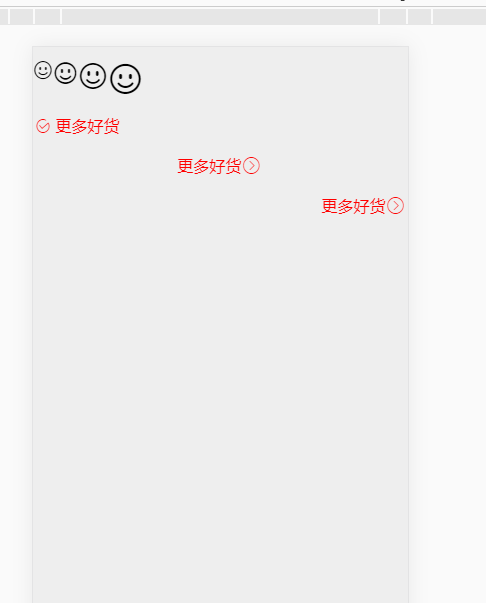
这个应该没有干货
//iconfont.vue
<template>
<div class="container" data-role="iconfont">
<div class="wrapper" style="height: 80">
<text class="icon"></text>
<text class="icon icon-small"></text>
<text class="icon icon-middle"></text>
<text class="icon icon-big"></text>
</div>
<div class="wrapper">
<text class="icon icon-fixed"></text>
<text class="text">更多好货</text>
</div>
<div class="wrapper center">
<text class="text">更多好货</text>
<text class="icon icon-fixed"></text>
</div>
<div class="wrapper right">
<text class="text">更多好货</text>
<text class="icon icon-fixed"></text>
</div>
</div>
</template>
<style>
.icon {
font-family: 'iconfont';
font-size: 40;
}
.icon-small {
font-size: 50;
}
.icon-middle {
font-size: 60;
}
.icon-big {
font-size: 70;
}
.wrapper {
flex-direction: row;
height: 40;
margin-top: 20;
margin-bottom: 20;
}
.icon-fixed {
margin-top: -8;
margin-right: 5;
color: #FF0000;
}
.text {
font-size: 32;
color: #FF0000;
height: 32;
line-height: 32;
}
.center {
justify-content: center;
}
.right {
justify-content: flex-end;
}
</style>
<script>
module.exports = {
data: {},
methods: {},
created: function (){
//目前支持ttf、woff文件,不支持svg、eot类型
require('@weex-module/dom').addRule('fontFace', {
'fontFamily': 'iconfont',
'src': 'url("//at.alicdn.com/t/font_1474166554_8834667.ttf")'
});
}
};
</script>

这个的干货据说是懒加载
这个是double-image组件
//double-image.vue

<template>

    <div class="wrapper" data-role="double_image">

        <div repeat={{picUrlList}} class="url" onclick="goTargetUrl" url="{{url}}">

            <image src="{{pic}}" class="image"></image>

        </div>

    </div>

</template>

<style>

    .wrapper {

        flex-direction: row;

        justify-content: space-between;

        width: 750;

        height: 224;

        margin-bottom: 18;

        padding-left: 18;

        padding-right: 18;

        padding-top: 18;

        padding-bottom: 18;

        background-color: #ffffff;

        box-sizing: border-box;

    }

    .url{

        width: 345;

        height: 188;

    }

    .image{

        width: 345;

        height: 188;

    }

</style>

<script>

    module.exports = {

        data : {

            picUrlList: []

        },

        methods: {

            goTargetUrl: function(e) {

                require('@weex-module/event').openURL(e.target.attr.url);

            },

            render: function(ds) {

                //console.log('ds:', ds);

                this.picUrlList = ds;

            }

        }

    };

</script>
//lazyload.vue

<template>

    <scroller class="container" loadmoreoffset="960" onloadmore="loadMore" show-scrollbar="false" onappear="appear" ondisappear="disappear">

        <double-image id="component-0"></double-image>

        <double-image id="component-1"></double-image>

        <double-image id="component-2"></double-image>

        <double-image id="component-3"></double-image>

        <double-image id="component-4"></double-image>

        <double-image id="component-5"></double-image>

        <double-image id="component-6"></double-image>

        <double-image id="component-7"></double-image>

        <double-image id="component-8"></double-image>

        <double-image id="component-9"></double-image>

        <double-image id="component-10"></double-image>

        <double-image id="component-11"></double-image>

        <double-image id="component-12"></double-image>

        <double-image id="component-13"></double-image>

        <double-image id="component-14"></double-image>

        <double-image id="component-15"></double-image>

        <double-image id="component-16"></double-image>

        <double-image id="component-17"></double-image>

        <double-image id="component-18"></double-image>

        <double-image id="component-19"></double-image>

    </scroller>

</template>

<style>

    .container{

        width: 750px;

        background-color: #eeeeee;

        display: flex;

        flex-direction: column;

        padding-bottom: 50px;

    }

</style>

<script>

    require('../c/double-image.we');

    module.exports = {

        data: {

            pointer: 0,

            shouldStop: true,

            picUrlList: [

                {

                    pic: "https://gw.alicdn.com/imgextra/i2/263662065/TB2VVk4jFXXXXbWXpXXXXXXXXXX_!!263662065.jpg",

                    url: "//h5.m.taobao.com/wirelessshop/decorator/view.html?userId=123&pageId=46&ttt=111&isMock=true#222222"

                }, {

                    pic: "https://gw.alicdn.com/tps/i3/TB1RqA7HFXXXXbbXFXXrVZt0FXX-640-200.jpg",

                    url: "//h5.wapa.taobao.com/wirelessshop/decorator/view_h5.html?userId=123&pageId=46&ttt=111&isMock=true#222222"

                }

            ]

        },

        methods: {

            appear: function () {

                this.$broadcast('sliderStart');

                console.log('appear');

            },

            disappear: function () {

                this.$broadcast('sliderStop');

                console.log('disappear');

            },

            loadMore: function (e) {

                console.log('loadmore');

                if(this.shouldStop) {

                    return;

                }

                for(var i = 0; i < 10; i++) {

                    var compVm = this.$vm('component-' + this.pointer);

                    if(!compVm) {

                        this.shouldStop = !0;

                        return;

                    }

                    if(!compVm.render) {

                        this.pointer++;

                        continue;

                    }

                    compVm.render(this.picUrlList);

                    this.pointer++;

                }

            }

        },

        ready: function (){

            console.log('ready');

            this.shouldStop = false;

            for(var i = 0; i < 10; i ++) {

                var compVm = this.$vm('component-' + i);

                //console.log(compVm);

                if(!compVm) {

                    this.pointer++;

                    continue;

                }

                if(!compVm.render) {

                    this.pointer++;

                    continue;

                }

                compVm.render(this.picUrlList);

                this.pointer++;

            }

        }

    };

</script>
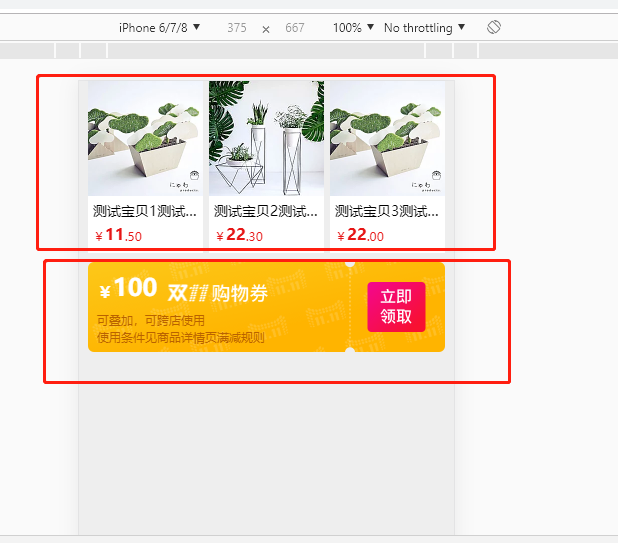
这个里面用了两个组件
//itemlist.vue

<template>

    <div data-role="itemlist">

        <div class="wrapper" if="{{mds.itemList.length}}">

            <div repeat="{{mds.itemList}}" url="{{url}}" class="item-url" onclick="goTargetUrl">

                <image src="{{pic_url}}" class="item-img"></image>

                <div class="item-info">

                    <text class="item-name">{{title}}</text>

                    <div class="item-price">

                        <text class="item-price-text">¥</text>

                        <text class="item-price-text big">{{price.split('.')[0]}}</text>

                        <text class="item-price-text">{{price.split('.').length > 1 ? '.' + price.split('.')[1] : ''}}</text>

                    </div>

                </div>

            </div>

        </div>

    </div>

</template>

<style>

    .wrapper {

        width: 750;

        padding-left: 18;

        padding-right: 18;

        margin-bottom: 18;

        box-sizing: border-box;

        flex-direction: row;

        justify-content: space-between;

    }

    .item-url {

        width: 230;

        background-color: #ffffff;

        flex-direction: column;

        justify-content: space-between;

    }

    .item-img {

        width: 230;

        height: 230;

    }

    .item-info {

        width: 230;

        padding-left: 10;

        padding-right: 10;

        padding-bottom: 18;

        box-sizing: border-box;

        flex-direction: column;

    }

    .item-name {

        line-height: 56;

        height: 56;

        flex-direction: row;

        color: #000000;

        font-size: 28;

        overflow: hidden;

        text-overflow: ellipsis;

        white-space: nowrap;

        display: block;

        lines: 1;

    }

    .item-price {

        flex-direction: row;

        align-items: flex-end;

        height: 40;

    }

    .item-price-text {

        color: #e61616;

        font-size: 24;

    }

    .big {

        font-size: 32;

        font-weight: bold;

    }

</style>

<script>

    module.exports = {

        data: {

            mds: {

                dataParams: {

                    "catId": "-1"

                },

                itemList: [],

            },

            gdc: {

                "ownerId": 2202220535

            }

        },

        methods: {

            goTargetUrl: function(e) {

                require('@weex-module/event').openURL(e.target.attr.url);

            },

            render: function(ds, gd){

                var vm = this;

                if(ds){ vm.mds = ds; }

                if(gd){ vm.gdc = gd; }

            }

        },

        ready: function() {

            console.log('ready:', this.mds);

        }

    };

</script>
promotion组件
//promotion.vue

<template>

    <div class="wrapper" data-role="promotion" onclick="goTargetUrl">

        <image src="//img.alicdn.com/tps/TB1V2AeNXXXXXbXXFXXXXXXXXXX-714-180.png" class="image"></image>

        <div class="container">

            <div class="price">

                <text class="priceText small">¥</text>

                <text class="priceText">{{mds.ticketDesc}}</text>

                <image class="priceImg" src="//img.alicdn.com/tps/TB1gEj7NXXXXXc7XVXXXXXXXXXX-201-36.png"></image>

            </div>

            <div class="detail">

                <text class="desc">可叠加,可跨店使用</text>

                <text class="desc">使用条件见商品详情页满减规则</text>

            </div>

        </div>

    </div>

</template>

<style>

    .wrapper {

        width: 750;

        box-sizing: border-box;

        margin-bottom: 18;

        padding-left: 18;

        padding-right: 18;

        position: relative;

    }

    .image{

        width: 714;

        height: 180;

    }

    .container{

        flex-direction: column;

        box-sizing: border-box;

        width: 714;

        height: 180;

        position: absolute;

        padding-left: 36;

        left: 0;

        top: 0;

    }

    .price{

        height: 80;

        flex-direction: row;

        align-items: flex-end;

    }

    .priceText {

        color: #ffffff;

        font-size: 48;

        font-weight: bold;

    }

    .priceImg {

        width: 201;

        height: 36;

        margin-left: 20;

    }

    .small {

        font-size: 32;

    }

    .detail{

        width: 354;

        height: 68;

        margin-top: 20;

        flex-direction: column;

        box-sizing: border-box;

    }

    .desc{

        width: 354;

        height: 34;

        line-height: 34;

        color: #B96200;

        font-size: 24;

    }

    .time{

        width: 354;

        height: 26;

        flex-direction: row;

    }

    .timeText{

        color: #ffffff;

        font-size: 24;

    }

</style>

<script>

    module.exports = {

        data: {

            mds: {

                ticketUrl: '',

                ticketDesc: '100'

            },

            gdc: {}

        },

        methods: {

            goTargetUrl: function() {

                require('@weex-module/event').openURL(this.mds.ticketUrl);

            },

            render: function(ds){

                if(ds){

                    this.mds.ticketUrl = ds.ticketUrl;

                    this.mds.ticketDesc = ds.ticketDesc;

                }

            }

        },

        ready: function() {

            console.log('ready:', this.mds);

        }

    };

</script>
完整代码为
<template>

    <scroller show-scrollbar="false">

        <itemlist mds="{{dataSource[0]}}" gdc="{{golbalData}}"></itemlist>

        <promotion mds="{{dataSource[1]}}" gdc="{{golbalData}}"></promotion>

    </scroller>

</template>

<script>

require('../c/itemlist.we');

require('../c/promotion.we');

</script>

<script>

    module.exports = {

        data: {

            golbalData: {

                ownerId: 2202220535

            },

            dataSource: [

                {

                    itemList: [

                        {

                            title:"测试宝贝1测试宝贝1测试宝贝1测试宝贝1",

                            pic_url:"//gw.alicdn.com/bao/uploaded/i1/2202220535/TB2du8TqFXXXXa1XpXXXXXXXXXX_!!2202220535.jpg",

                            url:"https://www.taobao.com/",

                            price:"11.50"

                        },

                        {

                            title:"测试宝贝2测试宝贝1测试宝贝1测试宝贝1",

                            pic_url:"//gw.alicdn.com/bao/uploaded/i2/2202220535/TB25odWqFXXXXaxXpXXXXXXXXXX_!!2202220535.jpg",

                            url:"https://www.taobao.com/",

                            price:"22.30"

                        },

                        {

                            title:"测试宝贝3测试宝贝1测试宝贝1测试宝贝1",

                            pic_url:"//gw.alicdn.com/bao/uploaded/i1/2202220535/TB2du8TqFXXXXa1XpXXXXXXXXXX_!!2202220535.jpg_200x200",

                            url:"https://www.taobao.com/",

                            price:"22.00"

                        }

                    ]

                },

                {

                    ticketUrl: 'http://www.taobao.com',

                    ticketDesc: '100'

                }

            ]

        },

        created: function (){

            var vm = this;

        },

        ready: function () {

            console.log(this.dataSource[0],this.dataSource[1]);

        }

    };

</script>

item组件
<template>

    <div class="item" data-role="item" onclick="goTargetUrl">

        <image src="{{pic_url}}" class="item-img"></image>

        <div class="item-info">

            <text class="item-name">{{title}}</text>

            <div class="item-price">

                <text class="item-price-text">¥</text>

                <text class="item-price-text big">{{price.split('.')[0]}}</text>

                <text class="item-price-text">{{price.split('.').length > 1 ? '.' + price.split('.')[1] : ''}}</text>

            </div>

        </div>

    </div>

</template>

<style>

    .item {

        width: 250;

        background-color: #ffffff;

        flex-direction: column;

        justify-content: space-between;

    }

    .item-img {

        width: 230;

        height: 230;

    }

    .item-info {

        width: 230;

        padding-left: 10;

        padding-right: 10;

        padding-bottom: 18;

        box-sizing: border-box;

        flex-direction: column;

    }

    .item-name {

        line-height: 56;

        height: 56;

        flex-direction: row;

        color: #000000;

        font-size: 28;

        overflow: hidden;

        text-overflow: ellipsis;

        white-space: nowrap;

        display: block;

        lines: 1;

    }

    .item-price {

        flex-direction: row;

        align-items: flex-end;

        height: 40;

    }

    .item-price-text {

        color: #e61616;

        font-size: 24;

    }

    .big {

        font-size: 32;

        font-weight: bold;

    }

</style>

<script>

    module.exports = {

        data: {

            title: '测试宝贝,勿拍',

            url: '//detail.m.tmall.com/item.htm?id=538817029299',

            pic_url: '//gw.alicdn.com/tfscom/tuitui/i4/TB1g4hXNXXXXXcVXXXXXXXXXXXX_!!0-item_pic.jpg',

            price: '100.00'

        },

        methods: {

            goTargetUrl: function() {

                require('@weex-module/event').openURL(this.url);

            }

        },

        created: function() {

        }

    };

</script>
完整代码为
<template>

    <list show-scrollbar="false" class="container">

        <header class="title">

            <text class="title-text">热门榜单</text>

            <image class="title-image" src="//gw.alicdn.com/tps/i2/T11ftRFpXaXXa8IXfX-14-26.png"></image>

        </header>

        <cell class="itemlist">

            <item></item>

            <item></item>

            <item></item>

            <item></item>

            <item></item>

            <item></item>

        </cell>

        <header class="title">

            <text class="title-text">热门榜单</text>

            <image class="title-image" src="//gw.alicdn.com/tps/i2/T11ftRFpXaXXa8IXfX-14-26.png"></image>

        </header>

        <cell class="itemlist">

            <item></item>

            <item></item>

            <item></item>

            <item></item>

            <item></item>

            <item></item>

        </cell>

        <header class="title">

            <text class="title-text">热门榜单</text>

            <image class="title-image" src="//gw.alicdn.com/tps/i2/T11ftRFpXaXXa8IXfX-14-26.png"></image>

        </header>

        <cell class="itemlist">

            <item></item>

            <item></item>

            <item></item>

            <item></item>

            <item></item>

            <item></item>

        </cell>

    </list>

</template>

<style>

    .container {

        width: 750;

        background-color: #eeeeee;

        margin-bottom: 28;

    }

    .title {

        flex-direction: row;

        justify-content: space-between;

        align-items: center;

        width: 750;

        height: 88;

        padding-left: 18;

        padding-right: 18;

        background-color: #ffffff;

        border-width: 0;

        border-style: solid;

        border-color: #cccccc;

        border-top-width: 1;

        border-bottom-width: 1;

        box-sizing: border-box;

    }

    .title-image {

        width: 14;

        height: 26;

        justify-content: center;

    }

    .title-text {

        width: 700;

        height: 88;

        justify-content: center;

        font-size: 32;

        color: #000000;

    }

    .itemlist {

        width: 750;

        padding-top: 18;

        margin-bottom: 18;

        background-color: #ffffff;

        box-sizing: border-box;

        flex-direction: row;

        flex-wrap: wrap;

        border-width: 0;

        border-style: solid;

        border-color: #cccccc;

        border-bottom-width: 1;

    }

</style>

<script>

    require('../c/item.we');

</script>

<script>

    module.exports = {

        data: {

        },

        methods: {

        },

        created: function (){

            var vm = this;

        }

    };

</script>
【weex】h5weex-example的更多相关文章
- 【weex】publishTask
这个小项目还挺有意思的,是一个效果取快递的项目 我们看下效果 放博客的github地址:https://github.com/xiaomaer/publishTask 我们来看下代码,这几个页面运行的 ...
- 【Weex学习】环境搭建
教程来源:http://jspang.com/2017/07/12/weex/,我本地是第一次安装Android Studio和教程有些出入 一.软件安装 1.安装Node.js 2.安装Java(h ...
- 【quickhybrid】H5和原生的职责划分
前言 在JSBridge实现后,前端网页与原生的交互已经通了,接下来就要开始规划API,明确需要提供哪一些功能来供前端调用. 但是在这之前,还有一点重要工作需要做: 明确H5与Native的职责划分, ...
- 【微信小程序项目实践总结】30分钟从陌生到熟悉 web app 、native app、hybrid app比较 30分钟ES6从陌生到熟悉 【原创】浅谈内存泄露 HTML5 五子棋 - JS/Canvas 游戏 meta 详解,html5 meta 标签日常设置 C#中回滚TransactionScope的使用方法和原理
[微信小程序项目实践总结]30分钟从陌生到熟悉 前言 我们之前对小程序做了基本学习: 1. 微信小程序开发07-列表页面怎么做 2. 微信小程序开发06-一个业务页面的完成 3. 微信小程序开发05- ...
- 【干货】零基础30分钟让你拥有一个完整属于自己的短视频APP系统
目录 一.附言: 1 二.购买域名和购买服务器: 2 三.搭建服务器环境: 5 四.配置APP前端部分: 8 1.工具以及文件准备: 9 2.配置后端接口地址 11 3.配置APP启动图和启动图标 ...
- Python高手之路【六】python基础之字符串格式化
Python的字符串格式化有两种方式: 百分号方式.format方式 百分号的方式相对来说比较老,而format方式则是比较先进的方式,企图替换古老的方式,目前两者并存.[PEP-3101] This ...
- 【原】谈谈对Objective-C中代理模式的误解
[原]谈谈对Objective-C中代理模式的误解 本文转载请注明出处 —— polobymulberry-博客园 1. 前言 这篇文章主要是对代理模式和委托模式进行了对比,个人认为Objective ...
- 【原】FMDB源码阅读(三)
[原]FMDB源码阅读(三) 本文转载请注明出处 —— polobymulberry-博客园 1. 前言 FMDB比较优秀的地方就在于对多线程的处理.所以这一篇主要是研究FMDB的多线程处理的实现.而 ...
- 【原】Android热更新开源项目Tinker源码解析系列之一:Dex热更新
[原]Android热更新开源项目Tinker源码解析系列之一:Dex热更新 Tinker是微信的第一个开源项目,主要用于安卓应用bug的热修复和功能的迭代. Tinker github地址:http ...
随机推荐
- 使用jqselectable构建美化的select元素
本文只对此插件的应用做一些探讨,本插件版权属于原作者,插件原始下载地址:http://www.jq22.com/jquery-info288 原插件也有些许不足之处,比如样式定义名称太过普通,容易和页 ...
- if __name__=='__main__'使用场景,彻底明白
本博中有一篇文章写了 if __name__=='__main__'的作用与原理http://www.cnblogs.com/fennudexiaoniao/p/7458324.html,但是好像似懂 ...
- Python爬虫笔记【一】模拟用户访问之设置请求头 (1)
学习的课本为<python网络数据采集>,大部分代码来此此书. 网络爬虫爬取数据首先就是要有爬取的权限,没有爬取的权限再好的代码也不能运行.所以首先要伪装自己的爬虫,让爬虫不像爬虫而是像人 ...
- Error: Could not link: /usr/local/share/doc/homebrew
mac 执行brew update 报错 Error: Could not link: /usr/local/share/doc/homebrew 更新brew,报错 Error: Could not ...
- Apache ActiveMQ教程
一.特性及优势 1.实现JMS1.1规范,支持J2EE1.4以上 2.可运行于任何jvm和大部分web容器(ActiveMQ works great in any JVM) 3.支持多种语言客户端(j ...
- yii2下使用支付宝
最近入坑了yii2 感觉是个很强大的框架.使用yii做支付宝的移动支付的时候出了点问题,记录下来避免以后忘记了. 使用的是支付宝立即到账的功能,网上很多集成好的接口我就不重复了,找不到的话github ...
- Vue:$route 和 $router 的区别
参考: https://uzshare.com/view/788446 https://router.vuejs.org/zh/ $route 是“路由信息对象”,包括 path,params,has ...
- [转]8天玩转并行开发——第二天 Task的使用
在我们了解Task之前,如果我们要使用多核的功能可能就会自己来开线程,然而这种线程模型在.net 4.0之后被一种称为基于 “任务的编程模型”所冲击,因为task会比thread具有更小的性能开销,不 ...
- 【NOIP2018模拟11.01】树
题目 描述 题目大意 维护一个序列,支持三种操作: 1.修改一段区间,将这段区间内的所有数都andandand一个数. 2.询问区间和. 3.询问区间两两相加的平方和. N≤10000N\leq 10 ...
- 廖雪峰Java10加密与安全-3摘要算法-4BouncyCastle
1.BouncyCastle: 第三方提供的一组加密/哈希算法 提供JDK没有提供的算法 RipeMD160哈希算法 官方网站 2.如何使用第三方提供的算法 2.1 添加第三方jar至classpat ...