
vue-transition-move
<!Doctype>

<html>

<head>

    <meta charset="utf-8">

    <meta name="viewport"

          content="width=device-width, initial-scale=1.0, maximum-scale=1.0, minimum-scale=1.0, user-scalable=no"/>

    <style>

        * {

            margin: 0;

            padding: 0;

        }

        .btn {

            position: fixed;

            bottom: 50px;

            right: 10px;

            z-index: 10;

            width: 50px;

            height: 50px;

            line-height: 50px;

            border-radius: 50%;

            border: none;

            outline: none;

            color: #fff;

            font-size: 18px;

            background: #5dfcff;

        }

        .menu {

            position: fixed;

            bottom: 50px;

            right: 10px;

            width: 50px;

            height: 50px;

            border-radius: 50%;

            transition: all .7s ease-in;

        }

        .menu.move-enter-active .inner {

            transform: translate3d(0, 0, 0);

            transition-timing-function: cubic-bezier(0, .57, .44, 1.97);

        }

        .menu.move-enter-active .inner-1 {

            transition-delay: .1s;

        }

        .menu.move-enter-active .inner-2 {

            transition-delay: .2s

        }

        .menu.move-enter-active .inner-3 {

            transition-delay: .3s;

        }

        .menu.move-enter .inner,

        .menu.move-leave-active .inner {

            transition-timing-function: ease-in-out

        }

        .menu.move-enter .inner-1,

        .menu.move-leave-active .inner {

            transform: translate3d(0, 60px, 0);

            transition-delay: .3s

        }

        .menu.move-enter .inner-2,

        .menu.move-leave-active .inner-2 {

            transform: translate3d(40px, 40px, 0);

            transition-delay: .2s

        }

        .menu.move-enter .inner-3,

        .menu.move-leave-active .inner-3 {

            transform: translate3d(60px, 0, 0);

            transition-delay: .1s

        }

        .inner {

            display: inline-block;

            position: absolute;

            width: 30px;

            height: 30px;

            line-height: 30px;

            border-radius: 50%;

            background: #ff495a;

            text-align: center;

            color: #fff;

            transition: all .4s;

        }

        .inner-1 {

            top: -50px;

            left: 10px;

        }

        .inner-2 {

            left: -30px;

            top: -30px;

        }

        .inner-3 {

            left: -50px;

            top: 10px

        }

    </style>

</head>

<body>

<div id="app">

    <template>

        <button @click="showMenu" class="btn">{{text}}</button>

        <transition name="move">

            <div class="menu" v-show="show">

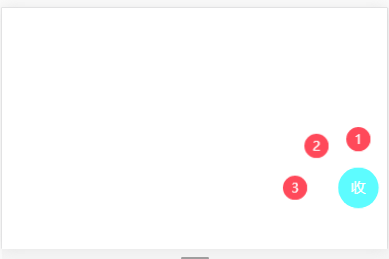
                <div class="inner inner-1">1</div>

                <div class="inner inner-2">2</div>

                <div class="inner inner-3">3</div>

            </div>

        </transition>

    </template>

</div>

<script src="../vue.js"></script>

<script>

    var app = new Vue({

        el: "#app",

        data: {

            show: false

        },

        methods: {

            showMenu: function () {

                this.show = !this.show;

            }

        },

        computed: {

            text: function () {

                return this.show ? '收' : '开';

            }

        }

    });

</script>

</body>

</html>

vue-transition-move的更多相关文章
- vue transition
Vue.js 教程 (9) : 过渡动画 Vue.js 提供非常简单的过渡动画接口.这些过渡动画在 Vue.js 将目标元素插入或移除出 DOM 的时候会自动执行.能够触发动画的指令包括 v-if , ...
- vue transition实现页面切换效果
我们都知道vue可以做成单页应用 点击的时候就能切换 如果我们要添加一些视觉效果 比如页面切换的时候有一个缓冲效果 这个时候就需要用到vue里的transition这个标签 在使用这个标签之前需要了 ...
- 记录一下vue transition 过渡各状态()
.slide-fade-enter{ opacity: 0; transform: translateX(100px); /*从哪里开始过渡:在过渡之前我就把位置定义在100px的位置,并 ...
- vue学习笔记
来公司以后就一直在用vue框架,不管是业务代码,还是做vue组件.关于vue有一些点是文档中没有提及的,记录一下以便以后查询- 一.Vue的特点 新一代 Vue.js 框架非常关注如何用极少的外部特性 ...
- VUE 入门笔记
前端的MVVM概念今年来也算是如火如荼,了解完 MVVM的概念,也该找个去尝试下 首先我先试了下 国内小而美的 VUE 试着照着文档敲出入门文件,内容都在注释里 <!doctype html&g ...
- Vue入门笔记#过渡
Vue过渡,可以在元素从DOM中移除,插入时自动调用过渡效果.根据设定,会适时的触发过渡效果. 在使用的目标标签里添加 transition: <div transition="my_ ...
- Vue.js相关知识1
<!DOCTYPE html><html lang="en"><head> <meta charset="UTF-8" ...
- vue.js笔记
一.v-bind 缩写 <!-- 完整语法 --> <a v-bind:href="url"></a> <!-- 缩写 --> &l ...
- 初步学习vue.js
vue是法语中视图的意思,Vue.js是一个轻巧.高性能.可组件化的MVVM库,同时拥有非常容易上手的API. 响应的数据绑定 Vue.js 的核心是一个响应的数据绑定系统,它让数据与 DOM 保持同 ...
- 【转】vue基础学习
1.基本绑定: new Vue( { el:'#elID', data:{ // data obj ...
随机推荐
- https的主体过程
https其实就是基于SSL的http.加密后的http信息按理是不会被篡改和查看的. https的过程总体上是按照下面来进行的: 1.客户端发起请求,服务端返回一个SSL证书,证书里面有一公钥A. ...
- 关于mysql开元数据库的几个随想
现在已经是凌晨了,昨天晚上写了我人生中的第一篇笔记,觉得没什么可写的,写了一个多小时都没写出什么,现在突然想写点东西了,这是一个比较有趣的问题,前两个月换了新工作,记得当初面试这份工作的时候面试到第三 ...
- HADOOP docker(一):安装hadoop实验集群(略操蛋)
一.环境准备 1.1.机器规划 主机名 别名 IP 角色 9321a27a2b91 hadoop1 172.17.0.10 NN1 ZK RM 7c3a3c9cd595 hadoo ...
- nodejs笔记--模块篇(三)
文件模块访问方式通过require('/文件名.后缀') require('./文件名.后缀') requrie('../文件名.后缀') 去访问,文件后缀可以省略:以"/&qu ...
- PHP 5.6.32 增加pdo_dblib.so拓展
首先说明,php增加pdo_dblib.so拓展不需要重新编译php源文件,只需要增加dblib源包即可. 1.下载安装所需包 1.#下载 wget http://mirrors.ibiblio.or ...
- Python的实现分类
目前流行的Python实现包括CPython,Jython,IronPython,Stackless,PyPy,Cython,Shed Skin. CPython Cpython是Python的标准实 ...
- 软工2017团队协作第七周——个人PSP
10.27 --11.2本周例行报告 1.PSP(personal software process )个人软件过程. 类型 任务 开始时间 结束时间 中断时间 实际用时 ...
- 11.24Daily Scrum(2)
人员 任务分配完成情况 明天任务分配 王皓南 实现网页上视频浏览的功能.研究相关的代码和功能.996 数据库测试 申开亮 实现网页上视频浏览的功能.研究相关的代码和功能.997 实现视频浏览的功能 王 ...
- 20172332 实验一《Java开发环境的熟悉》实验报告
20172332 2017-2018-2 <程序设计与数据结构>实验一报告 课程:<程序设计与数据结构> 班级: 1723 姓名: 于欣月 学号:20172332 实验教师:王 ...
- LintCode-366.斐波纳契数
斐波纳契数列 查找斐波纳契数列中第 N 个数. 所谓的斐波纳契数列是指: 前2个数是 0 和 1 . 第 i 个数是第 i-1 个数和第i-2 个数的和. 斐波纳契数列的前10个数字是:0, 1, 1 ...