
Cloudera Manager安装之时间服务器和时间客户端(Ubuntu14.04)(二)
第二步:
Cloudera Manager安装之时间服务器和时间客户端(二)
找一台机器作为时间服务器
我这里,放到ubuntucmbigdata1这台机器!
注意,之前是已经做了集群时间同步了。
在ubuntu系统里,跟centos系统有点出入。
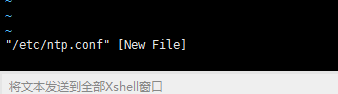
需要安装
root@ubuntucmbigdata1:~# sudo apt-get install ntp
然后,再来配置,就不为空了。
root@ubuntucmbigdata1:~# sudo vim /etc/ntp.conf
默认是如下

# /etc/ntp.conf, configuration for ntpd; see ntp.conf(5) for help

driftfile /var/lib/ntp/ntp.drift

# Enable this if you want statistics to be logged.

#statsdir /var/log/ntpstats/

statistics loopstats peerstats clockstats

filegen loopstats file loopstats type day enable

filegen peerstats file peerstats type day enable

filegen clockstats file clockstats type day enable

# Specify one or more NTP servers.

# Use servers from the NTP Pool Project. Approved by Ubuntu Technical Board

# on 2011-02-08 (LP: #104525). See http://www.pool.ntp.org/join.html for

# more information.

server 0.ubuntu.pool.ntp.org

server 1.ubuntu.pool.ntp.org

server 2.ubuntu.pool.ntp.org

server 3.ubuntu.pool.ntp.org

# Use Ubuntu's ntp server as a fallback.

server ntp.ubuntu.com

# Access control configuration; see /usr/share/doc/ntp-doc/html/accopt.html for

# details.  The web page <http://support.ntp.org/bin/view/Support/AccessRestrictions>

# might also be helpful.

#

# Note that "restrict" applies to both servers and clients, so a configuration

# that might be intended to block requests from certain clients could also end

# up blocking replies from your own upstream servers.

# By default, exchange time with everybody, but don't allow configuration.

restrict -4 default kod notrap nomodify nopeer noquery

restrict -6 default kod notrap nomodify nopeer noquery

# Local users may interrogate the ntp server more closely.

restrict 127.0.0.1

restrict ::1

# Clients from this (example!) subnet have unlimited access, but only if

# cryptographically authenticated.

#restrict 192.168.123.0 mask 255.255.255.0 notrust

# If you want to provide time to your local subnet, change the next line.

# (Again, the address is an example only.)

#broadcast 192.168.123.255

# If you want to listen to time broadcasts on your local subnet, de-comment the

# next lines.  Please do this only if you trust everybody on the network!

#disable auth

#broadcastclient
注意,这里有2处地方需要我们进行修改,如下
因为,
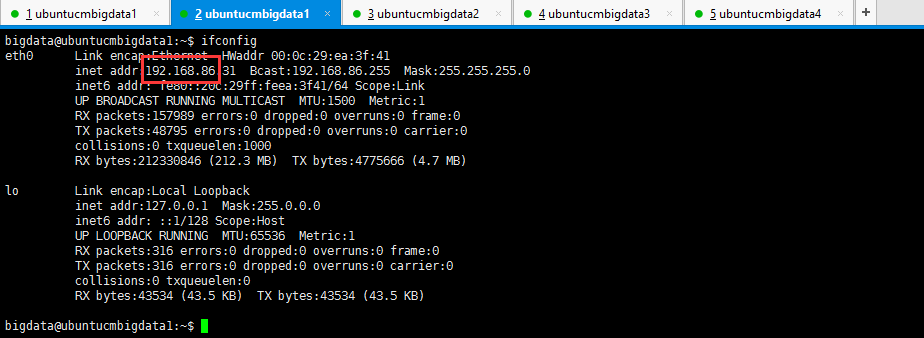
所以,修改地方1:


注意,Ubuntu系统的时间同步这块,跟centos系统有点出入。

root@ubuntucmbigdata1:~# sudo cp /usr/share/zoneinfo/Asia/Shanghai /etc/localtime

root@ubuntucmbigdata1:~# ntpdate pool.ntp.org

25 Jun 17:10:14 ntpdate[9227]: the NTP socket is in use, exiting

root@ubuntucmbigdata1:~# date

2017年 06月 25日 星期日 17:10:23 CST

root@ubuntucmbigdata1:~#
ubuntucmbigdata1、ubuntucmbigdata2、ubuntucmbigdata3、ubuntucmbigdata4都去执行。
修改linux swap空间的swappiness
Cloudera 建议将 /proc/sys/vm/swappiness 设置为 0。
修改swappiness的值为零:

root@ubuntucmbigdata1:~# cat /proc/sys/vm/swappiness

60

root@ubuntucmbigdata1:~# echo 0 > /proc/sys/vm/swappiness

root@ubuntucmbigdata1:~# cat /proc/sys/vm/swappiness

0

root@ubuntucmbigdata1:~#
我这里,仅拿ubuntucmbigdata1来说,其他的ubuntucmbigdata2、ubuntucmbigdata3和ubuntucmbigdata4是一样的。
同时,大家可以关注我的个人博客:
http://www.cnblogs.com/zlslch/ 和 http://www.cnblogs.com/lchzls/
人生苦短,我愿分享。本公众号将秉持活到老学到老学习无休止的交流分享开源精神,汇聚于互联网和个人学习工作的精华干货知识,一切来于互联网,反馈回互联网。
目前研究领域:大数据、机器学习、深度学习、人工智能、数据挖掘、数据分析。 语言涉及:Java、Scala、Python、Shell、Linux等 。同时还涉及平常所使用的手机、电脑和互联网上的使用技巧、问题和实用软件。 只要你一直关注和呆在群里,每天必须有收获
以及对应本平台的QQ群:161156071(大数据躺过的坑)



Cloudera Manager安装之时间服务器和时间客户端(Ubuntu14.04)(二)的更多相关文章
- Cloudera Manager安装之时间服务器和时间客户端(二)
福利 => 每天都推送 欢迎大家,关注微信扫码并加入我的4个微信公众号: 大数据躺过的坑 Java从入门到架构师 人工智能躺过的坑 Java全栈大联盟 ...
- Cloudera Manager安装_搭建CDH集群
2017年2月22日, 星期三 Cloudera Manager安装_搭建CDH集群 cpu 内存16G 内存12G 内存8G 默认单核单线 CDH1_node9 Server || Agent ...
- Cloudera Manager安装之Cloudera Manager 5.3.X安装(三)(tar方式、rpm方式和yum方式)
不多说,直接上干货! 福利每天都有 => =>=>=>=> 欢迎大家,关注微信扫码并加入我的4个微信公众号: 大数据躺过的坑 Java从入门到架构师 ...
- Cloudera Manager安装之Cloudera Manager安装前准备(CentOS6.5)(一)
Cloudera Manager安装前准备 (一)机器准备 192.168.80.148 clouderamanager01 (部署ClouderaManager-server和Mirror se ...
- Cloudera Manager安装之利用parcels方式安装3或4节点集群(包含最新稳定版本或指定版本的安装)(添加服务)(CentOS6.5)(五)
参考博客 Cloudera Manager安装之利用parcels方式安装单节点集群 Cloudera Manager安装之Cloudera Manager 5.3.X安装(三)(tar方式.rpm ...
- Cloudera Manager安装之利用parcels方式安装单节点集群(包含最新稳定版本或指定版本的安装)(添加服务)(CentOS6.5)(四)
不多说,直接上干货! 福利 => 每天都推送 欢迎大家,关注微信扫码并加入我的4个微信公众号: 大数据躺过的坑 Java从入门到架构师 人工智能躺过的坑 ...
- Cloudera Manager安装之利用parcels方式(在线或离线)安装3或4节点集群(包含最新稳定版本或指定版本的安装)(添加服务)(Ubuntu14.04)(五)
前期博客 Cloudera Manager安装之Cloudera Manager 5.6.X安装(tar方式.rpm方式和yum方式) (Ubuntu14.04) (三) 如果大家,在启动的时候,比如 ...
- Cloudera Manager 安装集群遇到的坑
Cloudera Manager 安装集群遇到的坑 多次安装集群,但每次都不能顺利,都会遇到很多很多的坑,今天就过去踩过的坑简单的总结一下,希望已经踩了的和正在踩的童鞋能够借鉴一下,希望对你们能有所帮 ...
- Cloudera Manager安装之Cloudera Manager安装前准备(Ubuntu14.04)(一)
其实,基本思路跟如下差不多,我就不多详细说了,贴出主要图. 博主,我是直接借鉴下面这位博主,来进行安装的!(灰常感谢他们!) 在线和离线安装Cloudera CDH 5.6.0 Cloudera M ...
随机推荐
- 【LeetCode C++】Two Sum
题目: Given an array of integers, return indices of the two numbers such that they add up to a specifi ...
- Linux或者window装svn
Centos7搭建SVN Server手记 安装svn和依赖模块 yum install httpd httpd-devel subversion mod_dav_svn mod_auth_mysql ...
- hdu2993 MAX Average Problem (斜率dp)
参考:http://www.cnblogs.com/kuangbin/archive/2012/08/27/2657878.html //#pragma warning (disable: 4786) ...
- thinkjs系统服务启动
- Linq的使用场景简介和认识
一:C#的一个分支Linq 二:学Linq需要有一些基础知识 1. var 隐式类型 2. 匿名类型/匿名方法 3. 自动属性 4. 委托/泛型的委托 5. lambda 6. 扩展方法 7. 对象初 ...
- jquery实现简单抽奖功能
一直纠结要怎么用jquery实现抽奖功能,看别人很多都是用flash制作的,找了很多资料,最终找到一个比较适合需求的,我做了些许调整,以下是代码展示(复制下来可以直接使用). 先上图:
- scrapy爬虫框架入门实战
博客 https://www.jianshu.com/p/61911e00abd0 项目源码 https://github.com/ppy2790/jianshu/blob/master/jiansh ...
- leetcode 从排序数组中删除重复项
最近的学习是相当的无聊,并且很无趣,每天都浪费了很多时间,比如今天下午,就是搞一手成语接龙,我也是醉了- 并且我也不知道学什么了,所以决定刷题 虽然我是0算法基础,0逻辑能力的渣渣,但是尽力每天做一道 ...
- CF455C Civilization | luogu HXY造公园
题目链接: https://www.luogu.org/problemnew/show/P2195 http://codeforces.com/contest/455/problem/C 显然我们可以 ...
- 【04】循序渐进学 docker:Dockerfile
写在前面的话 从前面我们简单的了解了镜像,也运行了容器,各种官方的镜像显然无法满足我们自己的需求,我们目的终究是运行自己的业务. 所以,本章节的 Dockerfile 就主要讲怎么在官方镜像的基础上制 ...