
ToggleButton开关状态按钮控件
ToggleButton开关状态按钮控件
一、简介
1、

2、ToggleButton类结构
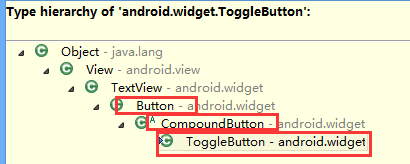
父类是CompoundButton,引包的时候注意下
二、ToggleButton开关状态按钮控件使用方法
1、新建ToggleButton控件及对象
private ToggleButton toggleButton1;
toggleButton1=(ToggleButton) findViewById(R.id.toggleButton1);
2、设置setOnCheckedChangeListener方法
toggleButton1.setOnCheckedChangeListener(new OnCheckedChangeListener() {})
3、根据是否checked方法实现操作
if(isChecked){//开
linearLayout1.setOrientation(LinearLayout.VERTICAL);
}
else{//关
linearLayout1.setOrientation(LinearLayout.HORIZONTAL);
}
三、代码实例
1、效果图:
开状态
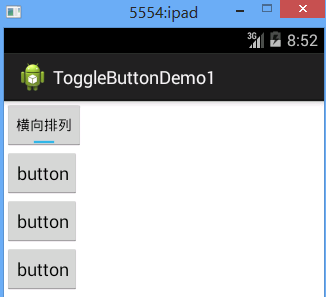
关状态

2、代码:
fry.Activity01
 package fry;

 import com.example.ToggleButtonDemo1.R;

 import android.app.Activity;

 import android.os.Bundle;

 import android.widget.CompoundButton;

 import android.widget.CompoundButton.OnCheckedChangeListener;

 import android.widget.LinearLayout;

 import android.widget.ToggleButton;

 public class Activity01 extends Activity{

     private LinearLayout linearLayout1;

     private ToggleButton toggleButton1;

     @Override

     protected void onCreate(Bundle savedInstanceState) {

         // TODO Auto-generated method stub

         super.onCreate(savedInstanceState);

         setContentView(R.layout.activity01);

         linearLayout1=(LinearLayout) findViewById(R.id.linearLayout1);

         toggleButton1=(ToggleButton) findViewById(R.id.toggleButton1);

         /*

          * ToggleButton开关状态按钮控件使用方法

          * 1、新建ToggleButton控件及对象

          * 2、设置setOnCheckedChangeListener方法

          * 3、根据是否checked方法实现操作

          *

          */

         toggleButton1.setOnCheckedChangeListener(new OnCheckedChangeListener() {

             @Override

             public void onCheckedChanged(CompoundButton buttonView, boolean isChecked) {

                 // TODO Auto-generated method stub

                 if(isChecked){//开

                     linearLayout1.setOrientation(LinearLayout.VERTICAL);

                 }

                 else{//关

                     linearLayout1.setOrientation(LinearLayout.HORIZONTAL);

                 }

             }

         });

     }

 }
/ToggleButtonDemo1/res/layout/activity01.xml
 <?xml version="1.0" encoding="utf-8"?>

 <LinearLayout xmlns:android="http://schemas.android.com/apk/res/android"

     android:layout_width="match_parent"

     android:layout_height="match_parent"

     android:orientation="vertical" >

     <ToggleButton

         android:id="@+id/toggleButton1"

         android:layout_width="wrap_content"

         android:layout_height="wrap_content"

         android:checked="true"

         android:textOn="横向排列"

         android:textOff="纵向排列"

         />

     <LinearLayout

         android:id="@+id/linearLayout1"

         android:layout_width="wrap_content"

         android:layout_height="wrap_content"

         android:orientation="vertical"

         >

         <Button

             android:layout_width="wrap_content"

             android:layout_height="wrap_content"

             android:text="button"

             />

         <Button

             android:layout_width="wrap_content"

             android:layout_height="wrap_content"

             android:text="button"

             />

         <Button

             android:layout_width="wrap_content"

             android:layout_height="wrap_content"

             android:text="button"

             />

     </LinearLayout>

 </LinearLayout>
四、获得
1、
android:checked="true"
设置ToggleButton 状态
2、
android:textOn="横向排列"
设置ToggleButton打开文本
3、
toggleButton1.setOnCheckedChangeListener(new OnCheckedChangeListener() {})
设置ToggleButton的setOnCheckedChangeListener方法
4、
if(isChecked)
判断ToggleButton状态开关
ToggleButton开关状态按钮控件的更多相关文章
- 重新想象 Windows 8 Store Apps (2) - 控件之按钮控件: Button, HyperlinkButton, RepeatButton, ToggleButton, RadioButton, CheckBox, ToggleSwitch
原文:重新想象 Windows 8 Store Apps (2) - 控件之按钮控件: Button, HyperlinkButton, RepeatButton, ToggleButton, Rad ...
- WinRT自定义控件第一 - 转盘按钮控件
之前的文章中,介绍了用WPF做一个转盘按钮控件,后来需要把这个控件移植到WinRT时,遇到了很大的问题,主要原因在于WPF和WinRT还是有很大不同的.这篇文章介绍了这个移植过程,由于2次实现的控件功 ...
- MFC编程入门之二十三(常用控件:按钮控件的编程实例)
上一节讲了按钮控件Button.Radio Button和Check Box的基本用法,本节继续讲按钮控件的内容,通过一个实例让大家更清楚按钮控件在实际的软件开发中如何使用. 因为Button控件在前 ...
- MFC编程入门之二十二(常用控件:按钮控件Button、Radio Button和Check Box)
本节继续讲解常用控件--按钮控件的使用. 按钮控件简介 按钮控件包括命令按钮(Button).单选按钮(Radio Button)和复选框(Check Box)等.命令按钮就是我们前面多次提到的侠义的 ...
- FineUI第五天---按钮控件
按钮控件 <x:Button runat="server" ID="按下" Text="按下"></x:Button> ...
- VC按钮控件实现指示灯效果
VC为按钮控件添加图片的方法有很多种: 直接调用SetBitmap: CButton pButton->SetBitmap(hBitmap); 使用CButtonST控件: 使用CDC: 使用 ...
- Qt编写自定义控件11-设备防区按钮控件
前言 在很多项目应用中,需要根据数据动态生成对象显示在地图上,比如地图标注,同时还需要可拖动对象到指定位置显示,能有多种状态指示,安防领域一般用来表示防区或者设备,可以直接显示防区号,有多种状态颜色指 ...
- Qt编写自定义控件9-导航按钮控件
前言 导航按钮控件,主要用于各种漂亮精美的导航条,我们经常在web中看到导航条都非常精美,都是html+css+js实现的,还自带动画过度效果,Qt提供的qss其实也是无敌的,支持基本上所有的CSS2 ...
- 安卓开发_复选按钮控件(CheckBox)的简单使用
复选按钮 即可以选择若干个选项,与单选按钮不同的是,复选按钮的图标是方块,单选按钮是圆圈 复选按钮用CheckBox表示,CheckBox是Button的子类,支持使用Button的所有属性 一.由于 ...
随机推荐
- Spring - Netty (整合)
写在前面 大家好,我是作者尼恩.目前和几个小伙伴一起,组织了一个高并发的实战社群[疯狂创客圈].正在开始 高并发.亿级流程的 IM 聊天程序 学习和实战,此文是: 疯狂创客圈 Java ...
- 第13章—数据库连接池(Druid)
spring boot 系列学习记录:http://www.cnblogs.com/jinxiaohang/p/8111057.html 码云源码地址:https://gitee.com/jinxia ...
- 【我的Android进阶之旅】Android Studio查看Logcat时,如果一行Log太长如何换行显示?
使用Android Studio一段时间了,还有很多小技巧没有掌握.今天又发现了一个比较好用的小技巧,这里分享出来. 1.Android Studio默认显示效果 比如我们用Logcat来查看打印的L ...
- python selenium 下载安装(一)
1. python安装地址:https://www.python.org/downloads/windows/ 2. 下载想要安装的版本,建议3.5,3.6版本 3. 安装一路下一步(也可自定义安装 ...
- tomcat 日志目录 介绍
[root@mysql tomcat]# ll 总用量 drwxr-x---. root root 11月 : bin -rw-r-----. root root 11月 : BUILDING.txt ...
- 0407-服务注册与发现-Eureka深入理解-元数据、高可用HA
一.Eureka元数据 参看地址:https://cloud.spring.io/spring-cloud-static/Edgware.SR3/single/spring-cloud.html#_e ...
- tf.clip_by_value:将tensor中的0和NONE进行范围限制的函数
tf.clip_by_value clip_by_value( t, clip_value_min, clip_value_max, name=None) Defined in ...
- pycharm修改配置
恢复pycharm的初始设置
- [MongoDB] 学习笔记(2)
1. Mac 安装mongodb: 官网下载mac版mongodb,解压到本地目录,如/Applications/mongodb,注意这里的地址是根更目录下的Applications,然后在根目录下创 ...
- Linux下代理服务器(proxy)配置
Linux下有很多程序都只有命令行接口,对于这类程序,它们通过代理服务器(proxy)访问网络的方式也不尽相同.在本文中Easwy总结了一些常用Linux程序配置代理服务器的方法. [ 通用代理服务器 ...